The Chart of Accounts
The chart of accounts is the list of every account your company posts to: bank accounts, accounts receivable and payable, equipment, loans, equity, revenue, job costs and overhead. Every journal entry in Structally, whether a bill, an invoice or a manual entry, debits and credits accounts from this list, and every financial report is built from their balances.
Each account has a code (a short number or word that sorts it), a name, and a role that tells Structally what kind of account it is. The role decides where the account appears on the Balance Sheet or Profit and Loss, its normal balance, and which screens may post to it.
Before You Begin
- You need View access to Accounting to open the chart, and Edit access to add or change accounts. Company Admins and Accountants have Edit, Viewers have View, Project Managers have none. See Roles and Permissions.
Navigation
Accounting → Chart of Accounts. Click an account's code to open its account page.
The Chart of Accounts List
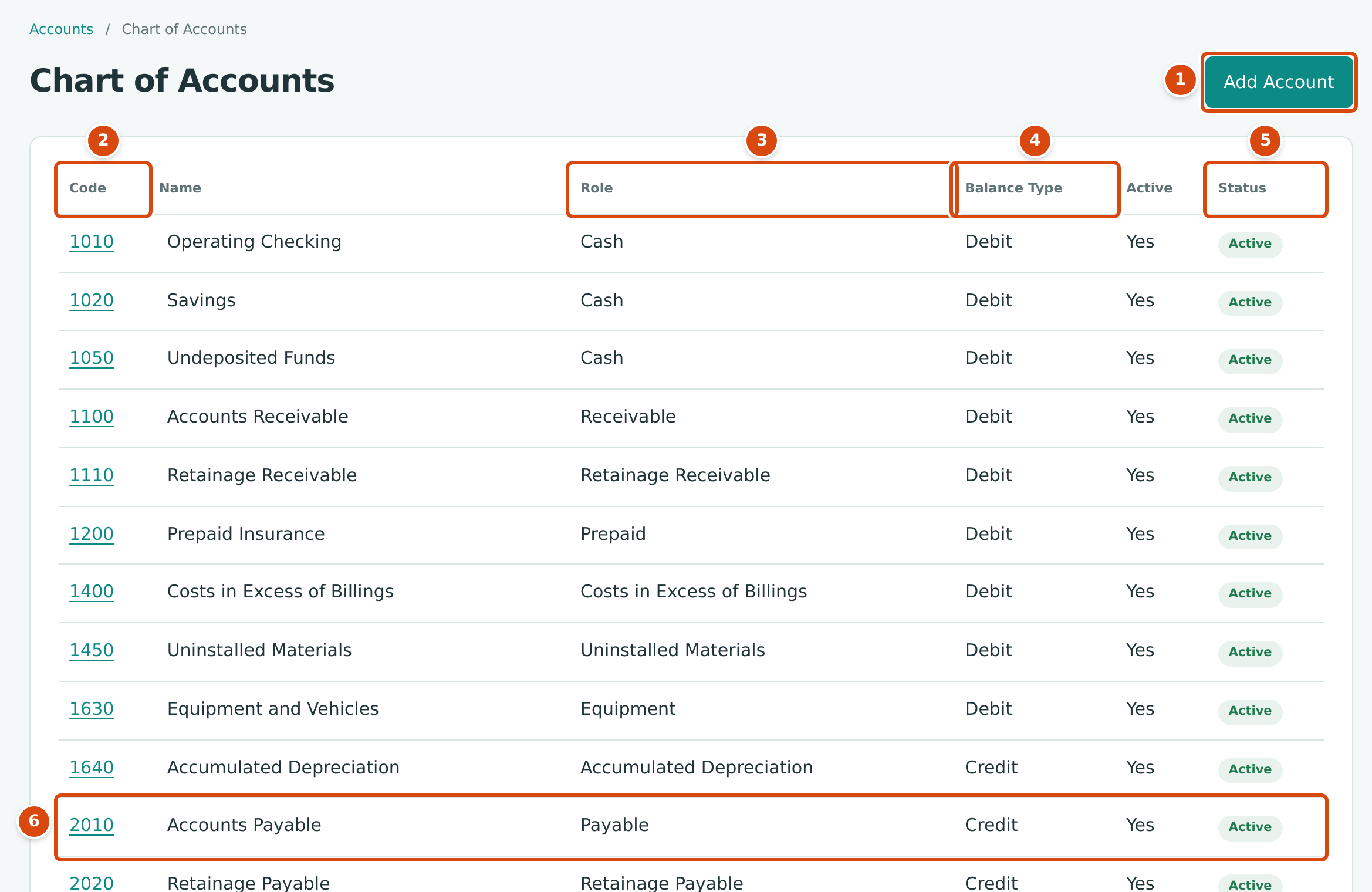
- Add Account: opens the Add Account drawer for a new account (Edit access only).
- Code: the account code, a link to the account page. Accounts are listed in code order, with each sub-account directly under its parent.
- Role: what kind of account it is (see Account Roles).
- Balance Type: Debit or Credit, the side that increases the account.
- Status: Active or Inactive. The Active column says the same as Yes or No.
- 2010 Accounts Payable: the account every bill posts to.
The list shows every account, active and inactive. A parent account with sub-accounts has a − button before its name; click it to hide the sub-accounts and + to show them again. Sub-account names are indented one step for each level.
The list has no search box, no filter and no balance column. To see what an account holds, open its account page (below) or run the Trial Balance. Users with Edit access also see the Add Account button beside the page title (see Creating and Editing Accounts).
Section Headings
Above your accounts Structally keeps six fixed section headings: Assets, Liabilities, Equity, Income, Direct Costs and Expenses. They do not appear in the list, cannot be opened, changed or posted to, and every account belongs under one of them according to its role. An account whose Parent Account is None sits directly under its section heading (level 1).
Account Roles
The Role column uses these labels. The balance type in the table is the only one the role allows.
| Section | Roles | Balance Type |
|---|---|---|
| Assets (current) | Cash, Receivable, Retainage Receivable, Inventory, Prepaid, Other Current Asset, Costs in Excess of Billings, Uninstalled Materials | Debit |
| Assets (long-term) | Equipment, Property, Other Long Term Asset | Debit |
| Assets (long-term) | Accumulated Depreciation | Credit |
| Liabilities (current) | Payable, Retainage Payable, Credit Card, Short Term Debt, Deferred Revenue, Tax Payable, Other Current Liability, Billings in Excess of Costs, Provision for Contract Losses | Credit |
| Liabilities (long-term) | Long Term Debt | Credit |
| Equity | Owner Equity, Opening Balance Equity | Credit |
| Equity | Owner Draws | Debit |
| Income | Revenue, WIP Revenue Adjustment, Other Income, Gain Loss | Credit |
| Direct Costs | Direct Materials, Direct Subcontract, Direct Equipment, Direct Labor, Direct Other, Contract Loss Expense | Debit |
| Direct Costs | Uninstalled Materials Deferral | Credit |
| Expenses | Operating Expense, Depreciation, Interest Expense, Tax Expense, Other Expense | Debit |
Some roles change what Structally does with the account:
| Role | What It Means in Structally |
|---|---|
| Payable, Receivable | The accounts payable and receivable accounts. Posting a bill credits the active Payable account and posting an invoice debits the active Receivable account, without you choosing it. They are not offered as line accounts on bills and invoices. |
| Retainage Payable, Retainage Receivable | Hold retainage on bills and invoices. Only bills, invoices and retainage releases can post to them; a journal entry to them is refused. See Retainage. |
| Cash, Credit Card | Bank and credit card accounts. They are the accounts you pay from and deposit to, and the accounts you reconcile in Banking. |
| Costs in Excess of Billings, Uninstalled Materials, Billings in Excess of Costs, Provision for Contract Losses, WIP Revenue Adjustment, Contract Loss Expense, Uninstalled Materials Deferral | WIP accounts. Only a posted WIP schedule can post to them. |
| Direct roles | Job cost accounts. Whether a line on one of them can or must carry a job is set in Job Costing Settings. |
| Opening Balance Equity | Takes the balancing amount of your Opening Balances. |
Keep one active account per control role
Structally finds the accounts payable account by its role. Keep exactly one active account with the role Payable, and one with Receivable. If you deactivate the only one, posting bills fails with No accounts payable account configured. If you add a second active one, posting fails with Several accounts payable accounts; mark one as default, and there is no screen for marking a default. The same applies to the retainage roles.
Sub-Accounts
A sub-account is an account placed under another account, its parent, for example separate trucks under 1630 Equipment and Vehicles. Sub-accounts are ordinary accounts that you post to; their balances also roll up into the parent's Combined Balance. In pickers a sub-account shows its parent's name, for example 1635 — Equipment and Vehicles: Trucks.
- A parent and its sub-accounts must be in the same group of the financial statements: for example both current assets, both long-term liabilities or both operating expenses.
- Accounts can be nested at most five levels deep. The account page shows each account's Level.
- A sub-account cannot be active under an inactive parent.
The sample company has no sub-accounts yet. To add one, see Adding a Sub-Account.
The Account Page
Click an account's code to open its page.
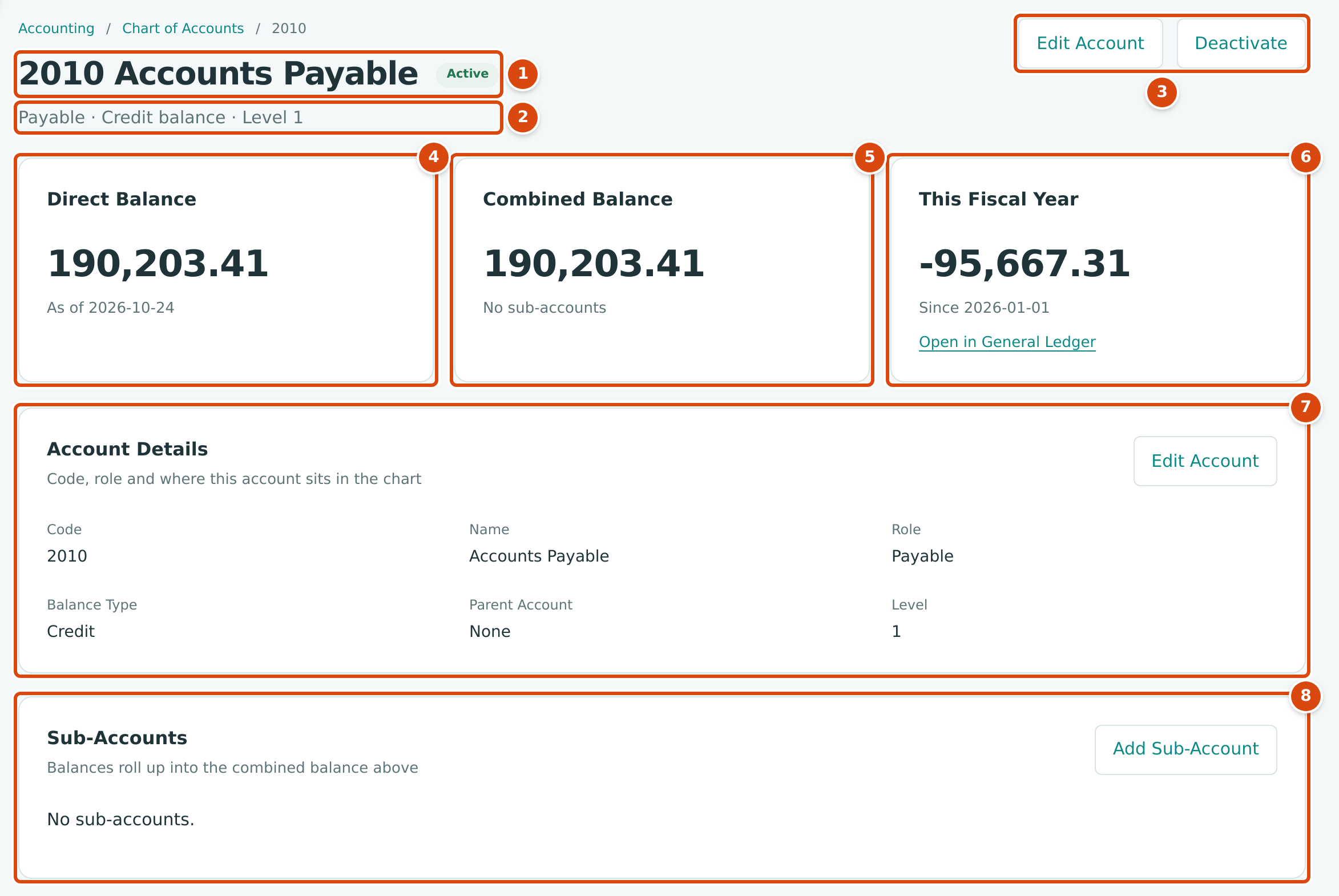
- The code and name, with the Active or Inactive status.
- The role, the balance type and the level in the chart (with the parent, when there is one).
- Edit Account and Deactivate (or Reactivate), for users with Edit access to Accounting.
- Direct Balance: the balance of postings to this account itself, as of today.
- Combined Balance: the direct balance plus the balances of all its sub-accounts, and how many sub-accounts there are.
- This Fiscal Year: how much the balance has changed since the first day of the current fiscal year. Open in General Ledger lists the postings behind it.
- Account Details: Code, Name, Role, Balance Type, Parent Account and Level.
- Sub-Accounts: each sub-account with its Direct and Combined balance and status. Add Sub-Account starts a new account under this one.
Balances are shown in the account's own direction: a positive amount is a normal balance (a debit balance on a debit account, a credit balance on a credit account), and a negative amount is the opposite. The This Fiscal Year figure is positive when the balance grew and negative when it shrank.
Seeing an Account's Activity
The account page shows balances, not individual postings. To see the transactions:
- Click Open in General Ledger. The General Ledger opens for this account from the start of the fiscal year to today; change the dates there to look further back.
- For a bank or credit card account, open its register in Account Registers.
Worked Example: Reading the Accounts Payable Balance
The figure above shows 2010 Accounts Payable in the sample company on October 24, 2026:
| Figure | Amount | Meaning |
|---|---|---|
| Direct Balance | 190,203.41 | Cedar Ridge owes its vendors $190,203.41 today. |
| This Fiscal Year | -95,667.31 | The amount owed is $95,667.31 lower than on January 1, 2026. |
| Balance on January 1, 2026 | 285,870.72 | 190,203.41 + 95,667.31: the year-start balance. |
Because 2010 has no sub-accounts, its Combined Balance equals its Direct Balance. The vendor-by-vendor detail behind the $190,203.41 is in the AP Aging report, and the Tie-Out report checks that the two agree.
Common Mistakes and Troubleshooting
| Message or Symptom | Why It Happens | What to Do |
|---|---|---|
| An account is missing from a picker. | It is inactive. Inactive accounts stay in the chart but are not offered for new entries. | Reactivate it on its account page. |
| No balances in the list. | The Chart of Accounts list has no balance column. | Open the account page, or run the Trial Balance. |
| No accounts payable account configured | No active account has the role Payable (or Receivable for invoices). | Reactivate the accounts payable account. |
| Several accounts payable accounts; mark one as default | More than one active account has the role Payable. | Deactivate the extra account so only one remains active. |
| Account 1400 accepts postings only from WIP schedules. | A journal entry used a WIP account. | Let the WIP schedule post these accounts. |
| Account 2020 accepts postings only from bills and retainage releases. | A journal entry used the Retainage Payable account. | Record retainage on bills and release it with a retainage release. |