| Account | Debit | Credit |
|---|---|---|
| 1100 Accounts Receivable | 122,400.00 | |
| 1110 Retainage Receivable | 13,600.00 | |
| 4010 Contract Revenue (J-101) | 136,000.00 |
D: Billing the Customer
Lakeview's contract is billed monthly with an AIA-style pay application: each month Cedar Ridge Training reports how much of each part of the work is done, and the customer pays that amount less 10% retainage. In this exercise you:
- set up the job's schedule of values, the list of billing lines that adds up to the contract;
- prepare pay application 1 for July, including materials stored on site;
- accept it, which posts the customer's invoice;
- record Lakeview's partial payment and deposit it in the bank.
Before You Begin
- Exercise C is done.
- J-101 has a Billing Retainage of 10% and the company has a Retainage Receivable account (Exercise A).
- Approving a schedule of values and accepting a pay application need a Company Admin or Accountant (see Roles and Permissions).
Step 1: Set Up the Schedule of Values
- Go to Jobs & Costing → Progress Billing. J-101 shows No schedule of values. Click Set Up Schedule.
- In Details, enter Contract Date 07/01/2026, Architect Northline Architects and Architect Project Number NA-2611. They print on the pay application.
- Click Add Line for each billing line and enter the Item, Description, Scheduled Value, Revenue Account (4010 — Contract Revenue), Work Retainage and Stored Materials Retainage:
| Item | Description | Scheduled Value | Work Retainage | Stored Materials Retainage |
|---|---|---|---|---|
| 1 | General Conditions | 32,000.00 | 10.00 | 10.00 |
| 2 | Concrete | 80,000.00 | 10.00 | 10.00 |
| 3 | Rough Carpentry | 64,000.00 | 10.00 | 10.00 |
| 4 | Drywall | 128,000.00 | 10.00 | 10.00 |
| 5 | Electrical | 176,000.00 | 10.00 | 10.00 |
| Total | 480,000.00 |
The schedule shows the revenue side of the contract; it does not have to match the budget's cost codes. Its total must equal the revised contract, and the Contract card says Matches when it does.
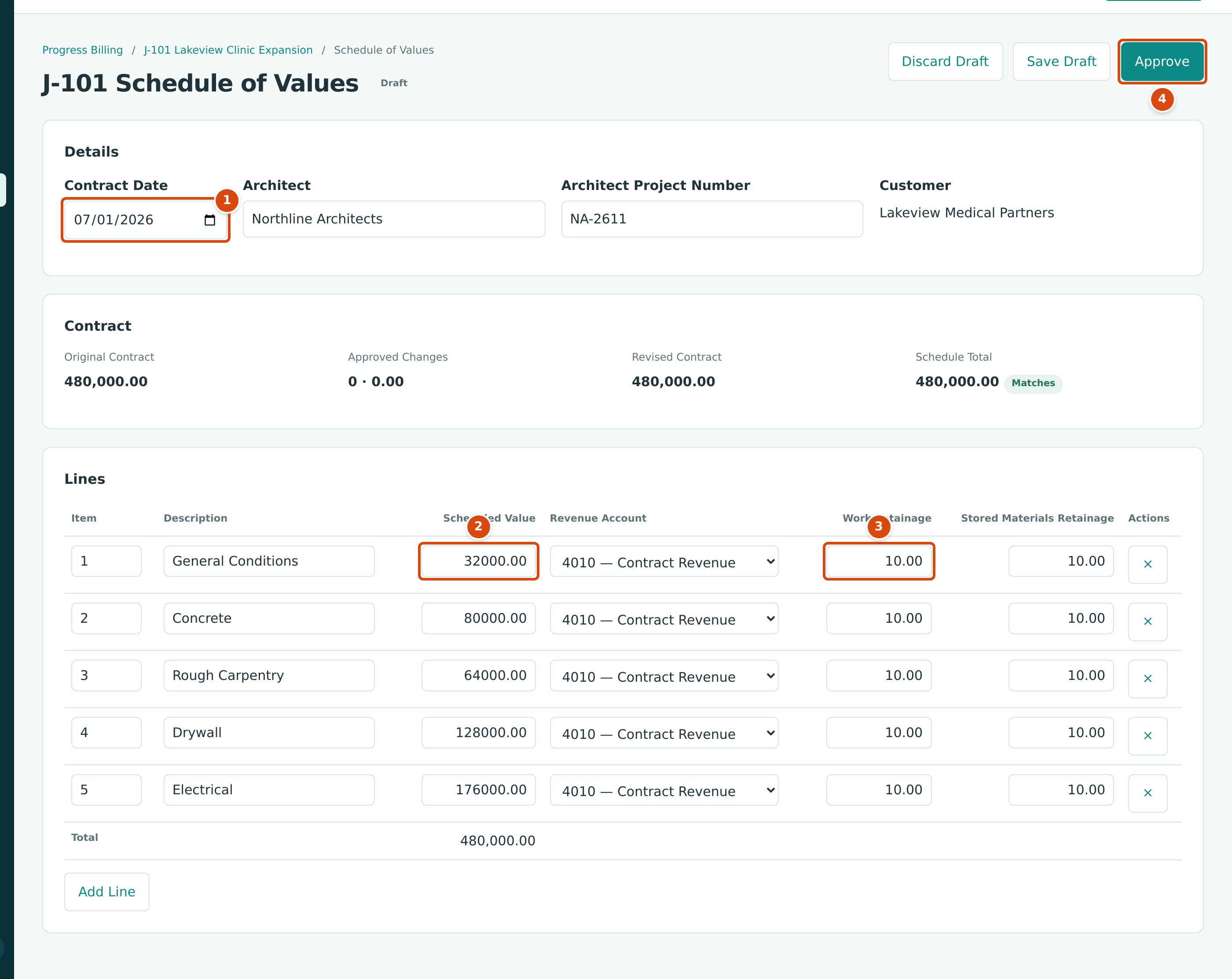
- Contract Date: the date of the contract with the customer.
- Scheduled Value: the contract amount allotted to the line.
- Work Retainage: the percentage withheld from work billed on the line (Stored Materials Retainage, beside it, applies to materials stored).
- Approve: makes the schedule the basis for billing.
- Click Approve. The schedule is Approved, and J-101 can now be billed through pay applications. From now on, an ordinary invoice to this job is refused unless its line is marked Extra (work outside the schedule).
See Schedules of Values.
Step 2: Prepare Pay Application 1
At the end of July the project manager agrees the progress with the architect:
| Line | Work Completed in July | Materials Stored on Site |
|---|---|---|
| 1 General Conditions | 8,000.00 | |
| 2 Concrete | 60,000.00 | |
| 3 Rough Carpentry | 16,000.00 | |
| 4 Drywall | 8,000.00 (board delivered, not yet hung) | |
| 5 Electrical | 44,000.00 | |
| Total | 128,000.00 | 8,000.00 |
- On the schedule page, click New Application. Choose the Job, and enter Application Date 07/31/2026 and Due Date 08/30/2026. Click Start Application.
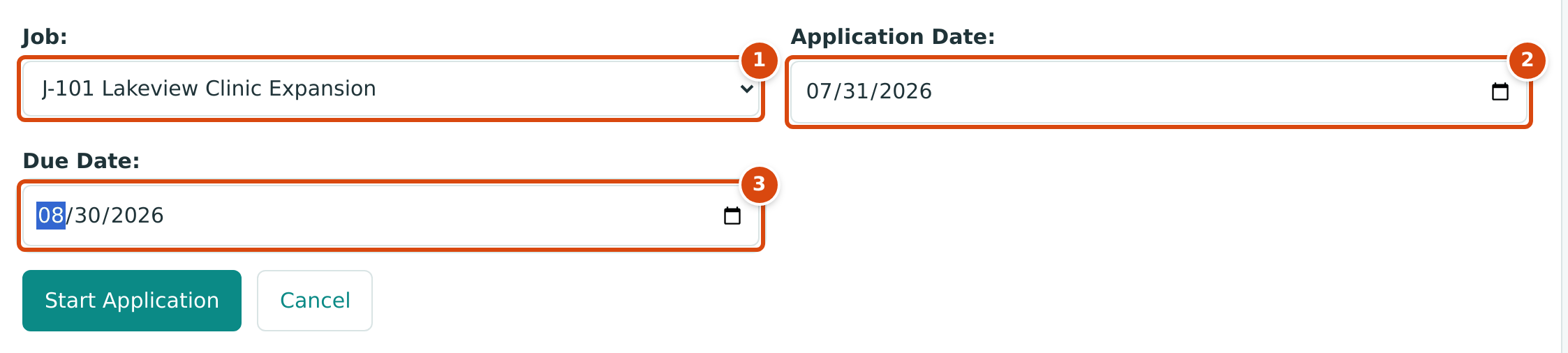
- Job: the job being billed.
- Application Date: the end of the period the application covers.
- Due Date: when the customer's payment is due.
- In Lines, enter each line's Work This Period, and for drywall the Added to Storage amount. Installed from Storage is for materials stored earlier and installed this period (you use it in August).
- Click Save Draft.
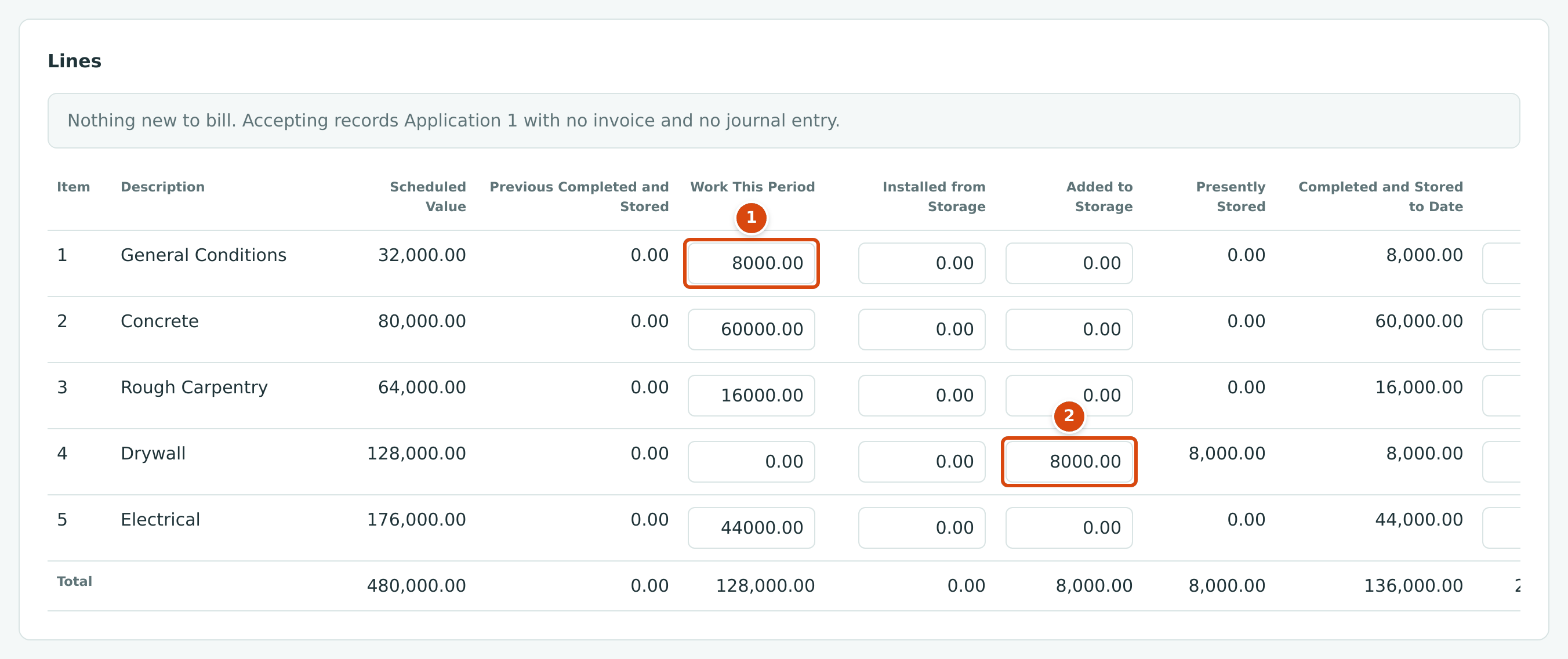
- Work This Period: work completed this month, line by line.
- Added to Storage: materials delivered and stored on site, billed before they are installed.
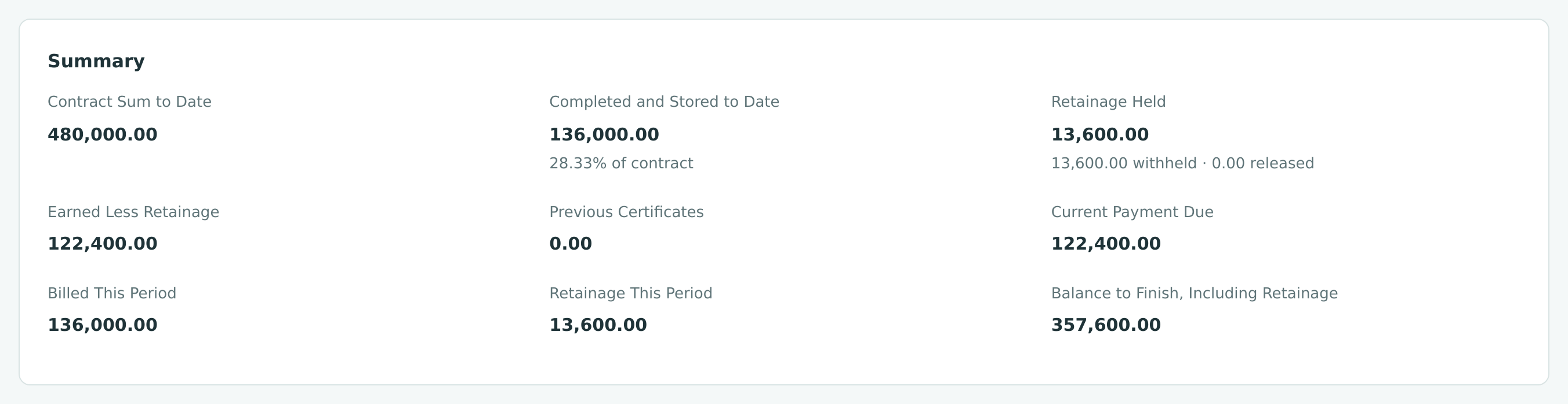
The figure was taken just before Save Draft, so the note above the lines still reflects the empty draft; it disappears once the figures are saved. The application then works out every total:
| Summary Line | Calculation | Amount |
|---|---|---|
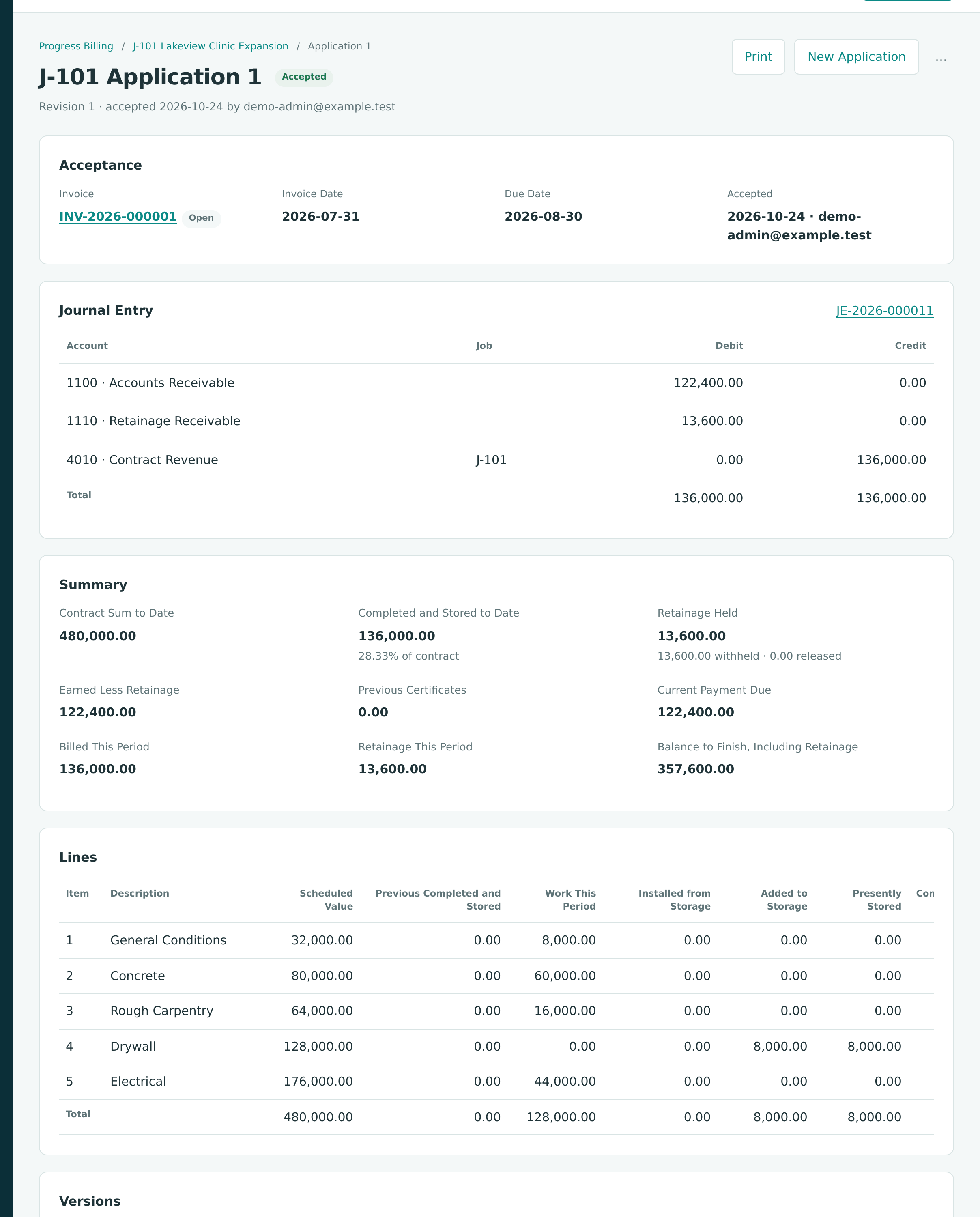
| Completed and Stored to Date | 128,000.00 work + 8,000.00 stored | 136,000.00 |
| Percent of contract | 136,000.00 ÷ 480,000.00 | 28.33% |
| Retainage Held | 10% × 136,000.00 | 13,600.00 |
| Earned Less Retainage | 136,000.00 − 13,600.00 | 122,400.00 |
| Previous Certificates | first application | 0.00 |
| Current Payment Due | 122,400.00 − 0.00 | 122,400.00 |
| Balance to Finish, Including Retainage | 480,000.00 − 122,400.00 | 357,600.00 |
- Click Print for Approval if the architect signs the application on paper, then Mark as Sent when it goes to the customer. Both are optional; Mark as Sent records the status Sent.
See Pay Applications for every column.
Step 3: Accept the Application
When the customer approves the application, click Accept…. Structally shows the invoice it is about to post, with its lines, retainage and journal entry:
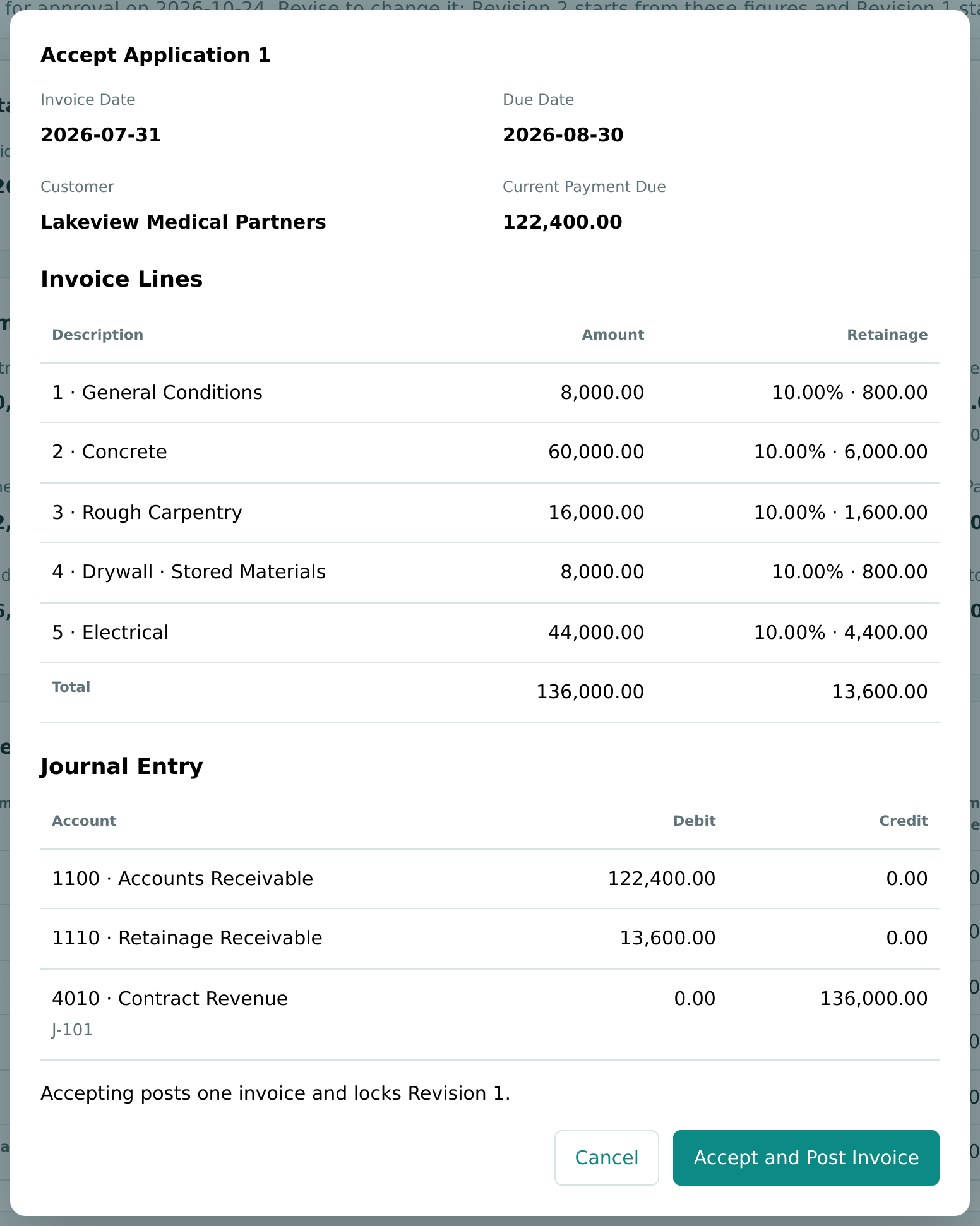
Click Accept and Post Invoice. Application 1 becomes Accepted and is locked, and invoice INV-2026-000001 is posted to accounts receivable.
The Invoice Entry (JE-2026-000011)
All $136,000.00 is revenue now, including the retainage and the stored materials. Only $122,400.00 is collectible now; the $13,600.00 sits in Retainage Receivable until it is released (Exercise H). Revenue on a contract job is adjusted to the percentage of completion at month-end by the WIP schedule (Exercise F).
Step 4: Receive the Customer's Payment
On August 25, Lakeview pays $100,000.00 by check 20417, part of the $122,400.00 due.
- Go to Customers & Invoices → Receipts and click Receive Payment.
- Choose Lakeview Medical Partners and click Load Open Items.
- Enter Date 08/25/2026, Funds Account 1050 - Undeposited Funds, Amount 100000.00, Method Check and Reference 20417.
- In Allocate, enter 100000.00 against INV-2026-000001.
- Click Receive Payment.
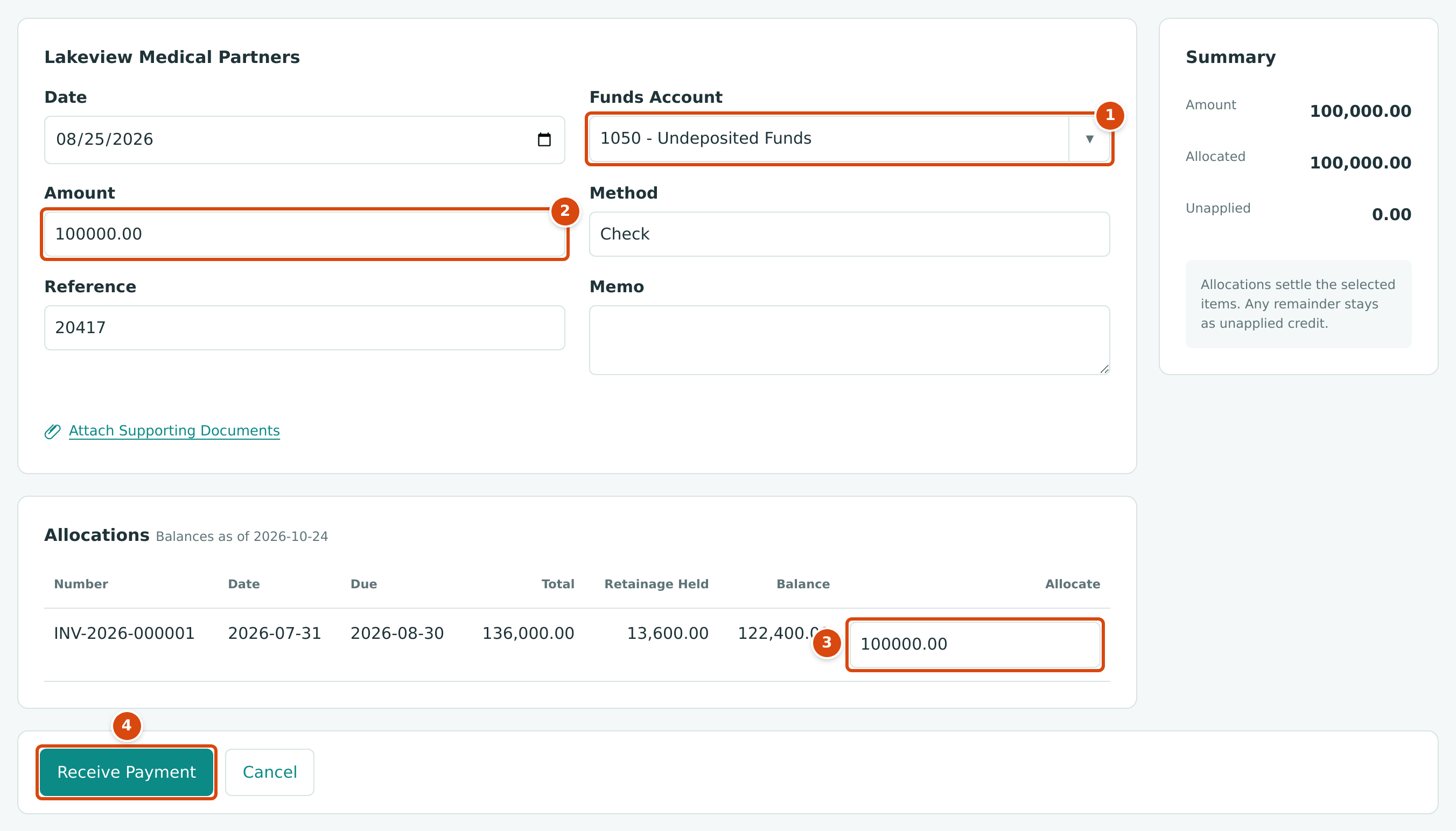
- Funds Account: Undeposited Funds holds checks until they are deposited.
- Amount received.
- Allocate: the part of the payment applied to this invoice.
- Receive Payment posts receipt RCPT-2026-000001.
INV-2026-000001 is now Partly Paid with $22,400.00 still open (paid in September). See Receiving Customer Payments.
Step 5: Deposit the Check
The next day the check goes to the bank.
- Go to Banking → Deposits and click Make Deposit.
- Leave From Account as 1050 - Undeposited Funds and click Load Receipts.
- Choose To Account 1010 - Operating Checking, Date 08/26/2026 and a Memo, and tick the receipt.
- Click Make Deposit.
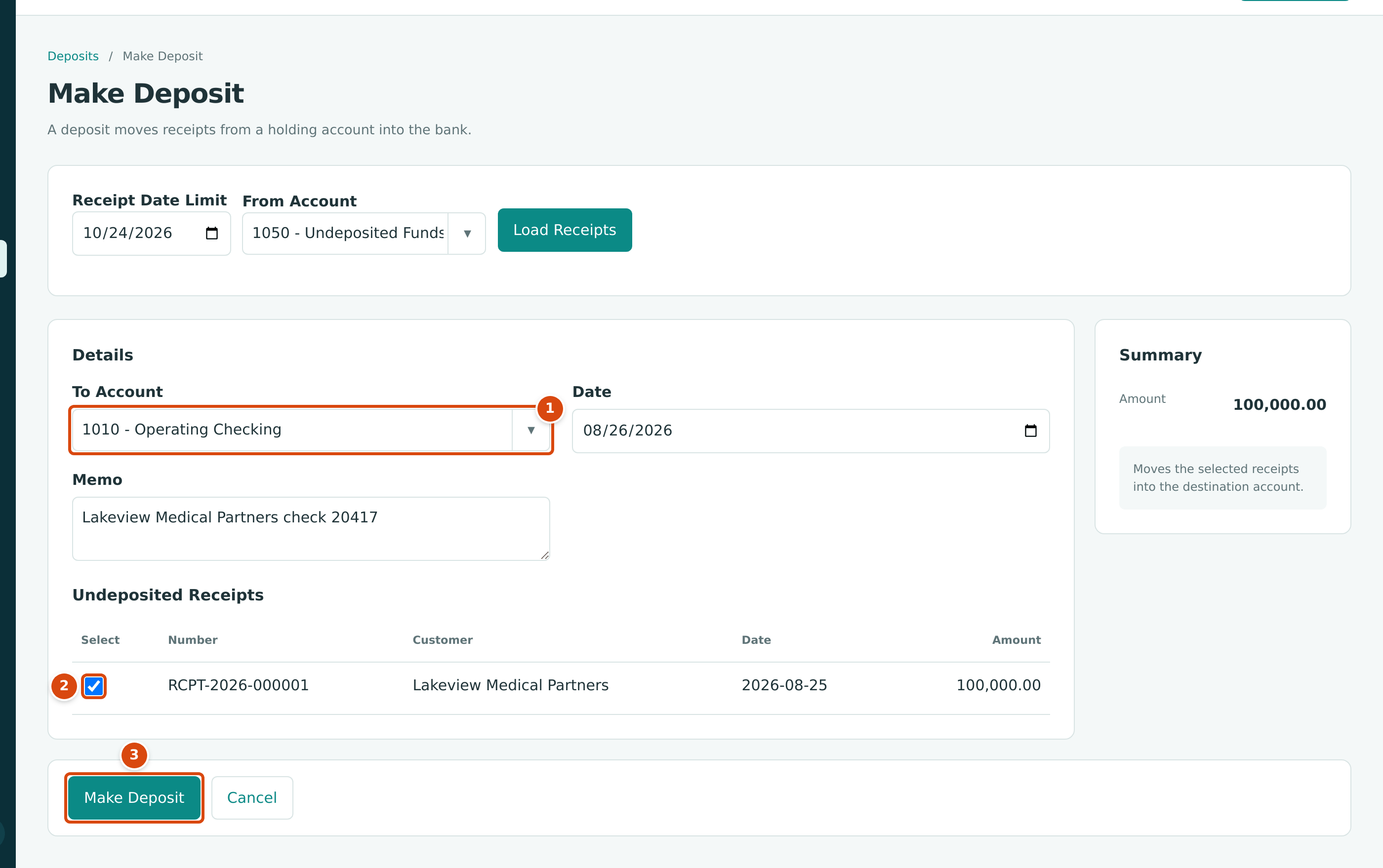
- To Account: the bank account that receives the deposit.
- Tick each receipt in the deposit.
- Make Deposit posts deposit DEP-2026-000001.
The Receipt and the Deposit
| Date | Account | Debit | Credit |
|---|---|---|---|
| 08/25 | 1050 Undeposited Funds | 100,000.00 | |
| 08/25 | 1100 Accounts Receivable | 100,000.00 | |
| 08/26 | 1010 Operating Checking | 100,000.00 | |
| 08/26 | 1050 Undeposited Funds | 100,000.00 |
Recording checks in Undeposited Funds first means the bank deposit, which may hold several checks, appears in the bank as one amount, the way the bank statement shows it. See Making Deposits.
The Rest of the Season
The same steps repeat each month. The later applications in this training project:
| Application | Date | Billed This Period | Retainage | Current Payment Due | Invoice |
|---|---|---|---|---|---|
| 1 | 07/31/2026 | 136,000.00 | 13,600.00 | 122,400.00 | INV-2026-000001 |
| 2 | 08/31/2026 | 144,000.00 | 14,400.00 | 129,600.00 | INV-2026-000002 |
| 3 | 09/30/2026 | 146,000.00 | 14,600.00 | 131,400.00 | INV-2026-000003 |
| 4 (final) | 10/20/2026 | 90,000.00 | 9,000.00 | 81,000.00 | INV-2026-000004 |
| Total | 516,000.00 | 51,600.00 | 464,400.00 |
Application 2 bills the change order of Exercise E and moves the stored drywall into place with Installed from Storage. Lakeview paid $152,000.00 on September 20 (the rest of invoice 1 and all of invoice 2) and $131,400.00 on October 15 (invoice 3).
Next: E: Managing Change Orders.