Aging Reports
The AP Aging report lists what you owe each vendor on unpaid bills, and the AR Aging report what each customer owes you on unpaid invoices, sorted into columns by how far past due each document is. Use AP Aging to plan payments and AR Aging to chase collections, and run both at each month end: their totals must agree with the Accounts Payable and Accounts Receivable accounts.
The two reports work the same way; this page describes both.
Before You Begin
- Bills and invoices count from the day they are posted. Their Due Date (set by the payment terms) decides how old they are.
- You need View or Edit access to Reports. Opening a vendor or customer from the report needs access to Vendors & Bills or Customers & Invoices. See Who Can Use Reports.
Navigation
Reports → AP Aging, or Reports → AR Aging.
Step by Step
- Open Reports → AP Aging (or AR Aging). It opens as of today.
- Enter the As Of date, for example 09/30/2026, or click a Quick dates button (Today, Last Month End, Last Fiscal Year End).
- Click Run Report.
- Click Detail beside a vendor or customer to list their open documents, or click the name to open their page.
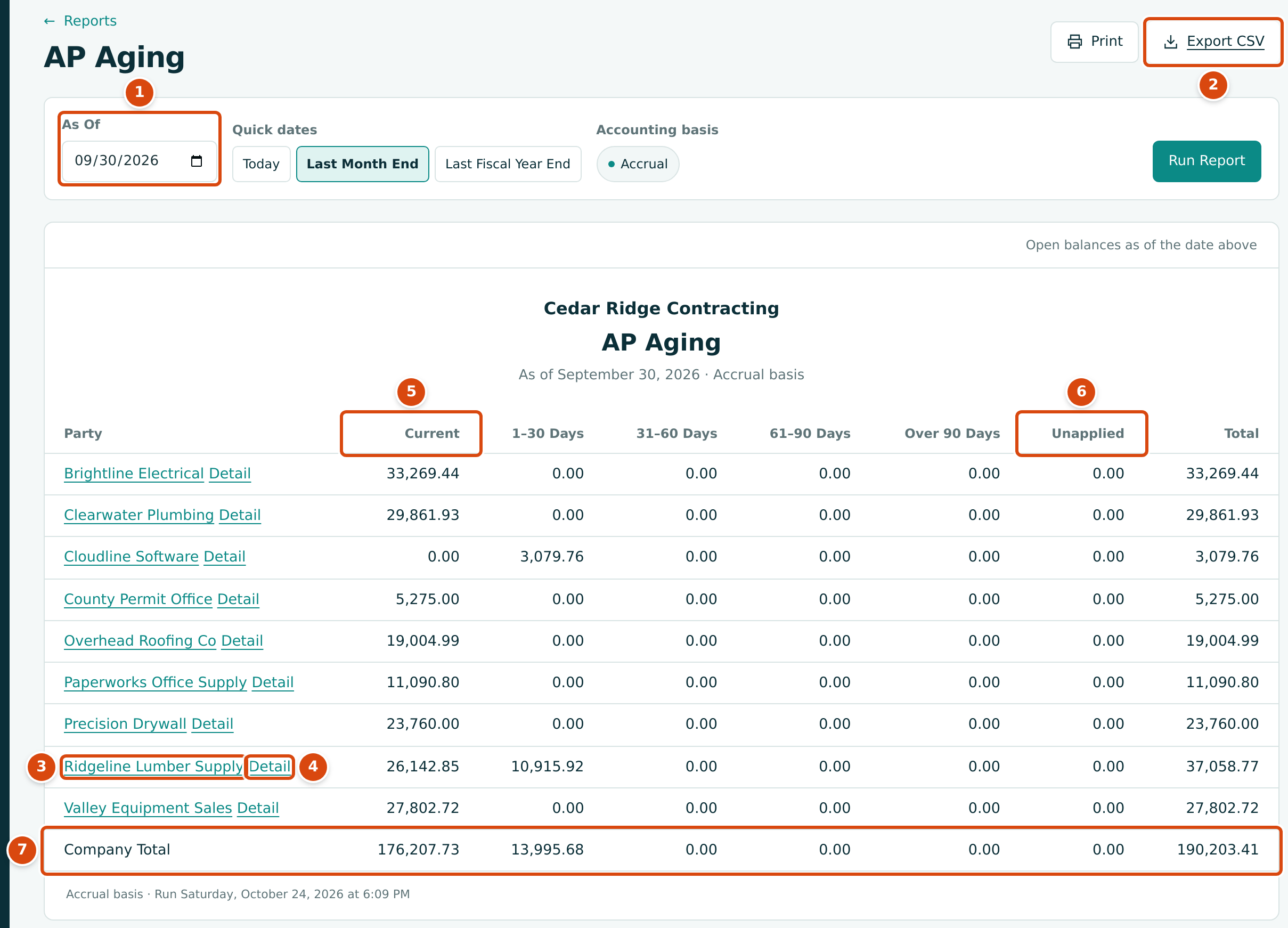
- As Of: the date the balances and ages are worked out at.
- Export CSV downloads the table.
- The vendor (or customer) name opens their page.
- Detail adds a sheet with this vendor's open documents (see The Detail Sheet).
- Current: documents not yet past due. Then 1–30 Days, 31–60 Days, 61–90 Days and Over 90 Days past due.
- Unapplied: payments and credits not yet applied to a document, as a negative amount. Total is the bucket amounts plus Unapplied.
- Company Total: the column totals. The Total must equal the Accounts Payable (or Accounts Receivable) balance on the same date.
How Amounts and Ages Are Worked Out
- What is included. Posted bills (AP) or invoices (AR) dated on or before the As Of date with an open balance. Drafts are never included. A document voided after the As Of date still counts, because it was open on that date.
- Open balance. The document total, less any retainage held on it, less the payments and credits applied to it on or before the As Of date. Payments made after the As Of date do not reduce it.
- Age. Days past due = As Of date − due date (or the document date when there is no due date). Zero or fewer days is Current; 1 to 30 days is 1–30 Days; 31 to 60 is 31–60 Days; 61 to 90 is 61–90 Days; more is Over 90 Days.
- Unapplied. Vendor payments (AP) or customer receipts (AR) not yet applied to a document, and vendor credits (AP) or credit memos (AR) not yet applied or refunded, as of the date. They reduce the party's total.
- Who is listed. Every vendor or customer with an open document or an unapplied amount, in name order. None means nothing is open.
Retainage
Retainage is not in the aging reports. A subcontractor bill of 26,400.00 with 10% retainage ages only its 23,760.00 amount due; the 2,640.00 held waits in Retainage Payable until you release it. The same applies to invoices and Retainage Receivable. So:
- The aging totals agree with Accounts Payable and Accounts Receivable, not with the retainage accounts.
- Retainage held is checked separately on the Tie-Out, and a customer's retainage appears on their statement as Retainage Held.
- When retainage is released, the release document is a new bill or invoice and ages like any other. See Releasing Retainage.
A Vendor You Have Overpaid
When a vendor's Unapplied amount is larger than its open bills, its Total is negative: you have paid ahead. The Balance Sheet shows the total of such amounts as Vendor Advances.
The Detail Sheet
Click Detail beside a party to add a second sheet below the report, named after them. The address keeps the As Of date, so the detail matches the row.
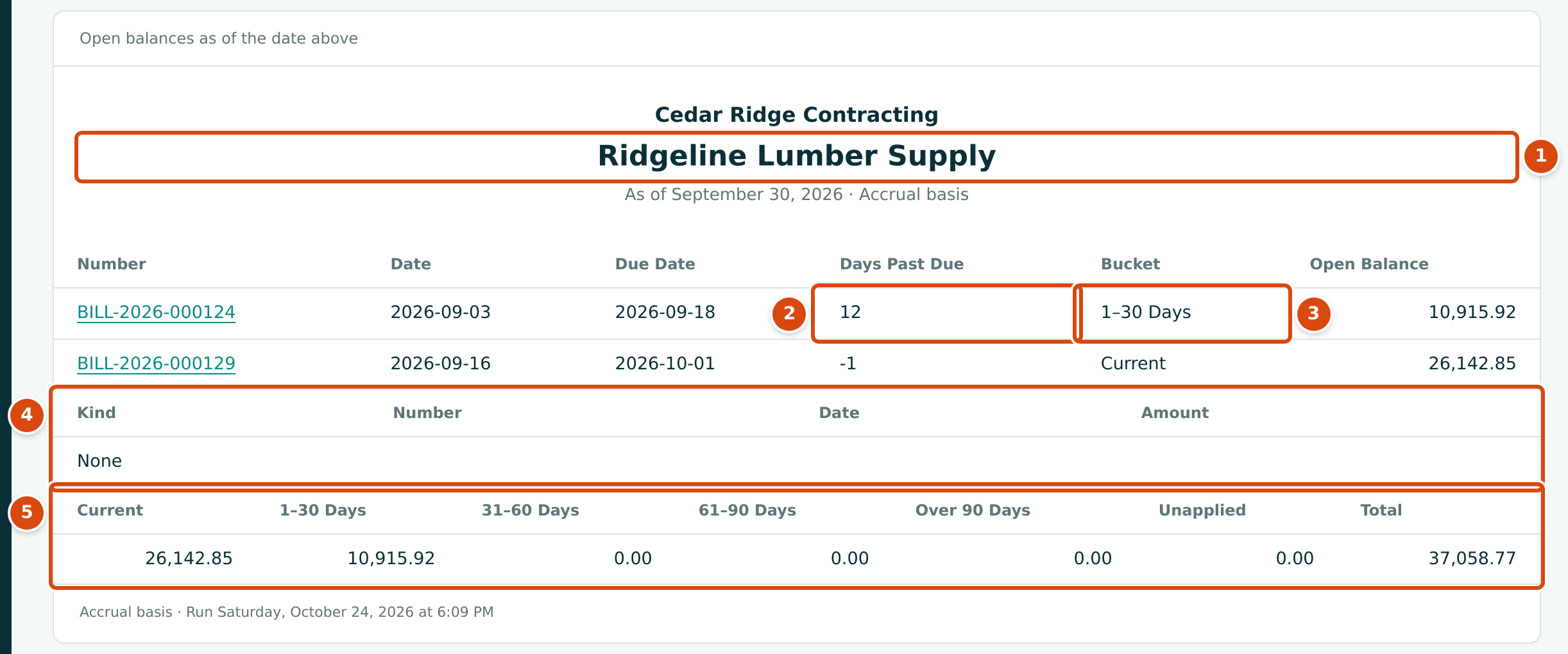
- The vendor or customer the detail is for.
- Days Past Due: As Of date − due date. A negative number means the document is not due yet.
- Bucket: the column the document falls in.
- The unapplied payments and credits, with Kind (Payment or Vendor credit on AP; Receipt or Credit memo on AR), Number, Date and Amount. None when there are none.
- The party's totals, the same as their row in the report.
Each document number opens the bill or invoice; each unapplied number opens the payment, receipt or credit.
Worked Example: Ridgeline Lumber Supply on September 30, 2026
The AP Aging as of 09/30/2026 shows Ridgeline Lumber Supply with 26,142.85 Current, 10,915.92 in 1–30 Days and a Total of 37,058.77. Its detail explains why:
| Bill | Date | Due Date | Days Past Due | Bucket | Open Balance |
|---|---|---|---|---|---|
| BILL-2026-000124 | 2026-09-03 | 2026-09-18 | 30 − 18 = 12 | 1–30 Days | 10,915.92 |
| BILL-2026-000129 | 2026-09-16 | 2026-10-01 | −1 | Current | 26,142.85 |
The Company Total of 190,203.41 equals the balance of 2010 Accounts Payable on the same date, which the Tie-Out confirms. The $43,614.02 of retainage held on subcontractor bills is not part of it.
On the AR Aging for the same date, Summit Tech Park owes 14,040.00, all Current: the rest of invoice INV-2026-000050 (28,080.00, due 2026-10-03) after a receipt of 14,040.00 on September 26. The $94,946.15 of retainage Summit Tech Park holds is not aged.
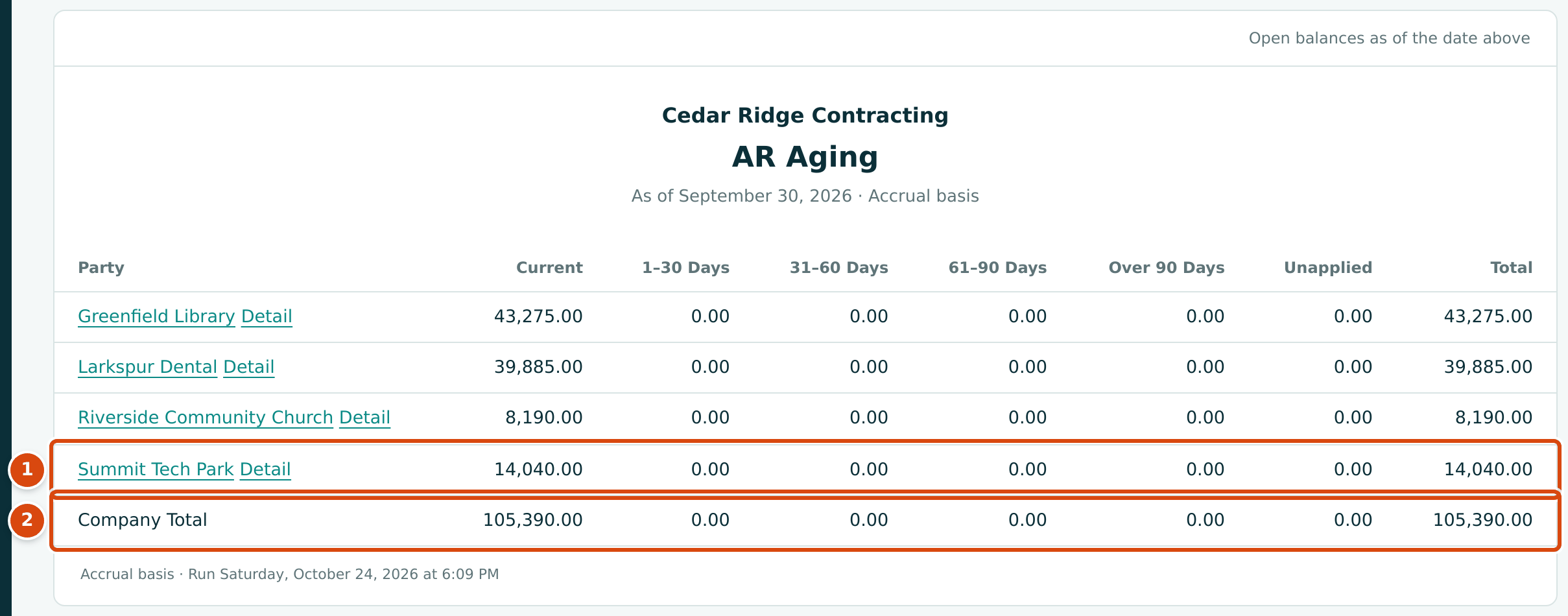
- Summit Tech Park: 14,040.00 current.
- Company Total: 105,390.00, the balance of 1100 Accounts Receivable.
Exporting and Printing
Export CSV gives one row per vendor or customer with the columns Party,
Current, 1-30 Days, 31-60 Days, 61-90 Days, Over 90 Days,
Unapplied and Total, and a Company Total row. The file is named
ap-aging-2026-09-30.csv or ar-aging-2026-09-30.csv. The detail sheet is not
included in the file. Print prints the report and, when it is open, the
detail sheet.
Common Mistakes and Troubleshooting
| Message or Symptom | Why It Happens | What to Do |
|---|---|---|
| Enter a valid date. | The As Of date is incomplete. | Pick the date from the calendar. |
| A bill or invoice is missing. | It is a draft, it is dated after the As Of date, or it was fully paid by then. | Post it, or check its date and payments. |
| A paid document still shows. | The payment is dated after the As Of date. | Run the report for a later date. |
| An old invoice is still Current. | Its due date is on or after the As Of date; ages run from the due date, not the invoice date. | Check the due date and terms on the invoice. |
| The total is less than the vendor's bills. | Retainage held is left out, and unapplied payments and credits are subtracted. | See Retainage. |
| A vendor's total is negative. | You have paid or credited more than its open bills. | Apply the payment or credit to a bill, or see Vendor Advances on the Balance Sheet. |
| The Company Total differs from the account on the Balance Sheet. | Something posted to the control account outside bills, invoices and payments. | Run the Tie-Out and follow its advice. |