Job Cost Reports
Structally reports job costs at three levels of detail:
- Job Cost Detail lists every posted line behind a job's cost (or revenue), with links to the documents. It is described on this page.
- Job Costs summarizes cost and revenue by job, cost code and cost type for a period and to date, with the GL Bridge and Exceptions.
- The job page, the Jobs & Costing Overview, Budgets, Forecasts and WIP schedules show each job's position against its budget, its commitments, its forecast and its earned revenue.
Financial statements (Balance Sheet, Profit and Loss, Trial Balance and General Ledger) are in Reports.
Before You Begin
- Jobs & Costing is turned on and at least one job is Active, On Hold or Closed. Until then Job Costs and Job Cost Detail are not listed under Reports.
- You need View or Edit access to Jobs & Costing to open Job Cost Detail, even though it is listed under Reports. Company Admins, Accountants, Viewers and Project Managers have it. See Roles and Permissions.
Navigation
Reports → Job Cost Detail. You also reach it by clicking a cost on the Job Costs page, or with View Job Cost Detail on a job's Costs card.

- Job Costs: the summary by job (see Job Costs).
- Job Cost Detail: the line detail for one job.
Job Cost Detail
Job Cost Detail lists the posted lines of one job for a period: what was posted, from which document, to which cost code and cost type. Use it to check a job's cost before a forecast, to find a miscoded line, and to start a cost transfer.
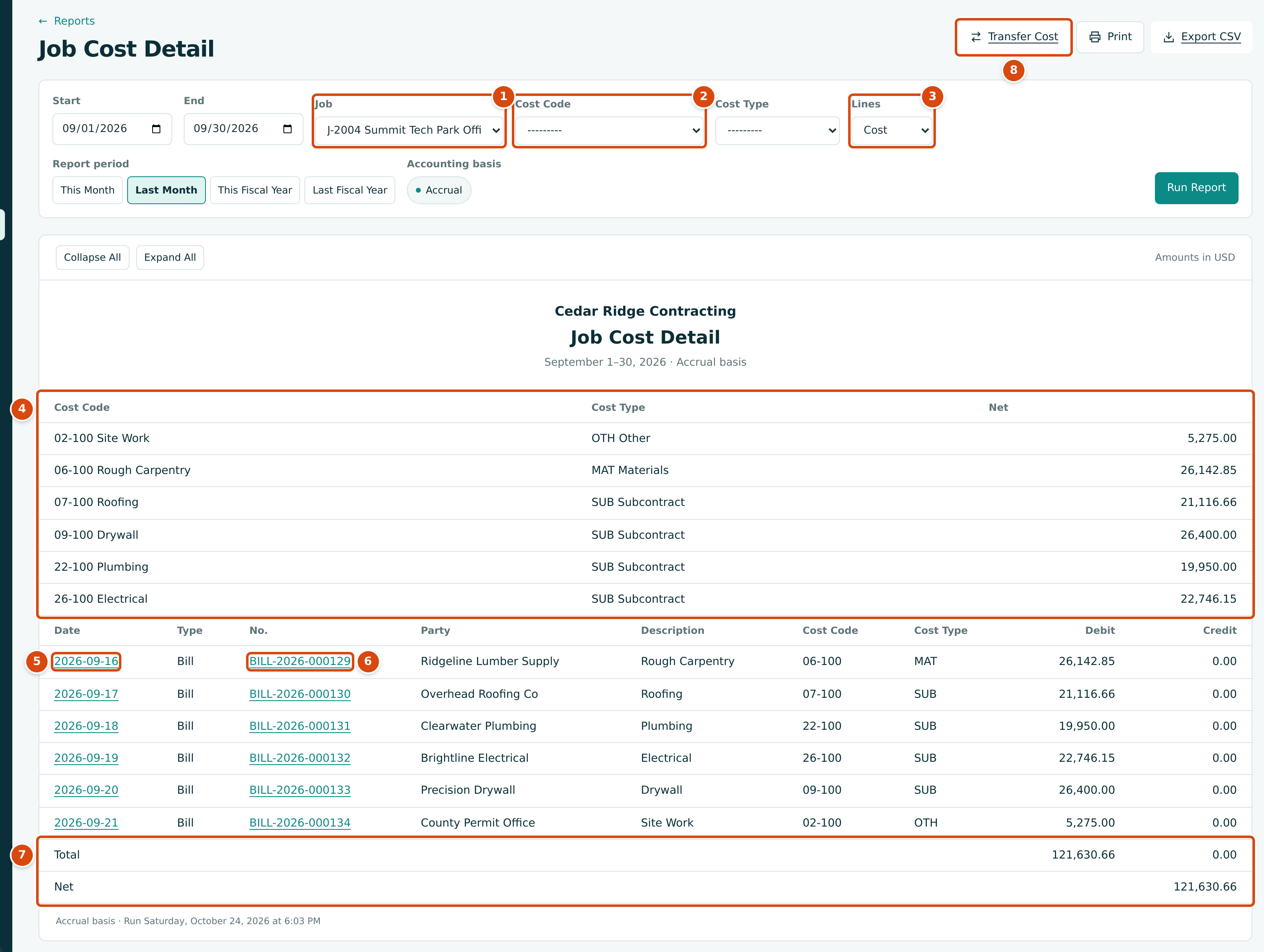
- Job: the job to report. Required.
- Cost Code and Cost Type: optional filters. A dashed line means all.
- Lines: Cost or Revenue.
- The summary: the net amount for each cost code and cost type in the period.
- Date: opens the journal entry behind the line.
- No.: opens the document (here the bill).
- Total debits and credits, and the Net (debits less credits).
- Transfer Cost: moves posted cost to another job, cost code or cost type. Shown on cost lines to users with Edit access to Jobs & Costing.
Step by Step
- Open Reports → Job Cost Detail.
- Choose the Job. The list holds Active, On Hold and Closed jobs.
- Type Start and End, or click a Report period shortcut. The page starts with the current month.
- Optionally narrow to one Cost Code and one Cost Type.
- Leave Lines on Cost, or choose Revenue.
- Click Run Report.
- Click a Date to see the journal entry, or a No. to open the document. Back to Report on that page brings you back to the same report.
- Click Export CSV to download the lines, or Print.
Field Reference
| Field | Description | Required | Example |
|---|---|---|---|
| Start and End | The period. Lines dated in it are listed. | Yes | 09/01/2026 to 09/30/2026 |
| Job | The job. | Yes | J-2004 Summit Tech Park Office Building |
| Cost Code | Show one cost code only. | No | 09-100 Drywall |
| Cost Type | Show one cost type only. | No | SUB Subcontract |
| Lines | Cost lists lines on job cost accounts; Revenue lists lines on job revenue accounts. | Yes | Cost |
Columns
| Column | What It Shows |
|---|---|
| Date | The accounting date. A link to the journal entry. |
| Type | The kind of document: Bill, Invoice, Expense, Journal Entry and so on. Cost transfers show as Journal Entry; the entry that cancels a voided document shows as Reversal. |
| No. | The document number, a link to the document. A dash when there is none. |
| Party | The vendor or customer. |
| Description | The line's description, or the entry's description when the line has none. |
| Cost Code and Cost Type | The line's coding. A dash when the line has none. |
| Debit and Credit | The line amount on its side. |
| Total and Net | Total debits and credits, and debits less credits. |
The CSV file has the same columns, one row per line, without the summary.
Checking a Job at Closeout
Before you prepare a job's closeout forecast and WIP schedule, run Job Cost Detail over the life of the job and compare its Net with the budget page. The training company's J-101 shows the whole job from July 1 to October 24, 2026:
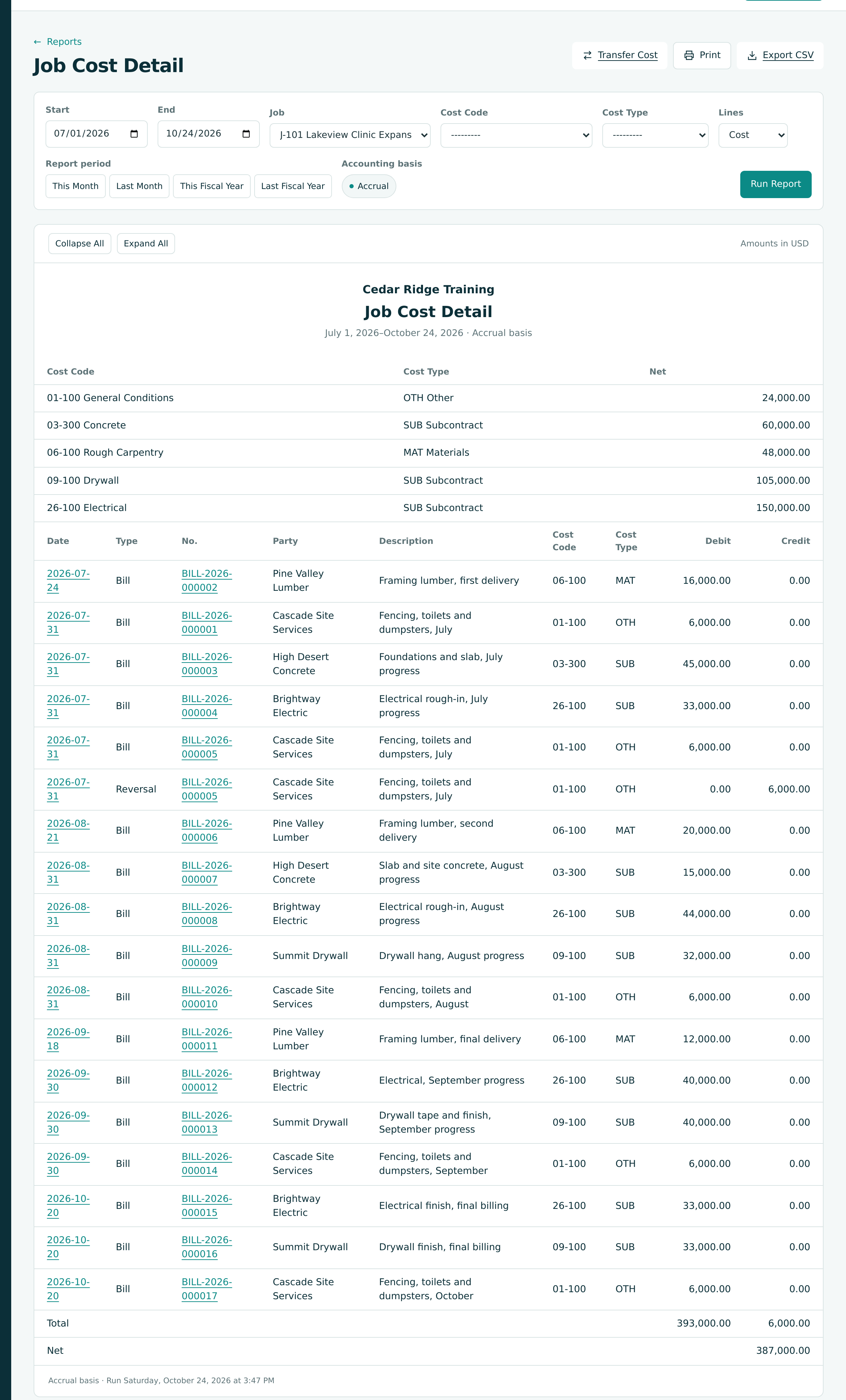
Bill BILL-2026-000005 repeats the July site charge of BILL-2026-000001 and was voided, so it appears as a Bill line (debit 6,000.00) and a Reversal line (credit 6,000.00) on the same date. The debits of 393,000.00 less the credits of 6,000.00 give a Net of 387,000.00, the job's cost to date. The budget page on the same date agrees, with nothing left:
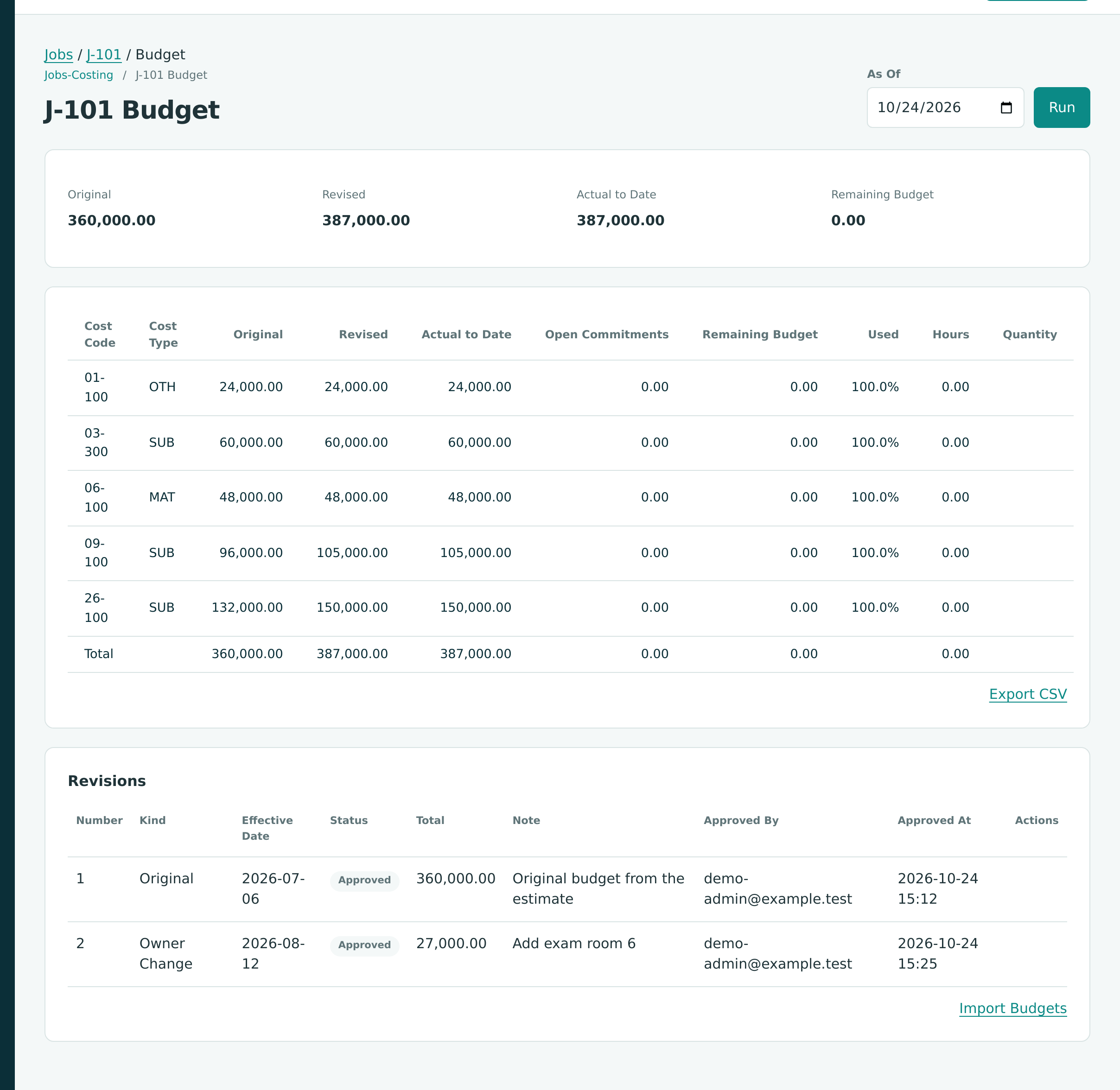
With all cost in and nothing left to buy, the closeout forecast should show a final cost equal to that net; see Closing Out a Finished Job.
Job Revenue Detail
Set Lines to Revenue to list the job's revenue lines instead. The title changes to Job Revenue Detail. Revenue lines have no cost code or cost type, and because revenue is a credit, the Net is negative.
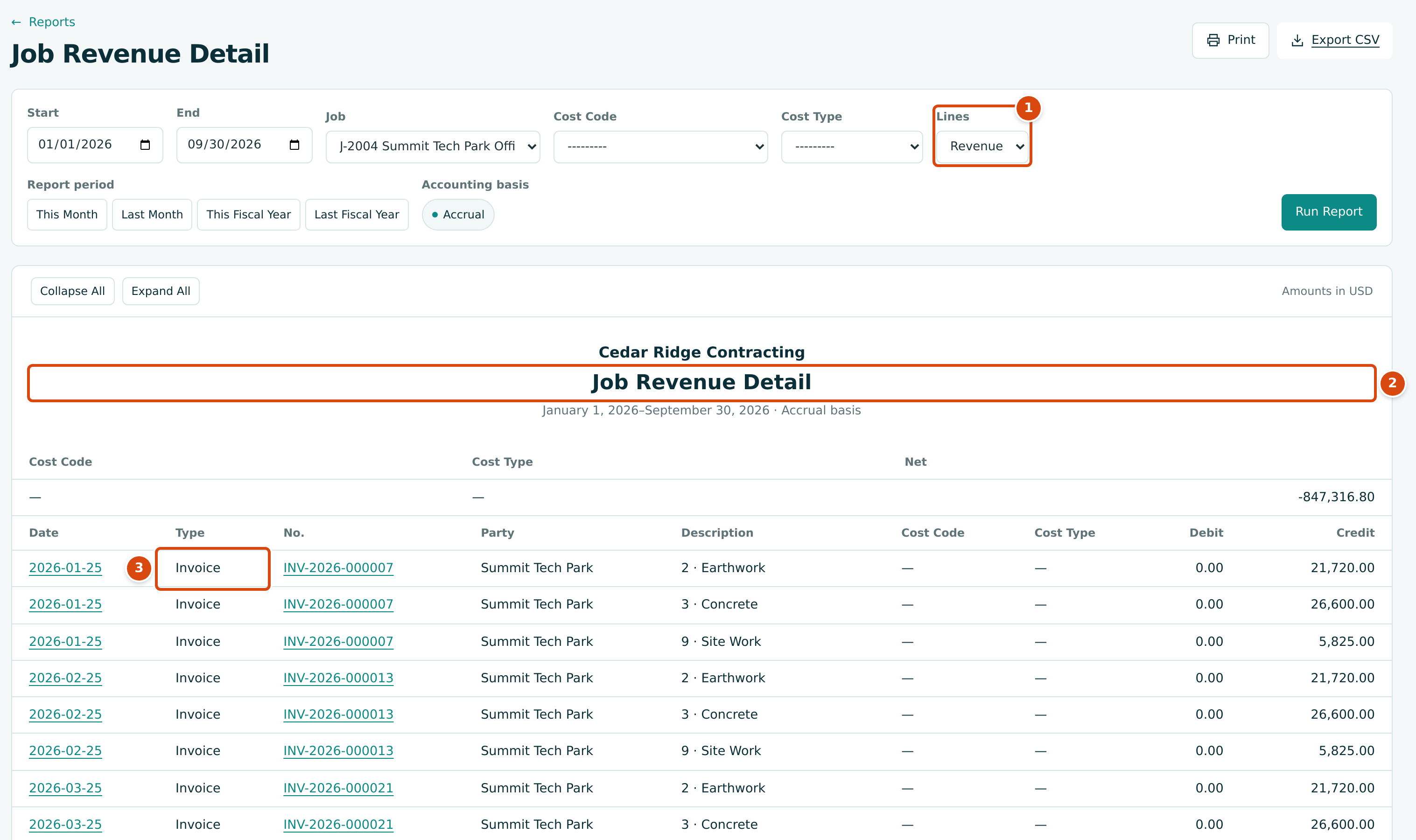
- Lines set to Revenue.
- The title changes to Job Revenue Detail.
- Type: Invoice. Each line's description names the line billed, such as 2 · Earthwork.
Transfer Cost is not offered on revenue lines. WIP revenue adjustments are not job revenue, so they are not listed here; see WIP Schedules.
The Job Page
Each job's page shows its job cost position in a row of cards. The figures are as of today.
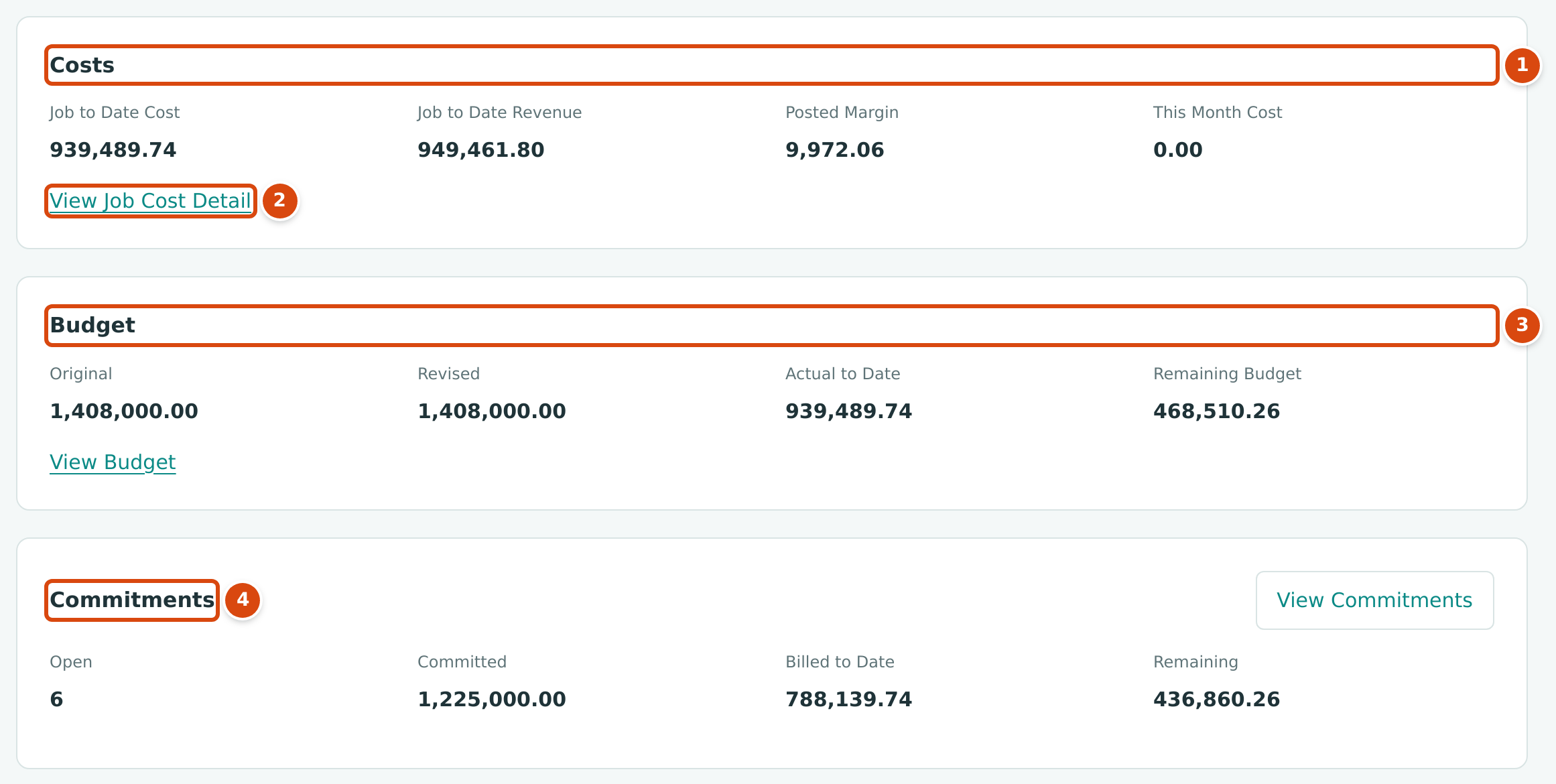
- Costs: posted cost and revenue to date, the posted margin, and this month's cost.
- View Job Cost Detail opens Job Cost Detail for this job and the current month.
- Budget: original, revised, actual to date and remaining budget.
- Commitments: open commitments and their committed, billed and remaining amounts.
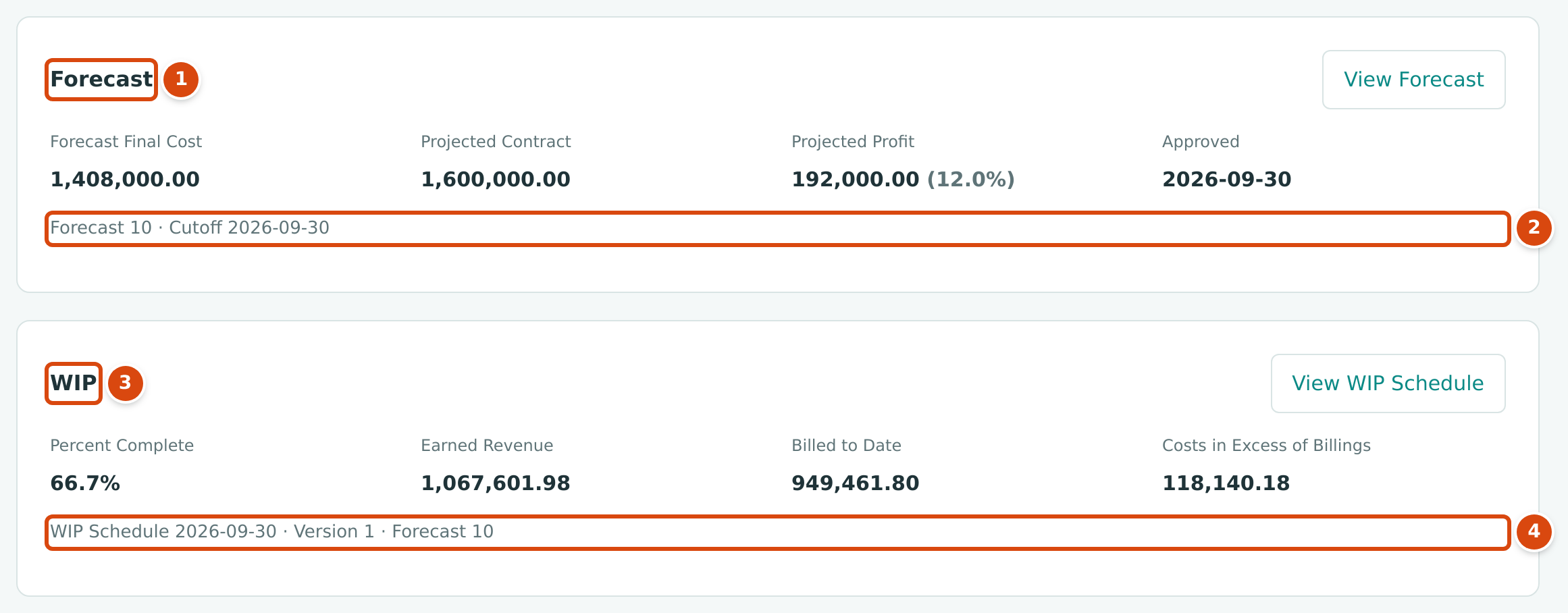
- Forecast: the latest approved forecast's final cost, projected contract, projected profit and approval date.
- Which forecast it is and its cutoff. A draft forecast, if any, is listed below with Open Draft.
- WIP: the latest approved WIP schedule's percent complete, earned revenue, billed to date, and costs in excess of billings or billings in excess of costs.
- Which schedule, version and forecast it comes from.
| Card | Field | How It Is Worked Out |
|---|---|---|
| Costs | Job to Date Cost, Job to Date Revenue, Posted Margin | As on Job Costs, up to today. |
| Costs | This Month Cost | Cost posted from the first of the current month to today. |
| Budget | Original, Revised | Approved budget revisions effective up to today. |
| Budget | Actual to Date, Remaining Budget | Posted cost; revised less actual. |
| Commitments | Open | The number of draft, approved and issued commitments. |
| Commitments | Committed, Billed to Date, Remaining | Issued and closed commitments including approved amendments; billed against them; the difference. |
| Forecast | Forecast Final Cost, Projected Contract, Projected Profit | From the latest approved forecast; see Forecasts. |
| WIP | Percent Complete, Earned Revenue, Billed to Date, over or under billing | From the latest approved WIP schedule; see WIP Schedules. |
The Jobs & Costing Overview
The Jobs & Costing Overview shows the active jobs with the highest cost to date and a Needs Attention list.
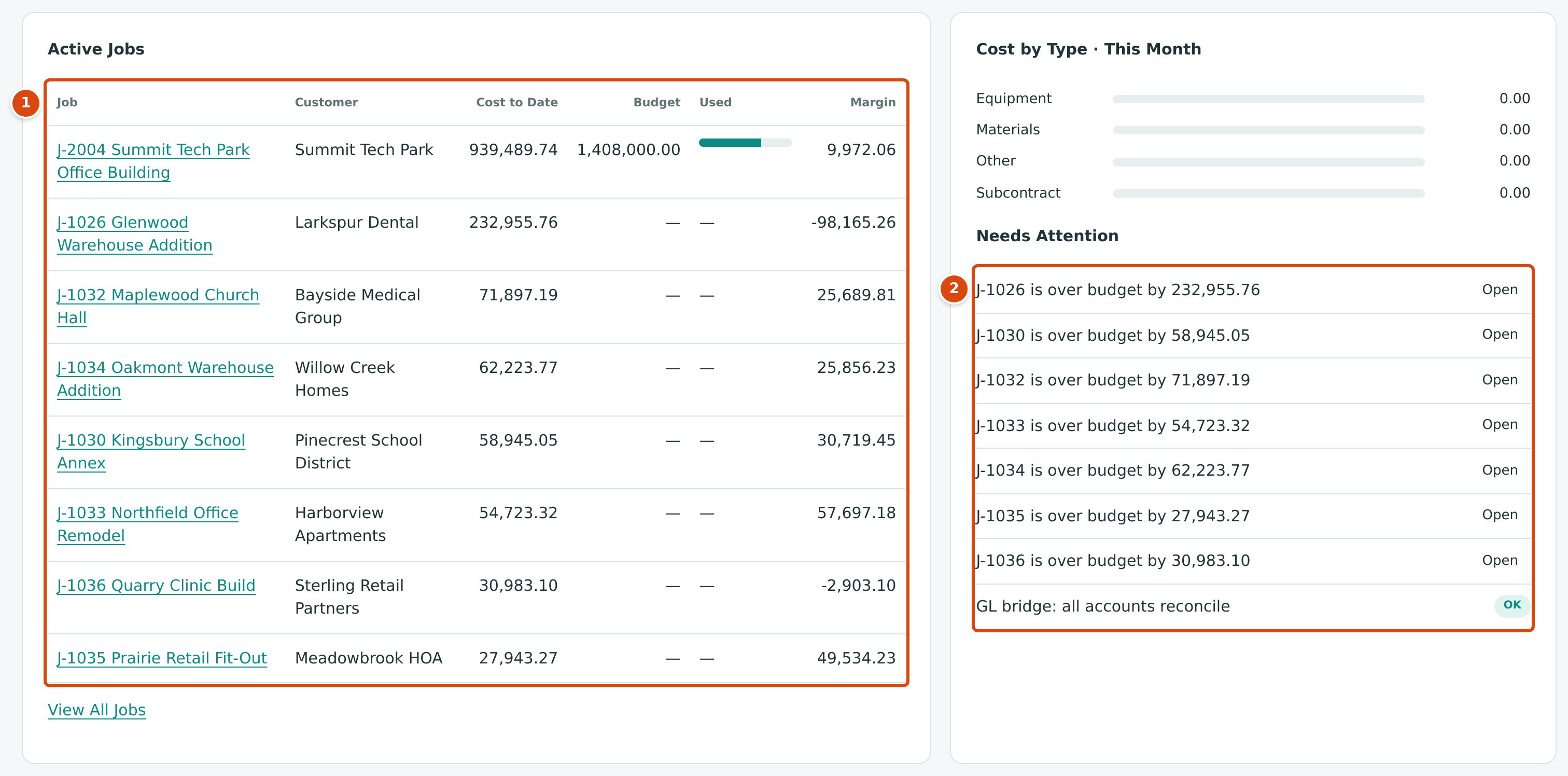
- Active Jobs: up to eight active jobs, largest cost to date first, with Customer, Cost to Date, Budget (the revised budget, shown only when the job has an original budget), Used (cost to date as a share of that budget) and Margin (the posted margin).
- Needs Attention: active jobs over budget, cost lines without a job, lines on on-hold or closed jobs, draft documents with job coding, and the GL Bridge result. Each item links to the page to review.
Jobs without a budget
A job with no budget at all has a revised budget of 0.00, so the overview lists it as over budget by its whole cost to date (for example J-1026 is over budget by 232,955.76). The sample company's active service jobs (J-1026, J-1030 and J-1032 to J-1036) have no budget, so they all appear. Read those items as "no budget yet".
Finding Overruns and Checking Profitability
| What You Want to Know | Where to Look | What to Look For |
|---|---|---|
| Is a job spending more than budgeted so far? | Budgets, the job page Budget card, the overview's Needs Attention | A negative Remaining Budget; is over budget by on the overview. |
| Which cost codes are over? | The job's budget page, or its forecast's Lines | A negative Variance on a forecast line. |
| Did a vendor bill more than the commitment? | Exceptions on Job Costs; Commitments | Commitment Overrun rows. |
| Will the job lose money? | The Forecasts list, the job page Forecast card | Projected Loss, or a low margin. |
| Is the loss booked? | The WIP schedule | Estimated Gross Profit below zero and a Loss Provision. |
| How much has the job earned against what was billed? | The WIP schedule, the job page WIP card | Costs in Excess of Billings (under billed) or Billings in Excess of Costs (over billed). |
| What has been billed against cost so far? | Job Costs, the overview's Margin | Posted Margin: revenue billed to date less cost to date. |
Worked Example: J-2004 at September 30, 2026
The views answer different questions, and their figures fit together. For J-2004 Summit Tech Park Office Building at the end of September 2026:
| View | Figure | Amount |
|---|---|---|
| Job Costs | Job to date cost | 939,489.74 |
| Job Costs | Job to date revenue (billed) | 949,461.80 |
| Job Costs | Posted Margin (949,461.80 − 939,489.74) | 9,972.06 |
| Budget card | Remaining budget (1,408,000.00 − 939,489.74) | 468,510.26 |
| Commitments card | Remaining on commitments (1,225,000.00 − 788,139.74) | 436,860.26 |
| Forecast 10 | Forecast final cost; variance against the budget | 1,408,000.00; 0.00 |
| Forecast 10 | Projected Profit (1,600,000.00 − 1,408,000.00) | 192,000.00 (12.0%) |
| WIP schedule | Earned revenue at 66.7% complete | 1,067,601.98 |
| WIP schedule | Gross profit earned to date (1,067,601.98 − 939,489.74) | 128,112.24 |
| WIP schedule | Costs in Excess of Billings (1,067,601.98 − 949,461.80) | 118,140.18 |
The posted margin and the earned gross profit differ by exactly the under billing: 9,972.06 + 118,140.18 = 128,112.24. The job is on budget and profitable; it has simply billed less than it has earned, because Pay Application 10 was sent but not yet accepted.
Common Mistakes and Troubleshooting
| Message or Symptom | Why It Happens | What to Do |
|---|---|---|
| Job Cost Detail shows only the filters. | No job was chosen yet. | Choose a Job and click Run Report. |
| This field is required. under Job | The report was run without a job. | Choose a job. |
| Start must be on or before end. | The dates are the wrong way round. | Swap the dates. |
| A closed job is missing from the Job list. | It is Draft or Archived. | Only Active, On Hold and Closed jobs are listed. |
| A line shows a dash under Cost Code. | The cost was posted to the job without a cost code or cost type. | Correct the document's coding; forecasts refuse jobs with uncoded cost. |
| A transfer shows as Journal Entry here. | Cost transfers are journal entries. | Open the date link; the entry page shows the type Job Cost Transfer. |
| Job Costs and Job Cost Detail are not on the Reports page. | Jobs & Costing is off, or no job is Active, On Hold or Closed yet. | Turn the module on or activate a job. |