The Receivables Overview
The Customers & Invoices overview is the landing page of the area. It answers the questions a bookkeeper asks every morning: how much do customers owe, how much of it is late, how much came in this month, and which invoices need a phone call. Every figure links to the documents behind it, so you can go straight from a total to the invoice or the customer.
The page only reads your books; nothing on it changes a balance.
Before You Begin
- You need View or Edit access to Customers & Invoices. The Receive Payment and New Invoice buttons appear only with Edit access. See Roles and Permissions.
Navigation
Customers & Invoices → Overview. Clicking Customers & Invoices in the navigation opens the same page.
Totals and Period
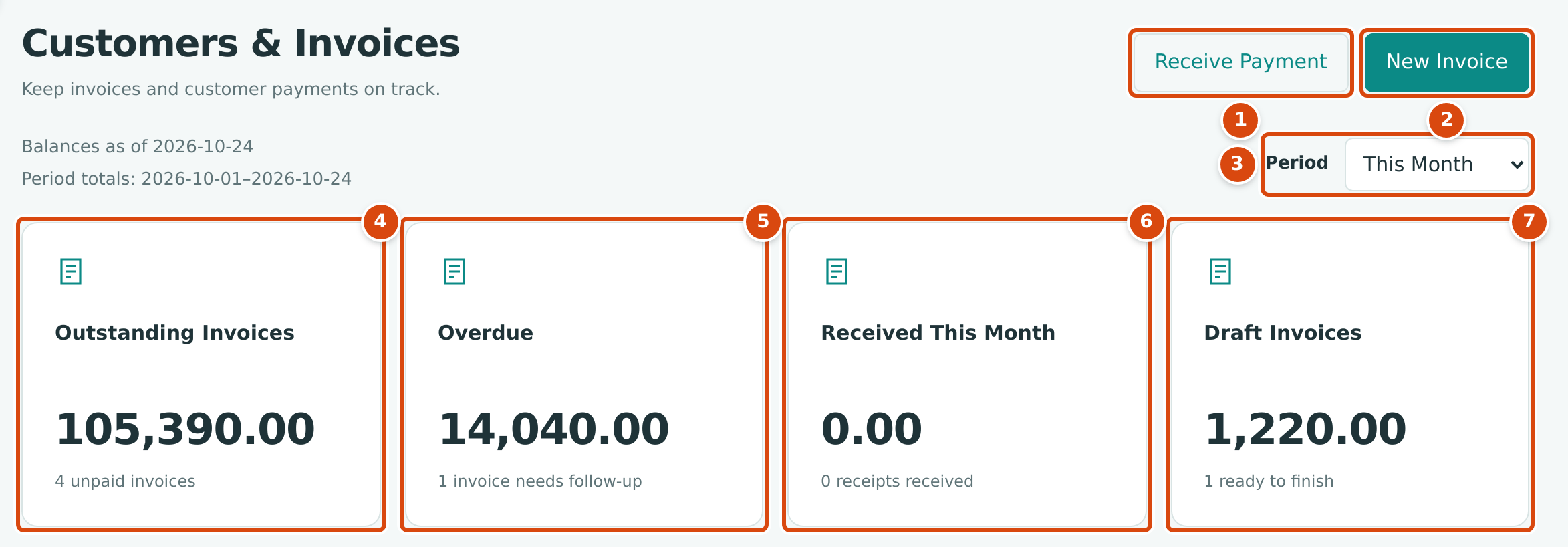
- Receive Payment opens Receive Payment to record money from a customer.
- New Invoice opens the New Invoice form.
- Period chooses This Month, Last 30 Days or Last 90 Days. It changes only the received total; the line above it shows the dates used.
- Outstanding Invoices: the unpaid amount of all posted invoices, with the number of unpaid invoices.
- Overdue: the part of that amount on invoices past their due date.
- Received This Month (or the period you chose): customer receipts dated in the period, with their count.
- Draft Invoices: the total of invoices saved as drafts and not yet posted.
Balances as of shows the date the balances are worked out for, which is always today. Period totals shows the first and last day of the period you chose: from the first of the month to today for This Month, or the last 30 or 90 days including today.
| Tile | What It Includes | What It Leaves Out |
|---|---|---|
| Outstanding Invoices | The open balance of every posted invoice: its amount due, less receipts and credit memos applied to it. | Drafts, voided invoices, and retainage the customer is holding. Retainage held appears on each customer's page. |
| Overdue | Open balances on invoices whose due date is before today. | Invoices without a due date. |
| Received | The amount of each customer receipt dated in the period, whether or not it has been applied or deposited. | Reversed receipts. |
| Draft Invoices | The total of every invoice with the status Draft, whatever its date. | Posted invoices. |
In the sample company on October 24, 2026, four invoices are unpaid: INV-2026-000050 (14,040.00 still due), INV-2026-000052 (43,275.00), INV-2026-000053 (8,190.00) and INV-2026-000054 (39,885.00). Together they make the Outstanding Invoices total of 105,390.00. Only INV-2026-000050 is past its due date of October 3, so Overdue shows 14,040.00.
Billing & Collections and Invoice Aging
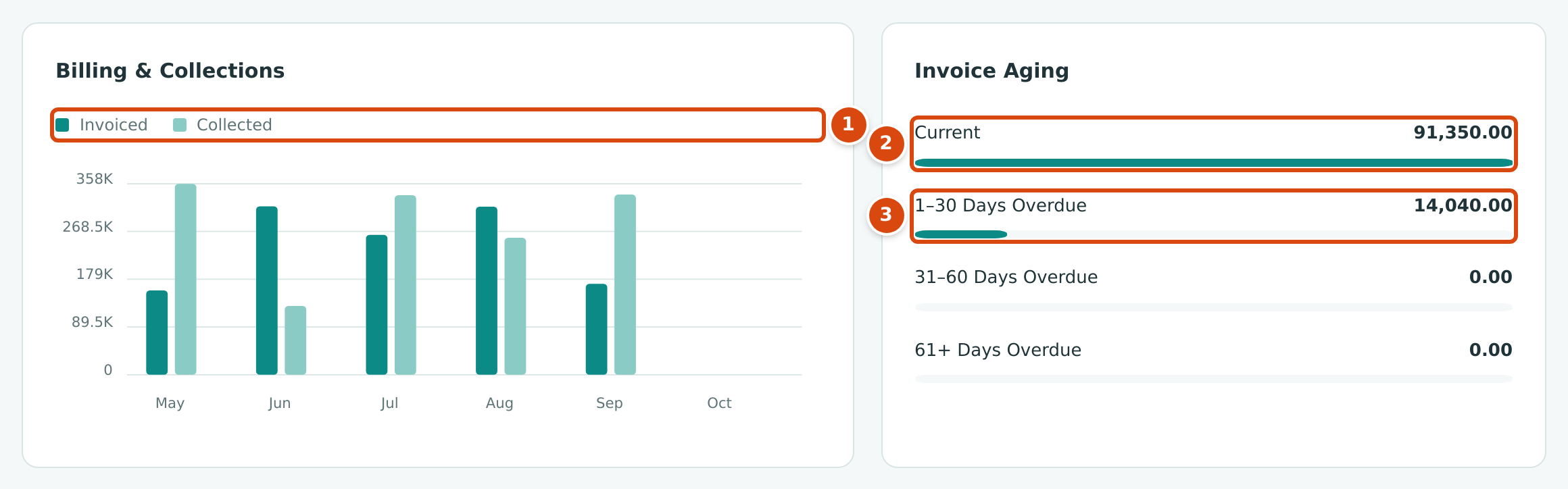
- Billing & Collections compares, month by month, what you Invoiced (the totals of posted invoices dated in the month, not counting retainage releases) with what you Collected (customer receipts dated in the month). It always shows the last six calendar months, including the current one. Point to a bar to see its amount.
- Current: unpaid amounts that are not yet past due.
- 1–30 Days Overdue, and below it 31–60 Days Overdue and 61+ Days Overdue: unpaid amounts by how late they are.
Each aging row is a link to the AR Aging report, which breaks the same amounts down by customer.
Overdue Invoices

- View All Invoices opens the Invoices list filtered to Overdue.
- The customer's name opens the customer's page.
- The invoice number opens the invoice.
- How many days have passed since the due date.
- Receive Payment opens Receive Payment with the customer chosen and the invoice's open balance already entered. It appears only with Edit access.
The table lists up to ten open invoices whose due date has passed. The Amount Due column is what is still unpaid on the invoice. When nothing is late, the table reads No overdue documents.
Overdue invoices on the Home dashboard
The Home dashboard also lists overdue invoices under Needs Attention (for example Review 1 Overdue Invoice), together with receipts waiting to be deposited.
Related Topics
- Creating an Invoice
- Receiving Customer Payments
- Managing Customers
- Aging Reports and Customer Statements
- The Payables Overview, the same page for vendors and bills