| Account | Debit | Credit |
|---|---|---|
| 2010 Accounts Payable | 24,666.75 | |
| 5040 Materials (J-1002 · 07-300 · MAT) | 1,482.46 | |
| 5040 Materials (J-1002 · 08-100 · MAT) | 23,184.29 |
Reversing and Correcting Transactions
In Structally a posted transaction is never edited or deleted. Its journal entry is locked, so the books always show what was recorded and when. To correct a mistake you void or reverse the record: Structally posts a second entry with the same lines on the opposite sides, dated on the day you choose, and marks the record Void or Reversed. Then you enter the transaction again correctly.
This page lists, for every kind of record, what correction the product offers, what has to be undone first, and what Structally posts. Drafts are different: they have not touched the books, so you simply edit them.
Before You Begin
- You need Edit access to the area the record belongs to: Vendors & Bills for bills, expenses, bill payments and vendor credits; Customers & Invoices for invoices, receipts and credit memos; Banking for transfers, deposits, refunds and the Bank Feed; Accounting for journal entries. Company Admins and Accountants have all of these; Project Managers have Vendors & Bills and Customers & Invoices; Viewers have none. See Roles and Permissions.
- Know the Books Closed date: a reversal must be dated after it.
How a Reversal Works
- Open the posted record.
- Click its correction action: Void Bill…, Void Invoice…, Void Vendor Credit… or Void Credit Memo… in the ⋯ menu, or the Reverse Payment…, Reverse Receipt…, Reverse Expense…, Reverse Transfer…, Reverse Deposit… or Reverse Refund… button.
- In the panel that opens, set the Date of the reversal (it starts as today) and optionally type a Memo saying why.
- Click the confirming button (Void Bill, Reverse Payment and so on), or Cancel.
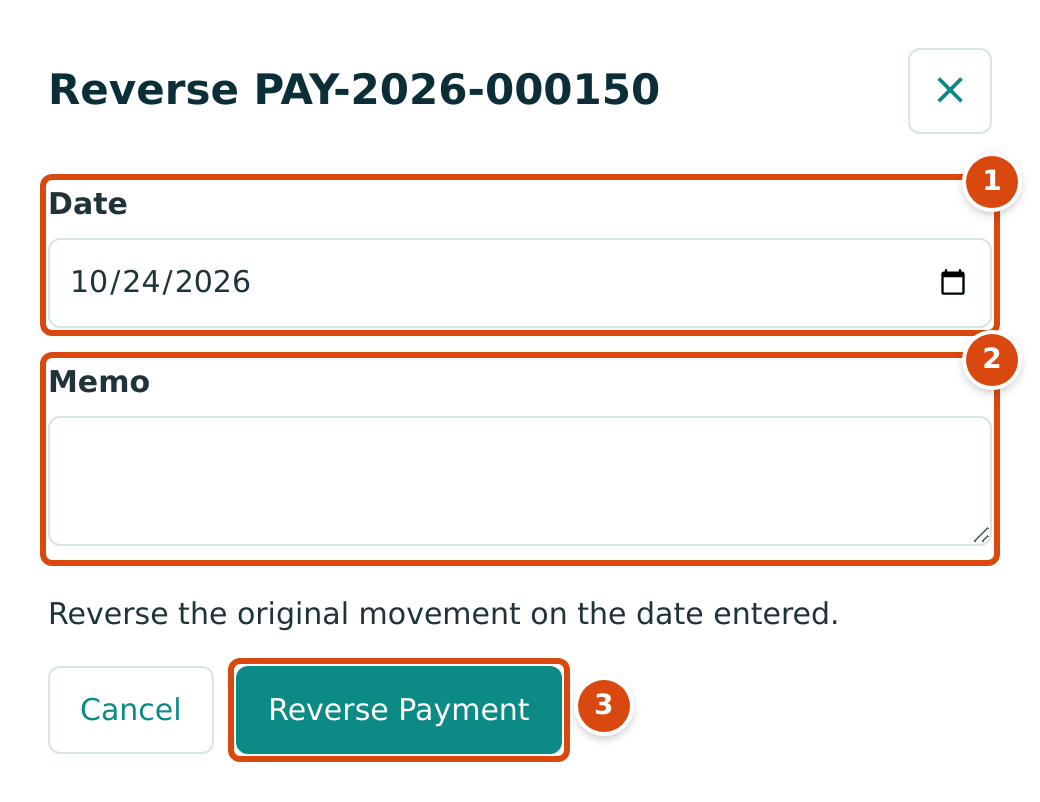
- Date: the accounting date of the reversing entry. It cannot be earlier than the original record's date and must be after the Books Closed date.
- Memo: becomes the description of the reversing entry, so say why.
- Reverse Payment posts the reversal. The panel for a bill says Void Bill and explains "This reverses the posting entry on the date entered."
The reversing entry mirrors the original exactly: every debit becomes a credit and every credit a debit, with the same accounts, amounts, job coding, classes and locations. The original entry stays on its own date, so reports for that period do not change; the correction shows in the period of the reversal date.
What You Can Do With Each Record
| Record | Correction on Screen | First Undo | What Structally Posts | Status After |
|---|---|---|---|---|
| Bill (posted, Open) | ⋯ → Void Bill… | Payments applied (Bill has payments applied; reverse them first), credits applied (Bill has credits applied; unapply them first), retainage releases (Bill has retainage releases; reverse them first). A bill that is not open cannot be voided (Only open bills can be voided). | The bill's posting entry reversed on the void date. | Void |
| Invoice (posted, Open) | ⋯ → Void Invoice… | Receipts (Invoice has receipts applied; reverse them first), credits (Invoice has credits applied; unapply them first), retainage releases (Invoice has retainage releases; reverse them first); Only open invoices can be voided. An invoice billed by a pay application shows "Void is not available: reverse Pay Application … instead." | The invoice's posting entry reversed. | Void |
| Vendor credit (posted, Open) | ⋯ → Void Vendor Credit… | Applications (Vendor credit has applications; unapply them first), refunds (Vendor credit has refunds; reverse them first); Only open vendor credits can be voided. | The credit's posting entry reversed. | Void |
| Credit memo (posted, Open) | ⋯ → Void Credit Memo… | Applications (Credit memo has applications; unapply them first), refunds (Credit memo has refunds; reverse them first); Only open credit memos can be voided. | The credit memo's posting entry reversed. | Void |
| Expense | Reverse Expense… | An expense created in the Bank Feed is matched to its bank line; undo the categorization there instead. | The expense's entry reversed. | Reversed |
| Bill payment | Reverse Payment… | Refunds (Payment has refunds; reverse them first). | The payment entry reversed. The amounts it applied to bills are taken off again, and a paid bill becomes open. | Reversed |
| Customer receipt | Reverse Receipt… | Refunds (Receipt has refunds; reverse them first) and deposits (Receipt is deposited; reverse the deposit first). | The receipt entry reversed; paid invoices reopen. | Reversed |
| Transfer | Reverse Transfer… | A transfer created in the Bank Feed: undo the categorization there instead. | The transfer entry reversed. | Reversed |
| Deposit | Reverse Deposit… | None beyond the bank-line rule below. | The deposit entry reversed. | Reversed |
| Refund | Reverse Refund… | None beyond the bank-line rule below. | The refund entry reversed; a vendor credit or credit memo it refunded is open again. | Reversed |
| Bank entry (from the Bank Feed) | Banking → Bank Feed → the line → Undo Categorization | Line is cleared in a reconciliation; unclear it first. | The expense, transfer or bank entry the line created is reversed, and the line is no longer categorized. | Reversed |
| Manual journal entry | Reverse Entry → Reverse on the entry page | None beyond the bank-line rule below. | The entry reversed. | Shows a Reversal Entry link |
| Retainage release | ⋯ → Reverse Release… | See Releasing Retainage. | The release's entry reversed. | Void |
| Pay application (accepted) | Reverse it on the pay application (Company Admin or Accountant) | Only the latest accepted application can be reversed. | Its invoice is voided. See Pay Applications. | Pay application reversed |
| WIP schedule (posted) | No reverse or void action | — | See WIP Schedules. | — |
| Opening balances | No reverse action on the entry page | — | See Opening Balances. | — |
| Job cost transfer | No reverse action | — | Transfer the cost back with a new transfer on Job Costs and Cost Transfers. | — |
Applying a credit or a payment's unapplied amount to a bill or invoice posts no journal entry, and neither does Unapply: it only removes the application, and the bill or invoice owes that amount again. The unapply date cannot be earlier than the application (Unapply date is before application date). See Vendor Credits, Paying Bills, Credit Memos and Receiving Customer Payments.
Rules for Every Reversal
| Rule | Message When It Is Broken |
|---|---|
| The reversal date is on or after the original date. | Reversal date cannot be earlier than the journal entry date. |
| The reversal date is after the Books Closed date. | Accounting date must be after the company closing date; 2026-07-15 is on a closed period. |
| The entry is not matched to a bank feed line. Unmatch it in the Bank Feed first. | Entry is matched to a bank line; unmatch it first |
| A record is reversed only once. | Payment is already reversed, Expense is already reversed, Transfer is already reversed and so on. |
Correcting something in a closed period
The Books Closed date stops new postings in closed periods, but it does not stop you correcting an old transaction: void or reverse it with a date after the Books Closed date. The original stays in the closed period untouched, and the correction lands in the open period. In the sample company the books are closed through July 31, 2026, so any reversal must be dated August 1, 2026 or later.
Drafts
Bills, invoices, vendor credits and credit memos saved with Save Draft have status Draft and no journal entry. Open the draft and click Edit Draft to change anything except the vendor or customer, or post it as it stands.
No Discard button for drafts
There is no button on screen to discard a draft bill, invoice, vendor credit or credit memo. A draft you no longer need stays in its list with the status Draft. It never affects your books or reports; edit it into the document you need, or leave it.
Worked Example: A Voided Duplicate Bill
In the sample company, Keystone Engineering's bill BILL-2023-000008 for $24,666.75 was posted on November 4, 2023 and voided on November 6, 2023 with the memo Supplier canceled duplicate bill. Nothing had been paid or applied, so the void was allowed.
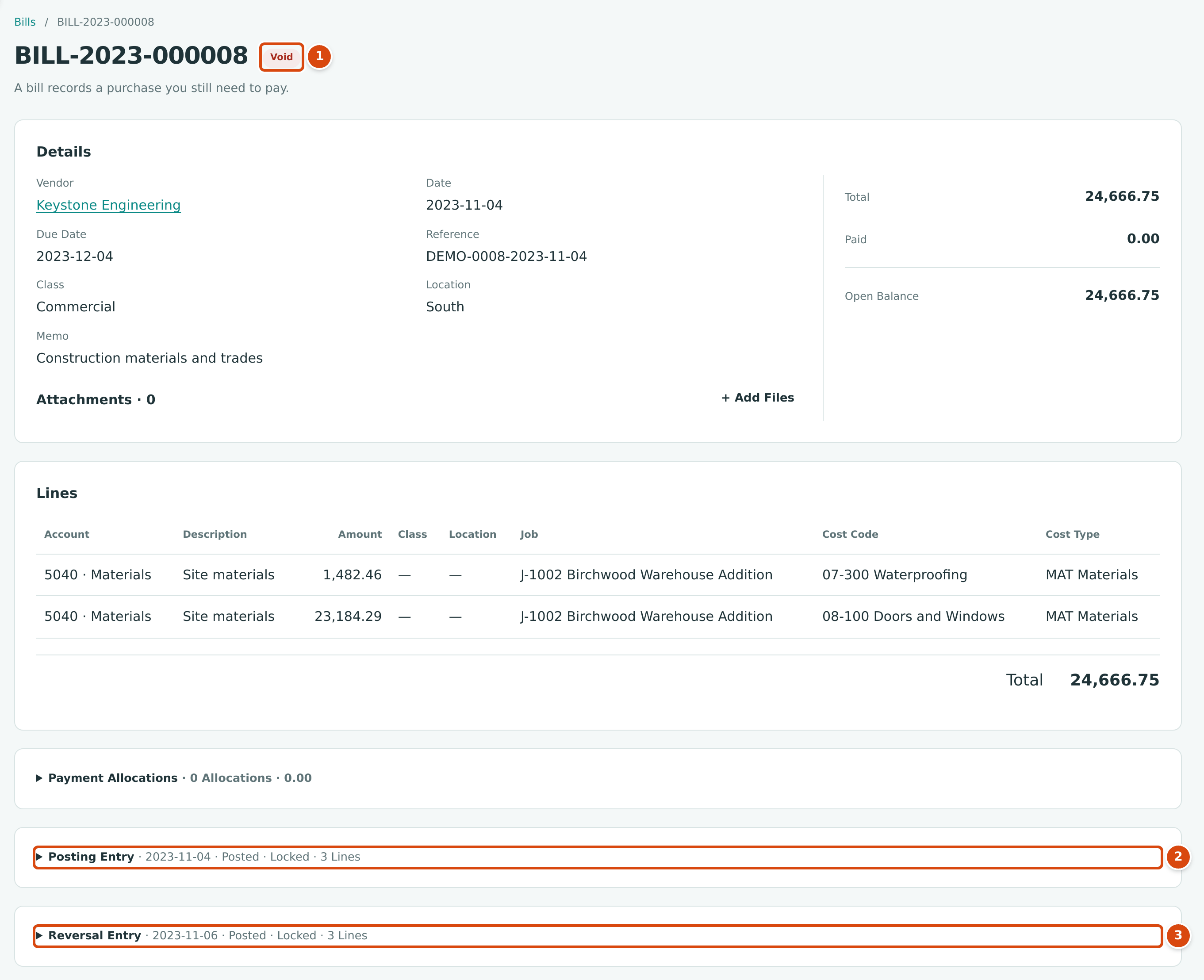
- The status is Void.
- Posting Entry: the original entry of November 4, 2023.
- Reversal Entry: the void entry of November 6, 2023.
The bill posted two job-coded material lines to job J-1002. The void posted the mirror image:
| Account | Posting Entry (2023-11-04) Debit | Posting Entry Credit | Void Entry (2023-11-06) Debit | Void Entry Credit |
|---|---|---|---|---|
| 5040 Materials (J-1002 · 07-300 · MAT) | 1,482.46 | 1,482.46 | ||
| 5040 Materials (J-1002 · 08-100 · MAT) | 23,184.29 | 23,184.29 | ||
| 2010 Accounts Payable | 24,666.75 | 24,666.75 |
1,482.46 + 23,184.29 = 24,666.75, so each entry balances, and together they leave Materials, the job costs of J-1002 and Accounts Payable exactly where they were before the bill.
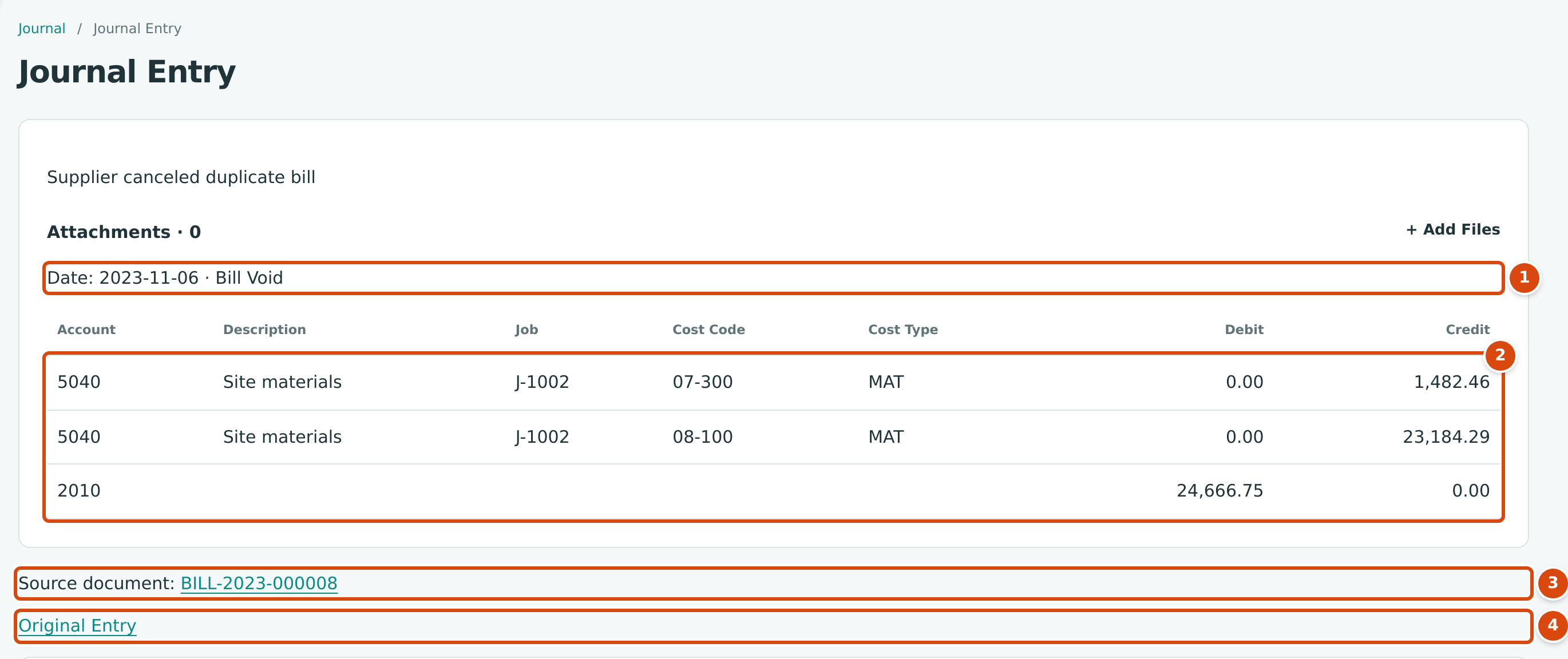
- The reversal's date and type, Bill Void. Its description is the memo typed when voiding.
- The lines: the original debits are now credits, and the original credit is now a debit, with the same job coding.
- Source document: the voided bill.
- Original Entry: opens the bill's posting entry.
The Void Entry
What Happens After You Void or Reverse
- The original record stays, with the status Void or Reversed, and cannot be changed or reversed again.
- Both entries are posted and locked. In the journal the reversal has its own type, such as Bill Void, Invoice Void, Vendor Credit Void, Credit Memo Void, Expense Reversal, Payment Reversal, Receipt Reversal, Transfer Reversal, Deposit Reversal, Refund Reversal, Bank Entry Reversal or Journal Entry Reversal.
- The record's History and the Audit Log record who voided or reversed it, when, with the date and memo.
- To finish the correction, enter the transaction again with the right details.
Common Mistakes and Troubleshooting
| Message or Symptom | Why It Happens | What to Do |
|---|---|---|
| Bill has payments applied; reverse them first | A payment paid part or all of the bill. | Reverse the payment (see Paying Bills), then void the bill. |
| Bill has credits applied; unapply them first | A vendor credit was applied to the bill. | Unapply the credit (see Vendor Credits). |
| Only open bills can be voided | The bill is a draft, already void, or fully paid. | Edit a draft instead; for a paid bill, reverse its payments first. |
| Receipt is deposited; reverse the deposit first | The receipt is in a posted deposit. | Reverse the deposit (see Making Deposits), then the receipt. |
| "Void is not available: reverse Pay Application … instead." | The invoice was created by a pay application. | Reverse the pay application. |
| Entry is matched to a bank line; unmatch it first | The entry is matched in the Bank Feed. | Unmatch or undo the categorization in the Bank Feed. |
| Line is cleared in a reconciliation; unclear it first | The bank line is part of a reconciliation. | Unclear it in Reconciling an Account. |
| Accounting date must be after the company closing date; 2026-07-15 is on a closed period. | The reversal date is in a closed period. | Date the reversal after the Books Closed date. |
| No void or reverse button. | You have View access only, the record is a draft, or it is already void or reversed. | Ask a user with Edit access, or edit the draft. |