| Account | Debit | Credit |
|---|---|---|
| 4100 WIP Revenue Adjustment | 10,827.59 | |
| 2400 Billings in Excess of Costs (J-101) | 10,827.59 |
F: Closing the Month
By the end of September, J-101 is three months in. August and September repeated the work of Exercises C and D (bills, payments, pay applications 2 and 3 and Lakeview's September payment; see the season so far). Before anyone relies on the September figures, the controller closes the month:
- forecasts the job's final cost;
- prepares and posts the WIP schedule, which adjusts revenue to the percentage of completion;
- imports the bank statement and reviews each line;
- reconciles the bank account to the statement;
- reads the quarter's Profit and Loss and Balance Sheet;
- closes the books through September 30.
Before You Begin
- Exercise E is done, and the August and September transactions below are entered.
- Approving a forecast or a WIP schedule, posting WIP entries and closing the books need a Company Admin or Accountant.
The Season So Far
| Month | Vendor Bills | Paid to Vendors | Billed to Lakeview | Received from Lakeview |
|---|---|---|---|---|
| July | 100,000.00 | 136,000.00 (application 1) | ||
| August | 117,000.00 | 62,500.00 (August 10) | 144,000.00 (application 2) | 100,000.00 (August 25) |
| September | 98,000.00 | 137,600.00 (September 10) | 146,000.00 (application 3) | 152,000.00 (September 20) |
| To September 30 | 315,000.00 | 200,100.00 | 426,000.00 | 252,000.00 |
Step 1: Forecast the Final Cost
A forecast asks, line by line, what the job will cost when it is finished. The September walk-through finds one problem: the drywall crew will have to patch around the electrical rough-in, which Summit Drywall prices at $4,500.00 more than its subcontract.
- Go to Jobs & Costing → Forecasts & WIP and click New Forecast.
- Choose Job J-101, enter Cutoff 09/30/2026 and a Note, and click Create Forecast.
- The forecast lists each budget line with its Revised Budget, Actual
Cost and Open Commitments. For each line, enter what is still to come:
- Still to Buy: cost not yet committed. On 01-100 General Conditions, enter 6000.00 for October's site services, which have no commitment.
- Adjustment: a cost change you know about but have not committed. On 09-100 Drywall, enter 4500.00 with the Note Patching after electrical rough-in.
- Click Save Draft.
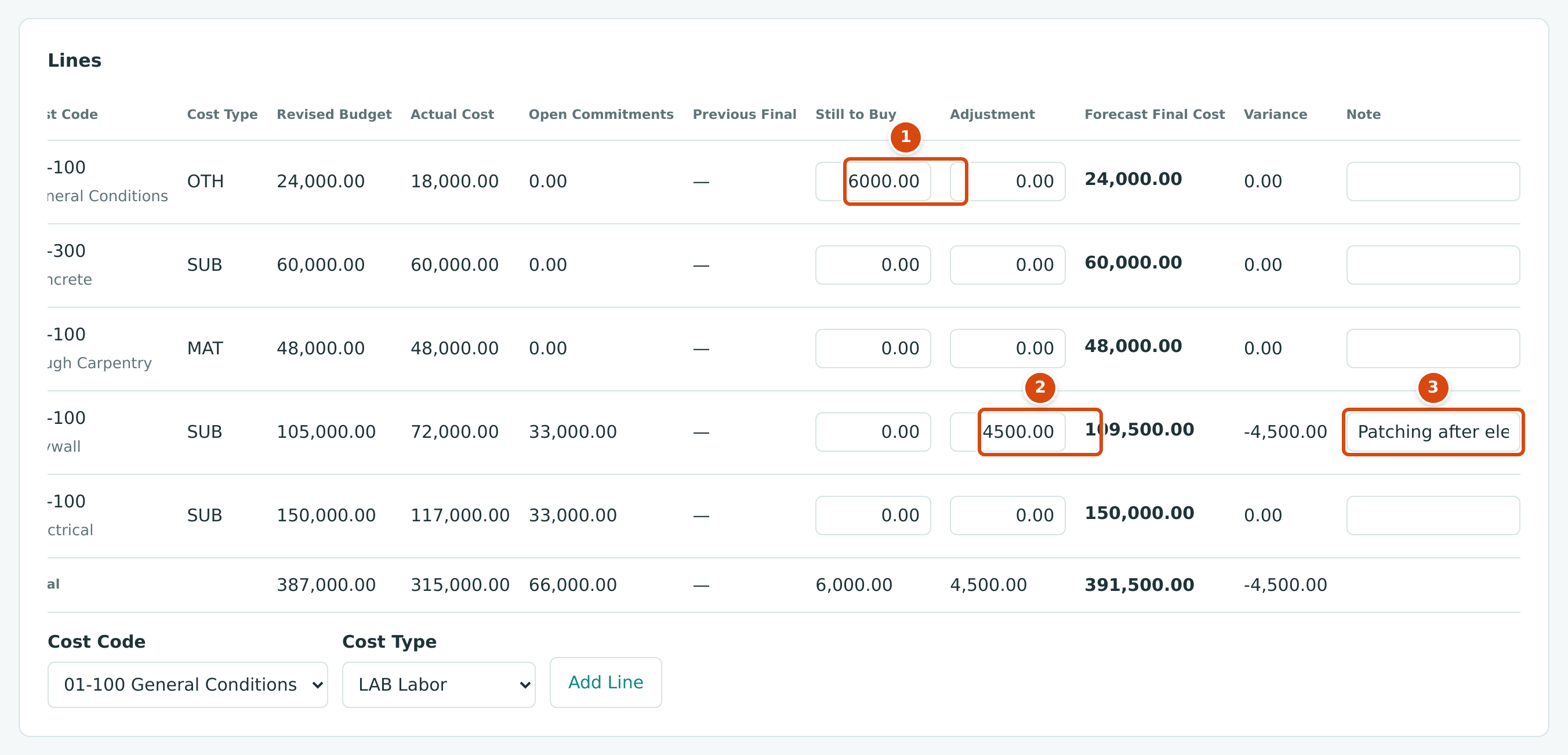
- Still to Buy: cost to come that is not in an open commitment.
- Adjustment: a known change in cost, here the drywall patching.
- Note: why the line changed.
Each line's Forecast Final Cost is Actual Cost + Open Commitments + Still to Buy + Adjustment. For drywall: 72,000.00 + 33,000.00 + 0.00 + 4,500.00 = 109,500.00. The Forecast card adds the lines up:

The job is now expected to cost $391,500.00 and earn $516,000.00 − $391,500.00 = $124,500.00, a margin of 24.1% instead of the planned 25.0%.
- Click Approve and confirm. The approved forecast is the one the WIP schedule uses.
See Forecasts.
Step 2: Prepare and Post the WIP Schedule
Lakeview has been billed $426,000.00, but by the percentage-of-completion method the company has earned only part of that. The WIP schedule works out the difference.
- On Forecasts & WIP, open the WIP Schedule tab and click New WIP Schedule. Enter Cutoff 09/30/2026 and click Create WIP Schedule.
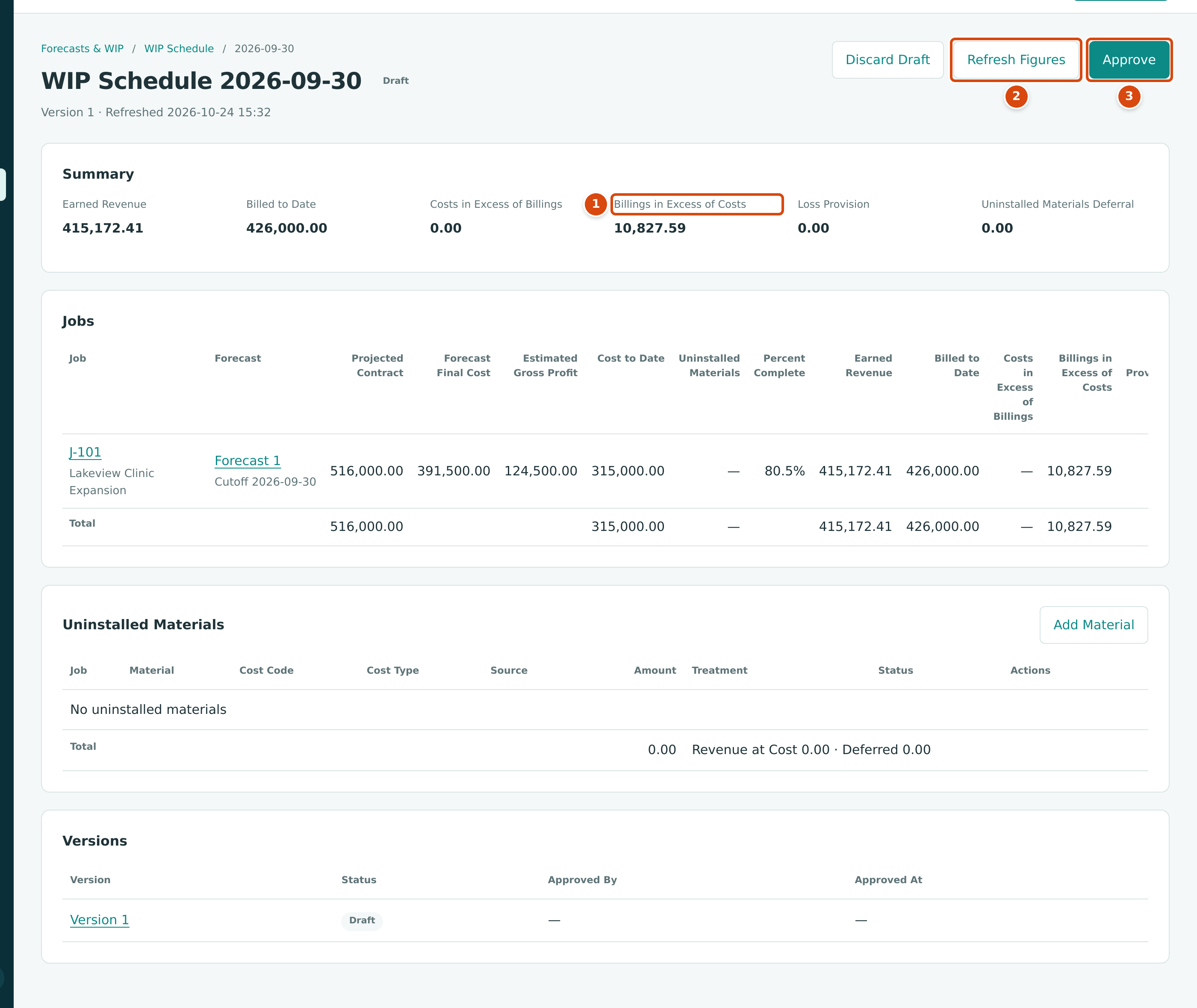
- Billings in Excess of Costs: billed more than earned, a liability.
- Refresh Figures recalculates the draft after later postings.
- Approve freezes the schedule.
| WIP Figure | Calculation | Amount |
|---|---|---|
| Percent Complete | Cost to Date 315,000.00 ÷ Forecast Final Cost 391,500.00 | 80.5% |
| Earned Revenue | 516,000.00 × 315,000.00 ÷ 391,500.00 | 415,172.41 |
| Billed to Date | applications 1 to 3 | 426,000.00 |
| Billings in Excess of Costs | 426,000.00 − 415,172.41 | 10,827.59 |
- Click Approve and confirm.
- Click Post WIP Entries. Structally shows the entry it will post, with the balance each WIP account should have (Target Balance) and the balance it has now (Recorded Balance).
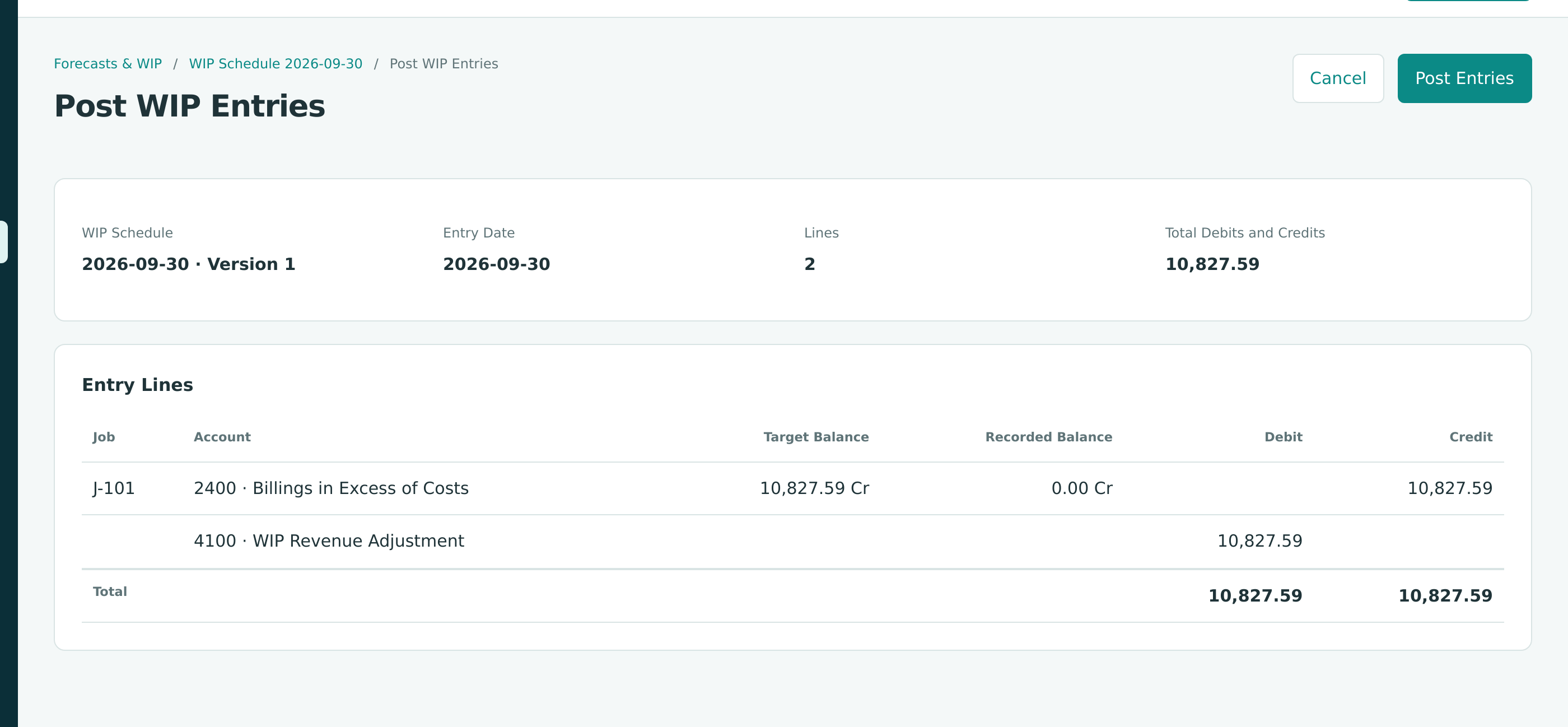
- Click Post Entries.
The WIP Entry (September 30)
Revenue for the quarter becomes $426,000.00 − $10,827.59 = $415,172.41, the amount earned. The $10,827.59 is a liability: work Lakeview has paid for or been billed for but that is not yet done. Next month's schedule replaces this balance with a new one.
See WIP Schedules.
Step 3: Import and Review the Bank Statement
The bank's September statement for Operating Checking arrives as a CSV file with ten lines from August 12 to September 30. Its first lines:
date,description,amount,external_id
2026-08-12,CHECK 1001,-16000.00,FVB-0812-001
2026-08-12,CHECK 1002,-6000.00,FVB-0812-002
2026-08-13,CHECK 1003,-40500.00,FVB-0813-001
2026-08-26,DEPOSIT,100000.00,FVB-0826-001
- Go to Banking → Bank Feed and click Import Statement on the 1010 Operating Checking card.
- Choose the file in Statement CSV and click Import CSV. The file uses the standard columns, so it imports directly.
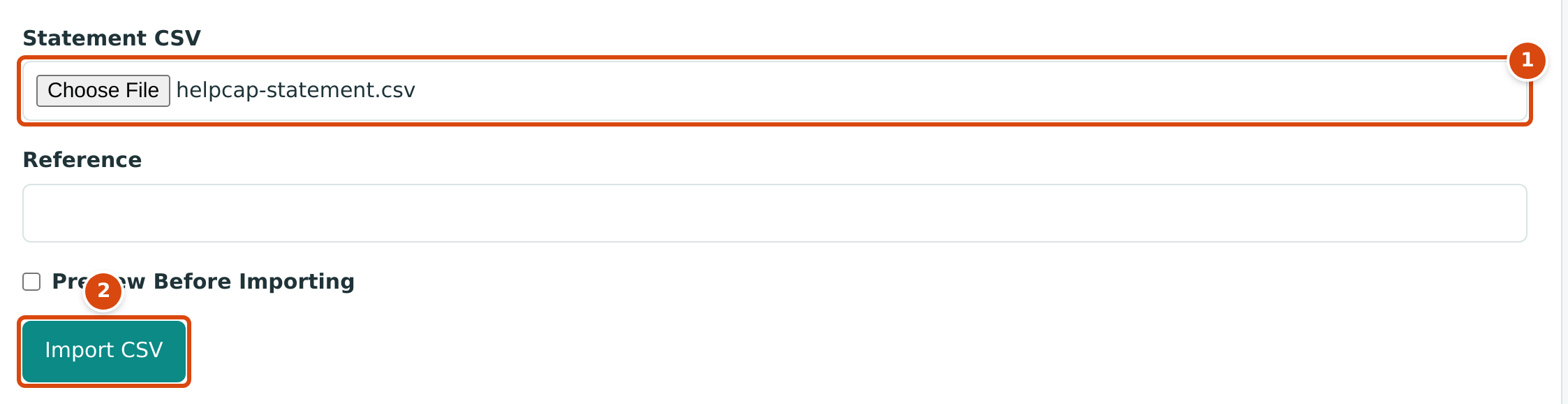
- Statement CSV: the file from the bank.
- Import CSV imports every line for review.
The account's Bank Transactions page now lists the ten lines For Review. Nine show 1 Possible Match: a payment, check or deposit already in the books with the same amount. The monthly service charge shows Needs Category.
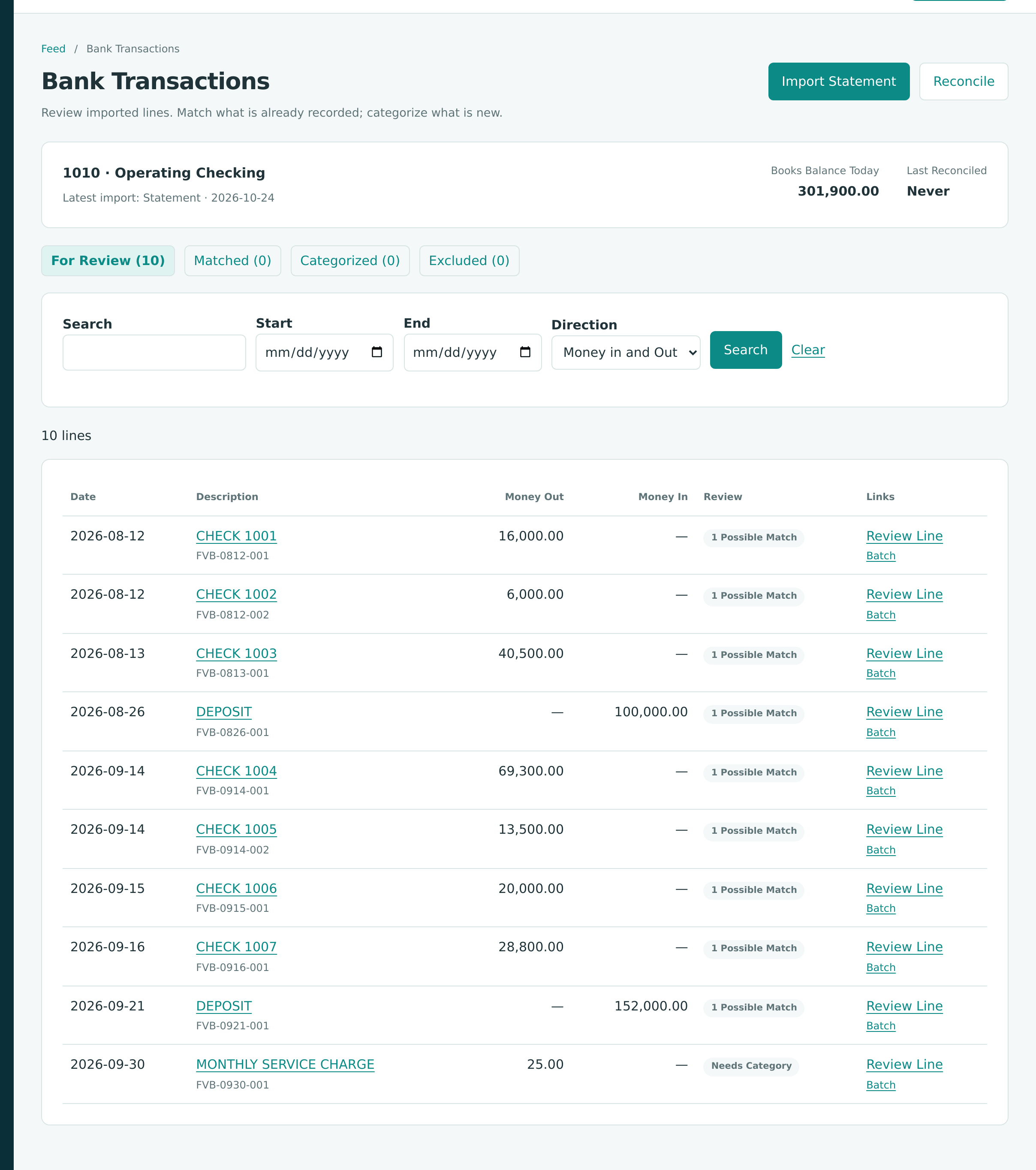
- Click Review Line on CHECK 1001. Structally proposes PAY-2026-000001, the August 10 payment to Pine Valley Lumber. Click Confirm Match. Matching links the line to the existing payment; nothing new is posted.
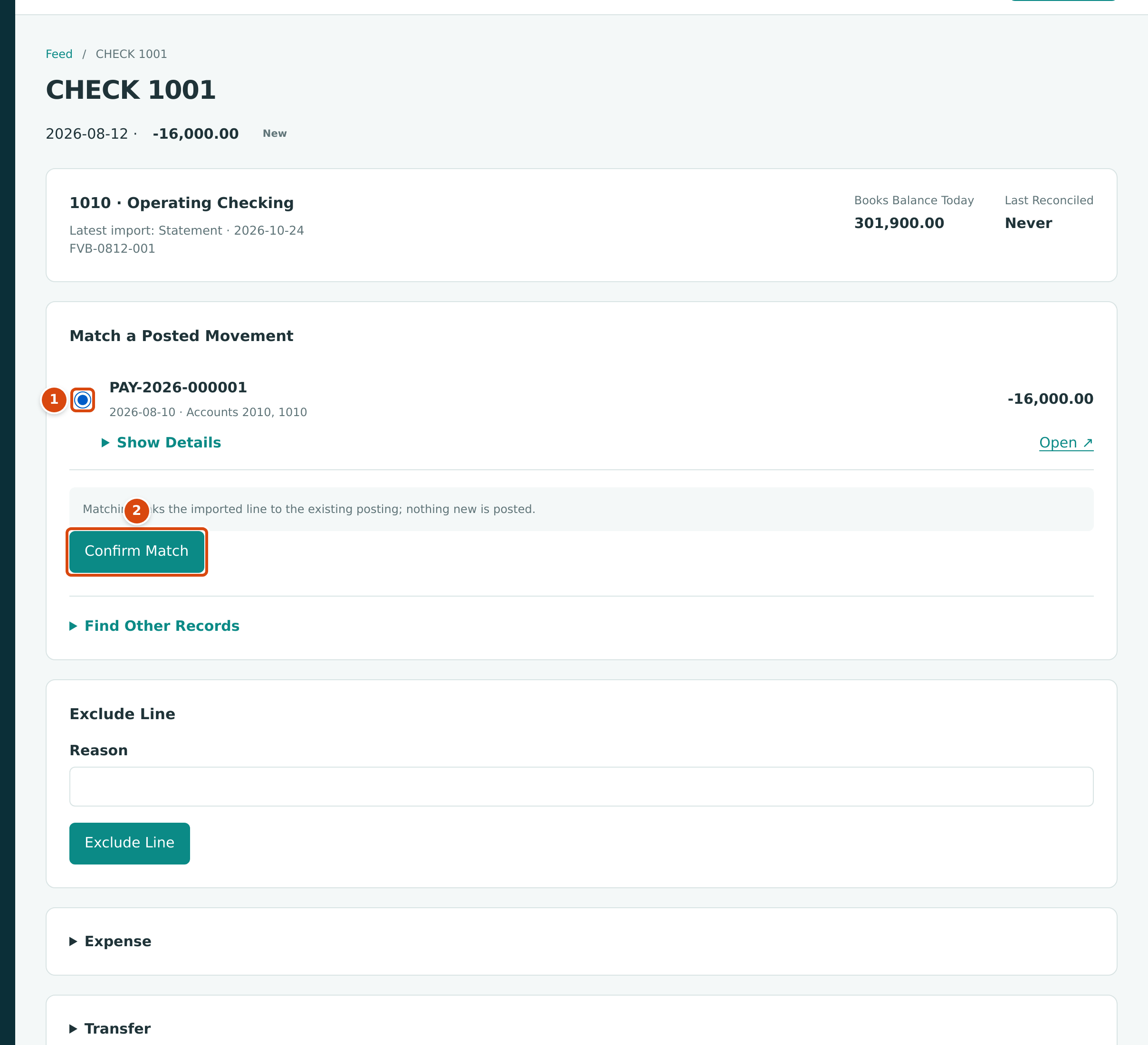
- The proposed record: same amount, dated two days before the bank cleared it.
- Confirm Match links the two.
- Match the other eight lines the same way.
- Open the MONTHLY SERVICE CHARGE line. Nothing in the books matches it, so it is new: under Bank Entry, choose Account 6020 - Bank Fees and click Categorize as Bank Entry.
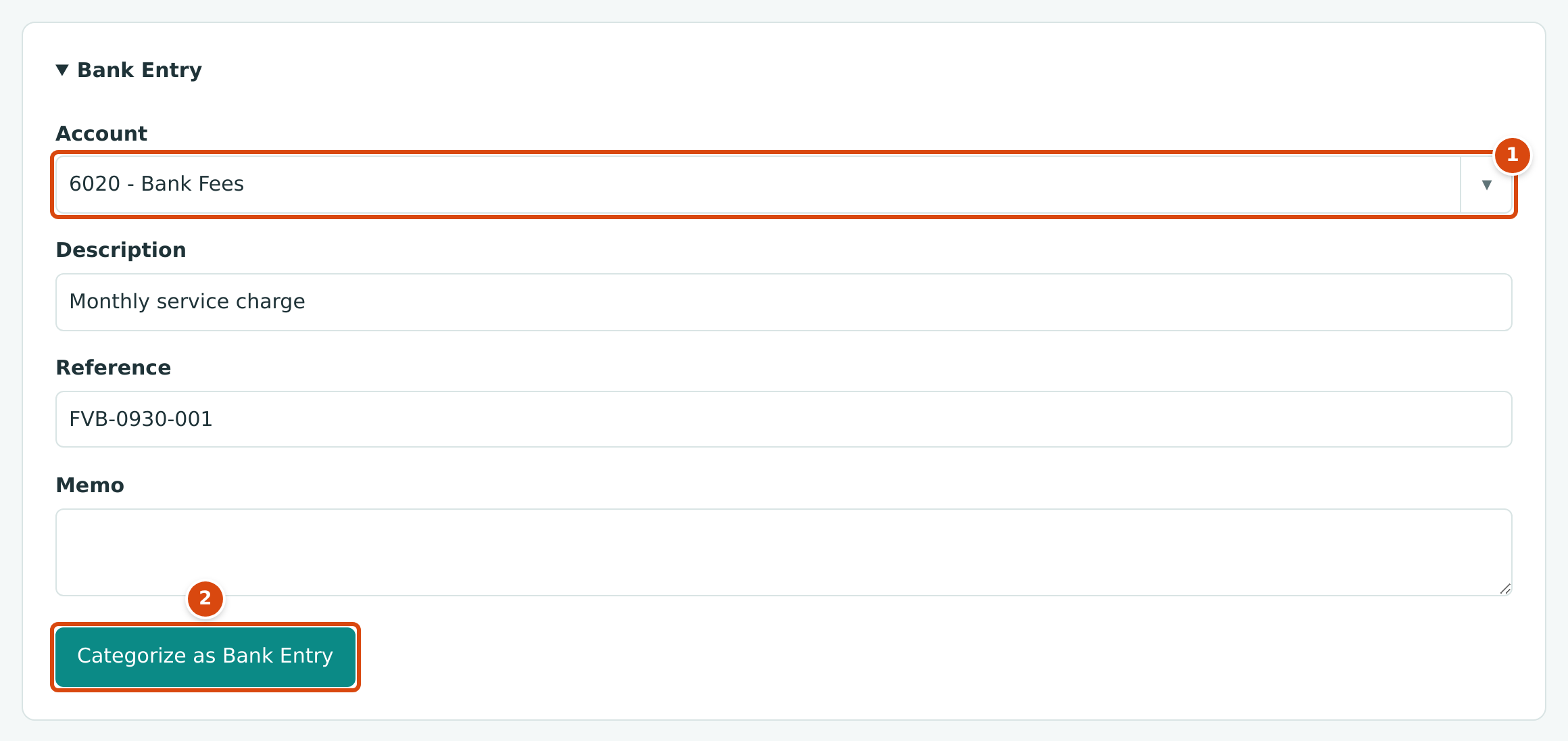
- Account: where the fee is charged.
- Categorize as Bank Entry posts the entry.
The Bank Fee (BE-2026-000001)
| Account | Debit | Credit |
|---|---|---|
| 6020 Bank Fees | 25.00 | |
| 1010 Operating Checking | 25.00 |
All ten lines are now reviewed: nine Matched and one Categorized. See Importing Bank Statements and Reviewing the Bank Feed.
Step 4: Reconcile the Bank Account
- On the Bank Transactions page, click Reconcile.
- Choose Imported Bank Statement, and enter Statement Date 09/30/2026, Opening Balance 250000.00 (the balance on July 1, when the books started) and the statement's Ending Balance 307875.00. Click Start Reconciliation.
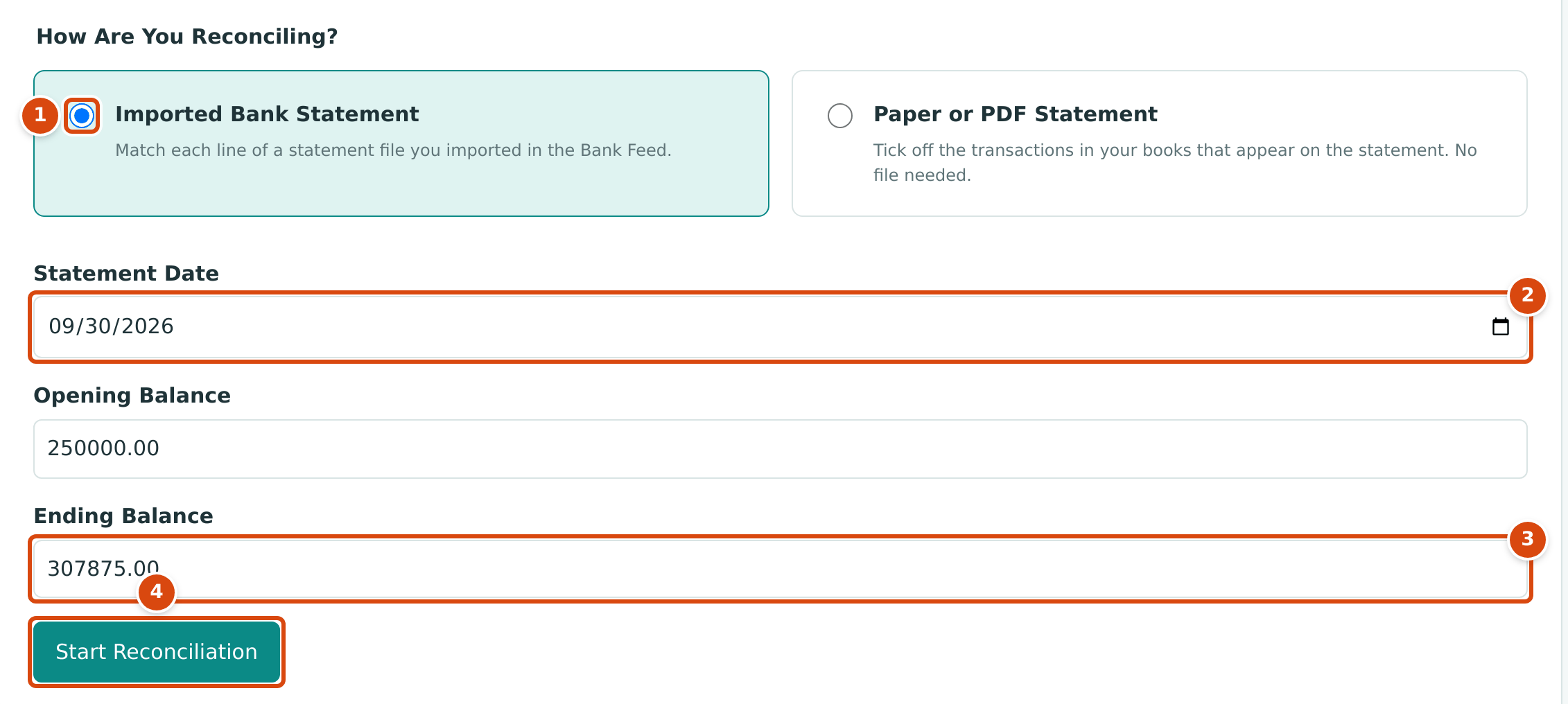
- Imported Bank Statement: reconcile the lines you reviewed in the feed.
- Statement Date: the last day of the statement.
- Ending Balance: the closing balance printed on the statement.
- Start Reconciliation opens the statement.
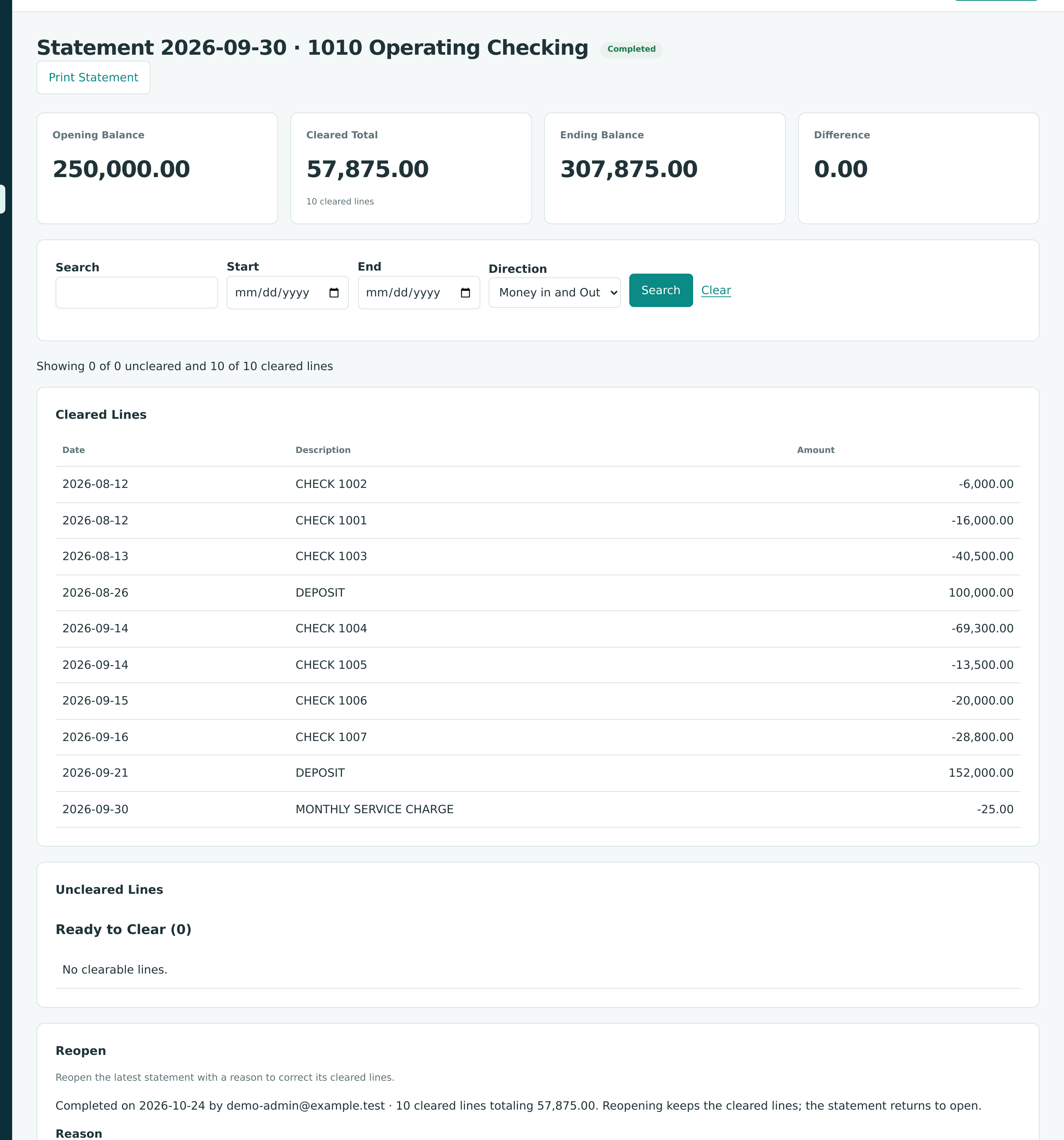
- Click Select All under Ready to Clear, then Clear. The ten reviewed lines move to Cleared Lines, and the Difference becomes 0.00: 250,000.00 + 57,875.00 cleared = 307,875.00.
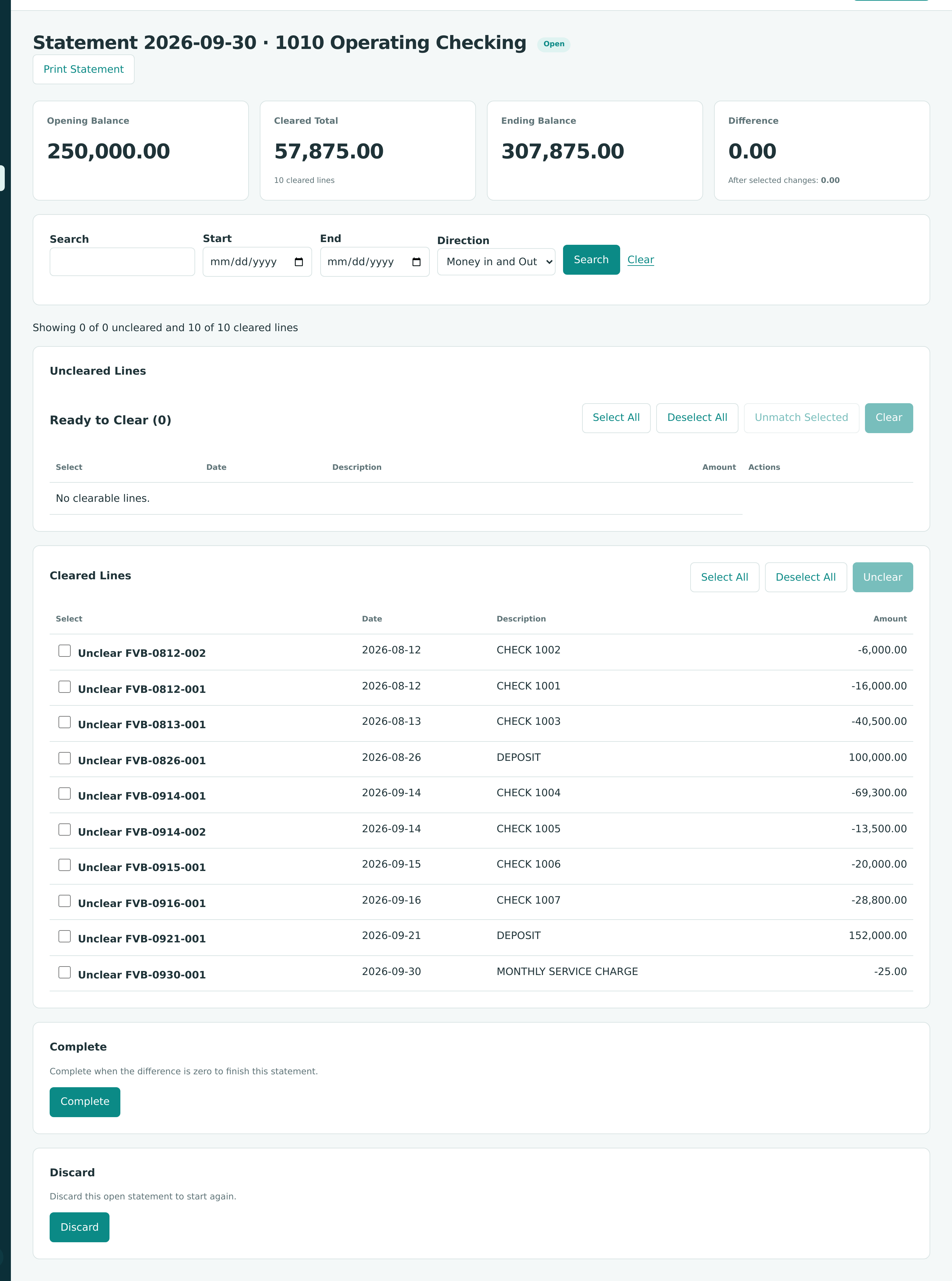
- Click Complete and confirm. The statement is Completed.
Why the Books Show Less Than the Bank
On September 30 the books show $301,875.00 in Operating Checking, $6,000.00 less than the bank. The difference is check 1008 (PAY-2026-000008) to Cascade Site Services, written on September 10 but not yet cashed. It stays uncleared until it appears on October's statement. An outstanding check is normal; an unexplained difference is not.
Step 5: Read the Quarter's Reports
Go to Reports and run the Profit and Loss from 07/01/2026 to 09/30/2026, and the Balance Sheet as of 09/30/2026.
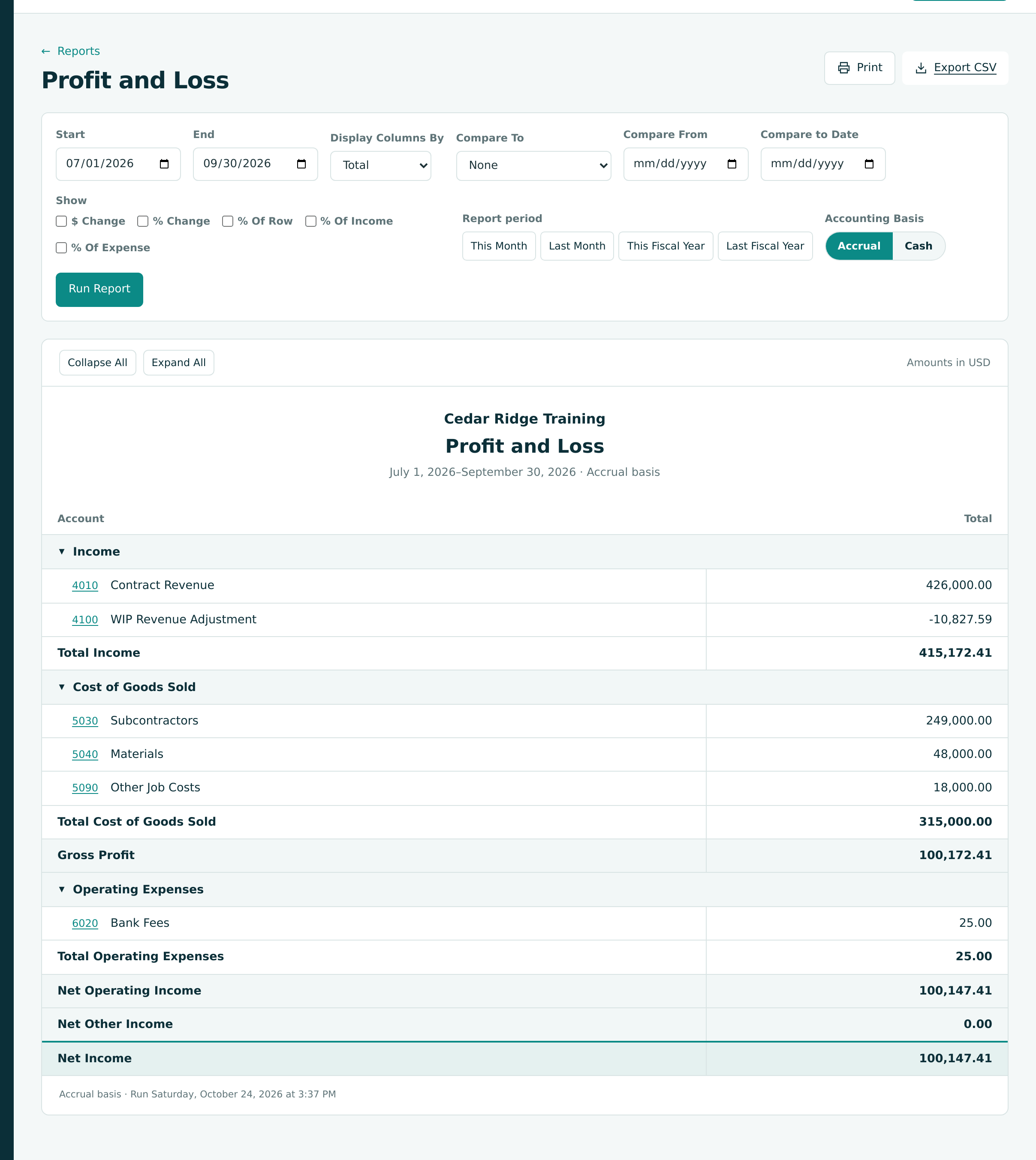
| Profit and Loss Line | Amount |
|---|---|
| 4010 Contract Revenue (applications 1 to 3) | 426,000.00 |
| 4100 WIP Revenue Adjustment | −10,827.59 |
| Total Income | 415,172.41 |
| 5030 Subcontractors | 249,000.00 |
| 5040 Materials | 48,000.00 |
| 5090 Other Job Costs | 18,000.00 |
| Gross Profit | 100,172.41 |
| 6020 Bank Fees | 25.00 |
| Net Income | 100,147.41 |
Gross profit is 100,172.41 ÷ 415,172.41 = 24.1% of revenue, the margin the forecast expects for the whole job. That is the point of the WIP adjustment: revenue follows cost, so each period shows the job's expected margin.
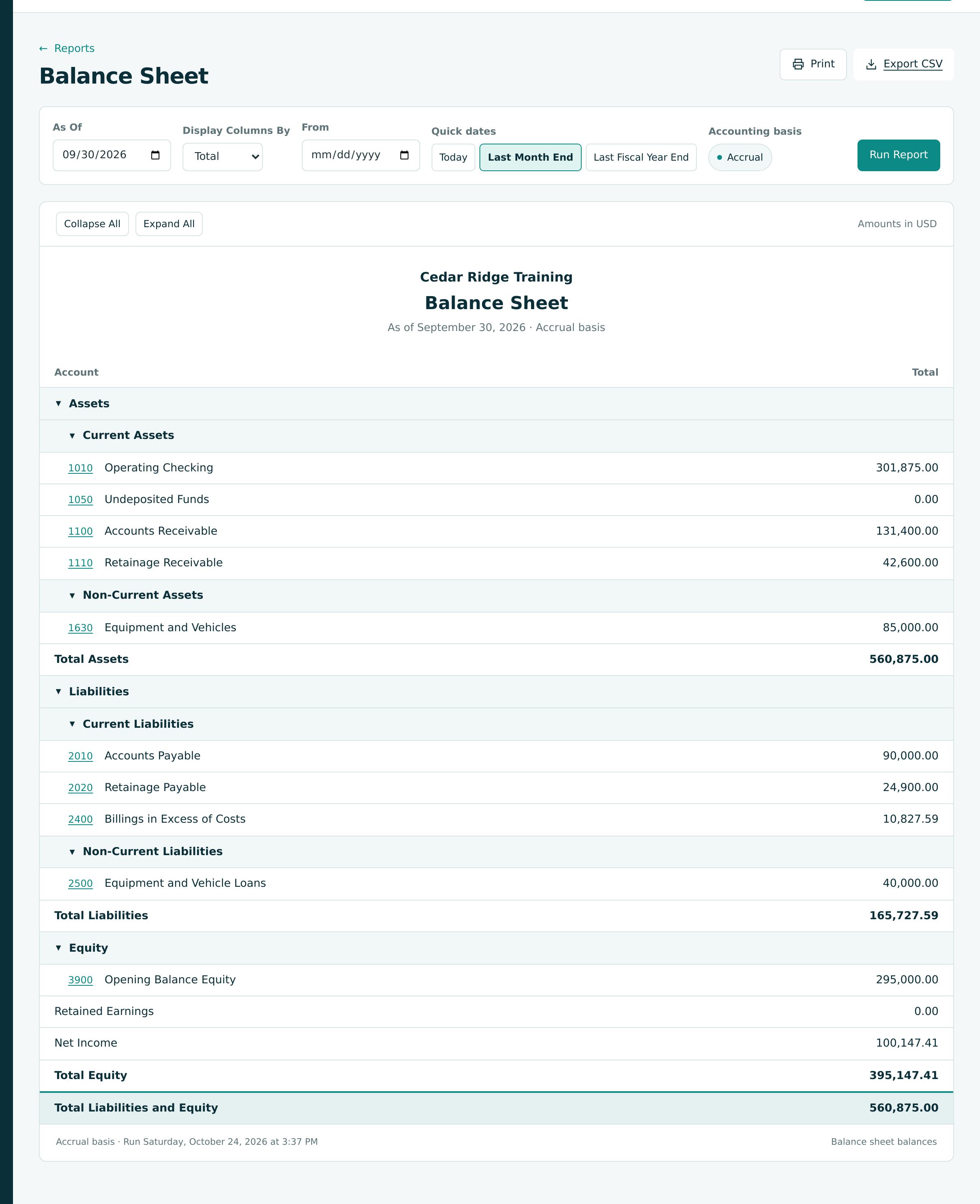
| Balance | Why |
|---|---|
| 1100 Accounts Receivable 131,400.00 | Invoice 3, billed September 30 |
| 1110 Retainage Receivable 42,600.00 | 10% held on applications 1 to 3 |
| 2010 Accounts Payable 90,000.00 | September's bills, less retainage, paid in October |
| 2020 Retainage Payable 24,900.00 | 10% held on the subcontractors' bills |
| 2400 Billings in Excess of Costs 10,827.59 | The WIP entry of Step 2 |
See Profit and Loss and Balance Sheet.
Step 6: Close the Books
With the month reviewed, protect it from later changes:
- Go to Settings → Books Closed. The Closed Through card shows Jun 30, 2026, the date set in Exercise A.
- Click Change Date, enter Lock Date 09/30/2026 and click Save.

- The last closed day.
- Change Date opens the Lock Date editor again at the next month-end.
- Reopen clears the date after you confirm in the Reopen Closed Books dialog.
From now on, nothing can be posted, voided or reversed with a date on or before September 30, 2026. A mistake found later is corrected in October, as Exercise G shows. See Books Closed.
Check Your Work
| Check | Where | Expected |
|---|---|---|
| Forecast | Forecasts & WIP | J-101 Forecast 1, cutoff 2026-09-30, Approved, 391,500.00 |
| WIP | WIP Schedule tab | 2026-09-30 Version 1, Posted |
| Bank | 1010 Bank Transactions | Matched (9), Categorized (1) |
| Reconciliation | Banking → Reconciliation | Statement 2026-09-30 Completed, difference 0.00 |
| Books | Settings → Books Closed | Sep 30, 2026 |
| Net income | Profit and Loss 07/01 to 09/30/2026 | 100,147.41 |
Next: G: Correcting Mistakes.