| Account | Debit | Credit |
|---|---|---|
| 6020 Bank Fees | 15.00 | |
| 1010 Operating Checking | 15.00 |
Reviewing the Bank Feed
After you import a statement, every row is a bank line waiting for review. Reviewing a line links it to your books:
- If the money movement is already recorded (a bill payment, a customer receipt deposit, a transfer), you match the line to that posting. Nothing new is posted.
- If it is not recorded yet (a bank fee, interest, a card purchase), you categorize the line. Structally posts an expense, a transfer or a bank entry for it, dated the line's date.
- If it does not belong in your books (a duplicate, a line the bank later canceled), you exclude it.
Matched and categorized lines are the lines you clear when you reconcile the account with the Imported Bank Statement method.
Before You Begin
- A statement is imported into the account. See Importing Bank Statements.
- You need Edit access to Banking to act on lines. Company Admins and Accountants have it; Viewers can open the feed and lines but see no actions; Project Managers have no Banking access. See Roles and Permissions.
Navigation
Banking → Bank Feed → Open on the account's card. From a reconciliation, the Review… and Categorize… buttons open the same line pages, with a Back to Statement link.
The Bank Transactions Page
Open on an account's card shows the account's Bank Transactions page. It opens with the For Review tab highlighted and lists the New lines (or No new lines.); click For Review to list the Flagged lines with them.
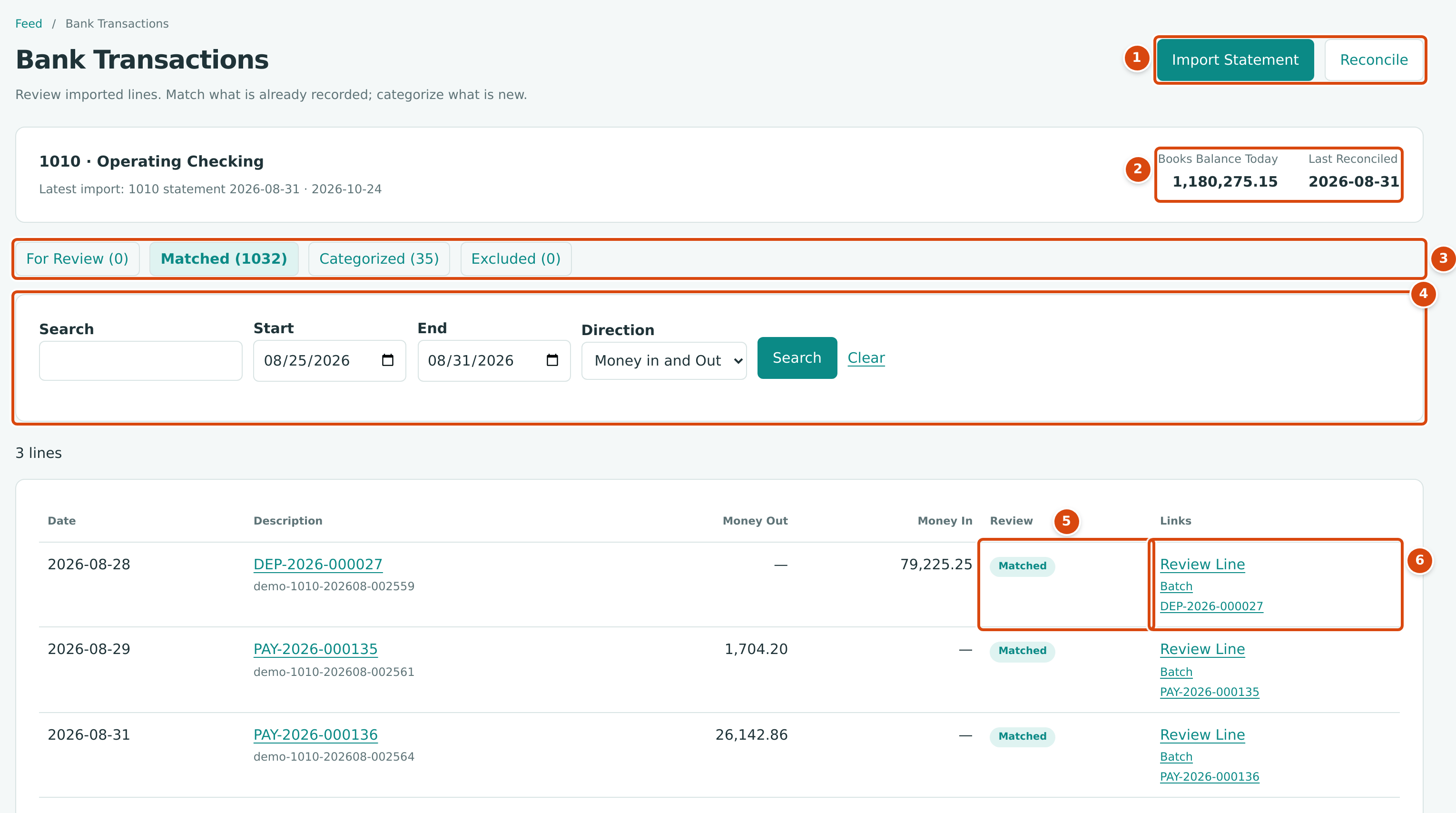
- Import Statement imports another statement; Reconcile starts a reconciliation of this account.
- Books Balance Today and Last Reconciled: the account's balance in your books and the date of its last completed reconciliation.
- The status tabs: For Review (new and flagged lines), Matched, Categorized and Excluded, each with its count.
- Search (description or external ID), Start and End dates and Direction (Money in and Out, Money In or Money Out). Clear removes the filters.
- Review: the line's state. For a new line it reads, for example, 1 Possible Match or Needs Category.
- Links: Review Line opens the line, Batch opens the import it came from, and the last link opens the matched document.
Each row shows Date, Description (with the external ID below it, or No external id), Money Out, Money In, Review and Links.
Line Statuses
| Status | Meaning | Actions Offered |
|---|---|---|
| New | Imported and not reviewed yet. | Confirm Match, Exclude Line, and the Expense, Transfer and Bank Entry categorize panels. |
| Flagged | Imported, but it looks like a line already in the feed (same date, amount and description, and no external ID). | Keep Line, Exclude Line. |
| Matched | Linked to a posting already in your books. | Unmatch. |
| Categorized | Structally posted an expense, transfer or bank entry for it. | Undo Categorization. |
| Excluded | Left out of your books and of reconciliation. | Restore Line. |
New and flagged lines dated on or before a statement date must be reviewed before that statement's reconciliation can be completed.
The Line Page
Click Review Line (or the description) to open a line. The page shows the line's description as its title, then its date, amount and status, the account, and only the actions that suit its status.
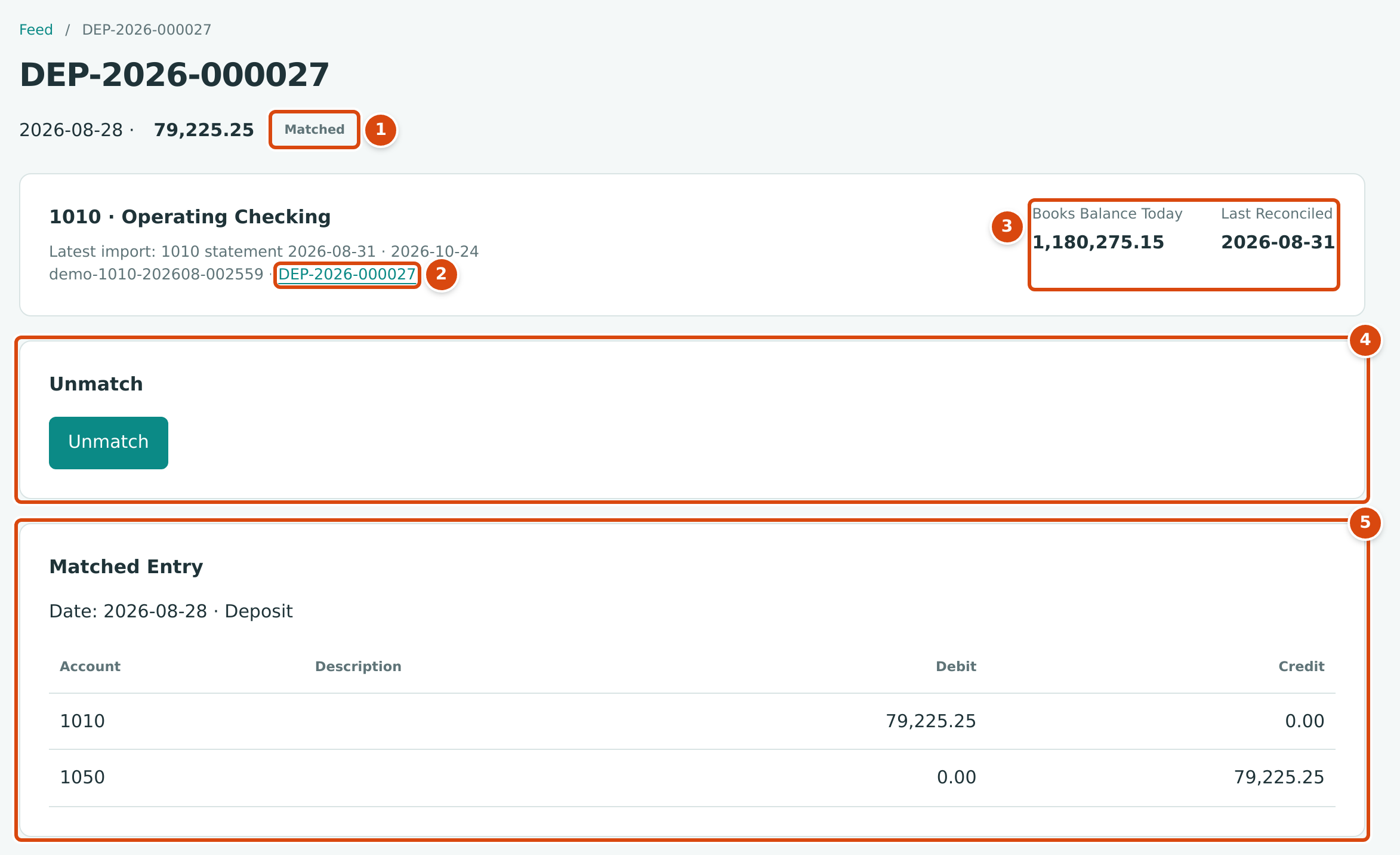
- The line's status, Matched.
- The external ID and the matched document. Click the document to open it.
- Books Balance Today and Last Reconciled for the account.
- Unmatch: the one action a matched line offers.
- Matched Entry: the journal entry the line is linked to. Here the deposit debits 1010 and credits 1050.
A flagged line also shows Possible duplicate of followed by a link to the line it resembles. An excluded line shows Excluded: and the reason given.
Reviewing a New Line
Every imported line in Cedar Ridge Contracting is already reviewed, so the figures in this section come from the training company, Cedar Ridge Training, right after it imported its checking statement. All ten lines wait under For Review:
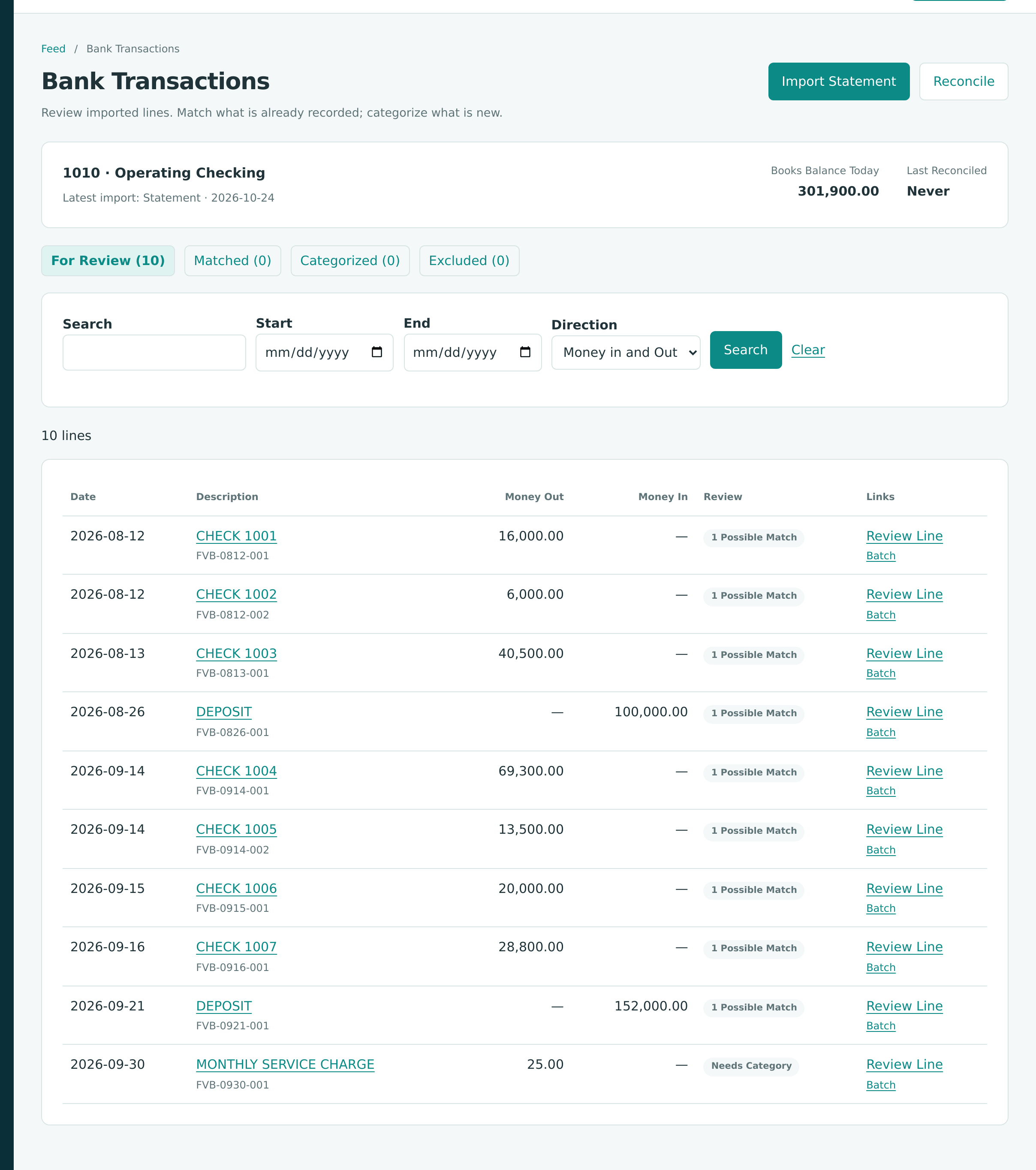
Nine lines are checks and deposits already in the books, so each shows 1 Possible Match. The bank's MONTHLY SERVICE CHARGE of 25.00 is not in the books yet and shows Needs Category.
A new line's page has a Match a Posted Movement section and an Exclude Line section, then three panels you open by clicking their titles: Expense, Transfer and Bank Entry. Use exactly one of them.
Not shown: Find Other Records results, the Expense and Transfer panels, flagged and excluded lines
Neither company has a flagged or excluded line, and the training company's review needed only Confirm Match and Bank Entry. The other panels are described from the product; the labels are quoted from it.
Match a Posted Movement
Structally suggests postings that could be the same movement. A posting is suggested when it:
- moves this account by exactly the line's amount, in the same direction;
- is dated within 7 days before or after the line;
- is not reversed and is not already matched to another line of this account.
The closest dates come first. Each suggestion shows the document (for example PAY-2026-000137 or Transfer 2026-09-05 · 1010 → 1020), its date, the Accounts it posts to and the amount. Show Details adds the customer or vendor, the date, Paid From or Deposit To, the amount, and either the bills or invoices a payment was Applied To or the entry's Lines. Open ↗ opens the document in a new tab.
- Select the right suggestion.
- Click Confirm Match.
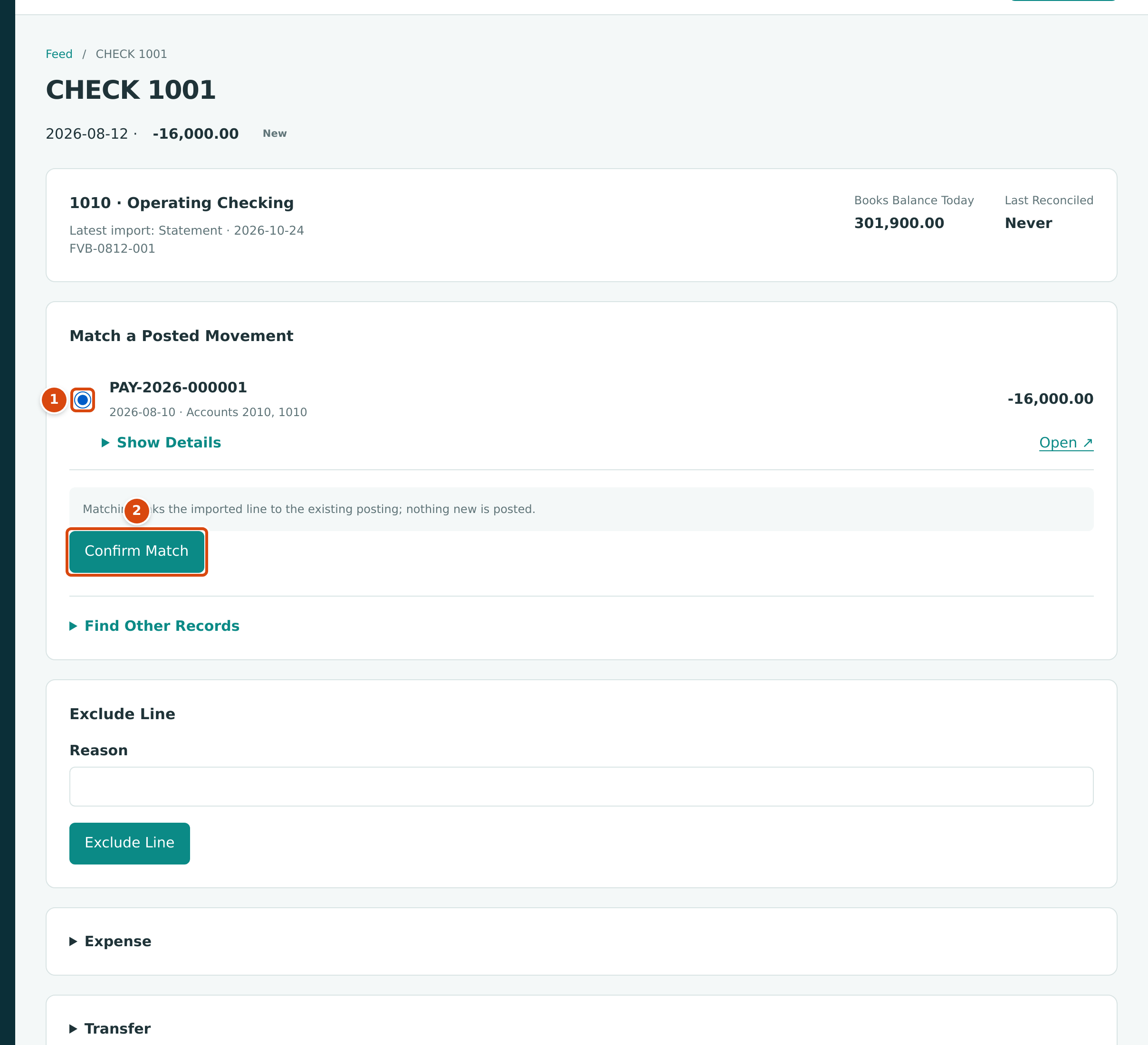
- The suggestion, selected: PAY-2026-000001, dated 2026-08-10, posting to accounts 2010 and 1010, for -16,000.00. The bank cleared the check two days later, inside the 7-day window.
- Confirm Match links the line to the payment.
The line becomes Matched. Matching links the imported line to the existing posting; nothing new is posted. If nothing is suggested, the section reads No posted movement matches this line; categorize it instead.
Find Other Records
When the suggestion is not the right posting, open Find Other Records under the suggestions:
- Set Type (All Types, Bill Payments, Receipts, Expenses, Deposits, Transfers, Bank Entries, Journal Entries or Refunds), Party (text in the posting's description, such as a vendor name), Amount, and the From and To dates. The dates start 30 days either side of the line and may be at most 31 days from it.
- Leave Exact Amount Only ticked to see only postings of the line's amount, or untick it to see others.
- Click Search. Up to 25 unmatched postings are listed with Date, Type, Number, Party and Amount.
- Select one and click Match Selected.
Only postings of exactly the line's amount can be selected: Only postings with exactly the line amount can be matched; open a record to correct it. If the amount in your books is wrong, correct the document (for example reverse and re-enter it) and then match.
Categorize as Expense
Use Expense for money out of a bank account, or a charge on a card, that is not in your books yet: a supply purchase, a software subscription.
- Open the Expense panel.
- Optionally choose the Vendor (or leave No Vendor) and type a Reference and Memo.
- On each line choose the Account, type a Description and the Amount. Add Line splits the purchase across accounts. With Jobs & Costing turned on, tick Job Costing to code lines to jobs (see Coding Transactions to Jobs).
- Click Categorize as Expense.
The lines must add up to the bank line's amount. Structally posts an expense (EXP-year-sequence) dated the line's date and paid from this account, and the line becomes Categorized.
Categorize as Transfer
Use Transfer when the line is money moving to or from another of your own accounts.
- Open the Transfer panel.
- Choose the Other Account, the other bank or card account.
- Optionally type a Memo, then click Categorize as Transfer.
Structally works out the direction from the line: money out of a bank account goes to the other account; money into it comes from the other account; a payment on a card account comes from the other account. A charge on a card cannot be a transfer. Structally posts a transfer (see Transferring Funds) dated the line's date. If the other account's feed has exactly one new line for the same movement (the same amount as that account sees it) within 7 days, that line is matched to the same transfer automatically.
Categorize as Bank Entry
Use Bank Entry for a movement that is neither a purchase nor a transfer: a bank fee, interest earned, a loan payment taken by the bank.
- Open the Bank Entry panel.
- Choose the Account for the other side, for example 6020 - Bank Fees or 4020 - Interest Income.
- Optionally type a Description, Reference and Memo.
- Click Categorize as Bank Entry.
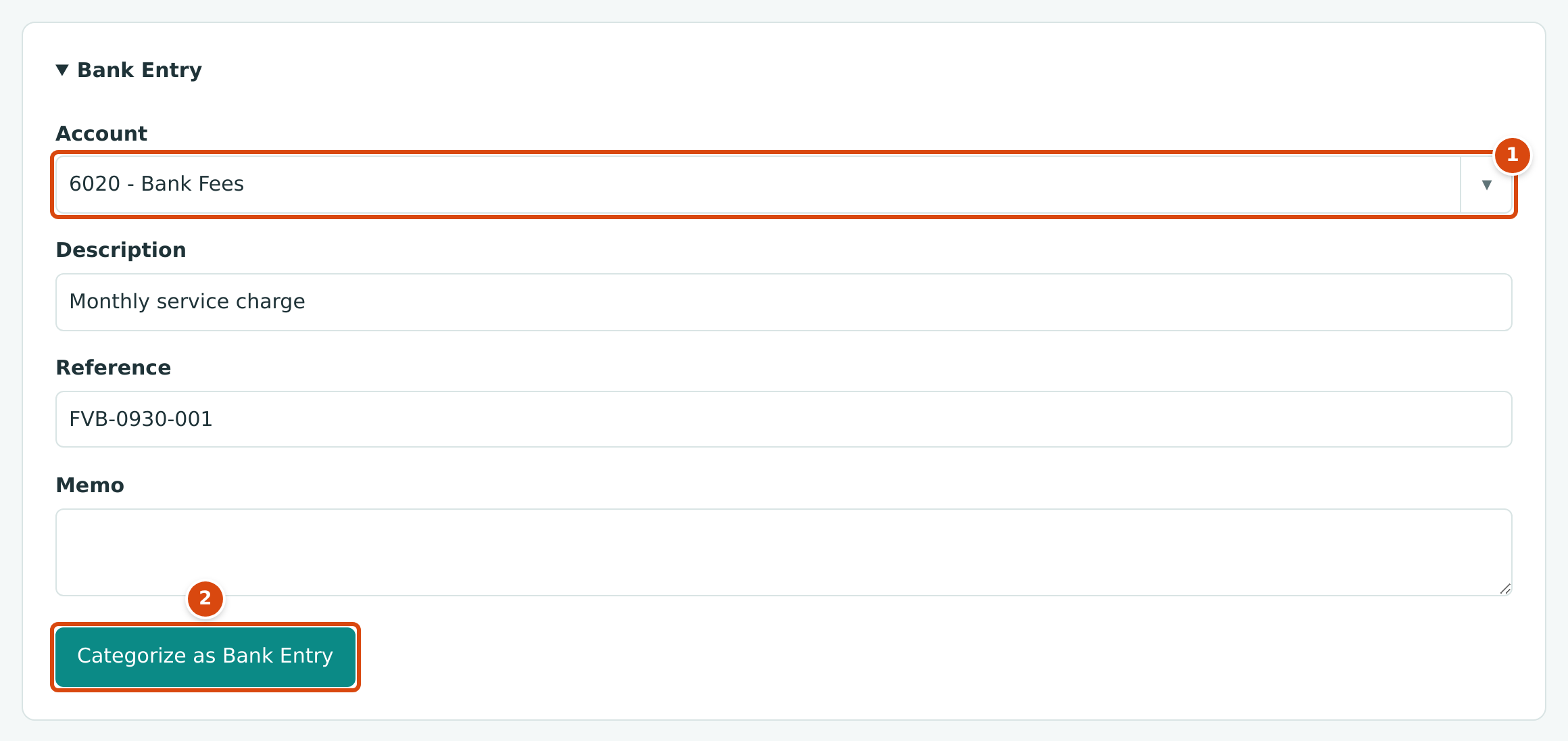
- Account: 6020 - Bank Fees, the other side of the entry.
- Categorize as Bank Entry posts the bank entry and marks the line Categorized.
Structally posts a bank entry (BE-year-sequence) dated the line's date for the line's amount: money in debits the bank account and credits the account you chose; money out does the opposite. A bank entry cannot use Accounts Payable or Accounts Receivable (use bills, invoices, payments or receipts) or another bank or card account (use a transfer).
Exclude a Line
Exclude a line that should not be in your books, for example a duplicate or a pending item the bank reversed.
- In Exclude Line, optionally type a Reason.
- Click Exclude Line.
The line becomes Excluded. Excluded lines are not reviewed, matched or cleared, and nothing is posted.
Flagged Lines
A flagged line arrived in an import with no external ID and the same date, amount and description as a line already in the feed. Open it and choose:
- Keep Line if it is a real second transaction (for example two identical fees on the same day). It becomes New and you review it as usual.
- Exclude Line if it is the same transaction imported twice.
Excluded Lines
Open the line from the Excluded tab and click Restore Line. The line becomes New again and its exclusion reason is cleared.
Unmatching a Line
Unmatch a line that was matched to the wrong posting. Open it and click Unmatch. The line becomes New; the posting is untouched and can be matched again. A line that is cleared in a reconciliation cannot be unmatched until it is uncleared.
Undoing a Categorization
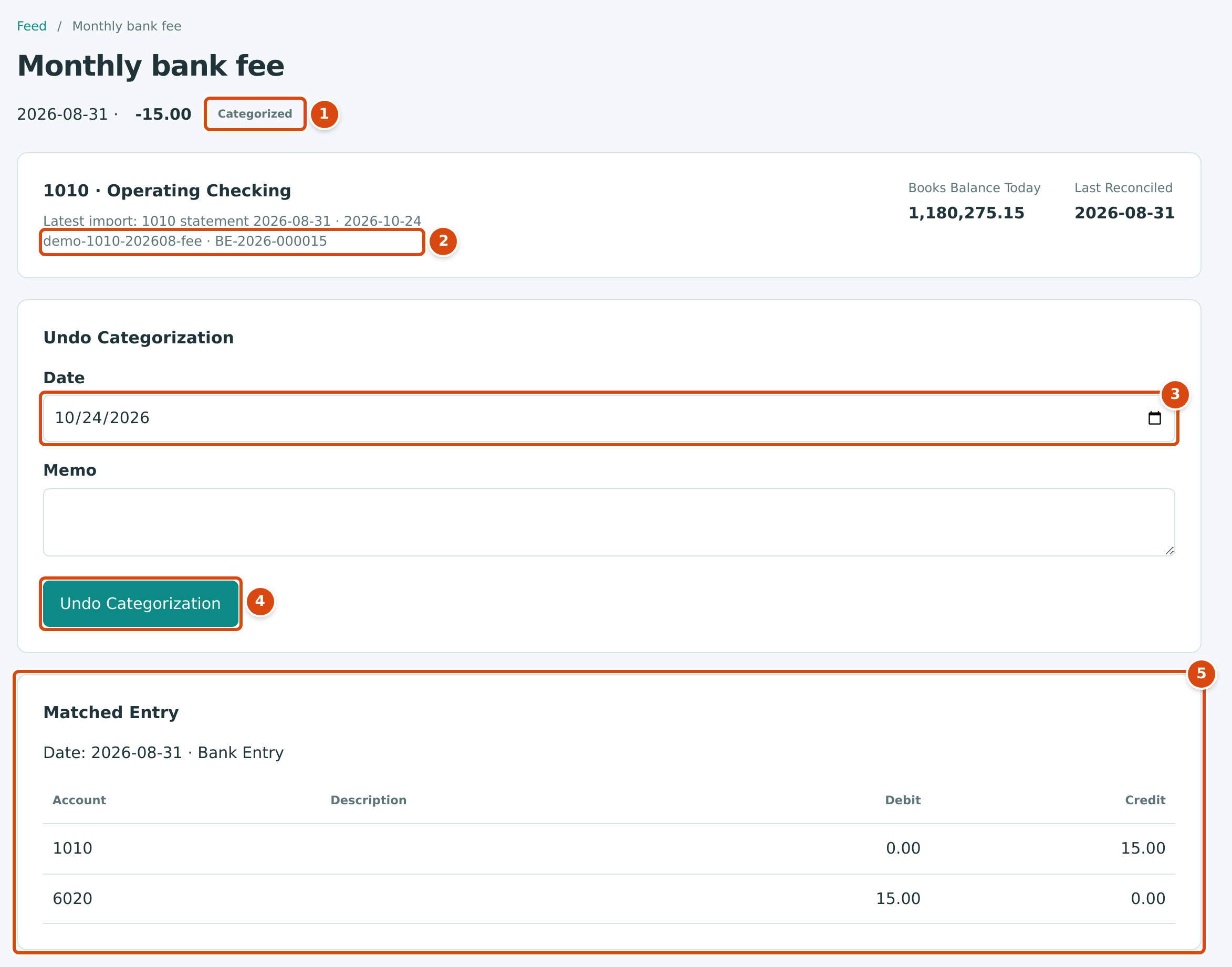
- The line's status, Categorized.
- The external ID and the document Structally posted, BE-2026-000015. Bank entries have no page of their own, so the number is not a link.
- Date: the date of the reversal. It starts as today.
- Undo Categorization reverses the document and returns the line to New.
- Matched Entry: the bank entry's journal entry, debit 6020 and credit 1010.
- Open the line from the Categorized tab.
- Set Date for the reversal (it cannot be earlier than the line's date) and optionally a Memo.
- Click Undo Categorization.
Structally reverses the expense, transfer or bank entry that the categorization posted, on the date you entered, and the line becomes New. For a transfer, the line on the other account that was matched to it also becomes New.
Field Reference
| Section | Field | Description | Required |
|---|---|---|---|
| Match a Posted Movement | (suggestion) | The posting to link to the line. | Yes |
| Find Other Records | Type, Party, Amount, From, To, Exact Amount Only | Search filters; dates within 31 days of the line. | Amount when Exact Amount Only is ticked |
| Expense | Vendor | The vendor, or No Vendor. | No |
| Reference, Memo | Up to 60 and 240 characters. | No | |
| Account, Description, Amount (each line) | Where the cost goes. Lines must total the bank line. Up to 50 lines. | Account and Amount | |
| Transfer | Other Account | The other bank or card account. | Yes |
| Memo | Up to 120 characters. | No | |
| Bank Entry | Account | The other side of the entry. Not a bank, card, payables or receivables account. | Yes |
| Description, Reference, Memo | Up to 240, 60 and 240 characters. | No | |
| Exclude Line | Reason | Why the line is excluded, up to 240 characters. | No |
| Undo Categorization | Date, Memo | Date of the reversal entry, and a note. | Date |
Worked Example: The Monthly Bank Fee
Operating Checking's August 2026 statement ends with a line the books did not have yet: a monthly bank fee.
| Date | Description | Amount | External ID |
|---|---|---|---|
| 2026-08-31 | Monthly bank fee | -15.00 | demo-1010-202608-fee |
There is no posting to match, so the line was categorized as a Bank Entry to 6020 - Bank Fees. Structally posted BE-2026-000015, dated August 31, 2026:
Every other line of that statement was matched to an existing posting; for example the deposit line of August 28 for 79,225.25 matched DEP-2026-000027. With all 26 lines matched or categorized, the August statement could be cleared and completed (see Reconciling an Account).
The training company's review followed the same pattern. Its nine checks and deposits were matched with Confirm Match, and the MONTHLY SERVICE CHARGE line was categorized as a bank entry to 6020 Bank Fees, which posted BE-2026-000001 on September 30, 2026:
| Account | Debit | Credit |
|---|---|---|
| 6020 Bank Fees | 25.00 | |
| 1010 Operating Checking | 25.00 |
Books Balance Today went from 301,900.00 to 301,875.00 (301,900.00 − 25.00 = 301,875.00), and the tabs now read For Review (0), Matched (9) and Categorized (1):
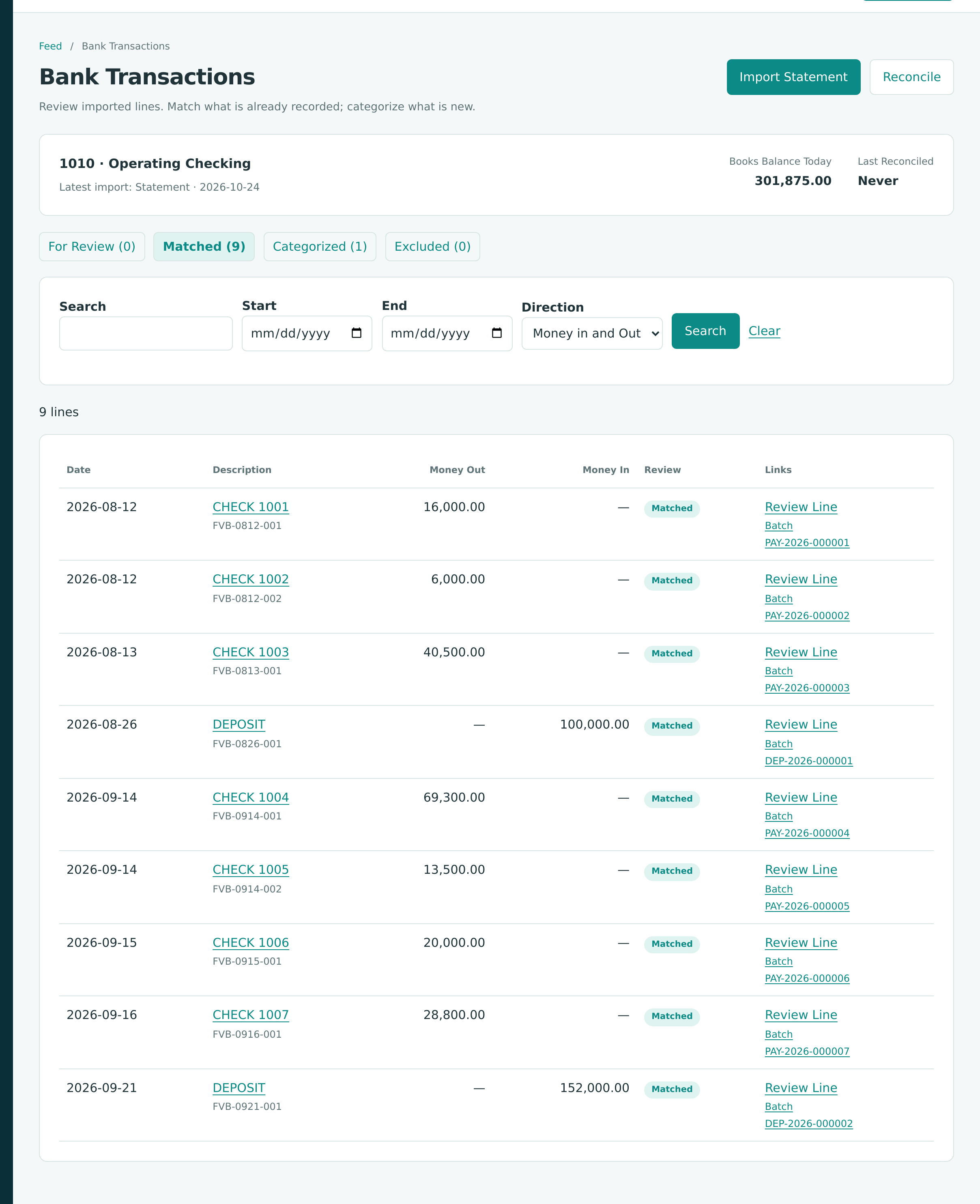
Each matched line's Links column now names its document: PAY-2026-000001 to PAY-2026-000007 for the checks and DEP-2026-000001 and DEP-2026-000002 for the deposits. The statement is ready to reconcile.
What Happens After You Review a Line
What each action posts
| Action | Journal Entry |
|---|---|
| Confirm Match, Match Selected, Unmatch | None. Only the link between the line and the posting changes. |
| Keep Line, Exclude Line, Restore Line | None. |
| Categorize as Expense | An expense: debit the line accounts, credit this bank or card account. |
| Categorize as Transfer | A transfer between this account and the other account. |
| Categorize as Bank Entry | A bank entry between this account and the chosen account. |
| Undo Categorization | A reversal of that expense, transfer or bank entry, on the date entered. |
Matched and categorized lines show the document they belong to on the Bank Transactions page and in the account register's Bank Line Status column. A posting that is matched to a bank line cannot be reversed or voided until the line is unmatched.
Credit Card Feeds
On a credit card account a charge is a positive amount and a payment to the card is negative, so the columns read the other way round from a bank account: charges appear under Money In and payments under Money Out, and the Money In direction filter finds charges.
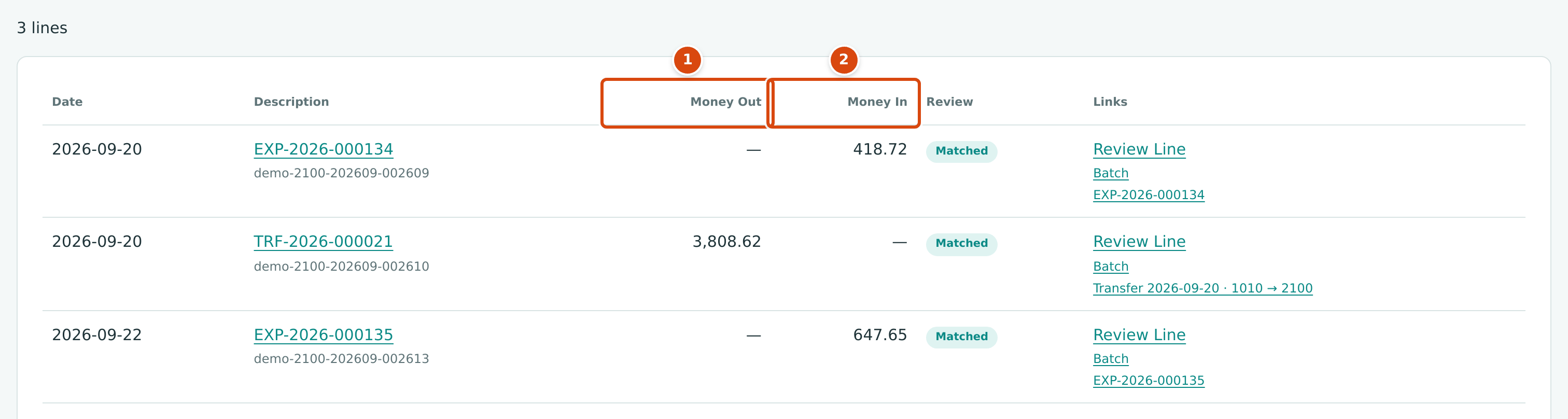
- Money Out: the card payment of 3,808.62 (transfer TRF-2026-000021).
- Money In: card charges, such as EXP-2026-000134 for 418.72.
Common Mistakes and Troubleshooting
| Message or Symptom | Why It Happens | What to Do |
|---|---|---|
| No posted movement matches this line; categorize it instead. | No unmatched posting of exactly this amount is within 7 days. | Use Find Other Records with a wider date range, or categorize the line. |
| Entry movement on the account does not equal the line amount (…) | The chosen posting moves the account by a different amount. | Choose a posting of exactly the line amount, or correct the document. |
| Entry date is outside the match window | The posting is more than 7 days (or 31 days from Find Other Records) from the line. | Use Find Other Records, or correct the posting's date. |
| Entry is already matched on this account | Another line of this account is already matched to that posting. | Unmatch the other line first if it is wrong. |
| Entry has been reversed | The posting was reversed. | Match the replacement posting instead. |
| Categorized document does not move the account by the line amount (…) | The expense lines do not add up to the bank line, or an expense was used for money coming in. | Make the lines total the bank line; use a bank entry or transfer for money coming in. |
| A card charge is an expense, not a transfer | Transfer was used on a card charge. | Categorize it as an expense. |
| Bank entries cannot settle payables or receivables; use bills, invoices, payments or receipts | The bank entry account is Accounts Payable or Accounts Receivable. | Record the vendor payment or customer receipt in its own area, then match. |
| Use a transfer for movements between bank and card accounts | The bank entry account is a bank or card account. | Categorize as a transfer. |
| Account 2020 accepts postings only from bills and retainage releases. (for example) | The account can only be posted by certain documents. | Choose another account. |
| Line account 1010 is excluded. | An expense line uses the account the line belongs to. | Choose the expense account. |
| Line is cleared in a reconciliation; unclear it first | You tried to unmatch, exclude or undo a line that is cleared. | Unclear it in the open reconciliation (reopen a completed one first). |
| Only new lines can be matched (or categorized) | The line was already reviewed, perhaps by someone else. | Reload the page. |
| Dates must be within 31 days of the bank line. | A Find Other Records date is too far from the line. | Narrow the dates. |
| Enter an amount greater than zero. | The Find Other Records amount is not a positive number, or is empty while Exact Amount Only is ticked. | Type the amount, or clear it and untick Exact Amount Only. |
| Accounting date must be after the company closing date. | Categorizing or undoing posts into a closed period. | Ask a Company Admin about the Books Closed date. |