How Structally Records Transactions
You work in Structally with business documents: invoices, bills, expenses, payments, deposits. Behind each one, Structally keeps a set of books by double-entry accounting and writes the accounting entries for you. This page explains the few rules that make everything else in the guide predictable: what posting does, why posted records cannot be edited, how corrections work, and how documents are numbered.
Double-Entry in Plain English
Every transaction changes at least two accounts by the same amount, once on the debit side and once on the credit side. Total debits always equal total credits, so the books always balance.
Whether a debit increases or decreases an account depends on its section. Your chart of accounts has six sections:
| Section | Increased By | Examples in the Sample Company |
|---|---|---|
| Assets | Debit | 1010 Operating Checking, 1100 Accounts Receivable |
| Liabilities | Credit | 2010 Accounts Payable, 2100 Company Credit Card |
| Equity | Credit | 3010 Owner's Capital |
| Income | Credit | 4010 Construction Revenue |
| Direct Costs | Debit | 5040 Materials, 5030 Subcontractor Costs |
| Expenses | Debit | 6030 Rent, 6050 Insurance |
The side that increases an account is its balance type, shown in the Balance Type column of the chart of accounts.
Structally keeps accrual books: income counts when you invoice, and costs count when you enter the bill, not when money changes hands. Reports such as Profit and Loss can also show a cash-basis view.
Accounts and Account Roles
Every account belongs to one section and has a Role that says what kind of account it is, for example Cash, Receivable, Prepaid or Credit Card. The role decides where the account appears on the financial statements and its balance type.
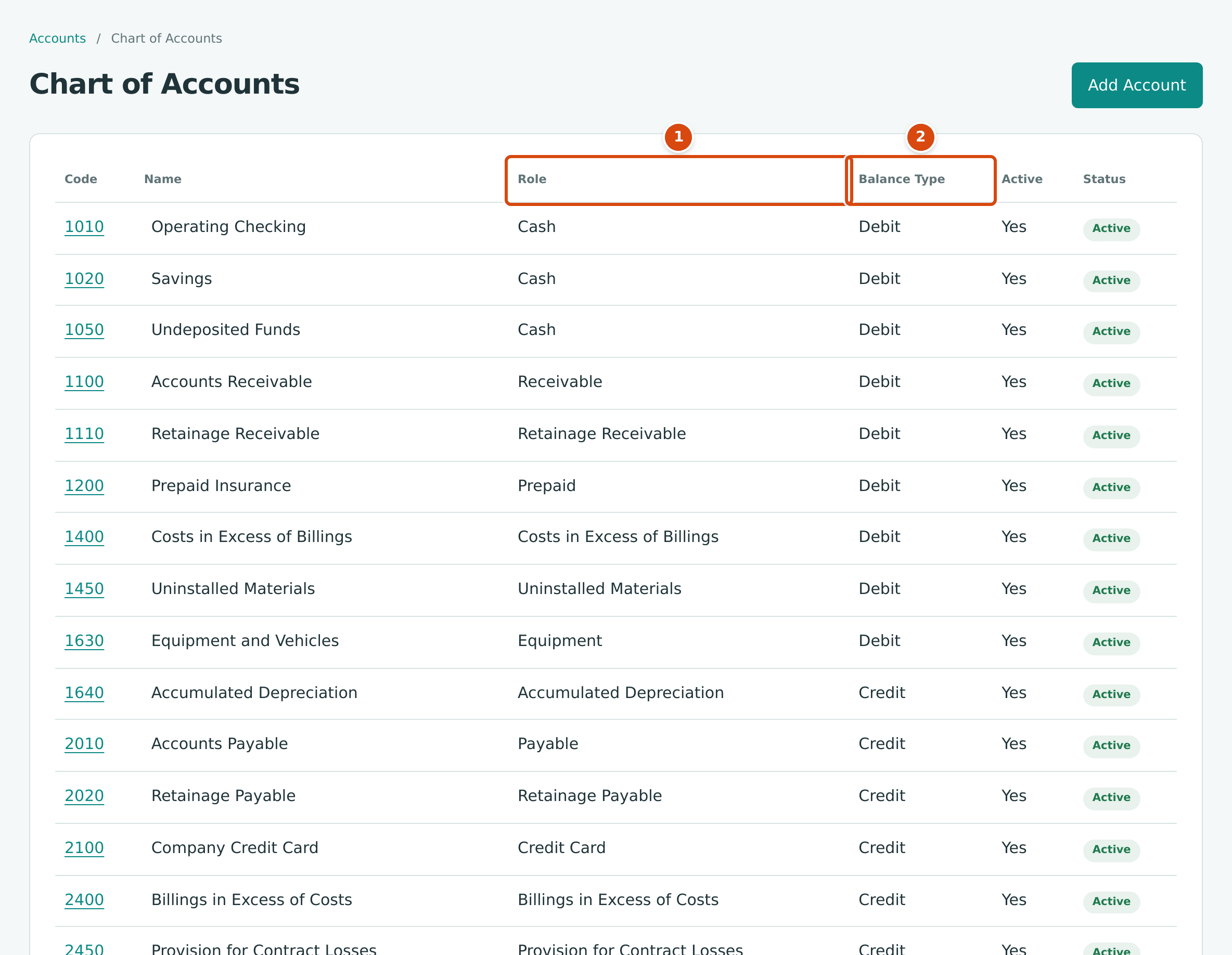
- Role: the kind of account.
- Balance Type: Debit or Credit, the side that increases the account.
A few roles have rules of their own:
| Role | Rule |
|---|---|
| Cash | Bank accounts, petty cash and holding accounts such as Undeposited Funds. They are used for payments and deposits, appear in Banking, and make up the Cash Balance on Home. |
| Credit Card | Card accounts. Used for paying, and listed in Banking with the bank accounts. |
| Receivable, Payable | Accounts Receivable and Accounts Payable. Invoices, bills, credits and payments write to them; a bill or invoice line cannot use them. |
| Retainage Receivable, Retainage Payable | Retainage Receivable is written only by invoices and their retainage releases, Retainage Payable only by bills and theirs. Any other posting is refused, for example Account 2020 accepts postings only from bills and retainage releases. |
| WIP roles (Costs in Excess of Billings, Billings in Excess of Costs and others) | Written only by WIP schedules: Account 1400 accepts postings only from WIP schedules. |
The six section headings (Assets, Liabilities and so on) are structural accounts that cannot be posted to, and an inactive account takes no new postings. See The Chart of Accounts.
Every Posted Document Writes One Balanced Journal Entry
Posting a document writes one journal entry dated on the document's date. Each entry:
- has at least two lines, each on a debit or credit side;
- balances exactly, to the cent;
- uses positive amounts with no more than two decimal places;
- is posted and locked at once: it can never be edited or deleted.
If anything is wrong (an unbalanced amount, an inactive account, a date in a closed period), nothing is saved at all: no entry, no half-posted document.
Open Posting Entry at the bottom of any posted document to see its entry. Here is invoice INV-2026-000052 to Greenfield Library:
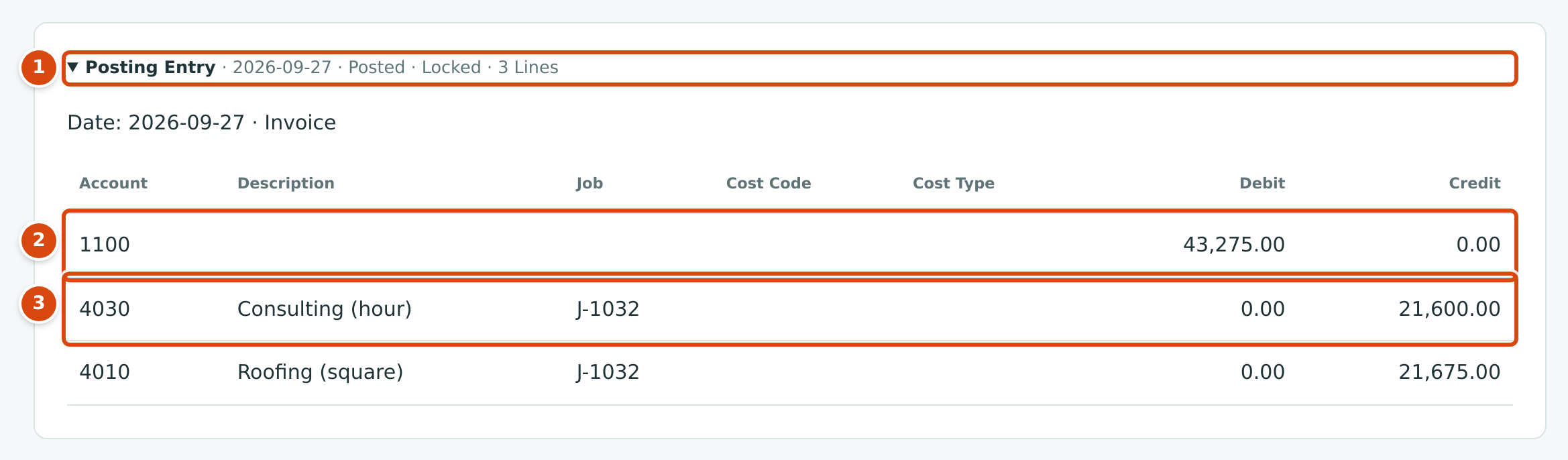
- The entry's date, Posted, Locked, and its number of lines.
- The customer now owes you: 1100 Accounts Receivable is debited.
- Income is credited on the accounts of the invoice lines, here coded to job J-1032.
When the bill payment PAY-2026-000150 paid Hilltop Equipment Rental $532.14, its entry reduced what is owed and the bank balance:
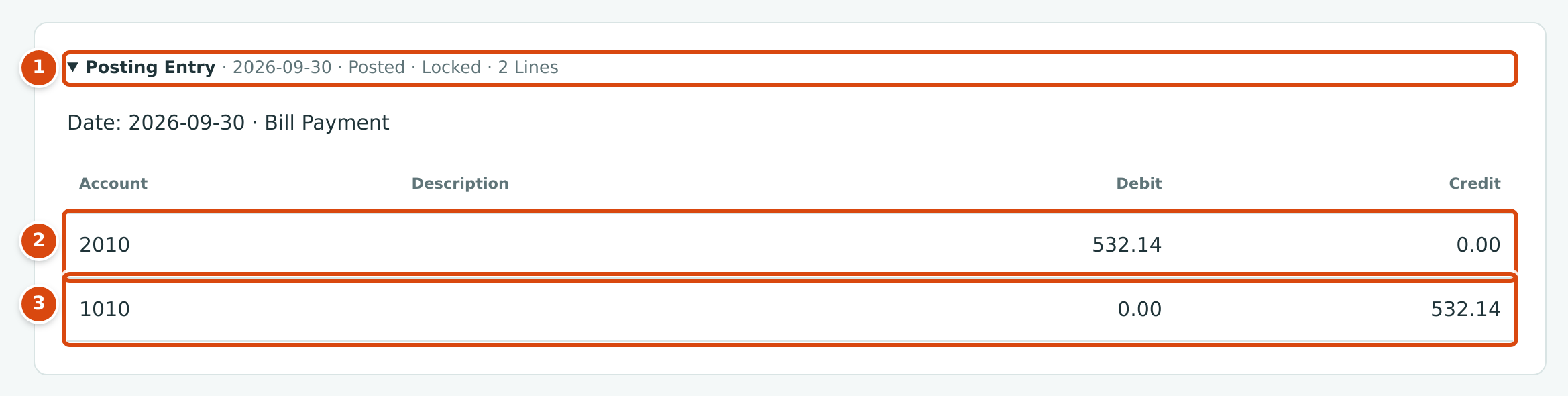
- The entry of the payment, posted and locked on the payment date.
- 2010 Accounts Payable is debited: you owe less.
- 1010 Operating Checking is credited: the money left the bank.
The usual documents post like this:
| Document | Debit | Credit |
|---|---|---|
| Invoice | Accounts Receivable (amount due) and Retainage Receivable (any retainage held) | The income accounts on its lines |
| Credit memo | The accounts on its lines | Accounts Receivable |
| Customer payment | The account it is deposited to (a bank account or Undeposited Funds) | Accounts Receivable |
| Bill | The cost, expense or asset accounts on its lines | Accounts Payable (amount due) and Retainage Payable (any retainage held) |
| Vendor credit | Accounts Payable | The accounts on its lines |
| Expense | The accounts on its lines | The bank or card account it was paid from |
| Bill payment | Accounts Payable | The bank or card account paid from |
| Deposit | The bank account deposited to | The holding account, such as Undeposited Funds |
| Transfer | The account receiving the money | The account the money leaves |
| Journal entry | As you enter it | As you enter it |
Jobs & Costing records such as budgets, commitments, change orders and forecasts do not post entries. Accepting a pay application creates and posts an invoice, a cost transfer between jobs posts a journal entry, and posting a WIP schedule writes its WIP adjustment entry.
Every journal entry, whatever wrote it, appears on the Journal Entries page of the Accounting area:
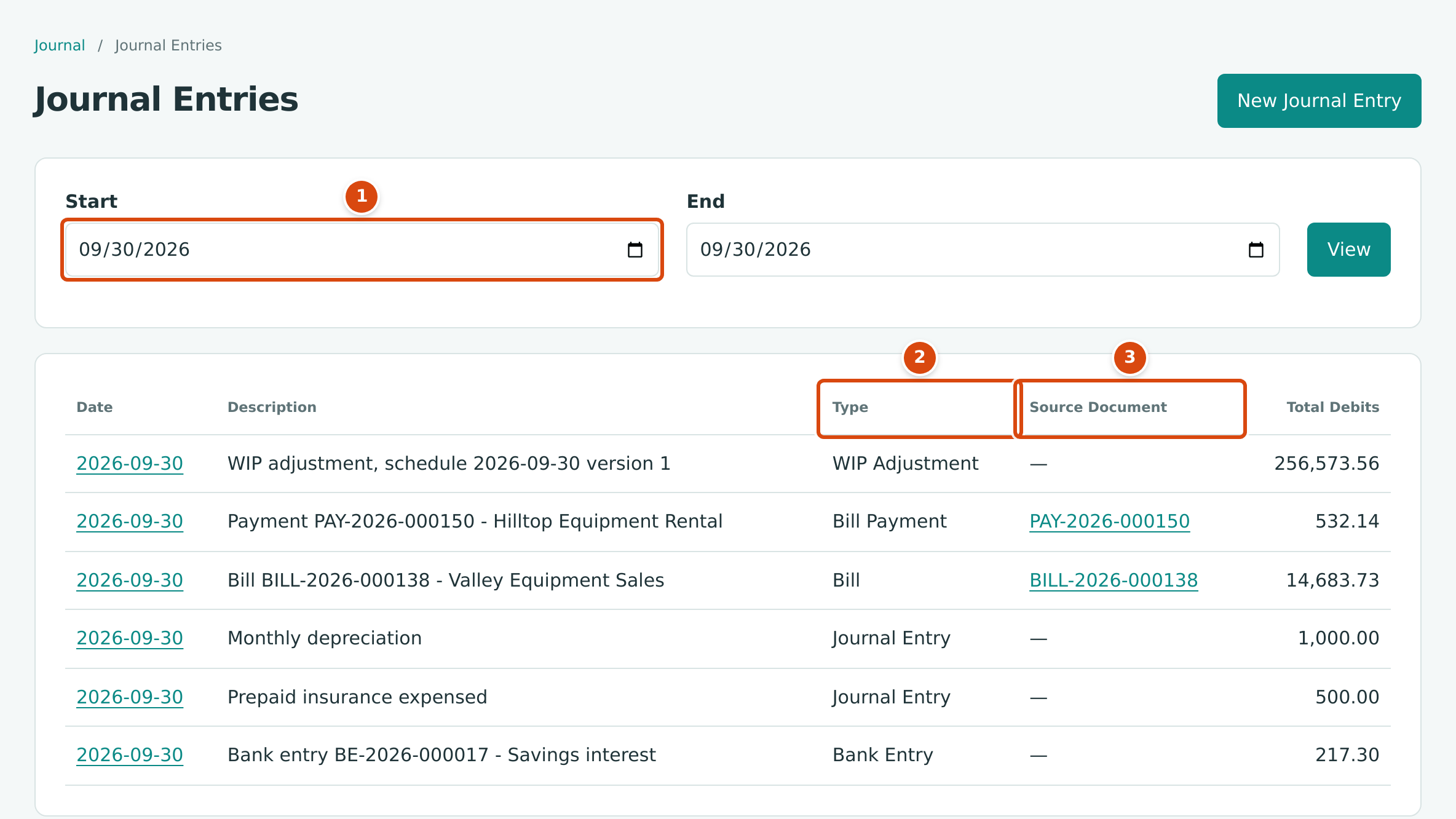
- Start and End choose the dates to list.
- Type: what wrote the entry, for example Bill, Bill Payment or Journal Entry.
- Source Document: the document behind the entry, with a link to it.
Drafts and Posted Documents
Invoices, bills, credit memos and vendor credits can be saved as a draft first. A draft:
- has a number but no journal entry, so it changes no balance or report;
- can be changed as often as you like with Edit Draft;
- becomes part of your books only when you post it (Post Invoice, Post Bill, and so on).
Other documents have no draft stage. Expenses, customer and vendor payments, deposits, transfers, refunds and journal entries are posted the moment you save them.
Posted Entries Are Locked: Corrections Are Voids and Reversals
A posted document cannot be edited or deleted. To correct one, you cancel its effect with a second entry and then enter it again correctly. The original and the correction both stay on record, so the history of your books is never rewritten.
- Invoices, bills, credit memos and vendor credits are voided (Void Invoice…, Void Bill… and so on, in the ⋯ menu). They can be voided only while they are Open with nothing applied to them: reverse their payments and unapply their credits first.
- Expenses, payments, receipts, deposits, transfers and refunds are reversed (Reverse Expense…, Reverse Payment… and so on).
- Journal entries you entered by hand are reversed from the journal entry's page.
Voiding or reversing asks for a date and writes a reversal entry on that date: the same lines with debits and credits swapped. The date cannot be earlier than the original entry. In the sample company, bill BILL-2023-000008 was posted on November 4, 2023 and voided two days later:

- The status Void.
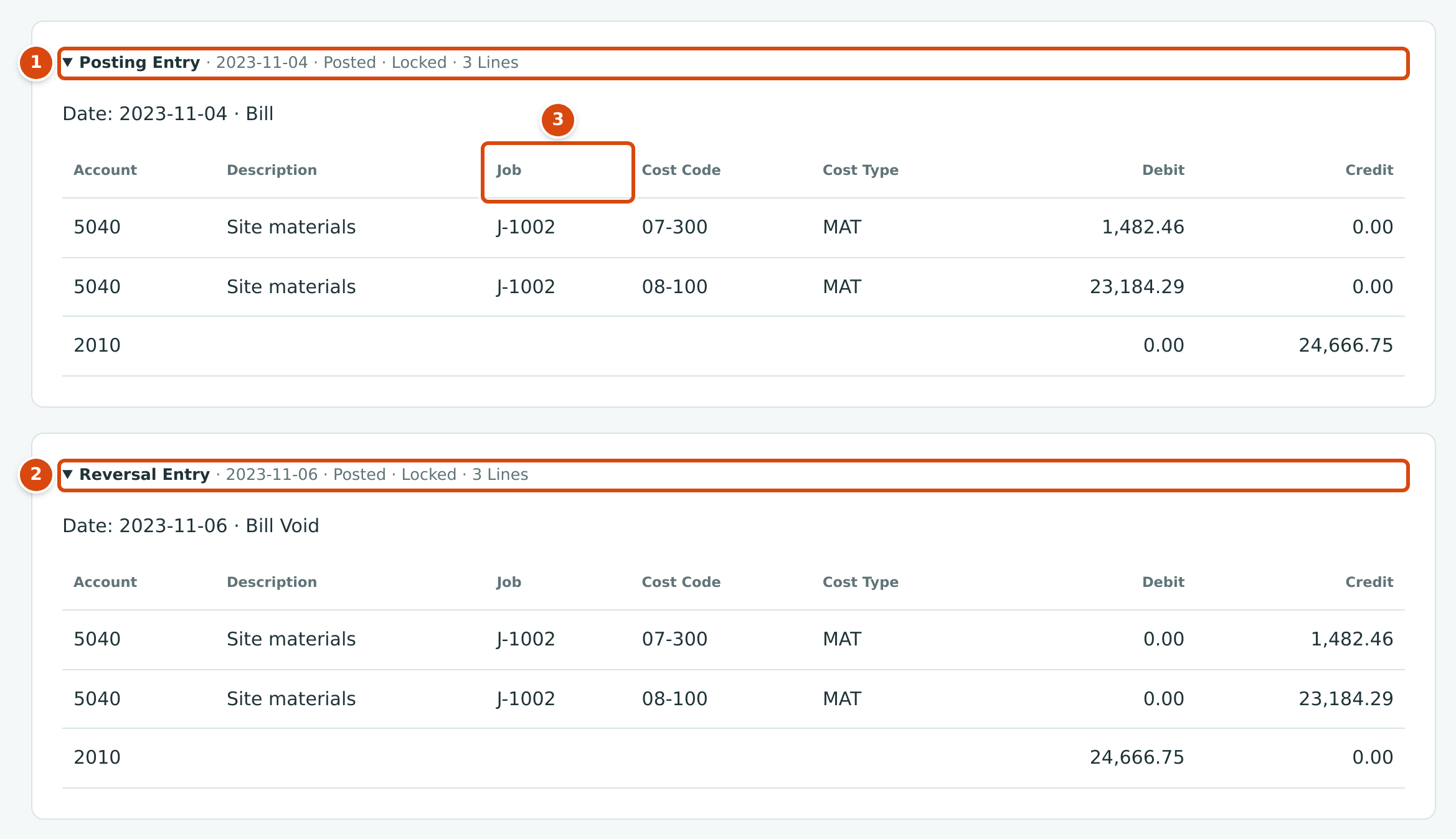
- Posting Entry: dated 2023-11-04, debiting 5040 Materials on job J-1002 and crediting 2010 Accounts Payable 24,666.75.
- Reversal Entry: dated 2023-11-06, the same lines on the opposite sides. Together the two entries add up to zero.
- Job, cost code and cost type travel with each line, so the job's costs are reversed too.
See Reversing and Correcting Transactions for every kind of correction.
The Books Closed Date
When a period is finished (reconciled, reviewed, reported), a Company Admin sets the Books Closed date on Settings → Books Closed. After that, nothing can be posted, voided or reversed with a date on or before that date. Structally refuses with Accounting date must be after the company closing date.
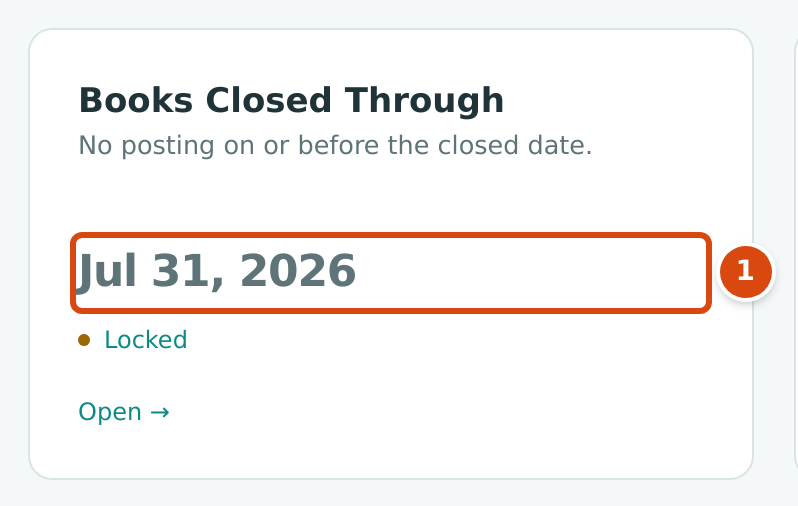
- The closed date. Everything dated on or before it is locked.
A correction for a closed period is therefore dated in the open period, for example a reversal dated August 1, 2026 for a bill of July 15. See Books Closed.
Dimensions: Class, Location, Job, Cost Code and Cost Type
Besides the account, each journal line can carry tags that let reports slice the same figures differently. Structally calls them dimensions:
| Dimension | Used For | Set Up In |
|---|---|---|
| Class | Type of work, for example Commercial, Remodel, Residential. | Classes & Locations |
| Location | A place or branch. | Classes & Locations |
| Job | The project a cost or revenue belongs to. | Jobs |
| Cost Code | The work category within a job, for example 06-100 Rough Carpentry. | Cost Codes and Cost Types |
| Cost Type | The kind of cost, for example LAB Labor, MAT Materials, SUB Subcontract. | Cost Codes and Cost Types |
Dimensions never change the debits and credits; they only label lines. Invoice lines also record the item sold. A dimension that is inactive cannot be used on a new posting, but past postings keep it. Your company may have renamed Class and Location (for example to Division); this guide uses the standard names.
Document Numbers
Structally numbers documents itself, in order, with a prefix, the year and a six-digit sequence:
| Prefix | Documents | Example |
|---|---|---|
INV |
Invoices | INV-2026-000052 |
CM |
Credit memos | CM-2026-000005 |
RCPT |
Customer payments (receipts) | RCPT-2026-000067 |
BILL |
Bills | BILL-2026-000138 |
VCR |
Vendor credits | VCR-2026-000004 |
EXP |
Expenses | EXP-2026-000135 |
PAY |
Bill payments | PAY-2026-000150 |
DEP |
Deposits | DEP-2026-000029 |
TRF |
Transfers | TRF-2026-000021 |
RFD |
Refunds | RFD-2026-000002 |
BE |
Bank entries (from the bank feed) | BE-2026-000017 |
JE |
Journal entries, including those written by documents (see the note below) | JE-2026-000656 |
PO, SC |
Purchase orders and subcontracts | SC-2025-000008 |
V, C |
Vendors and customers (no year) | V-000001, C-000001 |
- The year is the fiscal year of the document's date, named after the calendar year in which that fiscal year starts. The fiscal year start is set when Structally creates your company. In the sample company the fiscal year starts in January, so the year matches the calendar year. With a July start, a bill dated March 15, 2027 would be numbered BILL-2026-….
- Each prefix starts again at 000001 in each fiscal year.
- Invoices, bills and credits get their number when first saved, even as drafts. Numbers are never reused, so a draft that is later discarded leaves a gap.
- Change orders, pay applications, budgets and forecasts are numbered per job (for example CO-1, Application 10, Forecast 3).
- Journal entries receive a
JEnumber when they are posted, but the journal pages and reports identify an entry by its date, type and source document rather than by that number.
Who Can Post and Correct
Posting, voiding and reversing need Edit access to the document's area. Company Admins and Accountants can post and correct everything; Project Managers can post and correct invoices, bills and the other customer and vendor documents their areas include; Viewers cannot post anything. Journal entries need Edit on Accounting. Setting the Books Closed date needs the Company Admin role (or a Custom role with Edit on Settings). See Roles and Permissions.
Common Messages
| Message | Why It Happens | What to Do |
|---|---|---|
| Accounting date must be after the company closing date. | The date is on or before the Books Closed date. | Use a date in the open period, or ask a Company Admin. |
| Debits and credits must balance exactly. | A journal entry's debits and credits differ. | Correct the amounts until the totals agree. |
| Account 2020 accepts postings only from bills and retainage releases. | A retainage or WIP account was used on another kind of entry. | Use the document that owns the account, or another account. |
| Reversal date cannot be earlier than the journal entry date. | The reversal date is before the original. | Use the original date or later. |
| Bill has payments applied; reverse them first (and the same for invoices) | A document with payments cannot be voided. | Reverse the payment first, then void. |