Account Registers
A register is the checkbook view of one account: every posted movement in the account for the dates you choose, in date order, with the balance after each one. It also shows whether each movement is linked to a line of the bank's statement and whether it is cleared in a reconciliation, so you can see at a glance which payments have not reached the bank yet.
Registers are available for every active account with the Cash or Credit Card role. They are read-only: nothing on a register can be changed.
Before You Begin
- You need at least View access to Banking. Company Admins, Accountants and Viewers have it; Project Managers do not. See Roles and Permissions.
Navigation
Banking → Registers. The Registers link on the Home dashboard's Cash Balance card opens the same page.
Choosing an Account and Dates

- Account: the bank, cash or credit card account.
- Start: the first date. It starts as the first day of the current month.
- End: the last date. It starts as today.
- View Register shows the register.
- Open Banking → Registers.
- Choose the Account.
- Set Start and End. Remember that the sample company's history ends on September 30, 2026, so the default dates in October show no movements.
- Click View Register.
To look at another period, change the dates on the register itself and click View Register again. The register's Account list offers only the account you are looking at; to switch accounts, click Registers at the top, which returns to the empty form.
Reading the Register
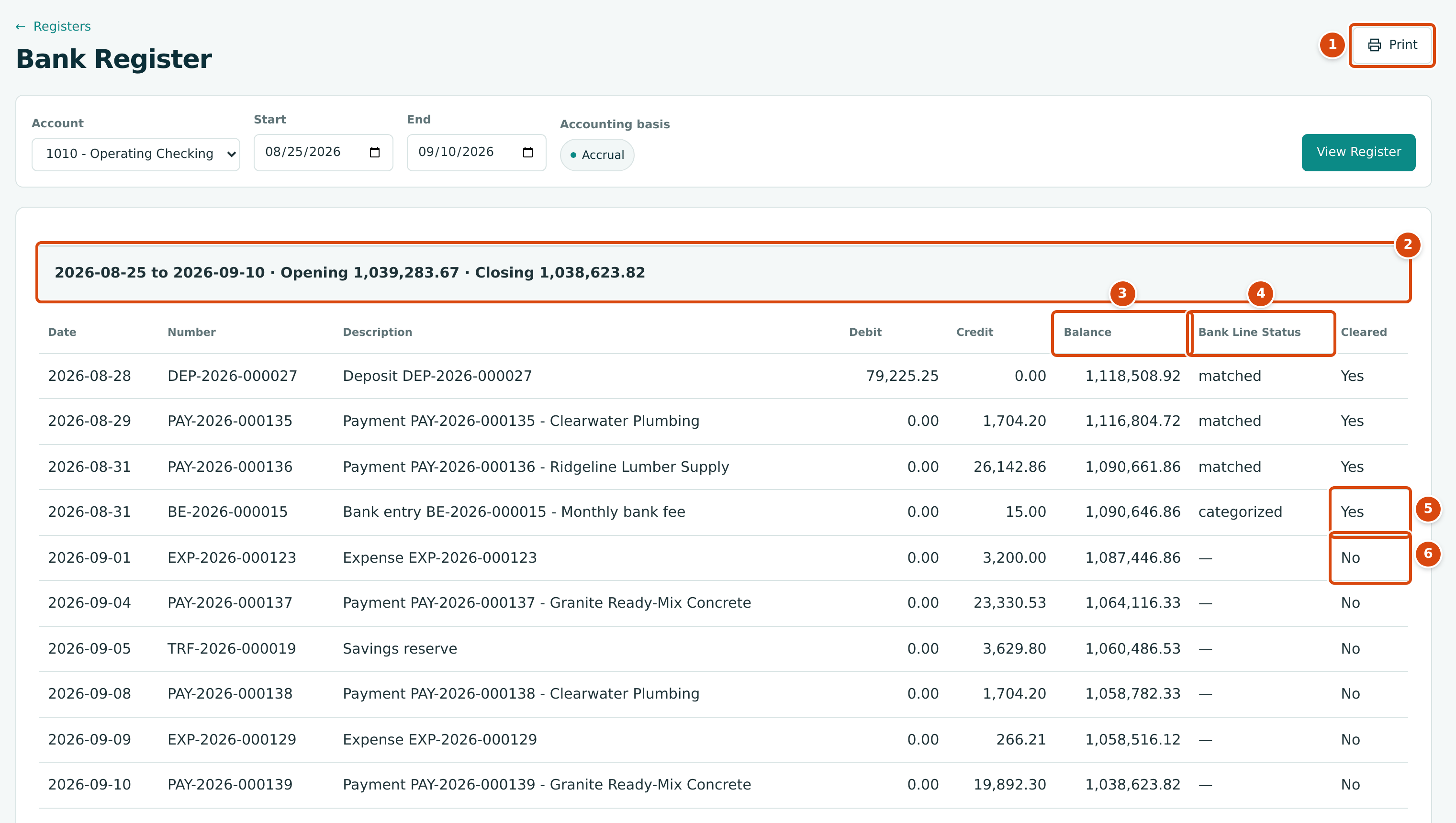
- Print prints the register from your browser.
- The dates, the Opening balance (the balance at the end of the day before Start) and the Closing balance.
- Balance: the running balance after each movement.
- Bank Line Status: matched or categorized when the movement is linked to an imported bank line, — when it is not.
- Cleared Yes: the bank line is cleared in a reconciliation (open or completed).
- Cleared No: not cleared yet. September 2026's checking statement has not been imported, so no September movement is cleared.
Each row is one journal entry that moved the account:
| Column | What It Shows |
|---|---|
| Date | The accounting date of the entry. |
| Number | The document number (deposit, payment, expense, transfer, bank entry), or — for a journal entry. |
| Description | The entry's description, such as Payment PAY-2026-000135 - Clearwater Plumbing. |
| Debit, Credit | The entry's net effect on this account. When an entry has several lines on the account, they are added together into one row. |
| Balance | The running balance. |
| Bank Line Status | Whether an imported bank line is linked to the entry. |
| Cleared | Whether that bank line is cleared in a reconciliation. |
Rows are in date order and, within a day, in the order the entries were posted. The register shows posted entries only; drafts never appear.
Nothing on the register opens
Register rows are not links. To open a document, find it by its number in its own list (for example Vendors & Bills → Payments, or Banking → Deposits), or use the General Ledger.
Credit Card Registers
A credit card register shows the balance owed. Charges increase it and appear in the Credit column; payments to the card reduce it and appear in the Debit column.
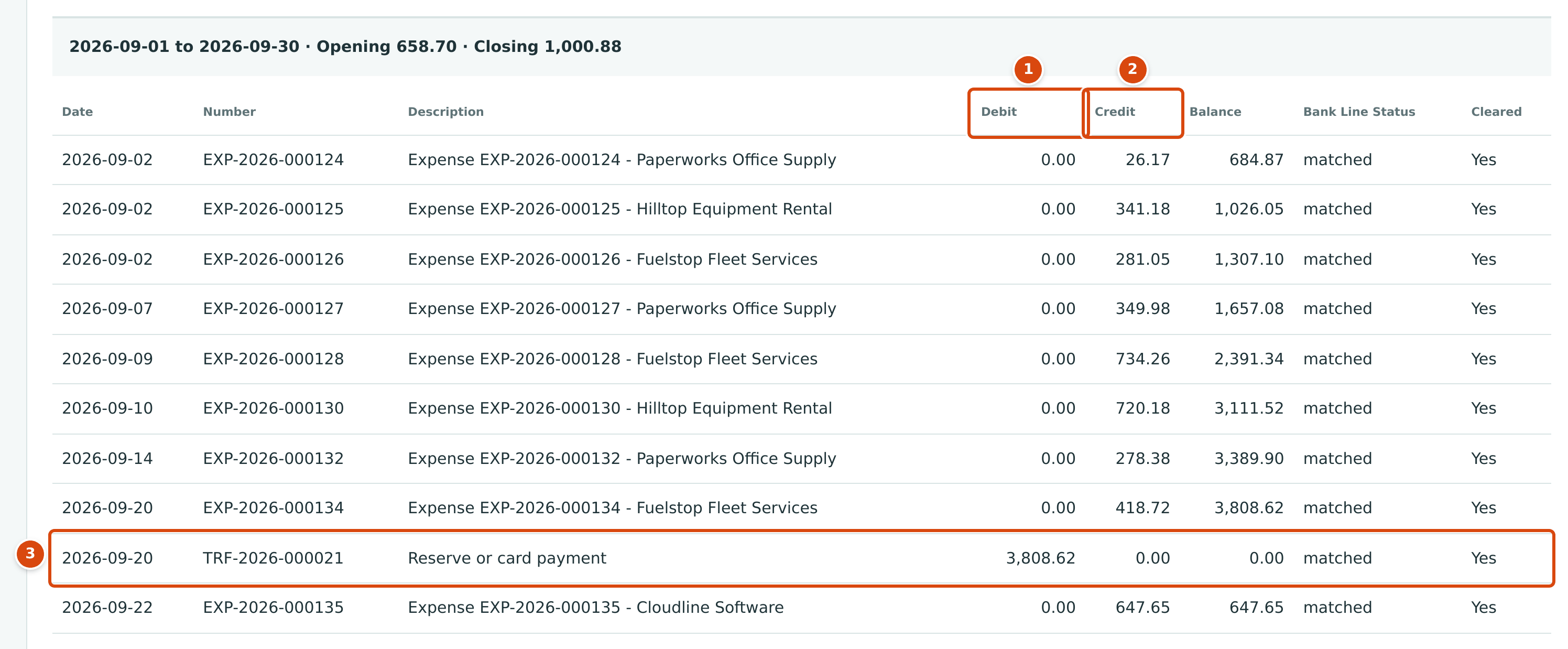
- Debit: payments to the card.
- Credit: charges.
- The card payment TRF-2026-000021 of 3,808.62 brings the balance owed to 0.00.
Worked Example: Following the Running Balance
The checking register above opens at $1,039,283.67 at the end of August 24, 2026. The first rows:
| Date | Number | Debit | Credit | Balance |
|---|---|---|---|---|
| Opening | 1,039,283.67 | |||
| 2026-08-28 | DEP-2026-000027 | 79,225.25 | 1,118,508.92 | |
| 2026-08-29 | PAY-2026-000135 | 1,704.20 | 1,116,804.72 | |
| 2026-08-31 | PAY-2026-000136 | 26,142.86 | 1,090,661.86 | |
| 2026-08-31 | BE-2026-000015 | 15.00 | 1,090,646.86 |
Each balance is the one before plus the debit, minus the credit; for example 1,039,283.67 + 79,225.25 = 1,118,508.92. The balance on August 31, $1,090,646.86, is exactly the ending balance of the completed August statement, and every movement up to that date shows Cleared Yes.
Common Mistakes and Troubleshooting
| Message or Symptom | Why It Happens | What to Do |
|---|---|---|
| No posted movements in this date range. | Nothing posted to the account between Start and End. | Widen the dates. The sample company's history ends on September 30, 2026. |
| Start must be on or before end. | Start is after End. | Swap the dates. |
| An account is missing from Account. | It is inactive, or its role is not Cash or Credit Card. | Check it in the Chart of Accounts. |
| A payment shows Cleared No long after it was made. | The bank has not paid it yet (an outstanding check), or its bank line is not matched or not cleared. | Check the bank feed and the open reconciliation. |