Finding Unexpected Balances
A figure that looks wrong is usually the right answer to a slightly different question: another date, another basis, or a set of records that leaves something out on purpose. Every posted entry in Structally balances, and a posted entry never changes, so the cause can always be found by reading what was posted. This page lists the common causes, with the training company's figures where they show the point, and ends with a step-by-step way to trace any balance.
Before You Begin
- You need View or Edit access to Reports. Job figures need access to Jobs & Costing, and opening entries and documents from a report needs access to the area that holds them (see Roles and Permissions).
- The figures quoted come from the training company, Cedar Ridge Training, after the training exercises.
Quick Checks
| What You See | Most Likely Cause | Where to Read More |
|---|---|---|
| A report shows 0.00 or nothing | The dates: most reports open on today or on this month to date. | Dates and Basis |
| Net Profit on Home differs from the Profit and Loss | Home uses its own period, This Month, Last 30 Days or Last 90 Days. | The Home Page |
| A bill or invoice is missing from a report or balance | It is still a draft, or it is dated outside the period. | Drafts |
| A voided bill still shows an Open Balance | A known display gap; the books are right. | Voids and Reversals |
| Cash is higher than the bank | Receipts waiting in Undeposited Funds, or checks the bank has not cashed. | Undeposited Funds and Books Versus Bank |
| A customer or vendor owes more than Unpaid Invoices or Unpaid Bills shows | Retainage is held in its own accounts. | Retainage |
| Revenue on the Profit and Loss differs from what was invoiced | A WIP schedule adjusted revenue to the percentage of completion. | WIP Adjustments |
| A job's Open Commitments do not change with the As Of date | A known gap: the column always shows today's figure. | Job Figures |
| An account balance you cannot explain | Trace it entry by entry. | Tracing a Balance |
Check the Dates and the Basis
Every report answers for its dates only:
| Report | Dates | Opens With |
|---|---|---|
| Balance Sheet, Trial Balance, Tie-Out, AP Aging and AR Aging | As Of | Today |
| Profit and Loss, Cash Flow, General Ledger, Journal | Start and End | The first of this month to today |
| Customer Statements | Start and End | The start of the fiscal year to today |
So a Profit and Loss opened early in a month shows almost nothing, and a Balance Sheet opened today includes everything posted with today's date or earlier, including entries dated after the month you meant to look at. Enter the dates you mean, or use a Quick dates or Report period button, and click Run Report.
Three more points about dates:
- Accounting dates, not entry dates. Reports use each document's date. A bill entered today but dated last month changes last month's figures (unless that month is closed, see Books Closed).
- The Trial Balance shows income and expense accounts since the books began. Structally never closes them into equity with an entry, so their Trial Balance balances cover every year. Use the Profit and Loss for one year's figures; the Balance Sheet works out Retained Earnings and Net Income itself.
- The fiscal year decides This Fiscal Year, quarters and Retained Earnings. It is set when Structally creates the company.
Basis. Every report is on the accrual basis: income counts on the invoice date and costs on the bill or expense date, paid or not. Only the Profit and Loss can switch to Cash, where invoices and bills count when they are paid and WIP adjustments are left out. The two can differ widely: the sample company's third quarter of 2026 shows a net income of $143,394.25 on the accrual basis and $237,625.73 on the cash basis. Check the Accounting Basis before comparing a Profit and Loss with anything else. See Accrual or Cash.
The Home Page Uses Its Own Period
The Net Profit tile and the at a Glance card on Home cover the period chosen in the menu at the top right: This Month (where Home always opens), Last 30 Days or Last 90 Days. They never cover the fiscal year, and Last 30 and Last 90 Days count back from today rather than from a month end.
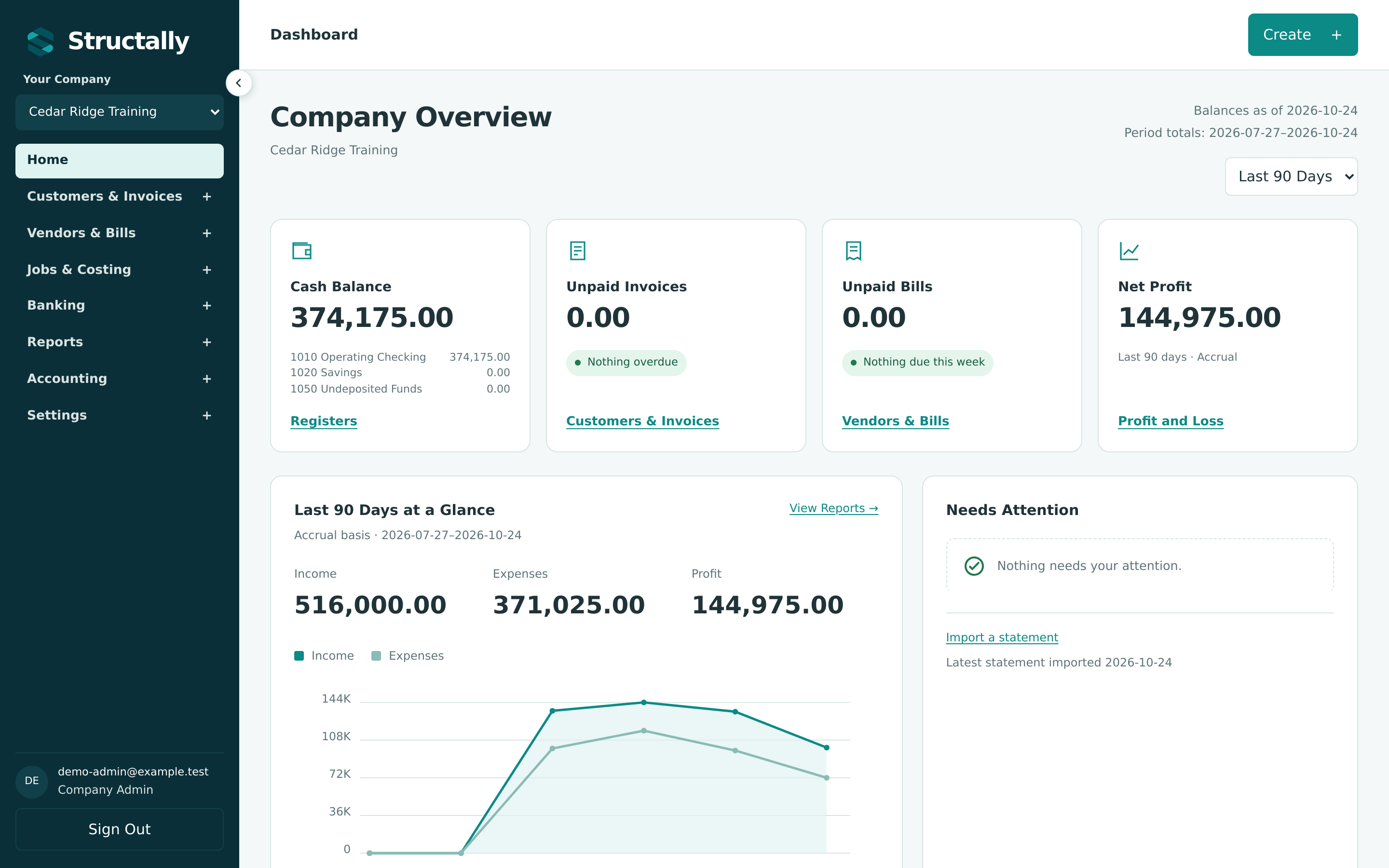
In the training company on October 24, 2026, Last 90 Days runs from July 27 to October 24 and shows Net Profit $144,975.00, while the Profit and Loss for July 1 to October 24 shows $128,975.00. The difference is the $16,000.00 lumber bill dated July 24, which falls before the 90 days: $128,975.00 + $16,000.00 = $144,975.00. To compare Home with a report, run the Profit and Loss for the same dates Home prints after Period totals. See The Home Dashboard.
The balance tiles (Cash Balance, Unpaid Invoices, Unpaid Bills) are always as of today, whatever the period.
Drafts Are Not in the Books
A draft bill, invoice, vendor credit or credit memo has a number but no journal entry. Until it is posted it is in no report, no account balance, no aging and no vendor or customer balance. Look for the Draft status:
- The Bills, Invoices, Vendor Credits and Credit Memos lists open on Draft and Open, so drafts sit among posted documents; set Status to Draft to see only them.
- Home's Needs Attention card shows, for example, Finish 2 Draft Bills.
- The Journal report never lists drafts, and Job Costs lists job-coded drafts under Exceptions as provisional.
Post the draft, or leave it if it should not count yet. See Statuses and Lifecycles.
Voids and Reversals
A void or reversal never deletes anything. It posts a second entry with the same lines on the opposite sides, dated on the date entered in the Void or Reverse drawer. Both entries stay in the General Ledger and the Journal, and they cancel out only in a period that contains both dates.
A reversal dated in a later period. In Exercise G the insurance premium was posted to 6050 Insurance on October 5 and reversed on October 24. A Profit and Loss for October 1 to October 20 shows 6050 Insurance 4,800.00; the same report to October 24 shows 0.00. Each figure is right for its dates. To keep a mistake out of a period entirely, date the void or reversal in the same period as the original, as the duplicate bill in Correction 1 was (both entries July 31).
Lists hide voided and reversed records. The bills and invoices lists open on Draft and Open, and the payments, receipts, transfers and deposits lists open on Posted, so a voided or reversed record is not shown until you choose Void, Reversed or All in Status.
A Voided Bill or Invoice Still Shows an Open Balance
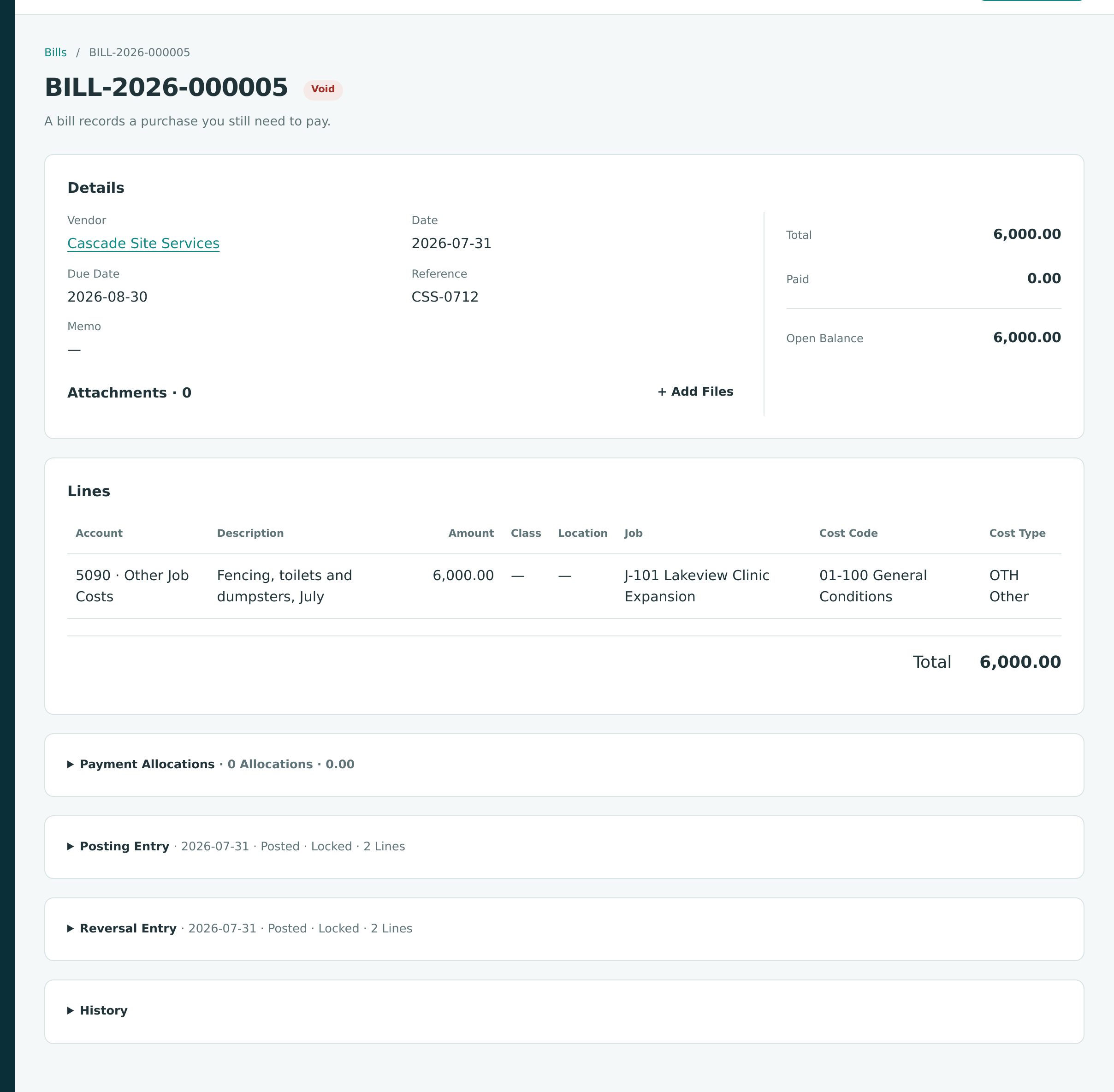
The page of a voided bill shows Paid 0.00 and an Open Balance equal to its amount due, as if it were still owed. In the training company, BILL-2026-000005 (the duplicate voided in Exercise G) shows Open Balance 6,000.00. A voided invoice's page works the same way. The books are right: the void's Reversal Entry took the amount out of Accounts Payable (or Accounts Receivable), and the vendor's balance, the aging reports and Unpaid Bills leave the document out. Go by the Void status. This is a known product gap.
See Reversing and Correcting Transactions.
Receipts Waiting in Undeposited Funds
A customer payment recorded into Undeposited Funds (1050 in the sample and training companies) is cash the company holds but has not yet taken to the bank. It raises Cash Balance on Home and the cash total on the Balance Sheet, but it is not in the bank account's register or the bank feed until you make the deposit.
- In the sample company on September 30, 2026, 1050 Undeposited Funds holds $64,660.00: two receipts waiting to be deposited. Home's Needs Attention shows Deposit 2 Receipts, and the Tie-Out checks the account with Receipts and deposits agree with 1050 Undeposited Funds.
- Move receipts with Make Deposit, not with a transfer. A transfer moves the money but leaves each receipt marked as not deposited, so it is offered again on the next deposit.
- A receipt recorded straight into the bank account, then deposited together with other checks, makes the bank show one deposit while the books show separate amounts. Reverse the receipt and record it again into Undeposited Funds, then make the deposit (see Receiving Customer Payments).
Retainage Is Held Apart From Receivables and Payables
When an invoice or bill holds retainage, only the Amount Due goes to Accounts Receivable or Accounts Payable. The retainage goes to Retainage Receivable or Retainage Payable (1110 and 2020 in the sample and training companies) until a retainage release moves it. So Unpaid Invoices, Unpaid Bills, the aging reports and a document's Open Balance leave retainage out.
What Lakeview Owed on September 30
The training company's Balance Sheet at September 30, 2026 shows:
| Account | Balance | What It Holds |
|---|---|---|
| 1100 Accounts Receivable | 131,400.00 | Invoice 3 (pay application 3), less its retainage |
| 1110 Retainage Receivable | 42,600.00 | 10% held on applications 1 to 3: 13,600.00 + 14,400.00 + 14,600.00 |
| 2010 Accounts Payable | 90,000.00 | September's bills, less retainage |
| 2020 Retainage Payable | 24,900.00 | 10% held on the subcontractors' bills |
Lakeview Medical Partners therefore owed $131,400.00 + $42,600.00 = $174,000.00, although its AR Aging total was $131,400.00.
Other places retainage shows up:
- A bill or invoice that is paid but still holds retainage shows the status Retainage Held instead of Paid in its list.
- On a vendor or customer page, the Open column of Recent Activity includes the retainage still held, so it can be higher than the document's Open Balance (and shows the retainage on a paid bill).
- A customer statement shows Total Outstanding Including Retainage under the balance. See Customer Statements.
- On a closed job, the Billing card can still show Retainage Held after the retainage was billed and paid with a release invoice; the card's Receivables column is right. This is a known product gap (see Exercise H).
See Retainage.
WIP Adjustments Change Revenue
Posting a WIP schedule adjusts each contract job's revenue to the revenue earned by the percentage of completion. The adjustment posts to 4100 WIP Revenue Adjustment in Income, against 1400 Costs in Excess of Billings (underbilled) or 2400 Billings in Excess of Costs (overbilled). Expected losses use 2450 Provision for Contract Losses and 5900 Contract Loss Expense, and deferred uninstalled materials use 1450 Uninstalled Materials and 5950 Uninstalled Materials Deferral (the sample company's codes).
In the training company, applications 1 to 3 billed $426,000.00 by September 30, but the job was 80.5% complete, so the September WIP entry debited 4100 and credited 2400 with $10,827.59. The quarter's Profit and Loss shows Total Income $415,172.41, not $426,000.00 (see Exercise F).
Things to know when revenue looks wrong:
- Each WIP entry is dated at the schedule's cutoff and brings the WIP accounts to their new target; it is never reversed. Over a finished job the adjustments add up to zero.
- The Profit and Loss on the Cash basis leaves WIP entries out.
- Job Costs, the job page and Posted Margin show billed revenue: the WIP accounts are excluded from job revenue, so they do not match the Profit and Loss after a WIP posting.
- The General Ledger shows WIP postings with the type Journal Entry and no number; the description names the schedule. The Journal report labels them WIP Adjustment.
Books Versus Bank
An account's balance in Structally is the book balance: every posted movement, including payments the bank has not yet paid. It is normal for it to differ from the bank's balance by the outstanding items.
Check 1008
On September 30, 2026, the training company's books show 1010 Operating Checking at $301,875.00 and the bank statement $307,875.00. The $6,000.00 difference is check 1008 (PAY-2026-000008) to Cascade Site Services, written on September 10 and not cashed until October. The September register lists it with Cleared No, and the September reconciliation completes with a difference of 0.00 without it (see Exercise F).
To explain a difference between books and bank:
- Open the account's register for the statement period and look at the Cleared column: anything No is not yet on a statement.
- In the bank feed, look for lines still For Review: bank fees, interest or deposits the books do not have yet.
- Reconcile the account. The Tie-Out's Completed Reconciliations sheet shows each account's latest statement and its Uncleared amount.
An outstanding check months old, or a difference no item explains, needs a closer look: a payment recorded twice, or one recorded from the wrong account.
Job Figures
Open Commitments ignores the As Of date. On a job's budget page, every column follows the As Of date except Open Commitments, which always shows what is still unbilled on the job's commitments today.
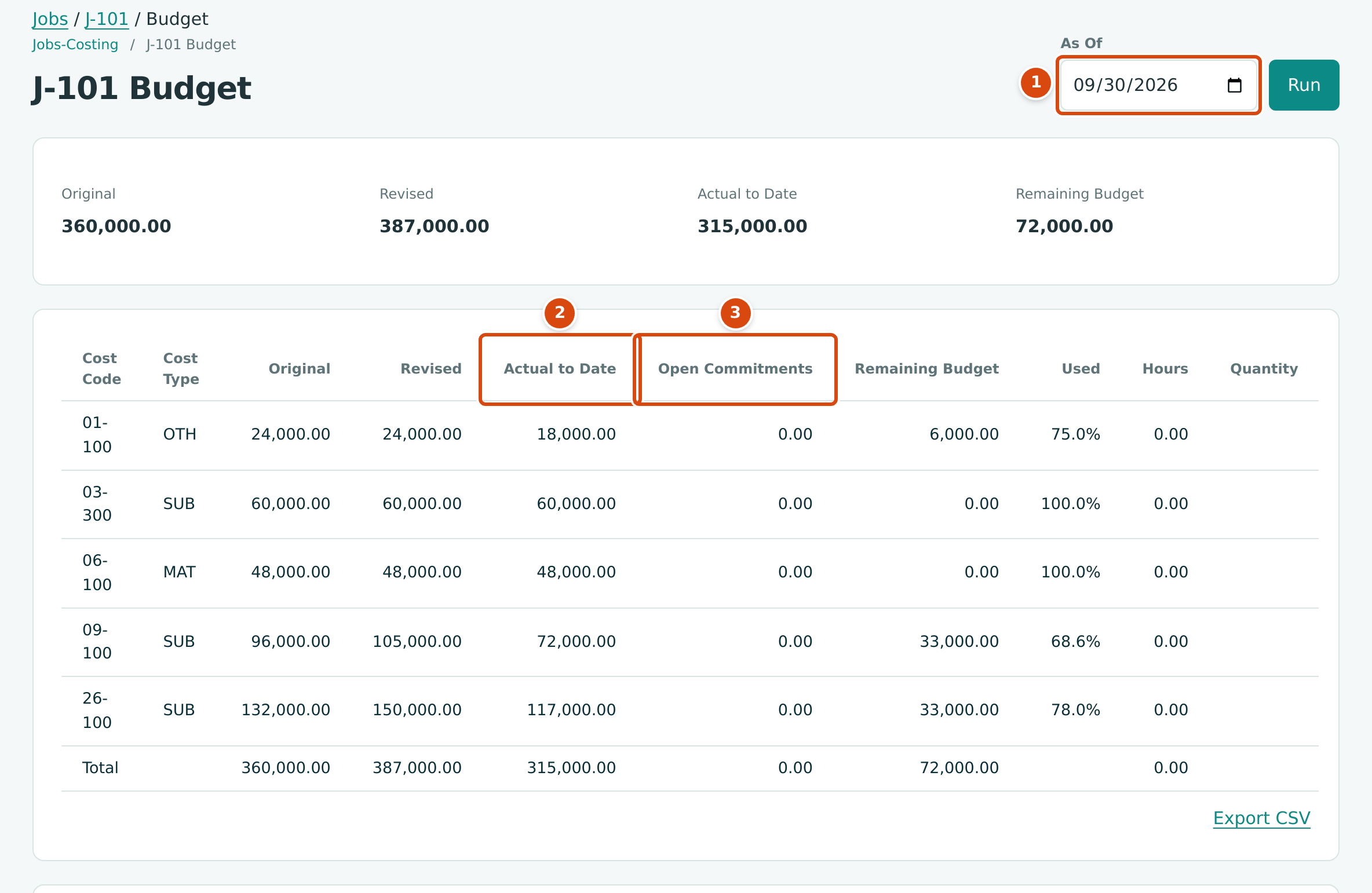
- As Of: September 30, 2026.
- Actual to Date follows the date: 315,000.00, the cost to September 30.
- Open Commitments shows today's figure, 0.00, because every commitment was billed and closed in October.
On September 30 the drywall and electrical subcontracts still had $33,000.00 each to bill, and the same page viewed in September showed Open Commitments 66,000.00 (see the figure in Budget, Committed, Actual and Remaining). For open commitments at a past date, read a forecast with that cutoff instead: its Open Commitments are figured at the cutoff. This is a known product gap.
Other job figures that surprise:
- Remaining Budget is the revised budget less actual cost; it does not subtract open commitments.
- The Jobs & Costing Overview counts an active job without an approved budget as having a budget of 0.00, so its whole cost lowers Remaining Budget and Needs Attention lists it as over budget.
- Unassigned on Job Costs is cost on job cost accounts posted without a job. With the standard settings every expense account counts as a job cost account, so overhead such as rent appears there.
- A cost coded to the wrong job stays there until you correct the document or transfer the cost.
Tracing a Balance Step by Step
When none of the causes above explains a figure, follow it down to the entries behind it:
- Run the Tie-Out for the date. If every check agrees, the ledger and its subledgers (aging, retainage, undeposited receipts, cash flow) agree with each other, and the question is which entries make up the figure. If a check is Off by an amount, start from that check; see When a Check Does Not Agree.
- Run the Trial Balance for the same date and find the account. An asset, liability or equity account has the same balance as on the Balance Sheet; an income or expense account shows its total since the books began.
- Click the account code to open the General Ledger for that account, from the start of the fiscal year to the date. Change Start to the beginning of the period you question if needed: the Opening Balance is the balance the day before, and each line shows the date, type, number, party and running Balance.
- Look for the line that does not belong: a manual Journal Entry posted to Accounts Payable or Accounts Receivable (it changes the account but no bill or invoice), a reversal dated in another period, a document dated in the wrong month, or an amount twice.
- Click the date to open the journal entry, or the number to open the document, and read its lines and history. Back to Report returns you to the ledger.
- Correct it with the document's own correction (void, reverse, unapply) or a journal entry, dated in an open period, and run the Tie-Out again.
Where 2400 Came From
The training company's Trial Balance at September 30, 2026 shows 2400 Billings in Excess of Costs with a credit of 10,827.59, and 4100 WIP Revenue Adjustment with a debit of the same amount. The General Ledger for 2400 from July 1 to September 30 has an Opening Balance of 0.00 and one line: 2026-09-30, type Journal Entry, no number, WIP adjustment, schedule 2026-09-30 version 1, credit 10,827.59. The balance is the September WIP entry, and the Tie-Out for the same date reads All 10 checks agree.
Very Long Ledgers
When a General Ledger period holds more than 5,000 lines, the page shows the first 5,000 and says so in an amber notice; the totals and balances still cover the whole period. Choose one account or a shorter period, or use Export CSV. See Very Long Ledgers.