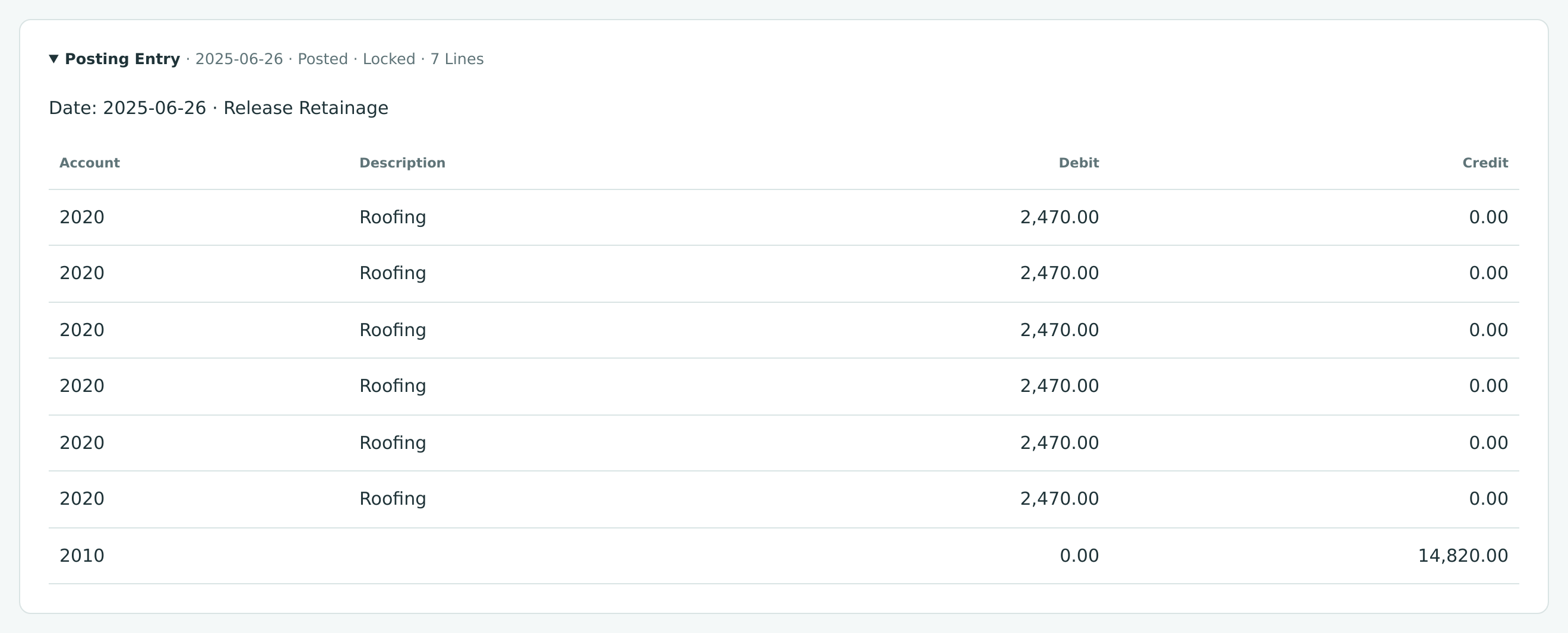
| Account | Debit | Credit |
|---|---|---|
| 2020 Retainage Payable (six lines of 2,470.00) | 14,820.00 | |
| 2010 Accounts Payable | 14,820.00 |
Releasing Retainage
Retainage stays in its own account until it is released. Releasing turns a retained amount into an ordinary amount due:
- A release to a vendor is a special bill, marked Retainage Release, that moves retainage you held from Retainage Payable to Accounts Payable. You then pay it like any bill.
- A release to a customer is a special invoice, marked Retainage Release, that moves retainage the customer held from Retainage Receivable to Accounts Receivable. You send it and receive payment like any invoice.
Releases are usually made at completion, but you can release any part of the retainage on any line at any time, for example when a subcontractor finishes its scope early.
Before You Begin
- Retainage is held on posted (open or paid) bills or invoices, and the Retainage Payable or Retainage Receivable account exists. See Retainage.
- The vendor or customer is active.
- Releases to vendors need Edit access to Vendors & Bills; releases to customers need Edit access to Customers & Invoices. Company Admins, Accountants and Project Managers have both; Viewers have neither. See Roles and Permissions.
Navigation
To a vendor: open the vendor (Vendors & Bills → Vendors), the bill, or the commitment, and click Release Retainage.
To a customer: open the customer (Customers & Invoices → Customers) or the invoice, and click Release Retainage.
Release Retainage appears only while retainage is held there and you have Edit access.
Release Retainage to a Vendor
Every posted bill that holds retainage has a Retainage Releases card listing the releases made from it:

- Release Retainage opens a new release for this vendor with only this bill's lines. From the vendor page you get all the vendor's held retainage; from a commitment page, the vendor's held retainage on that commitment's job.
Step by Step
- Click Release Retainage on the vendor, bill or commitment. The New Retainage Release page opens with the vendor chosen.
- To look at another vendor or one job only, choose Vendor and Job (All Jobs or a job that has held retainage) and click Load Held Retainage.
- Under Details, set the Date of the release (it starts as today). Terms start with the vendor's terms; leave Due Date empty to have it worked out from the terms when you save. Add a Reference and a Memo if you like.
- Under Retainage Held, type the amount to release in Release on each line you are releasing. Each line shows what was Retained, what has already been Released, and what is still Held. Leave the other lines empty.
- Check the Summary: Lines, Release Total, and Held After (what will still be held on the lines shown).
- Click Post Release to post it now, or Save Draft to keep it as a draft.
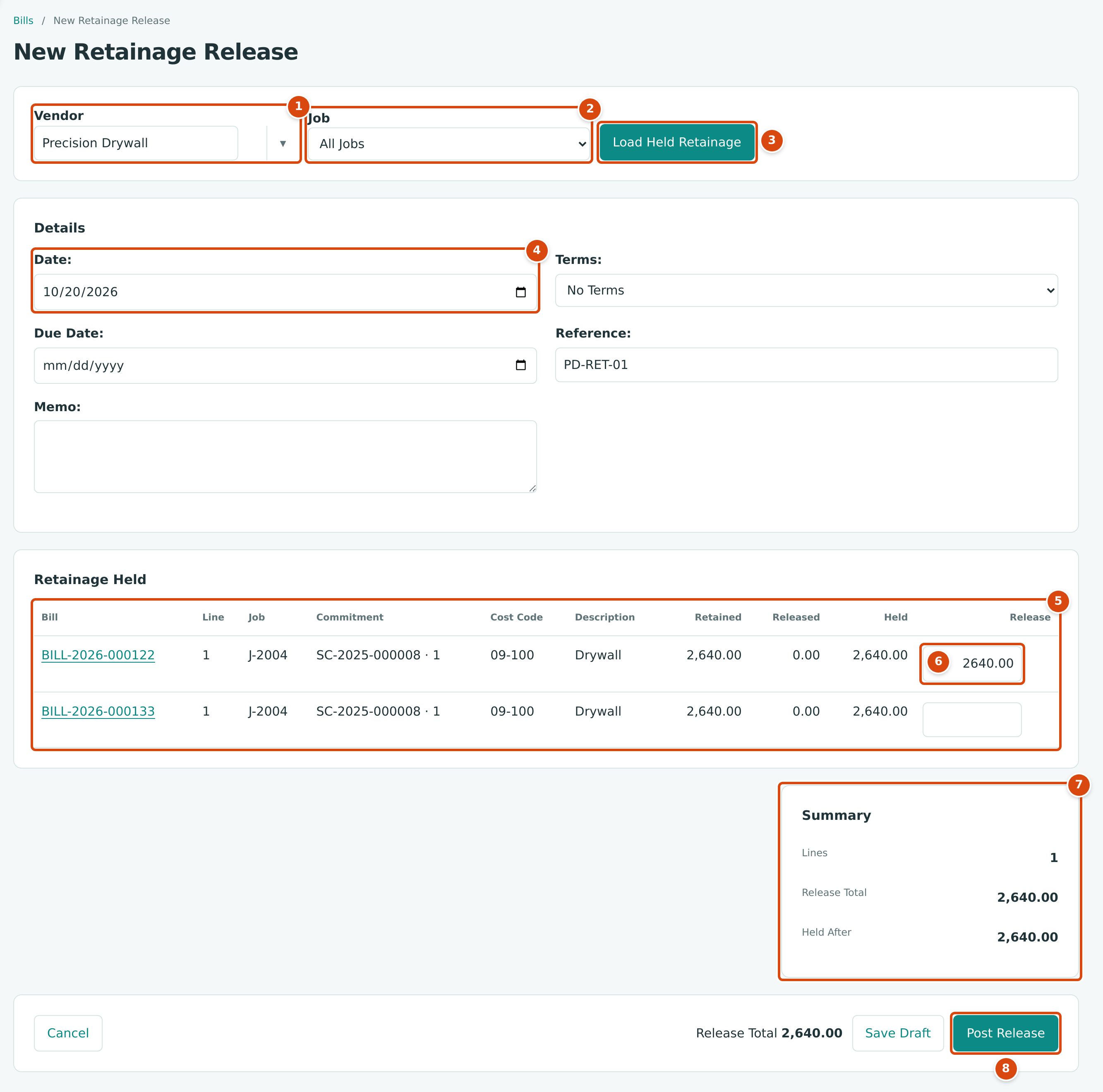
- Vendor: the vendor whose held retainage is listed.
- Job: All Jobs, or one job.
- Load Held Retainage reloads the list for the vendor and job chosen.
- Date: the accounting date of the release.
- Retainage Held: one row per posted bill line that still holds retainage, with its Bill, Line, Job, Commitment, Cost Code and Description.
- Release: the amount to release, up to the line's Held.
- Summary: 1 line, a release total of 2,640.00, and 2,640.00 still held after it.
- Post Release posts the release to accounts payable.
Structally confirms with a message such as Retainage release BILL-2026-000142 posted to accounts payable. (with the new bill number) and opens the release. Save Draft opens the draft instead; a draft changes nothing until you post it with Post Bill on its page, and Edit Draft reopens it as Edit Retainage Release.
Partial and Final Releases
Release any amount up to what is held on a line. What you do not release stays held on the line and appears again the next time you release. A line drops off the list once its retainage is fully released. One release can cover several bills, commitments and jobs of the same vendor.
A final release enters the full Held amount on every line, so Held After is 0.00:
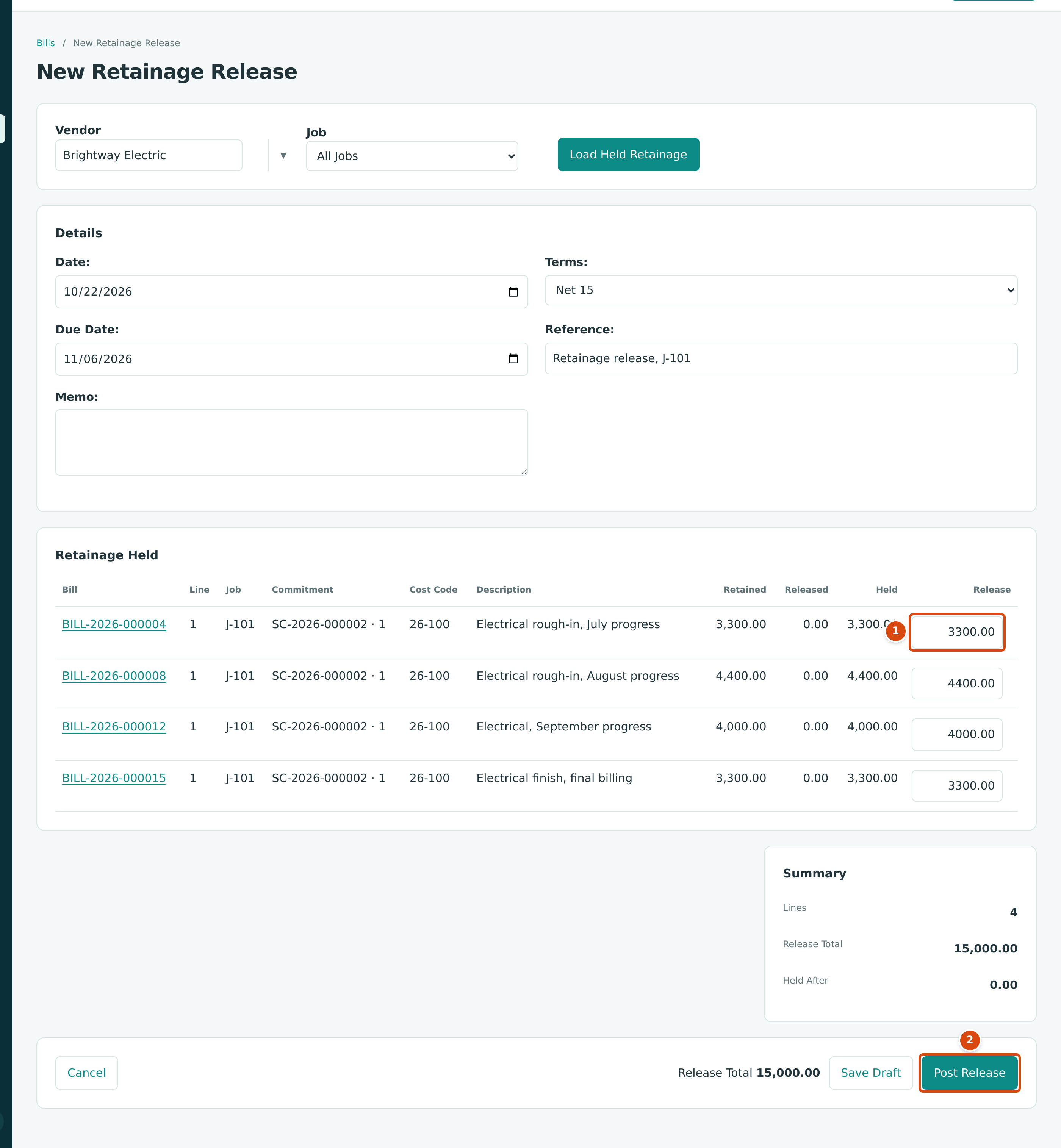
- Release: the full 3,300.00 held on the first bill line; every other line is released in full too.
- Post Release posts the 15,000.00 release (4 lines, held after 0.00).
After Posting
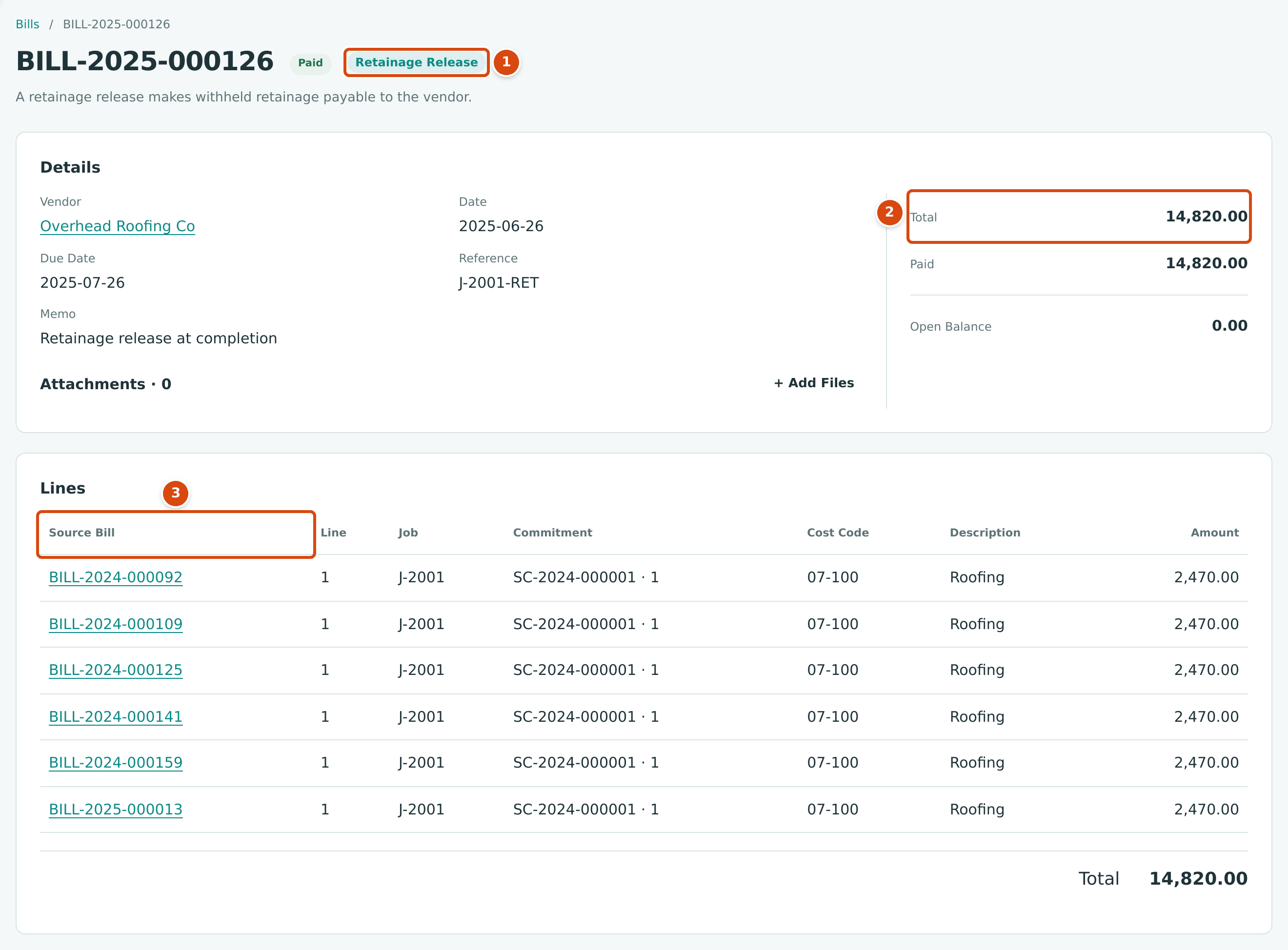
- The Retainage Release tag, with the explanation A retainage release makes withheld retainage payable to the vendor.
- Total: the amount now payable to the vendor.
- Source Bill: each line names the bill and line it releases, with the job, commitment and cost code.
- The release is a bill with the status Open. It appears in the Bills list, the vendor's balance and the AP Aging, and you pay it with Paying Bills.
- Each source bill's Retainage Held goes down, a Retainage Released line appears in its summary, and its Retainage Releases card lists the release.
The Posting Entry of a Vendor Release
A release debits Retainage Payable once per line and credits Accounts Payable for the total. It does not touch job costs: the cost was recorded when the original bills were posted.
Bill Retainage to a Customer
Releases to customers are made per job: one release covers the held retainage of one customer on one job.
- Open the customer (or one of its invoices that holds retainage) and click Release Retainage. The New Retainage Release page opens with the customer chosen and the first job with held retainage selected.
- To change them, choose Customer and Job and click Load Held Retainage.
- Under Details, set the Date, check Terms and Due Date, and add a Reference and Memo if you like.
- Under Retainage Held, type the amount to bill in Release on each line. Each row is one invoice line holding retainage, shown with its Invoice, Line, Job, Description, Retained, Released and Held. For pay application invoices the description is the schedule line, such as 1 · Mobilization.
- Check the Summary and click Post Release or Save Draft.
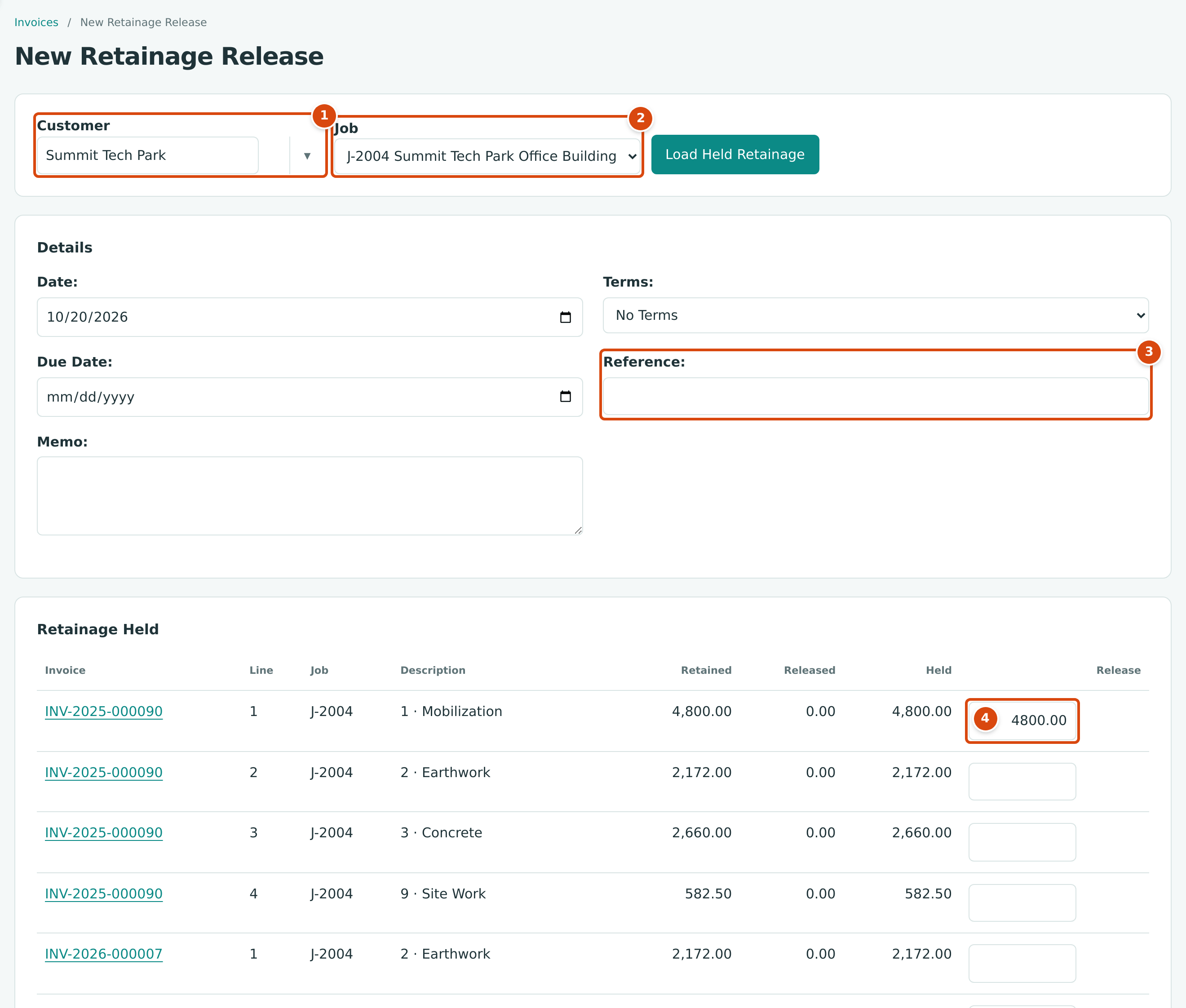
- Customer: the customer whose held retainage is listed.
- Job: a receivable release is always for one job.
- Reference: for example the customer's retainage request or your own reference.
- Release: here the 4,800.00 held on the Mobilization line of INV-2025-000090, released in full.
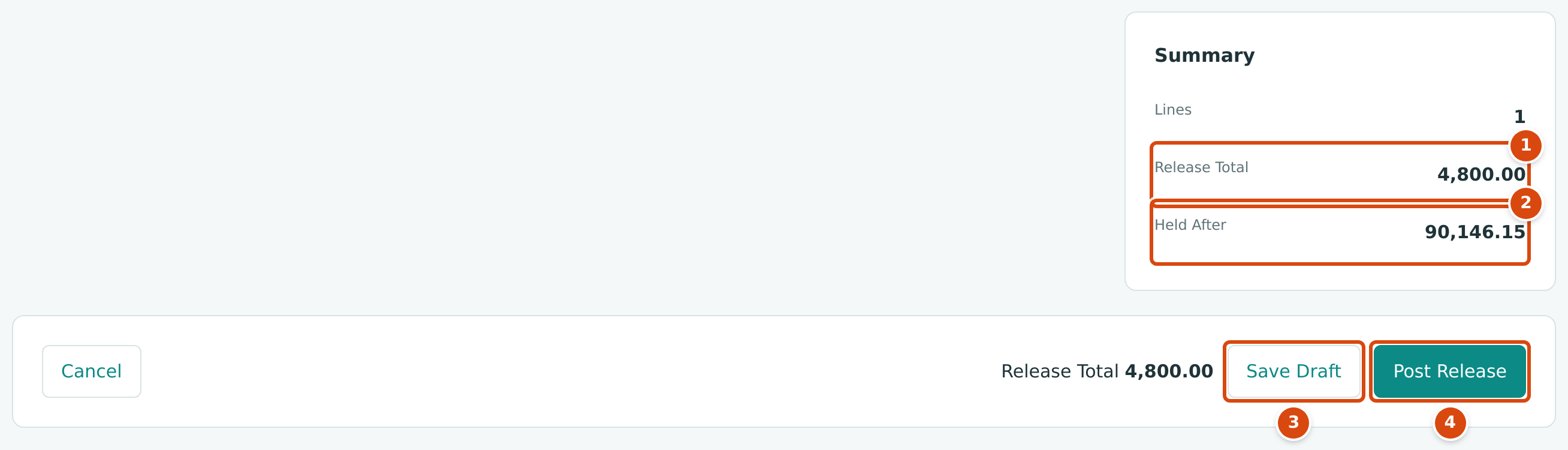
- Release Total: the amount the customer will owe on the release.
- Held After: 94,946.15 held on J-2004 less 4,800.00 = 90,146.15 still held.
- Save Draft keeps the release as a draft invoice.
- Post Release posts it to accounts receivable.
Structally confirms with a message such as Retainage release INV-2026-000051 posted to accounts receivable. (with the new invoice number). The release is an Open invoice: send it from its page and record the payment with Receiving Customer Payments. Printed, each line reads Retainage released on and the source invoice number.
At completion you usually bill everything that is held. Enter the full Held amount on every line; Held After then shows 0.00:
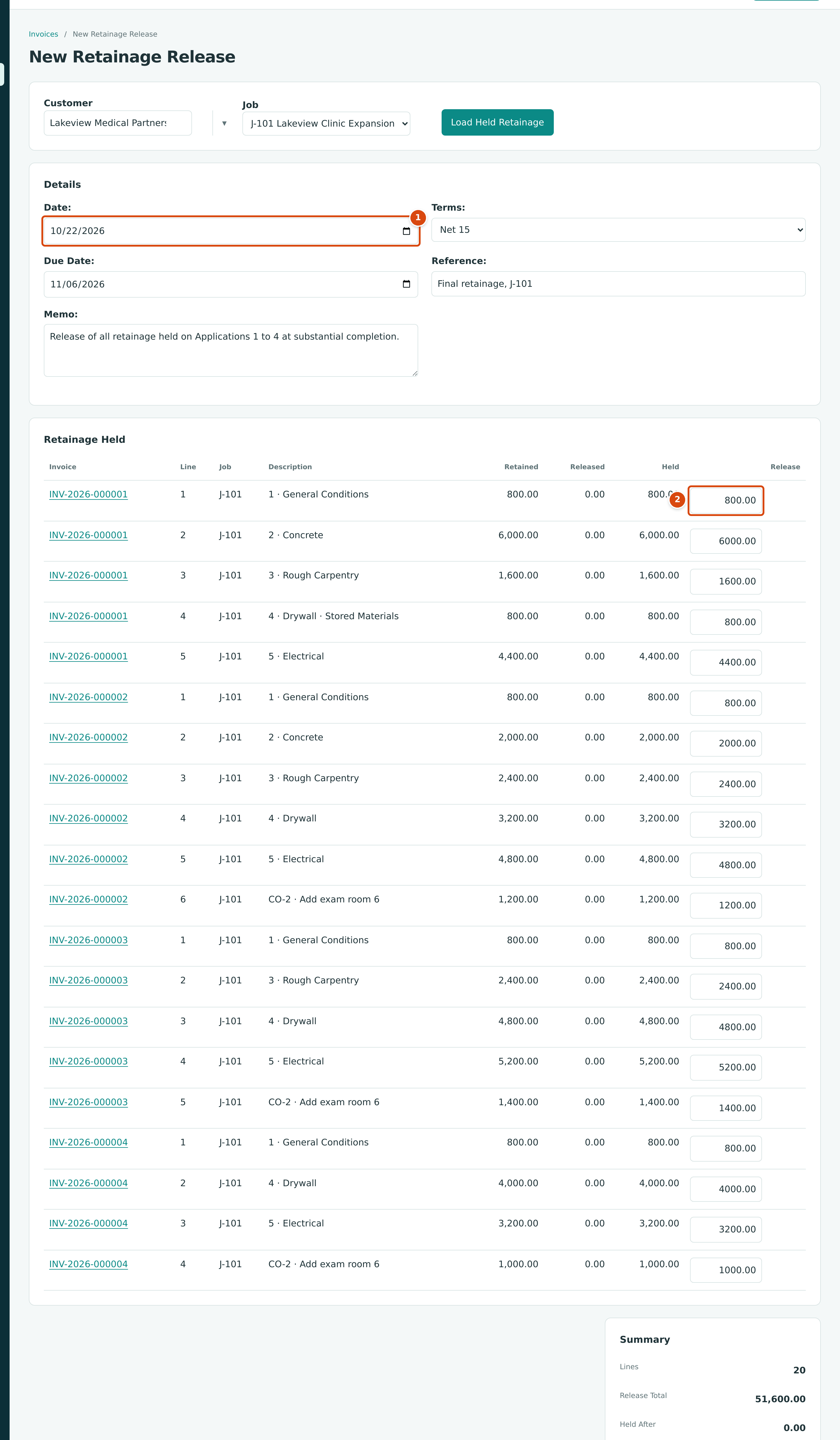
- Date: the date of the release invoice. With Net 15 terms the due date is 15 days later.
- Release: the full 800.00 held on the first line. All 20 lines from the four application invoices are released, 51,600.00 in total.
Once released, the amounts appear on the job's later pay applications: the printed application shows c. Less Retainage Released with the release invoice numbers, Retainage Held goes down, and Previous Certificates includes the released amount.
The Posting Entry of a Customer Release
A release debits Accounts Receivable for the total and credits Retainage Receivable once per line. Revenue is not touched: it was recorded when the original invoices were posted.
Worked Example: Closing Out J-2001
Job J-2001 Bayside Medical Office Building was completed in 2025. Both sides of its retainage were released on June 26, 2025.
To a subcontractor. Overhead Roofing Co billed its roofing under subcontract SC-2024-000001 with 10.00% retainage. Six bills each held $2,470.00. Release BILL-2025-000126 (reference J-2001-RET, memo Retainage release at completion) released all six lines:
| Source Bill | Line | Released |
|---|---|---|
| BILL-2024-000092 | 1 | 2,470.00 |
| BILL-2024-000109 | 1 | 2,470.00 |
| BILL-2024-000125 | 1 | 2,470.00 |
| BILL-2024-000141 | 1 | 2,470.00 |
| BILL-2024-000159 | 1 | 2,470.00 |
| BILL-2025-000013 | 1 | 2,470.00 |
| Total (6 × 2,470.00) | 14,820.00 |
Posting moved $14,820.00 from 2020 Retainage Payable to 2010 Accounts Payable, and the release was then paid.
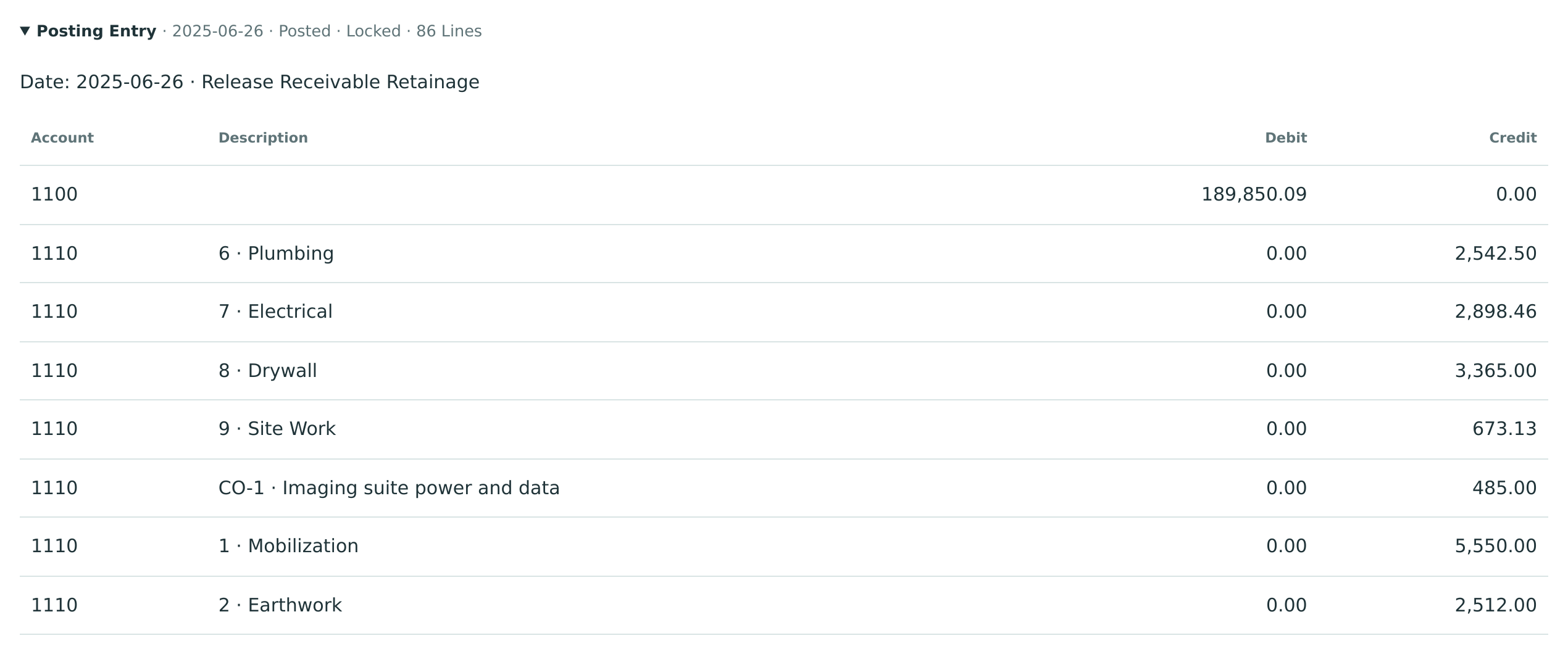
From the customer. After the last accepted application, Application 16, Bayside Medical Group held $189,850.09 of retainage on J-2001. Release INV-2025-000048 (reference J-2001 retainage) billed all of it in 85 lines, one per held invoice line:
| Account | Debit | Credit |
|---|---|---|
| 1100 Accounts Receivable | 189,850.09 | |
| 1110 Retainage Receivable (85 lines) | 189,850.09 |
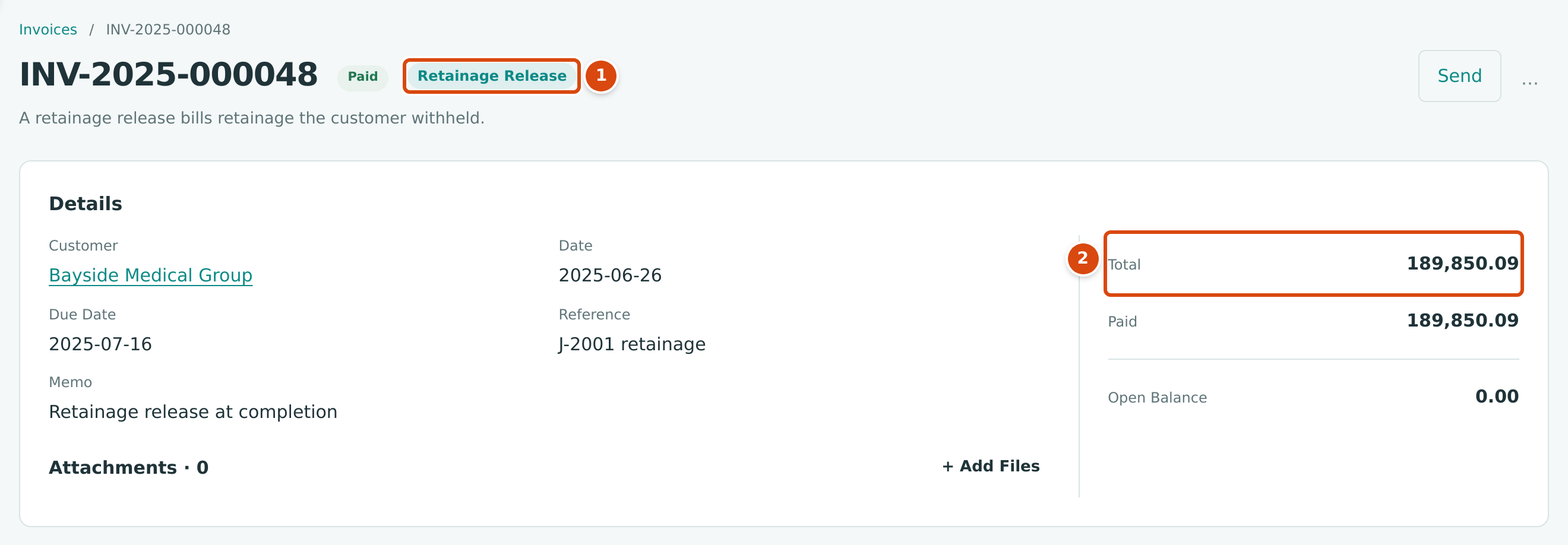
- The Retainage Release tag, with the explanation A retainage release bills retainage the customer withheld.
- Total: the retainage billed to the customer.
The customer paid it, so J-2001's retainage receivable is zero.
Reverse a Release
A posted release that has not been paid can be reversed:
- Open the release and click … → Reverse Release…. (The menu item appears while the release is Open.)
- Enter the Date of the reversal and an optional Memo. The panel explains This reverses the posting entry on the date entered.
- Click Reverse Release.
The release becomes Void, its entry is reversed on that date, and the retainage is held again on the source lines, ready to be released again. A release with a payment applied must have the payment reversed first.
The source documents are protected the other way round: a bill or invoice whose retainage was released cannot be voided (and a pay application whose invoice had retainage released cannot be reversed) until the release is reversed.
Field Reference
| Field | Description | Required | Example |
|---|---|---|---|
| Vendor / Customer | Whose held retainage is listed. Active vendors and customers only. | Yes | Precision Drywall |
| Job | Vendor releases: All Jobs or one job. Customer releases: one job, required. | Customer releases | J-2004 Summit Tech Park Office Building |
| Date | The accounting date of the release. Starts as today. | Yes | 10/20/2026 |
| Terms | Payment terms; start with the vendor's or customer's terms. No Terms leaves the due date to you. | No | Net 30 |
| Due Date | When the release is due. Empty means worked out from the terms. | No | 11/19/2026 |
| Reference | The vendor's invoice number, or your reference for the customer. | No | J-2001-RET |
| Memo | An internal note. | No | Retainage release at completion |
| Release (line) | The amount to release on the line: at least 0.01 and not more than Held. | On at least one line | 2,640.00 |
Common Mistakes and Troubleshooting
| Message or Symptom | Why It Happens | What to Do |
|---|---|---|
| There is no Release Retainage button. | Nothing is held there, or you lack Edit access to Vendors & Bills (vendor releases) or Customers & Invoices (customer releases). | Check the Retainage Held figures, or ask a user with Edit access. |
| No held retainage. in the table | The vendor or customer has no held retainage for the job chosen. | Choose All Jobs (vendors) or another job, or another vendor or customer. |
| At least one release line is required. | No Release amount was entered. | Enter an amount on at least one line. |
| Line 1 releases more than the retainage held on its source line. | The amount is more than Held, or another release of the same line was posted meanwhile. | Lower the amount to what is held. |
| Line 1 must name a posted bill line of this vendor that holds retainage. (or … posted invoice line of this customer …) | The source line was voided, or belongs to another vendor or customer. | Load the held retainage again. |
| Line 2 is on a different job than line 1. | A customer release mixes jobs. | Release each job separately. |
| Set up retainage in Job Costing Settings before releasing retainage. | The retainage account is missing or inactive. | Ask a Company Admin to set it up. |
| Vendor must be active. | The vendor was deactivated. | Reactivate the vendor first. |
| Bill has payments applied; reverse them first (or Invoice has receipts applied; reverse them first) | You tried to reverse a release that has been paid. | Reverse the payment, then the release. |
| Bill has retainage releases; reverse them first (or Invoice has retainage releases; reverse them first) | You tried to void a source bill or invoice, or reverse a pay application, whose retainage was released. | Reverse the release first. |
| This field is required. under Job on a new customer release | No customer is chosen yet. | Choose the customer and click Load Held Retainage. |
| Two drafts release the same retainage. | Drafts do not reserve retainage; only posted releases count. | Post one and correct or leave the other; posting refuses an amount above what is still held. |