Introduction to Structally
Structally is accounting software for contractors. It keeps a complete set of double-entry books (invoices and bills, banking and reconciliation, financial statements) and joins them to construction job costing: jobs, budgets, commitments, change orders, progress billing, retainage, forecasts and work in progress.
You record everyday business documents; Structally writes the accounting entries behind them, keeps every balance up to date, and reports the results by account, by job and by cost code. Nothing posted is ever overwritten: corrections are made with voids and reversals, so the books always show what happened and when (see How Structally Records Transactions).
What Structally Covers
| Area | What You Do There |
|---|---|
| Customers & Invoices | Keep customers and the items you sell, issue invoices, record customer payments and credit memos. |
| Vendors & Bills | Keep vendors, enter bills and paid expenses, pay bills, record vendor credits. |
| Jobs & Costing | Set up jobs, cost codes and cost types; budget them; issue subcontracts and purchase orders; manage change orders; bill with schedules of values and pay applications; hold and release retainage; forecast costs and prepare WIP schedules. |
| Banking | Move money between accounts, deposit customer payments, record refunds, import bank statements, review the bank feed and reconcile. |
| Reports | Balance Sheet, Profit and Loss, Cash Flow, Trial Balance, General Ledger, Journal, Tie-Out, aging reports and customer statements. |
| Accounting | The chart of accounts, journal entries, payment terms and the audit log. |
| Settings | Company details, document design, email sending, the Books Closed date, opening balances, classes and locations, users and access, and data imports. |
Jobs & Costing is a module: Structally turns it on for a company. When it is off, the rest of the product works as general accounting, and the navigation shows Jobs & Costing with a padlock.
Accrual Basis
Structally keeps accrual books. Income counts on the date you invoice and costs count on the date of the bill, whether or not money has moved. Unpaid invoices are an asset (accounts receivable) and unpaid bills a liability (accounts payable) until they are paid. The Profit and Loss report can also be viewed on a cash basis.
Companies and Users
A company in Structally is one set of books: its own chart of accounts, customers, vendors, jobs, settings and reports. Nothing is shared between companies.
A user is a person who signs in. Each user signs in with their email address and their own password, and can have access to several companies, with a role in each:
| Role | In Short |
|---|---|
| Company Admin | Everything, including Settings and the company's users. |
| Accountant | All the accounting and Jobs & Costing work, including approvals; no Settings. |
| Viewer | Can look at everything except Settings; changes nothing. |
| Project Manager | Customers, vendors and jobs; no Banking, Reports, Accounting or Settings, and no approvals. |
| Custom | The Company Admin chooses No Access, View or Edit for each area. |
Company Admins add users and set their roles on Settings → Users & Access. The full rules are in Roles and Permissions. Structally itself creates new companies, sets the month their fiscal year starts, turns modules on, and invites each company's first Company Admin.
The Sample Company Used in This Guide
Every screenshot and worked example in this guide comes from Cedar Ridge Contracting, a fictional general contractor. All its names, amounts and email addresses are invented.
| Fact | Sample Data |
|---|---|
| History | Three years of transactions: the books start on October 1, 2023 (with opening balances) and run to September 30, 2026. |
| Fiscal year | Starts in January. |
| Books closed | Through July 31, 2026. |
| Customers and vendors | 12 customers (Willow Creek Homes, Summit Tech Park and others) and 14 vendors (Ridgeline Lumber Supply, Precision Drywall and others). |
| Jobs | 40 jobs: service jobs numbered J-1001 to J-1036, and four contract jobs J-2001 to J-2004 with budgets, subcontracts, purchase orders, change orders, schedules of values and pay applications. |
| The active contract job | J-2004 Summit Tech Park Office Building, with issued subcontracts and purchase orders and Pay Application 10 sent. |
| Month-end work | Monthly reconciliations, an imported bank statement, forecasts and twelve monthly WIP schedules. |
| Users | A Company Admin, an Accountant and a Viewer, used to show what each role sees. |
The screenshots were taken on October 24, 2026, after the last month of sample history, so period screens in this guide use dates such as September 2026 or the last 90 days to show figures.
A Map of Structally
The navigation on the left lists the areas your role can see. Click an area's name to open its main page, or + to show its pages:
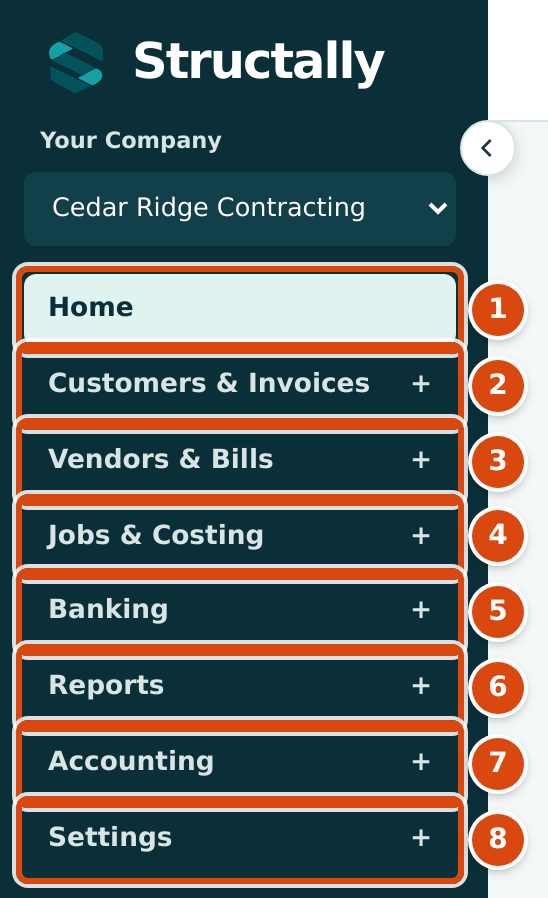
- Home: the Company Overview dashboard.
- Customers & Invoices
- Vendors & Bills
- Jobs & Costing (when the module is turned on)
- Banking
- Reports
- Accounting
- Settings (Company Admins, and Custom roles given access)
| Area | Pages in the Navigation | Guide Chapter |
|---|---|---|
| Home | The Company Overview dashboard | The Home Dashboard |
| Customers & Invoices | Overview, Invoices, Receipts, Customers, Items, Credit Memos | Customers & Invoices |
| Vendors & Bills | Overview, Bills, Expenses, Vendors, Payments, Vendor Credits | Vendors & Bills |
| Jobs & Costing | Overview, Jobs, Budgets, Job Costs, Commitments, Change Orders, Progress Billing, Forecasts & WIP, Job Costing Settings | Jobs & Costing |
| Banking | Transfers, Deposits, Refunds, Bank Feed, Reconciliation, Registers (the group name opens the Banking page) | Banking |
| Reports | Balance Sheet, Profit and Loss, Cash Flow, Trial Balance, General Ledger, Journal, Tie-Out, AP Aging, AR Aging, Statements | Reports |
| Accounting | Overview, Chart of Accounts, Journal Entries, Audit Log, Terms | Accounting |
| Settings | Overview, Company Details, Document Design, Email Sending, Books Closed, Opening Balances, Classes & Locations, Users & Access, Import Data | Settings |
Company Details, Classes & Locations and Users & Access appear only for Company Admins.
The Jobs & Costing Module
When Jobs & Costing is on, its Overview shows the state of your jobs at a glance:
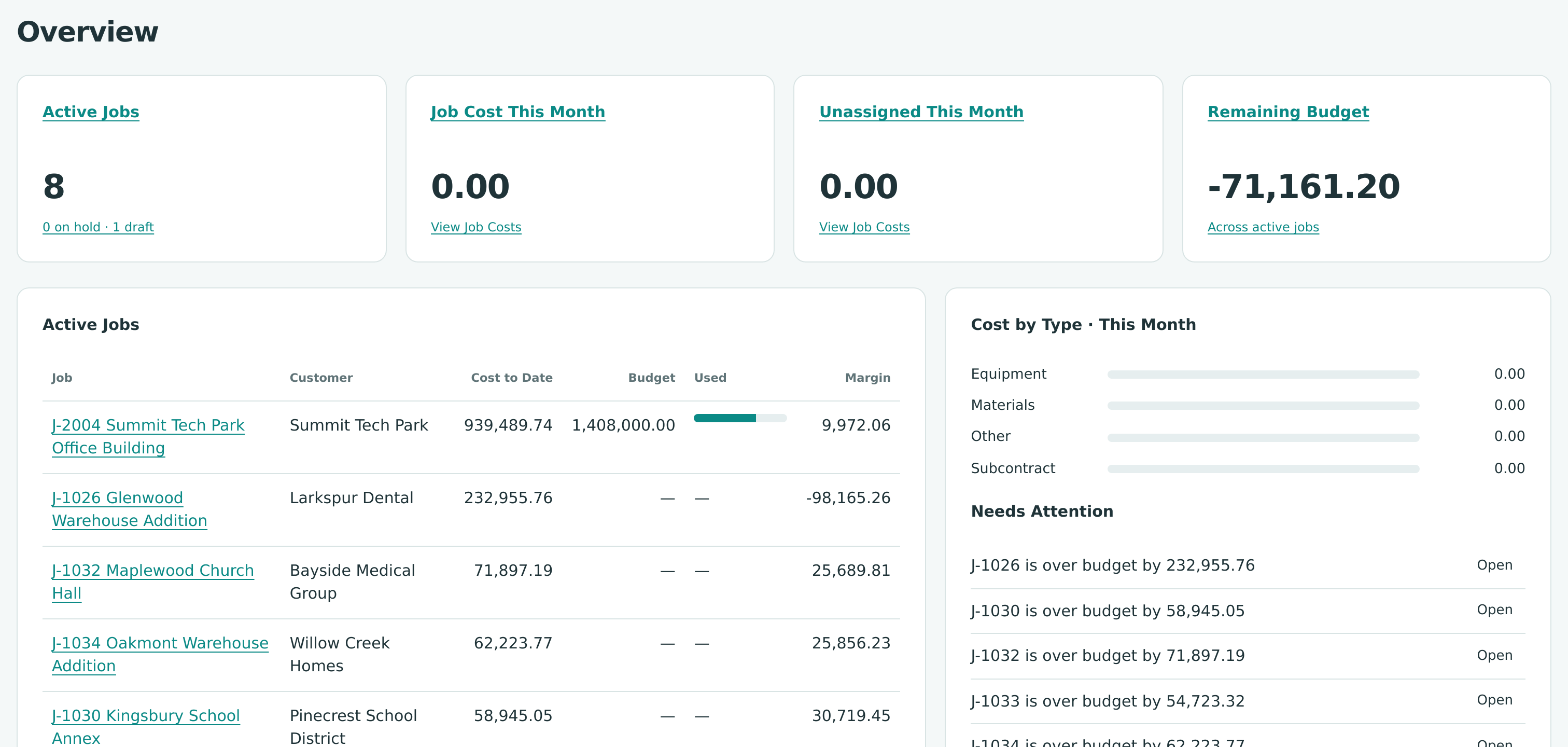
Costs and revenue reach a job when you code invoice, bill, expense and journal lines to it with a job, cost code and cost type; budgets, commitments and change orders track what you expect to spend and bill; schedules of values and pay applications produce the progress invoices; forecasts and WIP schedules measure each job's progress at month end. The Jobs & Costing chapter covers each step.