Statuses and Lifecycles
Every record in Structally carries a status, shown as a colored pill on its page and in its list. The status tells you what the record does to your books and what you can still do with it. This page lists every status by kind of record, with the action (the button) that moves a record from one status to the next.
Two rules hold everywhere:
- Only a Draft can be edited. Once a document is posted (or a construction record approved or issued), changes are made with a new record: a void, a reversal, an amendment, a revision.
- Actions you cannot perform in your role are not shown. Some steps are reserved for Company Admins and Accountants (see Roles and Permissions).
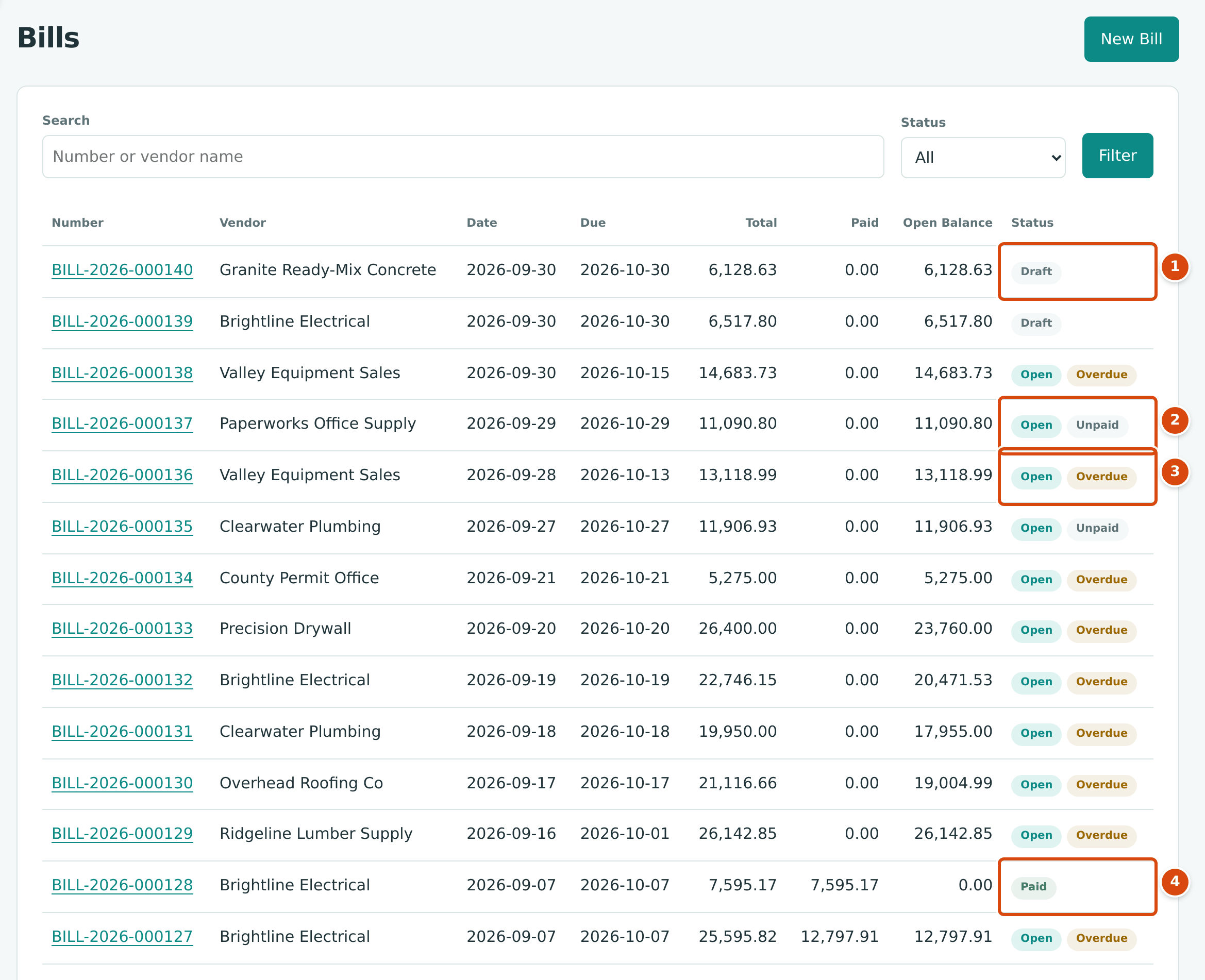
- Draft: saved, not posted.
- Open with Unpaid: posted, nothing paid, not yet due.
- Open with Overdue: posted and past its due date.
- Paid: fully settled.
Invoices and Bills
Invoices and bills share one lifecycle.
| Status | Meaning | How a Record Gets There |
|---|---|---|
| Draft | Saved with a number, but nothing posted. Can be changed with Edit Draft. | Save Draft on the form. |
| Open | Posted: the journal entry is written and the amount is owed. | Post Invoice or Post Bill (on the form or on the draft's page). Also back from Paid when a payment is reversed or a credit unapplied. |
| Paid | The amount due is fully settled by payments and credits. | Recording the payment or applying the credit that clears the balance. |
| Void | Canceled by a reversal entry. Stays on record, cannot be changed. | Void Invoice… or Void Bill… in the ⋯ menu of an Open document with no payments, credits or retainage releases applied. |
Next to Open, a second pill shows the payment state:
| Second Pill | Meaning |
|---|---|
| Unpaid | Nothing paid yet, and not past the due date. |
| Partly Paid | Some of the amount due is paid, and not past the due date. |
| Overdue | Past the due date with a balance left (whether or not part is paid). |
For documents that hold retainage, Retainage Held replaces Paid once the amount due is paid while retainage is still held; it stays until the retainage is released (see Retainage). An invoice created by an accepted pay application cannot be voided directly: its ⋯ menu says Void is not available: reverse Pay Application (number) instead.
| Step | Invoice to Cash | Bill to Cash |
|---|---|---|
| 1. Save | Save Draft: Draft | Save Draft: Draft |
| 2. Post | Post Invoice: Open and Unpaid | Post Bill: Open and Unpaid |
| 3. Part payment, or due date passes | Partly Paid or Overdue | Partly Paid or Overdue |
| 4. Settle | Receive Payment for the rest: Paid | Pay Bills for the rest: Paid |
See Posting, Editing, and Voiding Invoices and Posting, Editing, and Voiding Bills.
Credit Memos and Vendor Credits
| Status | Meaning | How a Record Gets There |
|---|---|---|
| Draft | Saved, not posted. | Save Draft. |
| Open | Posted; some or all of the credit is still available. | Post Credit Memo or Post Vendor Credit. Also back from Applied when an application is undone or a refund reversed. |
| Applied | The whole credit has been used, by applying it to invoices or bills or by refunding it. | Applying or refunding the last of the credit. |
| Void | Canceled by a reversal entry. | Void Credit Memo… or Void Vendor Credit… on an Open credit with nothing applied or refunded. |
See Credit Memos and Vendor Credits.
Payments, Expenses and Banking Documents
These documents are posted when you save them and have two statuses:
| Status | Meaning |
|---|---|
| Posted | The journal entry is written. |
| Reversed | A reversal entry cancels it. The record stays, read-only. |
| Document | Posted By | Reversed By | Before Reversing |
|---|---|---|---|
| Expense | Save Expense | Reverse Expense… | |
| Bill payment | Pay Bills | Reverse Payment… | Reverse any refund of it. The bills it paid return to Open. |
| Customer payment (receipt) | Receive Payment | Reverse Receipt… | Reverse any refund of it, and the deposit that includes it. The invoices it paid return to Open. |
| Deposit | Make Deposit | Reverse Deposit… | |
| Transfer | Saving a new transfer | Reverse Transfer… | |
| Refund | Saving a refund | Reverse Refund… | |
| Bank entry | Categorizing a bank feed line as a bank entry, or adding one while reconciling a paper statement | For one created from the bank feed: Undo Categorization on its line | Unclear the line if it is in a reconciliation. |
Refunds also show their kind, Vendor Refund or Customer Refund. See Reversing and Correcting Transactions.
Journal Entries
Journal entries have no status pill: every journal entry is Posted and Locked from the moment it exists, as its Posting Entry panel shows. A journal entry you entered by hand (and an opening balances or cost transfer entry) is corrected with Reverse on its page, which posts a reversal entry; the two entries link to each other as Original Entry and Reversal Entry. Entries written by documents are corrected through their document. See Journal Entries.
Bank Feed Lines
Each line of an imported bank or card statement has a status. The Bank Feed groups them under For Review, Matched, Categorized and Excluded.
| Status | Meaning | Gets There By | Leaves By |
|---|---|---|---|
| New (listed under For Review) | Not yet dealt with. Its hint reads Needs Category or the number of Possible Matches. | Importing a statement, or undoing one of the actions below. | Matching, categorizing or excluding it. |
| Flagged (under For Review) | Looks like a duplicate of a line already imported: Flagged Duplicate. | Importing a statement. | Keep Line (it becomes New) or Exclude Line. |
| Matched | Linked to a posting already in your books; nothing new is posted. | Match or Confirm Match. | Unmatch (back to New). |
| Categorized | Recorded as a new expense, transfer or bank entry. | Categorize as Expense, Categorize as Transfer or Categorize as Bank Entry. | Undo Categorization, which reverses what it created (back to New). |
| Excluded | Left out of your books on purpose. | Exclude Line. | Restore Line (back to New). |
A line that is cleared in a reconciliation must be uncleared first: Line is cleared in a reconciliation; unclear it first. See Reviewing the Bank Feed.
Reconciliations
| Status | Meaning | Gets There By |
|---|---|---|
| Open | A statement being reconciled. The account shows In Progress on the Reconciliation page. | Start Reconciliation, or Reopen on a completed one (a reason is required). |
| Completed | Finished: the difference is 0.00. | Complete. Refused with Reconciliation difference is (amount); it must be 0.00 while there is a difference. |
An Open reconciliation can be thrown away with Discard. Only the latest completed statement of an account can be reopened. See Reconciling an Account.
Jobs
| Status | Meaning |
|---|---|
| Draft | Being set up. |
| Active | Accepting coded costs and revenue. |
| On Hold | Paused. New costs are flagged while the job is on hold. Existing postings stay. |
| Closed | The job stops accepting new costs. Posted costs and revenue stay on the job. You can reopen it later. |
| Archived | The job leaves every list and takes no further postings. Final. |
Change a job's status with the Status list on the job's page; a dialog confirms each change:
| From | Action | To | Notes |
|---|---|---|---|
| Draft | Activate | Active | Needs at least one active cost code assigned and one active cost type. |
| Draft, Closed | Archive | Archived | A reason is required. |
| Active | Put On Hold | On Hold | |
| Active, On Hold | Close | Closed | Asks for a closing date, not after today. |
| On Hold | Resume | Active | |
| Closed | Reopen | Active | A reason is required. |
See Creating and Managing Jobs and Closing and Reopening Jobs.
Budgets
| Status | Meaning | Gets There By |
|---|---|---|
| Draft | Being prepared; can be edited or discarded. | Creating a budget. |
| Approved | In force. | Approve. Budget revisions created by an approved change order (kinds Owner Change and Internal Transfer) start as Approved. |
| Rejected | Turned down; kept for the record. | Reject, with a reason. |
| Withdrawn | Withdrawn by its preparer. | Withdraw. |
See Job Budgets.
Commitments and Amendments
Subcontracts and purchase orders:
| Status | Meaning | Gets There By |
|---|---|---|
| Draft | Being written; can be edited or discarded. | Creating it, or Withdraw on an approved one (Withdraw this commitment to draft?). |
| Approved | Agreed internally, not yet issued. Can be printed. | Approve. |
| Issued | Sent to the vendor. Issued lines are frozen; changes go through amendments. Bills can be matched to it. | Issue (Issue this commitment? Its lines will be frozen.). |
| Closed | Finished; the unused amount is recorded. | Close Commitment, with the unused amount and a reason. |
A commitment amendment is Draft until Approve makes it Approved and changes the issued commitment. Only an issued commitment can be amended, and only a draft amendment can be discarded. See Commitments and Commitment Amendments.
Change Orders
| Status | Meaning | Gets There By |
|---|---|---|
| Draft | Being prepared; can be edited or discarded. | Creating it. |
| Submitted | Waiting for a decision. Pending contract changes appear on the job as Pending, Not in Revised Contract. | Submit. |
| Approved | Accepted. A contract change order changes the revised contract and, when it adds to the contract, a line to the schedule of values; cost lines become an approved budget revision. | Approve… (Company Admins and Accountants). |
| Rejected | Turned down, with a reason. | Reject… (Company Admins and Accountants). |
| Withdrawn | Withdrawn before a decision. | Withdraw on a submitted change order. |
Approved, rejected and withdrawn change orders cannot change status again. See Change Orders.
Schedules of Values and Pay Applications
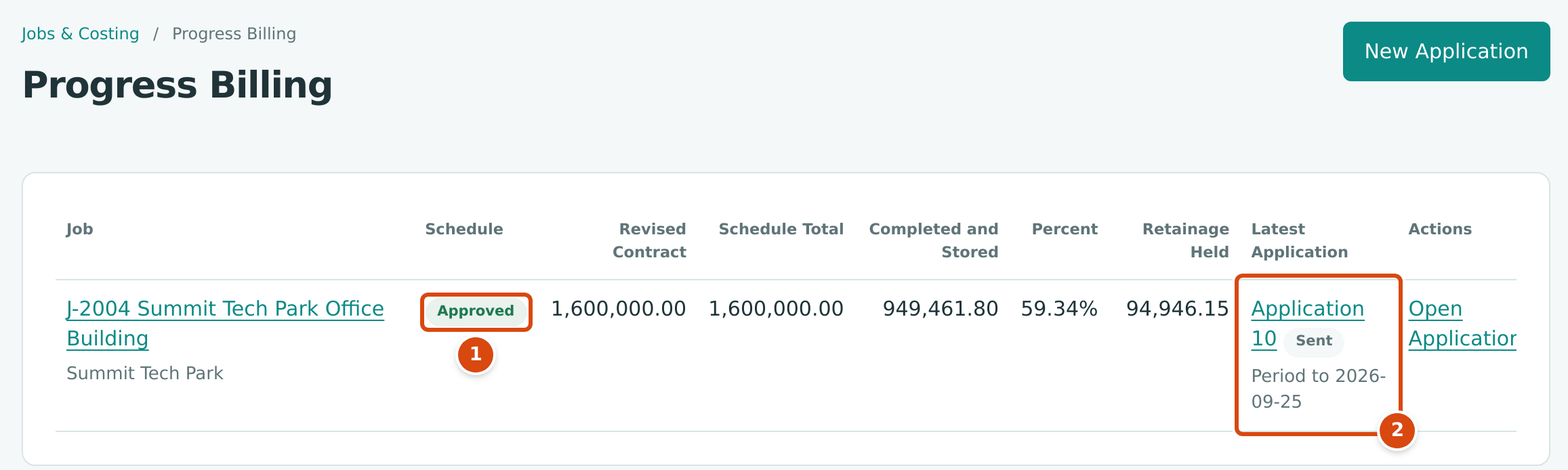
- The schedule of values status: Approved (or Draft, or Revision Draft while a revision is being prepared).
- The latest pay application and its status, here Sent.
Each revision of a schedule of values has a status:
| Status | Meaning | Gets There By |
|---|---|---|
| Draft | Being prepared. | Set Up Schedule, or Revise Schedule on an approved schedule. |
| Approved | The schedule in force. Its total must equal the job's revised contract. | Approve (Approve Revision for a later revision). Company Admins and Accountants. |
| Superseded | Replaced by a later approved revision. | Approving the next revision. |
Pay applications:
| Status | Meaning | Gets There By |
|---|---|---|
| Draft | Being prepared; can be discarded. Only one application per job can be in progress. | New Application or Start Application. |
| Sent | Sent to the owner for approval. | Mark as Sent. |
| Superseded | Replaced by a revised version of the same application. | Revise on a sent application, which creates a new draft revision. Discarding that draft makes the earlier version Sent again. |
| Accepted | Approved by the owner. Structally creates and posts the progress invoice. | Accept… on a draft or sent application (Company Admins and Accountants). |
| Reversed | Canceled after acceptance; its invoice is voided. | Reverse… on the latest accepted application (Company Admins and Accountants). |
See Schedules of Values and Pay Applications.
Forecasts and WIP Schedules
| Record | Status | Meaning | Gets There By |
|---|---|---|---|
| Forecast | Draft | Being prepared. One draft per job at a time. | New Forecast. |
| Forecast | Approved | The job's approved estimate at its cutoff date. | Approve Forecast (Company Admins and Accountants). |
| WIP schedule | Draft | Being prepared. One draft at a time. | Creating a schedule, or New Version. |
| WIP schedule | Approved | The approved schedule for its cutoff date. After Post WIP Entries, the page shows when and by whom it was posted. | Approve (Company Admins and Accountants). |
| WIP schedule | Replaced | An earlier approved version for the same cutoff date. | Approving a newer version. |
Drafts of both can be thrown away with Discard Draft. See Forecasts and WIP Schedules.
Users' Company Access
On Settings → Users & Access, each user's access to the company has a status:
| Status | Meaning | Gets There By |
|---|---|---|
| Pending | Invited, but the user has not set a password yet. | Adding the user. Resend Invitation sends the invitation again. |
| Active | The user can open the company. | The user sets a password; or Reactivate on a suspended user. |
| Suspended | The user cannot open the company for now. | Suspend. |
| Removed | Access ended; listed under Removed Users. | Remove. |
See Users & Access.