General Ledger
The General Ledger lists every posted line in an account over a period, in date order, with the account's opening balance, a running balance after each line and the closing balance. Use it to see what makes up a balance on the Balance Sheet or Trial Balance, to find a transaction, or to explain a number on the Profit and Loss.
You usually reach it by clicking an account code on another report, but you can also run it for any account, or for all accounts at once.
Before You Begin
- You need View or Edit access to Reports. Opening the entries and documents behind each line needs access to their areas. See Who Can Use Reports.
Navigation
Reports → General Ledger, or click an account code on the Balance Sheet, Profit and Loss or Trial Balance. On an account's page in the Chart of Accounts, Open in General Ledger opens it too.
Step by Step
- Open Reports → General Ledger. It opens for this month to date, for all accounts.
- Enter Start and End, or click a Report period button.
- In Account, choose one account, or leave All Accounts.
- To include an account's sub-accounts, tick Include Sub-Accounts.
- Click Run Report.

- Start and End: the period, both days included.
- Account: All Accounts, or one account, listed as code and name.
- Include Sub-Accounts: also list every sub-account below the chosen account.
- Report period: This Month, Last Month, This Fiscal Year, Last Fiscal Year. These keep the account you chose.
- Run Report.
| Field | Description | Required | Default |
|---|---|---|---|
| Start, End | The period. Start must be on or before End. | Yes | First of this month to today |
| Account | All Accounts or one account. The list includes the section headings (0100 Assets to 0600 Expenses), which hold no postings of their own. | No | All Accounts |
| Include Sub-Accounts | With one account chosen, also list its sub-accounts and a combined total. | No | Off |
Reading the General Ledger
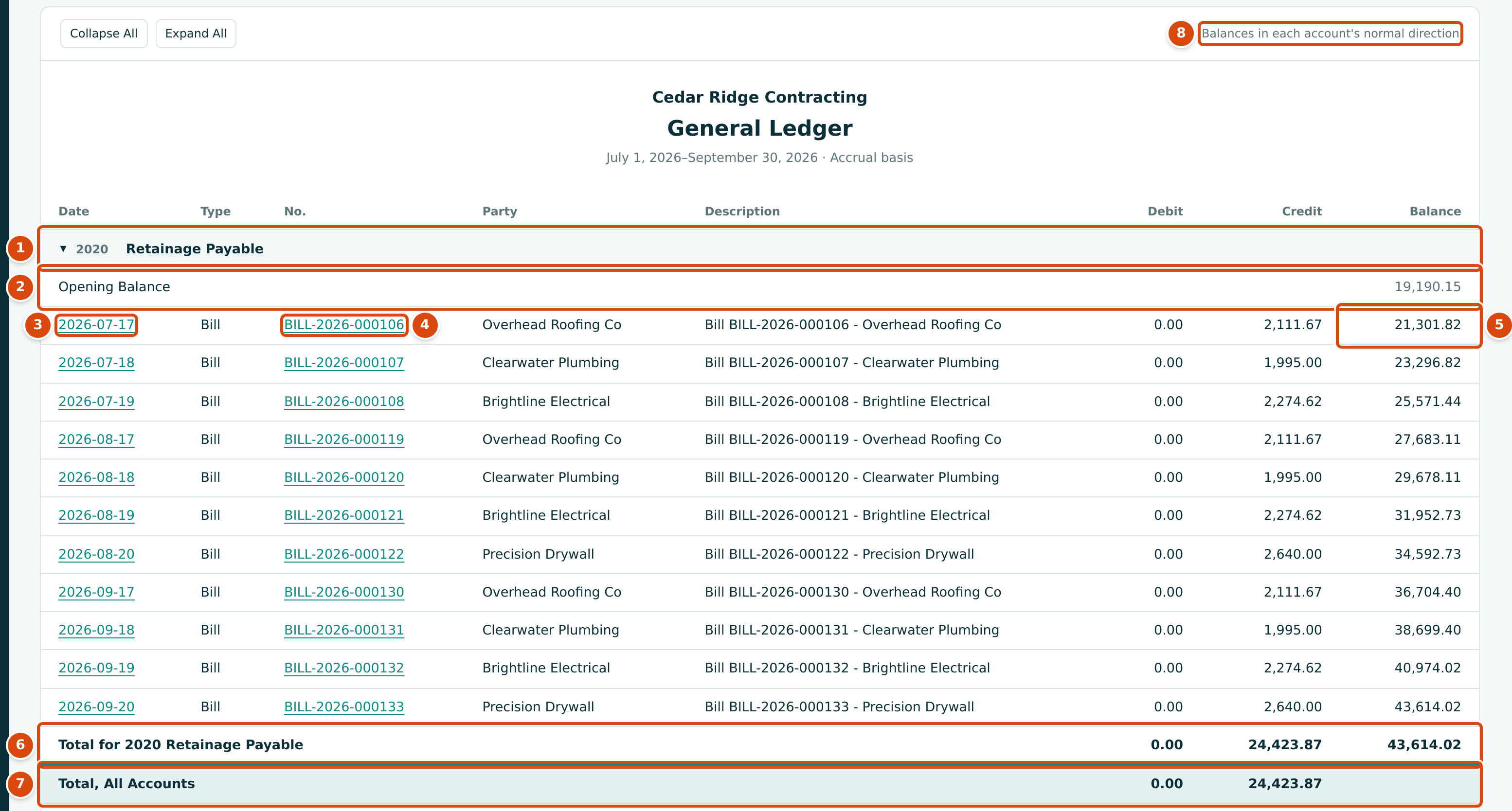
- The account: code and name, with a ▼ to fold its lines.
- Opening Balance: the account's balance at the end of the day before Start.
- Date: opens the journal entry that posted the line.
- No.: the document number, such as BILL-2026-000106, which opens the document. Entries without a document (manual journal entries, WIP schedule postings) show —.
- Balance: the running balance after the line.
- Total for the account: the period's debits and credits, and the closing balance.
- Total, All Accounts: the debits and credits of every account shown.
- Balances in each account's normal direction: a credit account like this one grows with credits, a debit account with debits.
| Column | What It Shows |
|---|---|
| Date | The entry date, linked to the journal entry. |
| Type | The kind of document that posted the line: Bill, Invoice, Expense, Bill Payment, Customer Receipt, Deposit, Transfer, Bank Entry, Vendor Credit, Credit Memo, Refund, Reversal, or Journal Entry for entries without a document. |
| No. | The document number, linked to the document, or —. |
| Party | The vendor or customer on the document, or —. |
| Description | The entry's description. |
| Debit, Credit | The line's amount on its side. |
| Balance | The running balance in the account's normal direction. A negative balance means the account has gone the other way, such as an overdrawn bank account. |
Lines are in date order, and in the order they were posted within a day.
All Accounts
With All Accounts, every account with posted activity up to End gets its own block, in code order. An account with earlier postings but none in the period shows a single line with its balance:

Including Sub-Accounts
Choose a parent account and tick Include Sub-Accounts to list the parent and every account below it, each indented under the one above, followed by a Total row with their combined debits, credits and closing balance. This is where the Total rows of the Balance Sheet and Profit and Loss lead. A section heading (0100 to 0600) cannot be used this way. The sample company has no sub-accounts.
Worked Example: Retainage Payable for the Third Quarter
Run the General Ledger for 2020 - Retainage Payable from 07/01/2026 to 09/30/2026 (the figure above).
| Item | Amount |
|---|---|
| Opening Balance on July 1, 2026 | $19,190.15 |
| Credits: retainage held on 11 subcontractor bills | $24,423.87 |
| Debits: retainage released | $0.00 |
| Closing balance on September 30, 2026 (19,190.15 + 24,423.87) | $43,614.02 |
The closing balance is the 2020 Retainage Payable amount on the Balance Sheet as of September 30, 2026. The last line, BILL-2026-000133 from Precision Drywall, holds $2,640.00: 10% of the $26,400.00 bill described in Entering a Bill. Clicking BILL-2026-000133 opens that bill; clicking its date opens the journal entry.
Exporting
Export CSV gives one row per line with the columns Code, Account,
Date, Document, Party, Description, Debit, Credit and
Balance, plus an Opening Balance and a Closing Balance row for each
account (and a Combined Closing Balance row with Include Sub-Accounts). The
file is named, for example, general-ledger-2020-2026-07-01-2026-09-30.csv.
Very Long Ledgers
The page shows at most 5,000 lines. When the period holds more, an amber notice appears above the report: Showing the first 5,000 of 12,345 lines. Opening balances, account totals and the grand total cover the full date range. (the numbers are an example). Each account that has lines left out gets a row such as 120 more lines in this account not shown. The opening balances, account totals, closing balances and grand totals still cover every line in the period, and Export CSV always contains every line. To see all the lines on the page, narrow the dates or choose an account.
Common Mistakes and Troubleshooting
| Message or Symptom | Why It Happens | What to Do |
|---|---|---|
| Start must be on or before end. | Start is after End. | Swap the dates. |
| Choose a non-root account to include sub-accounts. | Include Sub-Accounts is ticked with a section heading (0100 to 0600) chosen. | Choose a real account, or untick Include Sub-Accounts. |
| The ledger shows No activity in this period. | The account had no postings between Start and End. | Widen the period. |
| An account is missing from All Accounts. | It has never been used up to End. | Nothing to fix. |
| Clicking a date or number shows This Area Is Locked for You. | Your role has no access to the area that holds the entry or document. | Ask a Company Admin for access to that area. |
| A WIP schedule posting shows Type Journal Entry. | WIP postings have no document of their own. | Read the description, or open the entry. The Journal report labels them WIP Adjustment. |
Related Topics
- Reports
- Trial Balance and Balance Sheet
- Journal Report
- Account Registers, for bank and card accounts
- The Chart of Accounts