| Account | Debit | Credit |
|---|---|---|
| 5040 Materials (J-101 · 06-100 · MAT) | 16,000.00 | |
| 5030 Subcontractors (J-101 · 03-300 · SUB) | 45,000.00 | |
| 5030 Subcontractors (J-101 · 26-100 · SUB) | 33,000.00 | |
| 5090 Other Job Costs (J-101 · 01-100 · OTH) | 6,000.00 | |
| 2010 Accounts Payable | 92,200.00 | |
| 2020 Retainage Payable | 7,800.00 | |
| Total | 100,000.00 | 100,000.00 |
C: Recording Project Costs
Work on the Lakeview clinic starts in July. Cedar Ridge Training buys lumber under a purchase order, hires three subcontractors, and pays a site services company month by month. In this exercise you:
- add the five vendors;
- issue the purchase order and the three subcontracts as commitments;
- enter July's four bills, matched to the commitments, with retainage held on the subcontracts;
- pay three of the bills on August 10.
After each step you can see the cost arrive on the job and in the books.
Before You Begin
- Exercise B is done: J-101 is active with an approved budget.
- You need Edit access to Vendors & Bills and Jobs & Costing.
Step 1: Add the Vendors
Go to Vendors & Bills → Vendors, click New Vendor, and create each vendor with Payment Terms Net 30:
| Name | Code | Role on the Project |
|---|---|---|
| High Desert Concrete | HDC | Concrete subcontractor |
| Pine Valley Lumber | PVL | Lumber supplier |
| Brightway Electric | BWE | Electrical subcontractor |
| Summit Drywall | SDW | Drywall subcontractor |
| Cascade Site Services | CSS | Fencing, toilets and dumpsters, billed monthly |
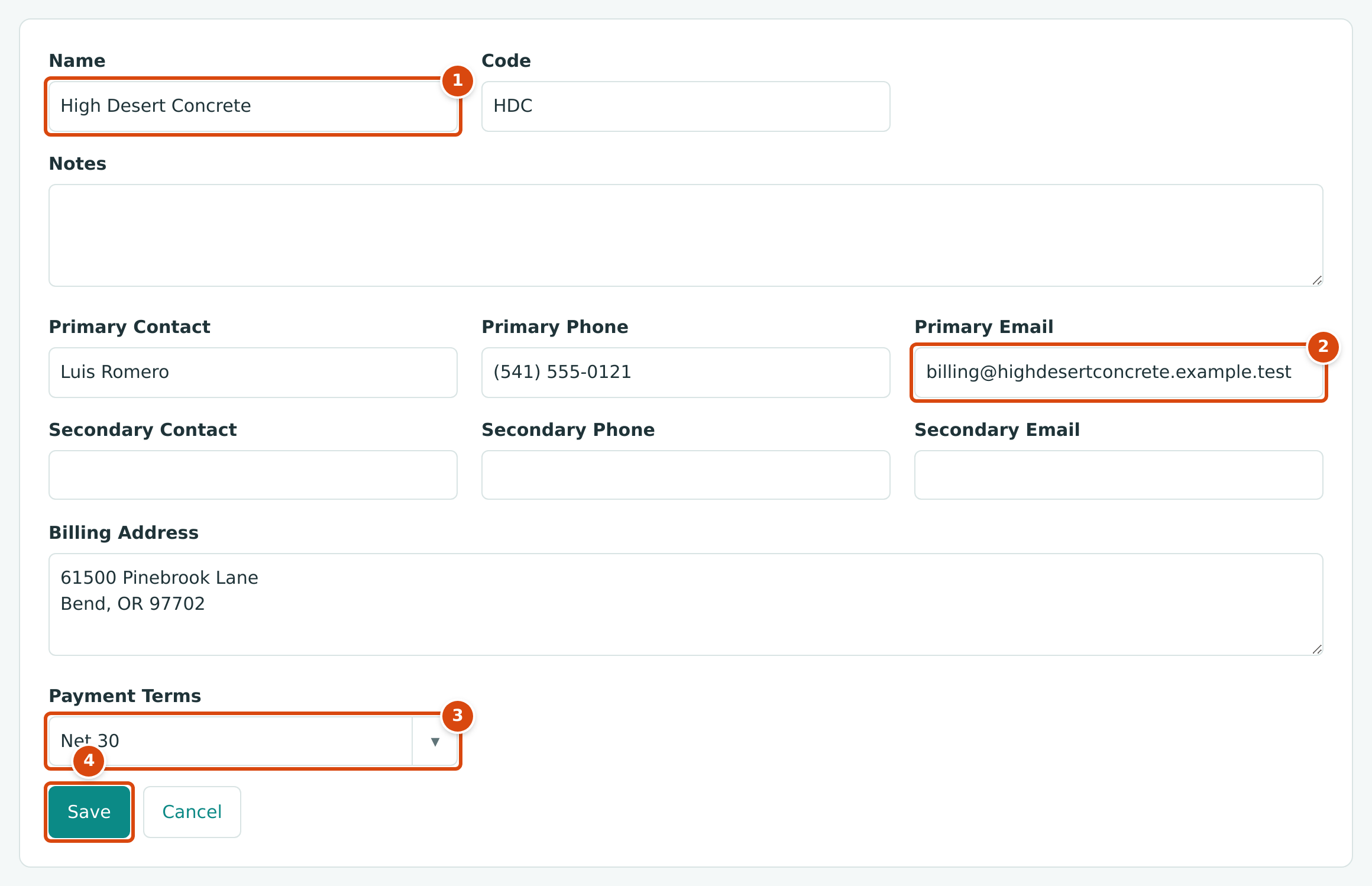
- Name: as it appears on the vendor's invoices.
- Primary Email: where you reach the vendor's accounts department.
- Payment Terms: kept on the vendor's record.
- Save creates the vendor.
See Managing Vendors.
Step 2: Issue the Commitments
A commitment is a subcontract or purchase order: an amount you have agreed to pay a vendor for part of the job. Entering it before the bills arrive shows the job's committed cost, and lets Structally check each bill against what was agreed.
- Go to Jobs & Costing → Commitments and click New Commitment.
- Choose the Kind, the Retainage percentage, the Job and the Vendor, set Date to 07/06/2026 and type a Title.
- Enter the line: Cost Code, Cost Type, Description and Amount.
- Click Save Commitment.
| Kind | Vendor | Title | Cost Code · Type | Amount | Retainage |
|---|---|---|---|---|---|
| Subcontract | High Desert Concrete | Foundations and slab | 03-300 · SUB | 60,000.00 | 10% |
| Purchase Order | Pine Valley Lumber | Framing lumber package | 06-100 · MAT | 48,000.00 | 0% |
| Subcontract | Brightway Electric | Electrical rough-in and finish | 26-100 · SUB | 132,000.00 | 10% |
| Subcontract | Summit Drywall | Drywall hang, tape and finish | 09-100 · SUB | 96,000.00 | 10% |
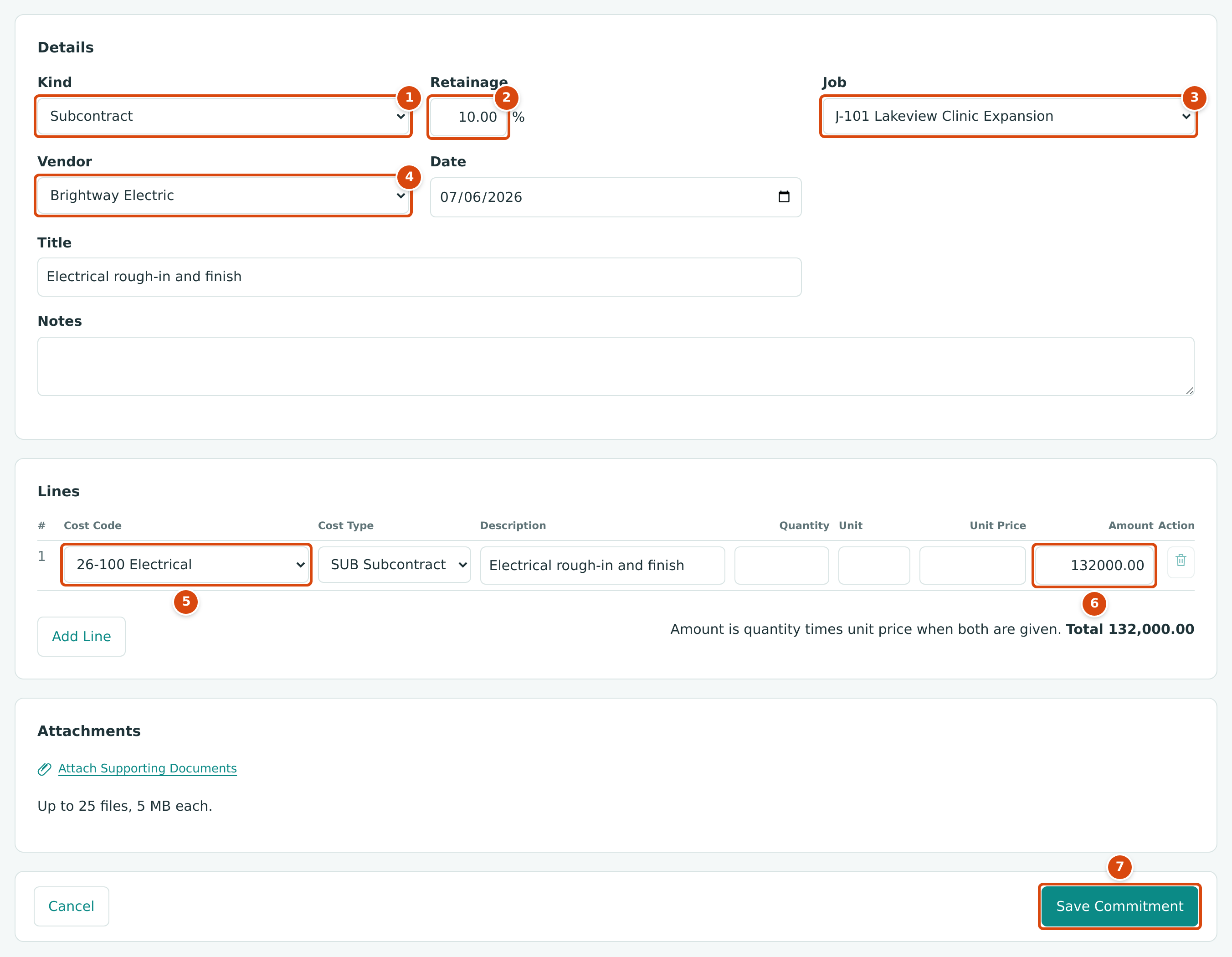
- Kind: Subcontract or Purchase Order.
- Retainage: the share of each bill held back until the work is accepted. It starts with the company default for the kind (10% for subcontracts, 0% for purchase orders).
- Job: the job the commitment is for.
- Vendor: the subcontractor or supplier.
- Cost Code and Cost Type of the line.
- Amount of the line.
- Save Commitment saves it as a draft.
Structally numbers them as it saves: purchase orders PO-2026-000001, and subcontracts SC-2026-000001 (concrete), SC-2026-000002 (electrical) and SC-2026-000003 (drywall).
A saved commitment is a Draft. Before bills can be matched to it, approve it and then issue it. On each commitment page:
- Click Approve and confirm.
- Click Issue and confirm. Issuing sends the commitment to the vendor in effect and freezes its lines; later changes go through amendments.
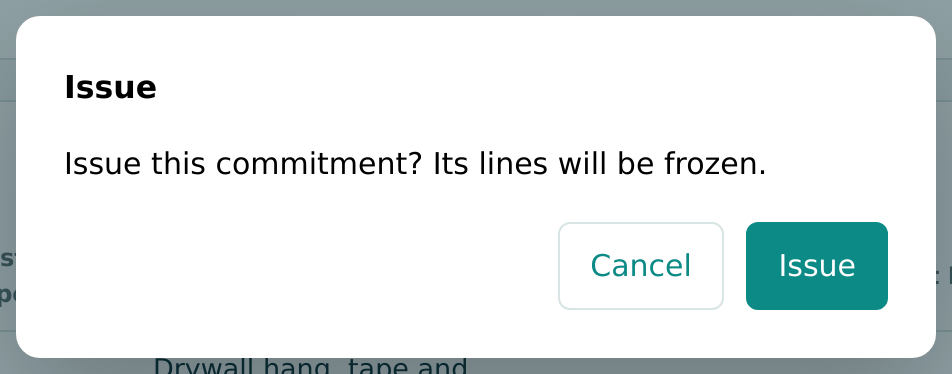
Once issued, the four commitments count as Open Commitments on the J-101 budget page: together they commit $336,000.00 of the $360,000.00 budget before any cost has been billed.
See Commitments.
Step 3: Enter July's Bills
At the end of July the vendors' invoices arrive. Enter each as a bill (see Entering a Bill for the full form):
| Vendor | Date | Reference | Matched To | Amount | Retainage | Amount Due |
|---|---|---|---|---|---|---|
| Pine Valley Lumber | 07/24/2026 | PVL-88412 | PO-2026-000001 | 16,000.00 | 0.00 | 16,000.00 |
| High Desert Concrete | 07/31/2026 | HDC-2207 | SC-2026-000001 | 45,000.00 | 4,500.00 | 40,500.00 |
| Brightway Electric | 07/31/2026 | BE-1031 | SC-2026-000002 | 33,000.00 | 3,300.00 | 29,700.00 |
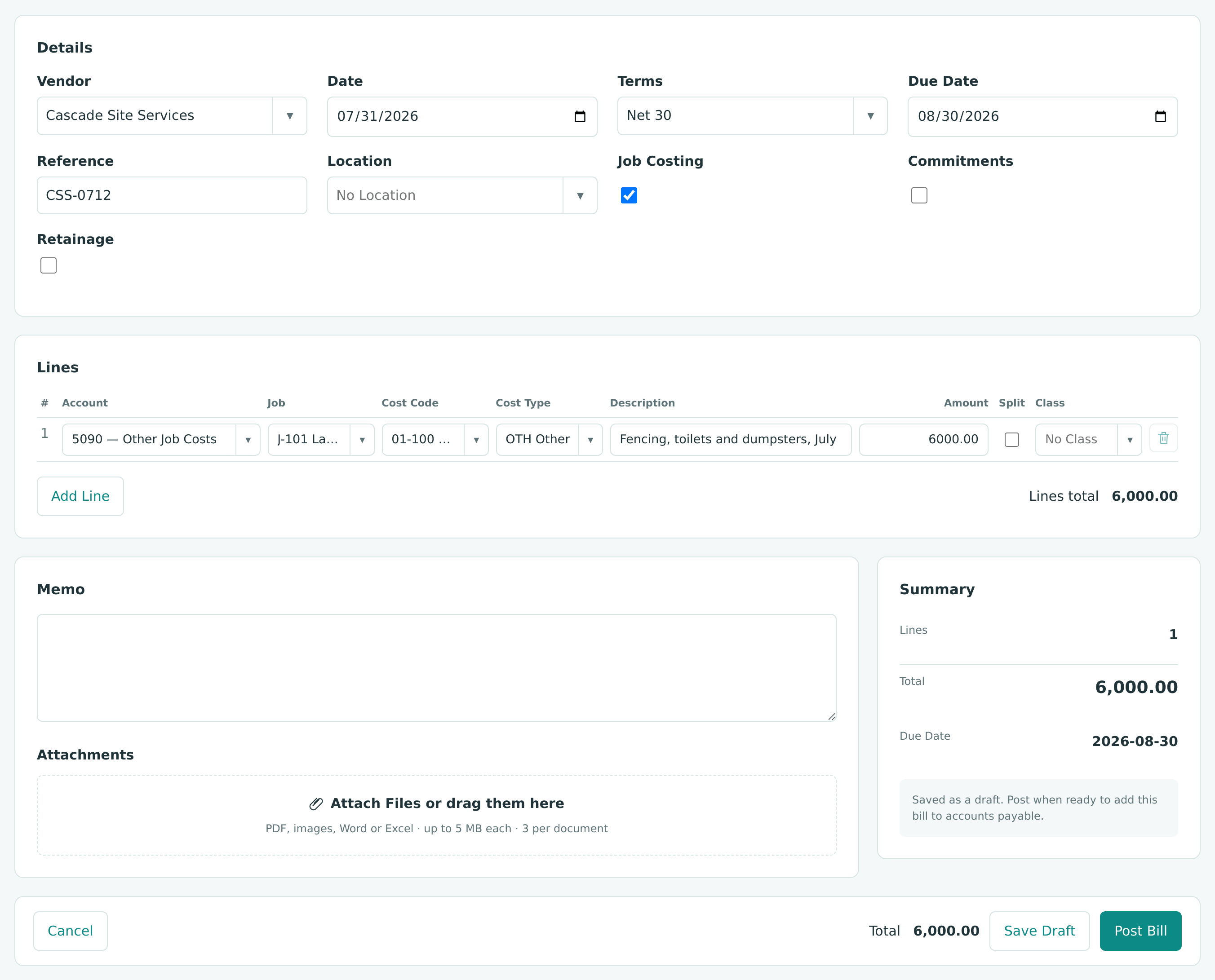
| Cascade Site Services | 07/31/2026 | CSS-0712 | none | 6,000.00 | 0.00 | 6,000.00 |
| Total | 100,000.00 | 7,800.00 | 92,200.00 |
For a vendor with an issued commitment, choosing the vendor turns on Job Costing and Commitments. Then:
- Choose the line's Account: 5030 — Subcontractors for the subcontracts, 5040 — Materials for the lumber. Matching a commitment does not choose the account for you.
- In Commitment, choose the commitment line. Structally fills the job, cost code, cost type and the retainage percentage.
- Replace the proposed amount with the invoice amount and click Post Bill.
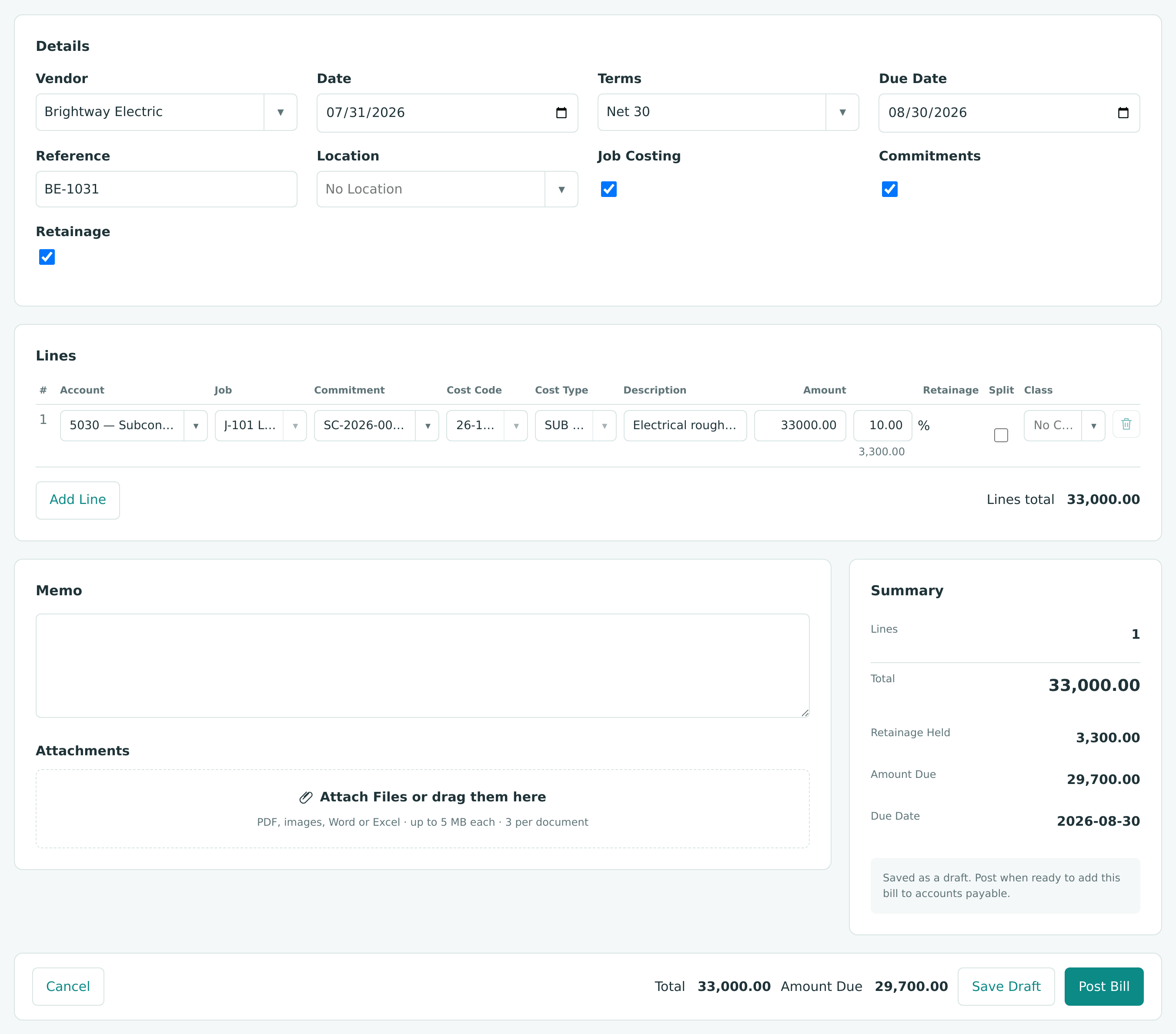
The Summary shows what happens to the $33,000.00: all of it is job cost, $3,300.00 is retainage held, and $29,700.00 is due now.
Cascade Site Services works without a commitment. Tick Job Costing, and code the line to 5090 — Other Job Costs, job J-101, cost code 01-100 and cost type OTH:
Structally numbers the bills as they post: BILL-2026-000001 (Cascade), BILL-2026-000002 (Pine Valley), BILL-2026-000003 (High Desert) and BILL-2026-000004 (Brightway).
The July Bills in the Books
Four entries, one per bill, shown here combined. The whole $100,000.00 is job cost in July; $7,800.00 of it will be paid only when the retainage is released (Exercise H).
Entered a bill twice?
In this exercise the Cascade bill was posted twice by mistake, as BILL-2026-000001 and BILL-2026-000005. Exercise G shows how the duplicate was voided.
Step 4: Pay the First Bills
On August 10, Cedar Ridge Training pays three bills by check from Operating Checking:
| Check | Vendor | Bill | Paid |
|---|---|---|---|
| 1001 | Pine Valley Lumber | BILL-2026-000002 | 16,000.00 |
| 1002 | Cascade Site Services | BILL-2026-000001 | 6,000.00 |
| 1003 | High Desert Concrete | BILL-2026-000003 | 40,500.00 |
For each payment:
- Go to Vendors & Bills → Payments and click Pay Bills.
- Choose the Vendor and click Load Open Items.
- Enter the Date (08/10/2026), Funds Account (1010 - Operating Checking), Amount, Method (Check) and Reference (the check number).
- In Allocate, enter the amount for each bill you are paying.
- Click Pay Bills.
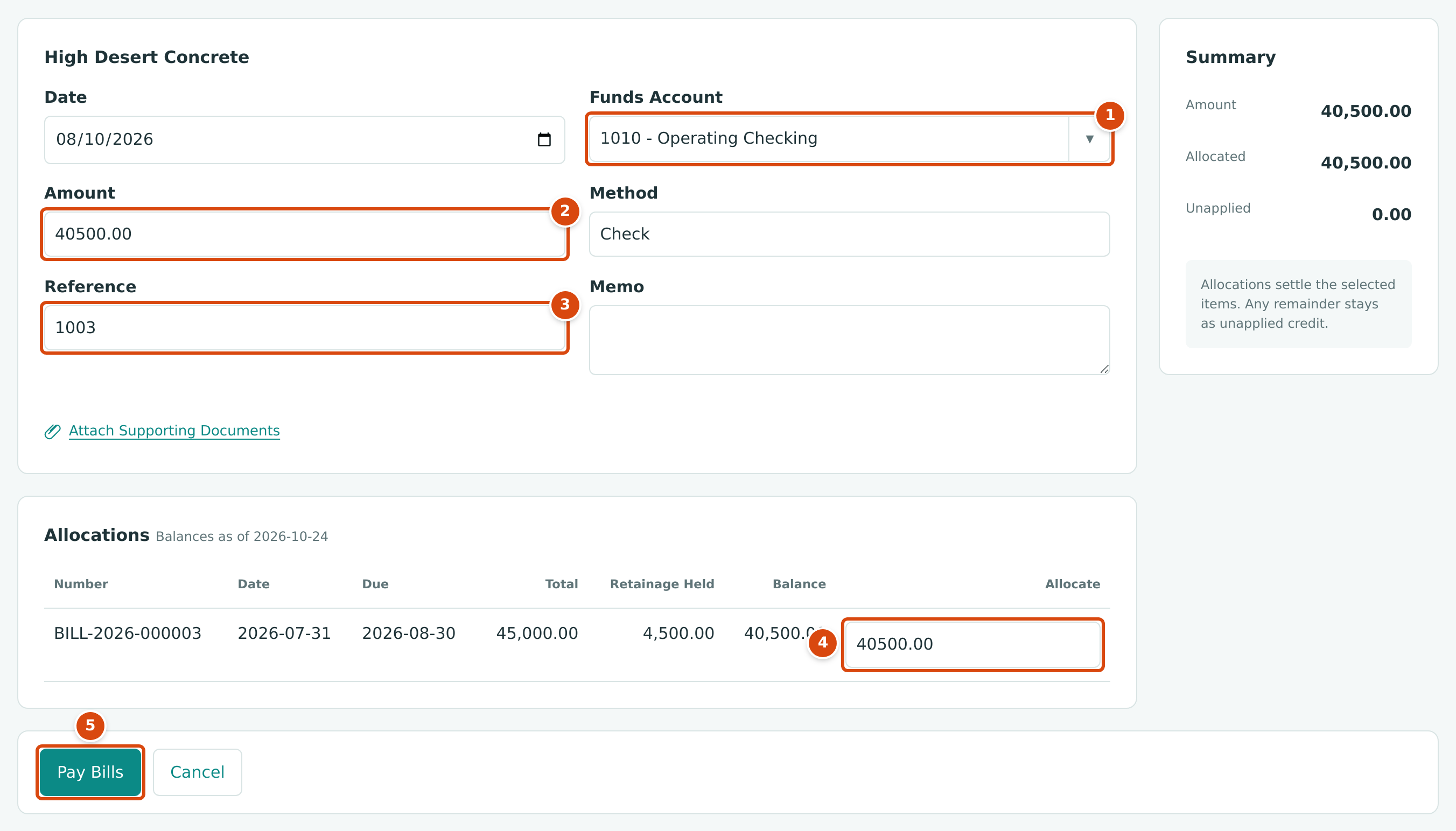
- Funds Account: the bank account the check is drawn on.
- Amount of the check.
- Reference: the check number.
- Allocate: how much of the payment settles this bill. The list shows the bill's Total, Retainage Held and Balance; you pay the balance, not the retainage.
- Pay Bills posts the payment.
The Payments in the Books
| Account | Debit | Credit |
|---|---|---|
| 2010 Accounts Payable | 62,500.00 | |
| 1010 Operating Checking | 62,500.00 |
Three entries (PAY-2026-000001 to PAY-2026-000003), combined here. Paying a bill never touches job cost again: the cost was recorded when the bill posted.
See Paying Bills.
Where the Costs Show
| Place | What You See After July |
|---|---|
| J-101 Budget | Actual to Date 100,000.00 by cost code; Open Commitments reduced by what was billed |
| Each commitment | Billed to Date and Remaining, for example SC-2026-000002 billed 33,000.00, remaining 99,000.00 |
| Vendors & Bills → Bills | The Brightway bill Open with 29,700.00 unpaid; the others Paid after August 10 |
| Reports → AP Aging | What is still owed, by vendor and age |
Next: D: Billing the Customer.