H: The Complete Project Lifecycle
The Lakeview clinic expansion is finished in October. This exercise takes J-101 from its last billing to a closed job with every balance settled:
- bill the final pay application;
- release the retainage held on both sides;
- collect from Lakeview and pay every subcontractor and supplier;
- close the commitments and the job;
- bring the forecast and the WIP schedule to the job's final figures;
- read the project's results.
Before You Begin
October Before Closeout
| Date | Transaction | Amount |
|---|---|---|
| October 10 | Checks 1010 to 1013: September's bills, less retainage | 90,000.00 |
| October 15 | Lakeview pays invoice 3 (RCPT-2026-000003) | 131,400.00 |
| October 20 | Bills from Brightway Electric (33,000.00), Summit Drywall (33,000.00) and Cascade Site Services (6,000.00), with 6,600.00 retainage held | 72,000.00 |
The October bills bring the job's cost to $387,000.00, exactly the revised budget.
Step 1: Bill the Final Application
On October 20, pay application 4 bills the rest of the contract, as in Exercise D: 8,000.00 of general conditions, 40,000.00 of drywall, 32,000.00 of electrical and 10,000.00 on the CO-2 line. Accepting it posts invoice INV-2026-000004.
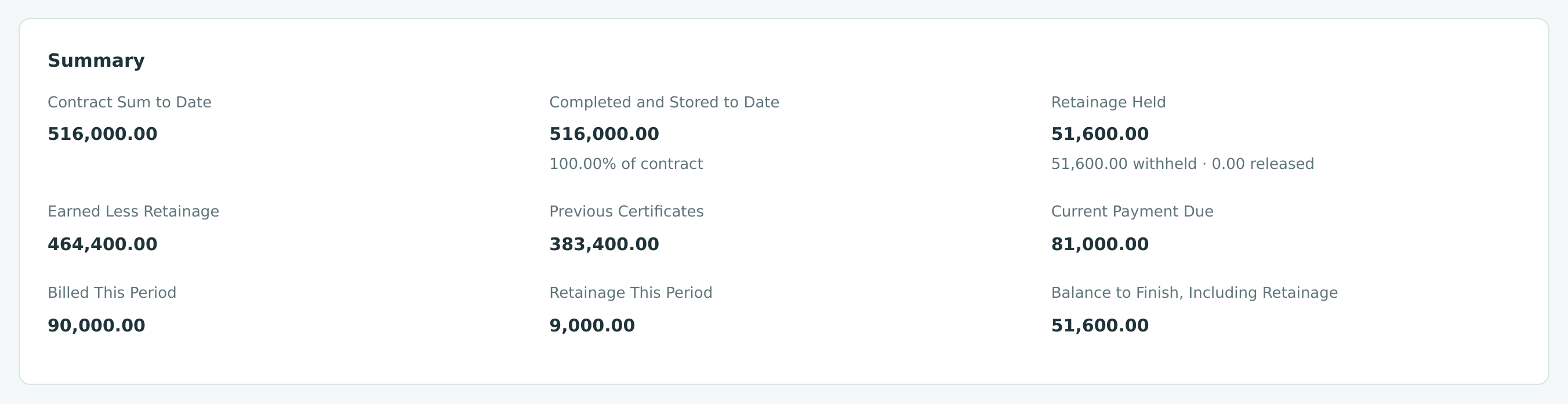
The whole contract, $516,000.00, is now billed. Lakeview still owes the $81,000.00 due on this application and the $51,600.00 of retainage held back across all four. The Balance to Finish, Including Retainage is exactly that retainage.
Step 2: Release the Retainage
At substantial completion Lakeview agrees to pay the retainage, and Cedar Ridge Training releases what it held from its subcontractors. Retainage is released with a retainage release, which turns retainage held into an ordinary amount due.
Bill the Customer's Retainage
- Open Lakeview Medical Partners (Customers & Invoices → Customers) and click Release Retainage. The New Retainage Release page opens with the customer and job J-101.
- Enter Date 10/22/2026, check the Terms (Net 15) and Due Date (11/06/2026), and enter a Reference and Memo.
- Under Retainage Held, every invoice line that holds retainage is listed, twenty in all. Enter the full Held amount in Release on each.
- Check that the Summary shows Release Total 51,600.00 and Held After 0.00, and click Post Release.
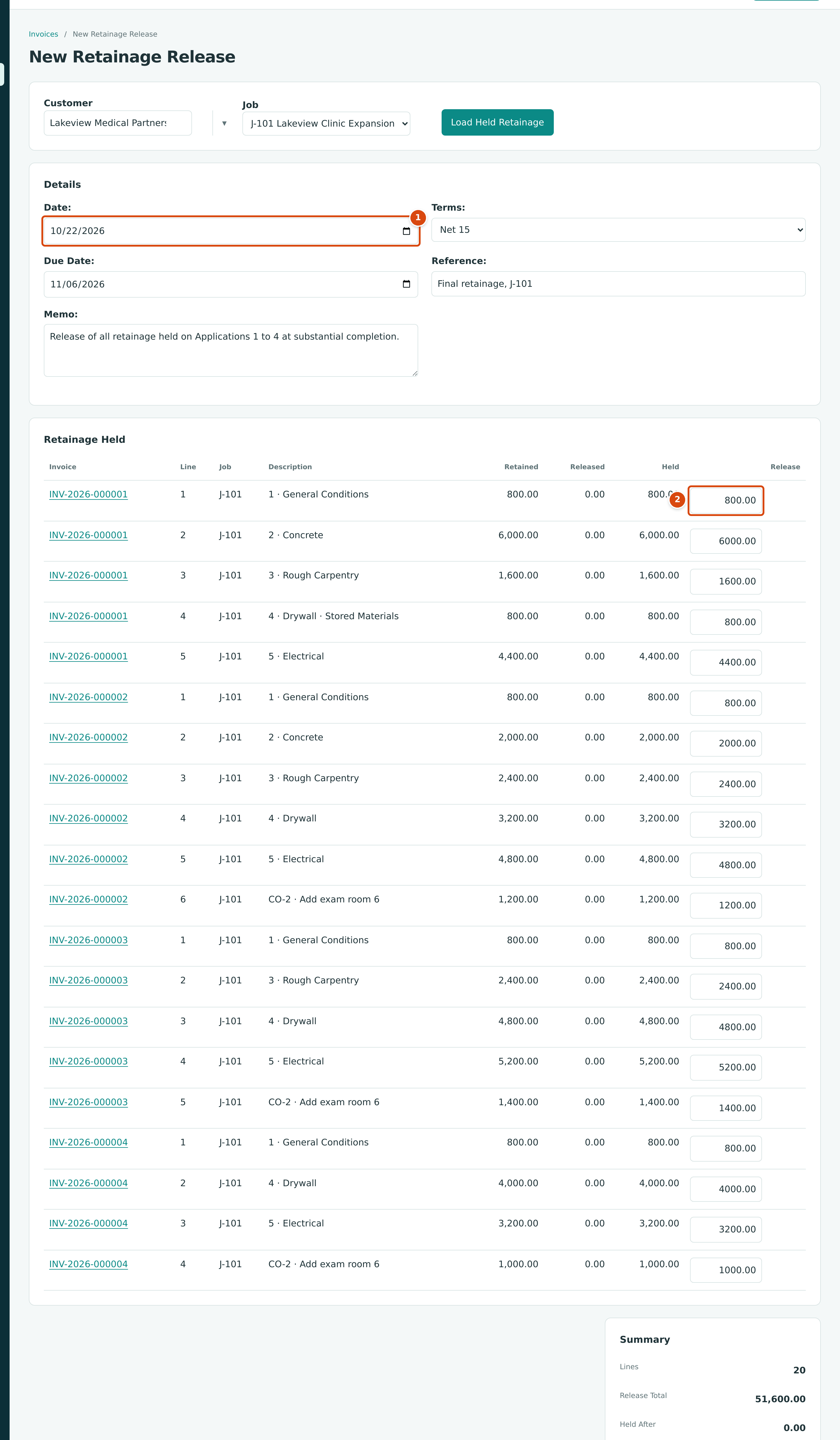
- Date: the date of the release invoice.
- Release: the amount to bill on each line, here everything held.
The release posts as invoice INV-2026-000005 for $51,600.00.
Release the Subcontractors' Retainage
- Open Brightway Electric (Vendors & Bills → Vendors) and click Release Retainage.
- Enter Date 10/22/2026, a Reference, and the full Held amount in Release on each of the four bills.
- Click Post Release.
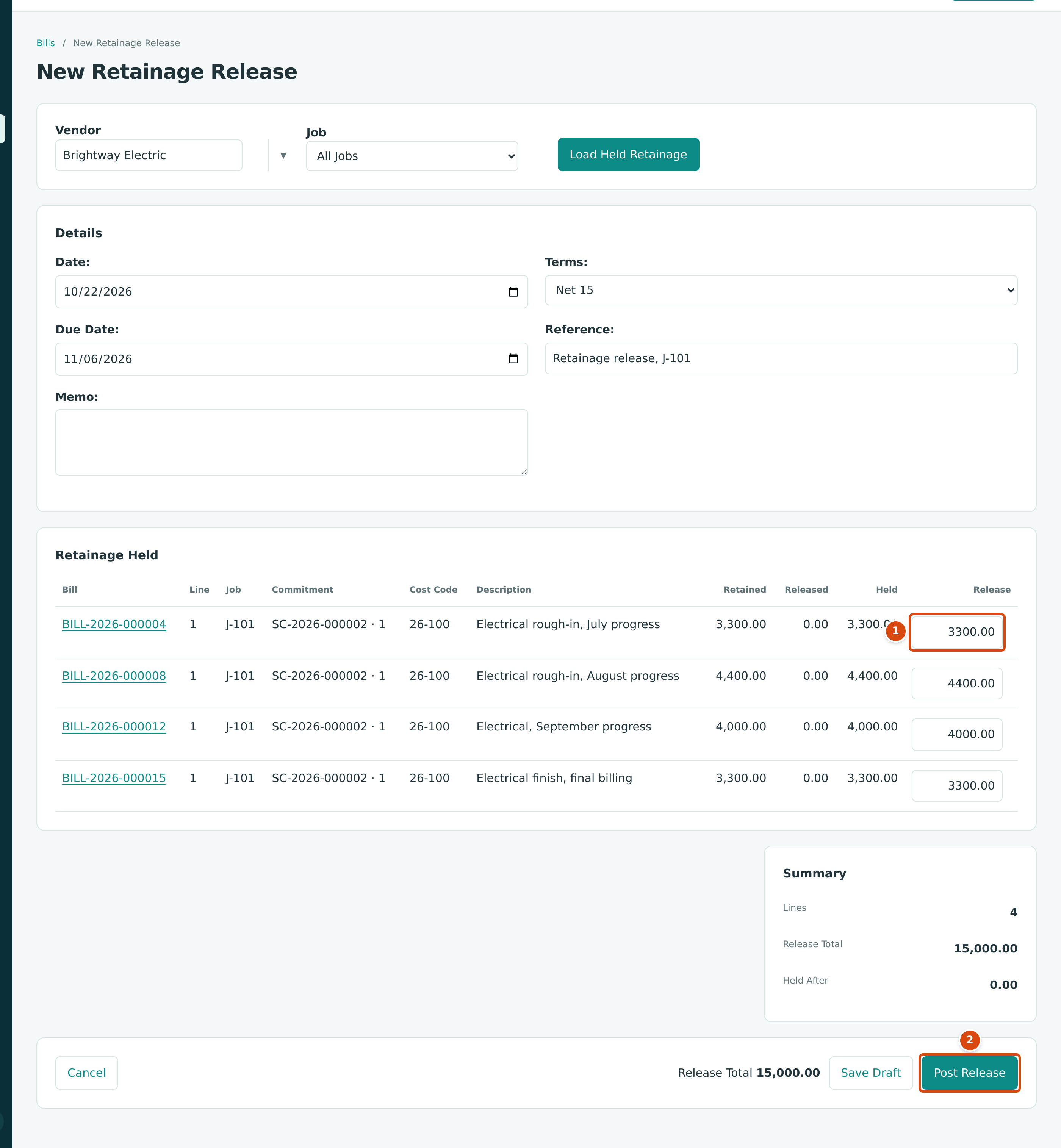
- Release: the amount released on each bill.
- Post Release posts the release as a bill.
Repeat for High Desert Concrete and Summit Drywall:
| Vendor | Retainage Held | Release Bill |
|---|---|---|
| Brightway Electric | 15,000.00 | BILL-2026-000018 |
| High Desert Concrete | 6,000.00 | BILL-2026-000019 |
| Summit Drywall | 10,500.00 | BILL-2026-000020 |
| Total | 31,500.00 |
Pine Valley Lumber and Cascade Site Services had no retainage.
The Releases
| Entry | Account | Debit | Credit |
|---|---|---|---|
| INV-2026-000005 | 1100 Accounts Receivable | 51,600.00 | |
| 1110 Retainage Receivable | 51,600.00 | ||
| BILL-2026-000018 to 000020 | 2020 Retainage Payable | 31,500.00 | |
| 2010 Accounts Payable | 31,500.00 |
No revenue or cost is touched: they were recorded when the original invoices and bills posted. A release only moves the amount from "held" to "due now".
See Releasing Retainage.
Step 3: Collect and Pay Everything
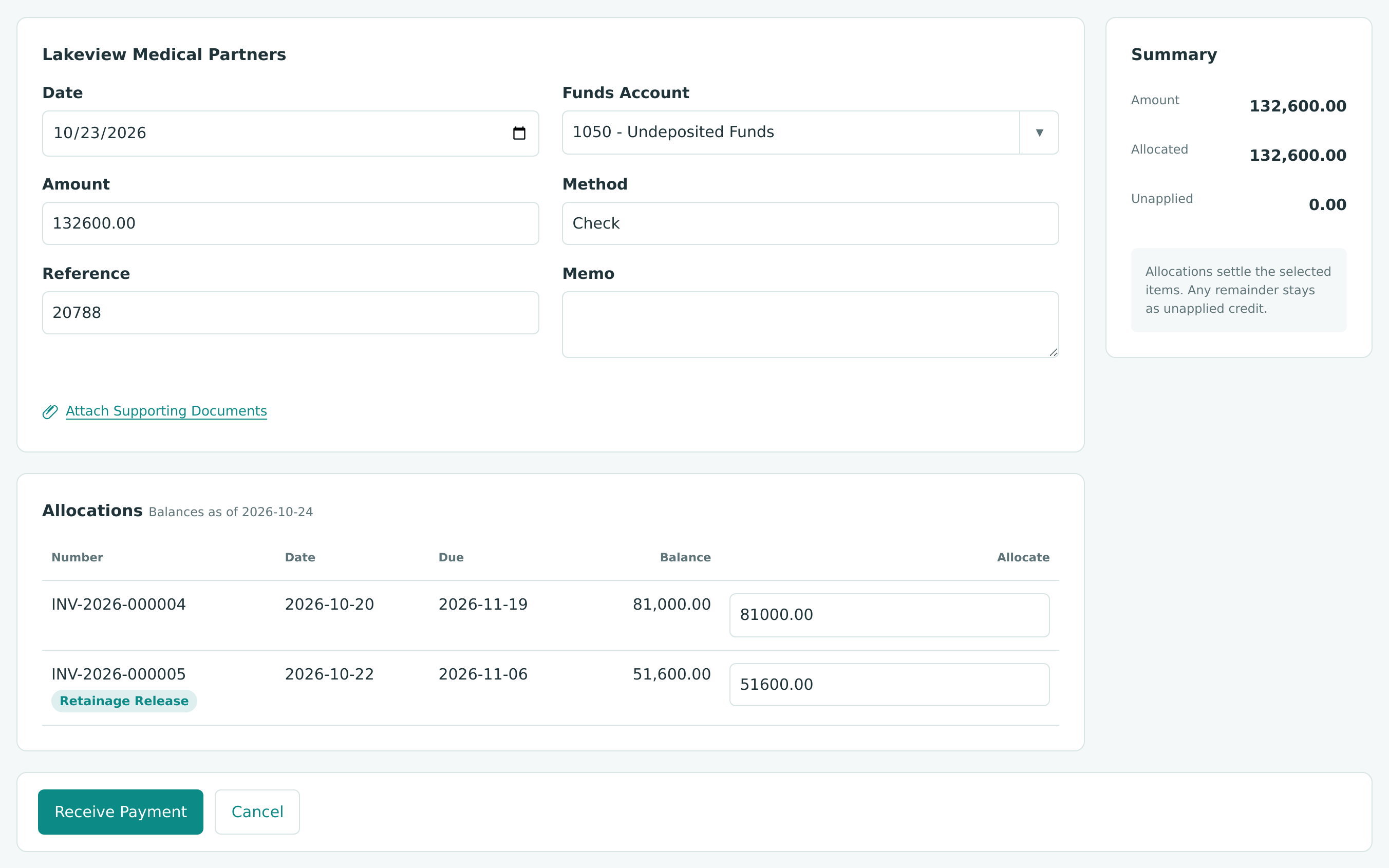
On October 23, Lakeview pays the final invoice and the retainage with one check, 20788 for $132,600.00. Record it with Receive Payment as in Exercise D, allocate 81,000.00 to INV-2026-000004 and 51,600.00 to INV-2026-000005, and deposit it the same day (DEP-2026-000004).
The same day, Cedar Ridge Training pays every vendor in full with Pay Bills:
| Check | Vendor | Paid | What It Settles |
|---|---|---|---|
| 1014 | Brightway Electric | 44,700.00 | October bill 29,700.00 + retainage 15,000.00 |
| 1015 | Summit Drywall | 40,200.00 | October bill 29,700.00 + retainage 10,500.00 |
| 1016 | High Desert Concrete | 6,000.00 | Retainage |
| 1017 | Cascade Site Services | 6,000.00 | October bill |
| Total | 96,900.00 |
Accounts receivable, accounts payable and both retainage accounts are now zero.
Step 4: Close the Commitments and the Job
Close Each Commitment
Every commitment is fully billed. Close each one so it no longer counts as open:
- Open the commitment and click Close Commitment.
- Enter the Unused Amount: the part of the commitment that will never be billed. Here it is 0.00.
- Type a Reason and click Close Commitment.
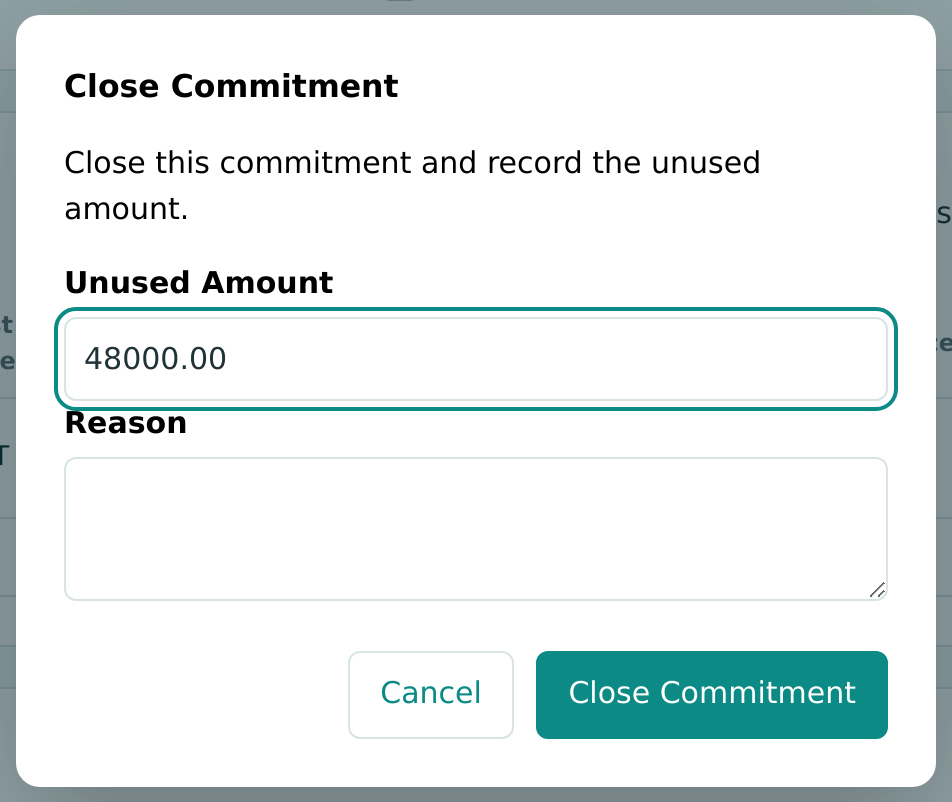
Check the Unused Amount
The window starts with the commitment's whole revised amount in Unused Amount (48,000.00 for the lumber purchase order), even when the commitment is fully billed. Replace it with what is really unused, here 0.00, before you close. This is recorded as a product gap.
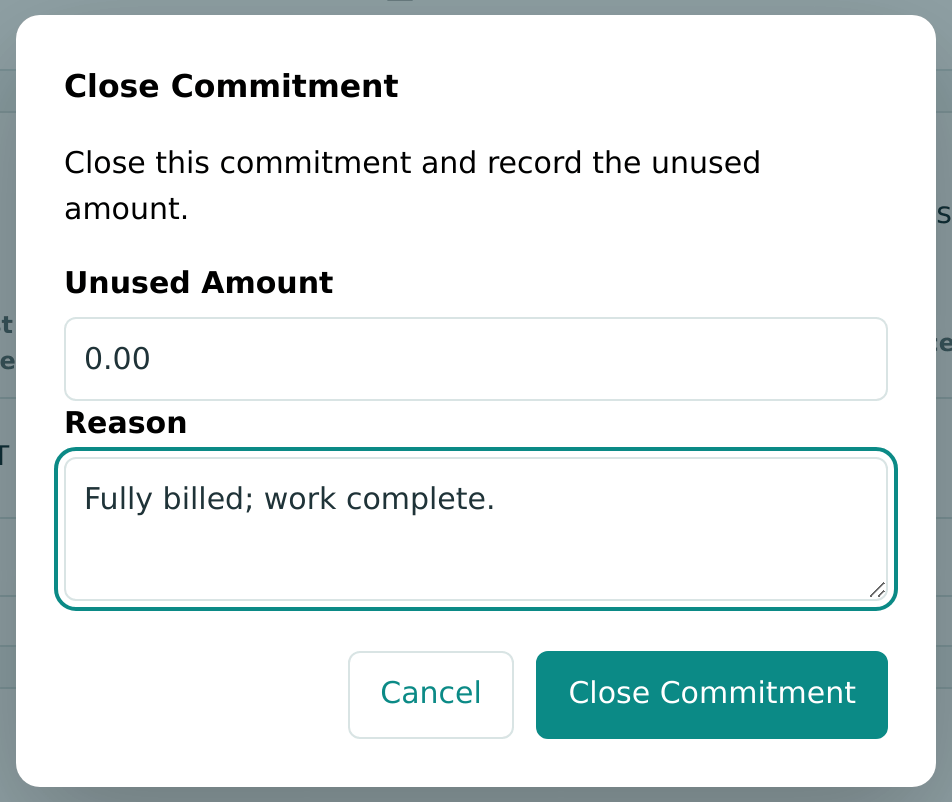
See Commitments.
Close the Job
- Open J-101 and choose Closed in Status.
- Confirm with Close.
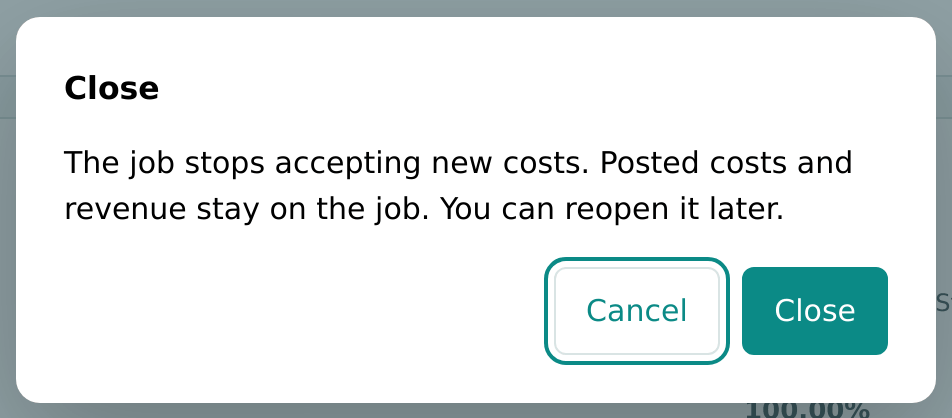
J-101 is Closed on October 24, 2026. Its page sums up the project: job to date cost 387,000.00, revenue 516,000.00, posted margin 129,000.00, and every commitment, receivable and retainage balance settled.
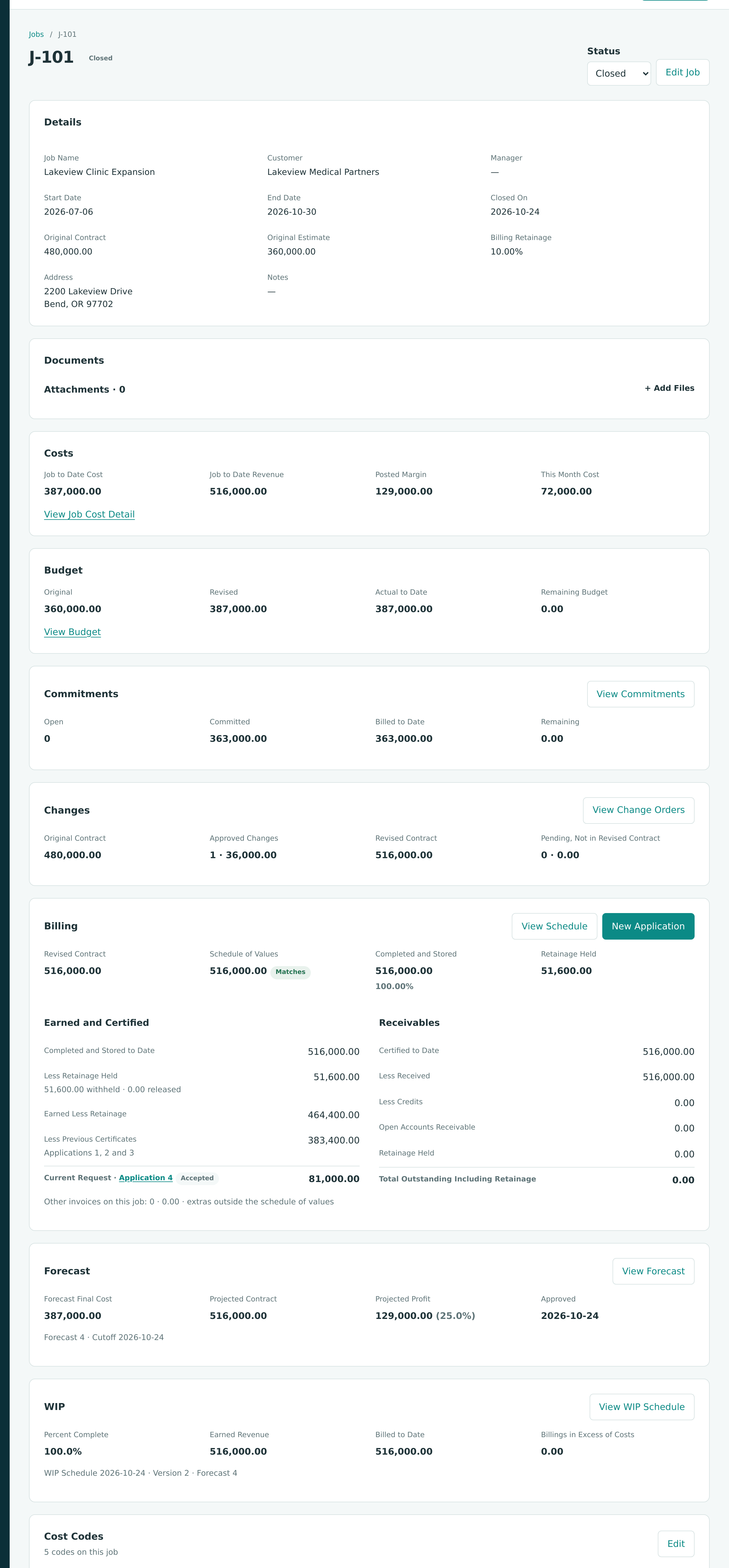
Two Retainage Figures on the Billing Card
On the closed job, the Billing card still shows Retainage Held 51,600.00 with 0.00 released, while its Receivables column shows Retainage Held 0.00 and nothing outstanding. The receivables column is right: the retainage was billed and paid through the release invoice. This is recorded as a product gap.
See Closing and Reopening Jobs.
Step 5: Bring the Forecast and WIP to the Final Figures
The September WIP entry left $10,827.59 in Billings in Excess of Costs. Now that the job is finished, the final WIP schedule must bring it to zero: 100% complete, all $516,000.00 earned.
What Went Wrong the First Time
The first closeout forecasts (Forecasts 2 and 3, cutoff October 24) were created from Forecast 1, so they carried its $391,500.00 final cost forward. The $4,500.00 drywall allowance, no longer needed, now sat in Still to Buy on 09-100 Drywall. Forecast 3 set that line's Adjustment to 0.00, which changed nothing:
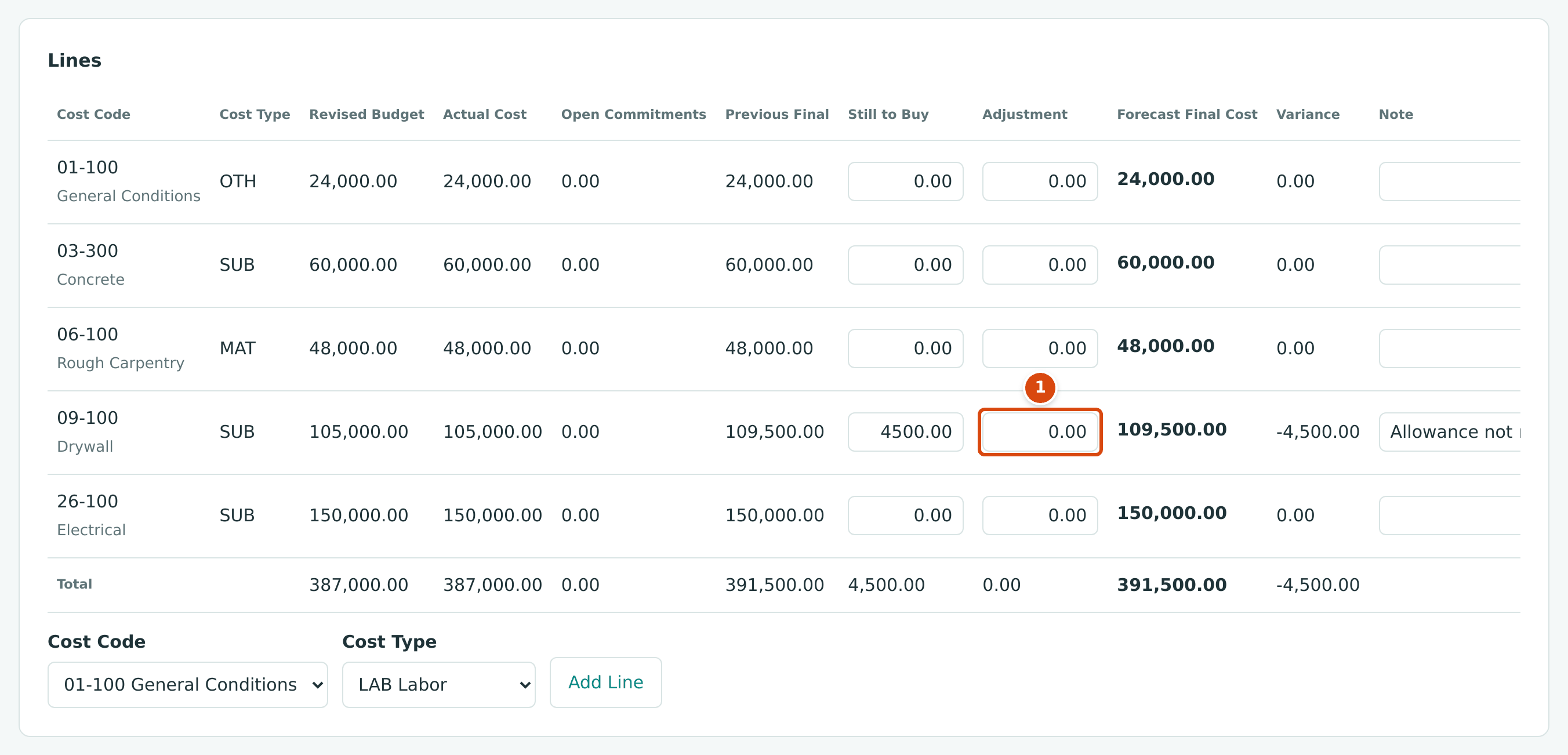
- Adjustment 0.00: the allowance is no longer here.
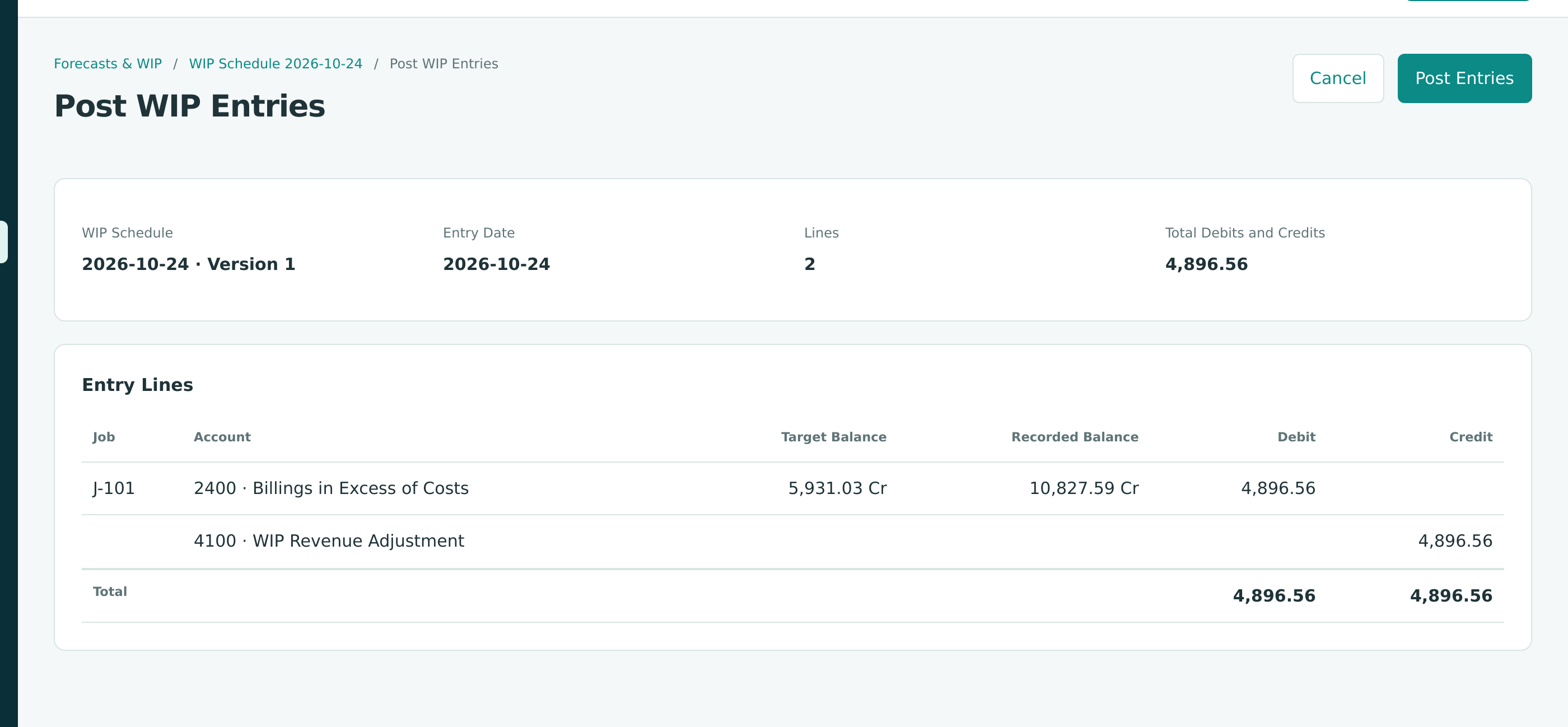
The WIP schedule of October 24 (Version 1) used that forecast: 387,000.00 ÷ 391,500.00 = 98.9% complete, earned revenue 510,068.97, Billings in Excess of Costs 5,931.03. Posting it reduced 2400 from 10,827.59 to 5,931.03:
The Correction
- Create Forecast 4 for J-101 with Cutoff 10/24/2026. On 09-100 Drywall, set Still to Buy to 0.00 and note why. Every line's Forecast Final Cost now equals its Actual Cost, and the total is 387,000.00. Approve it.
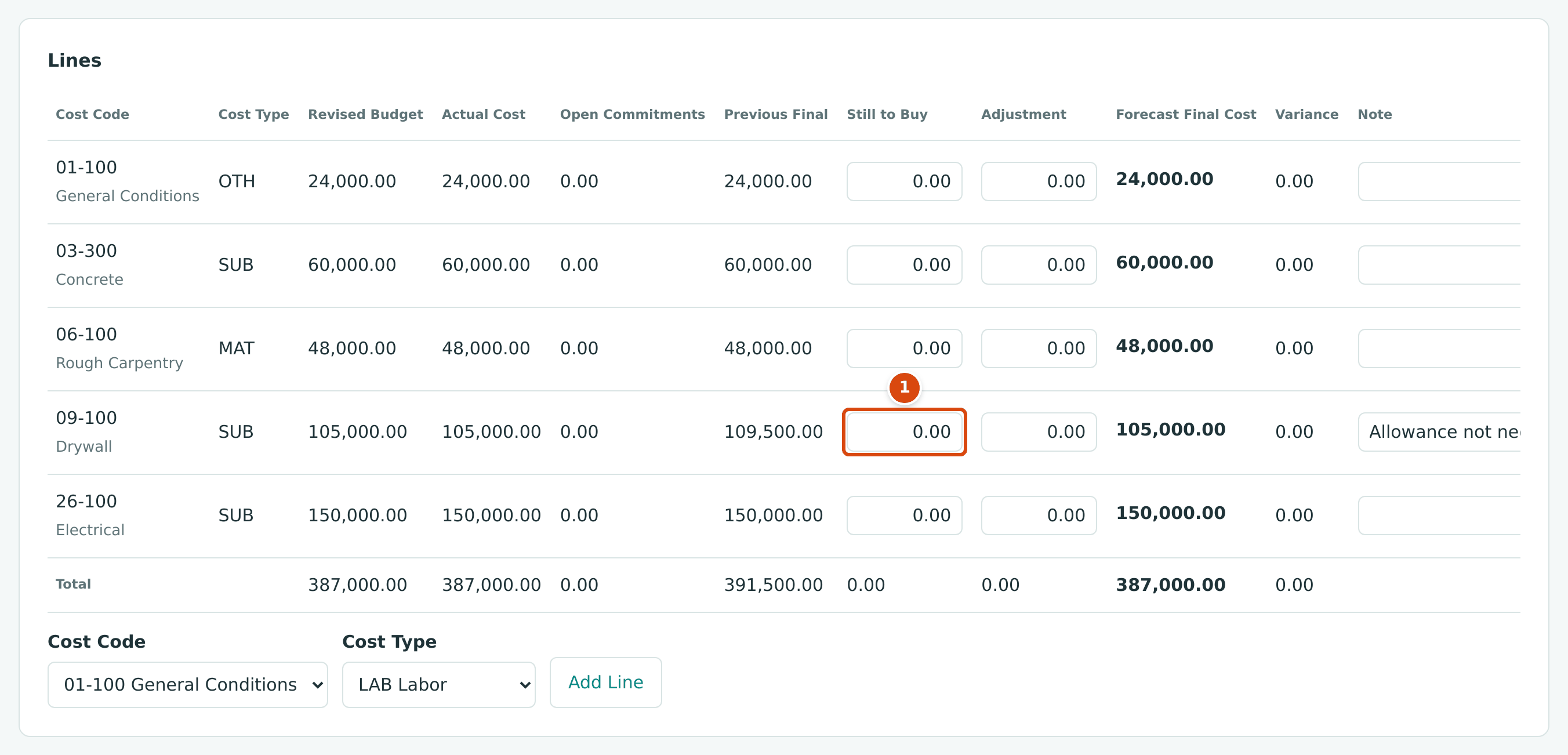
- Still to Buy 0.00 on the drywall line.
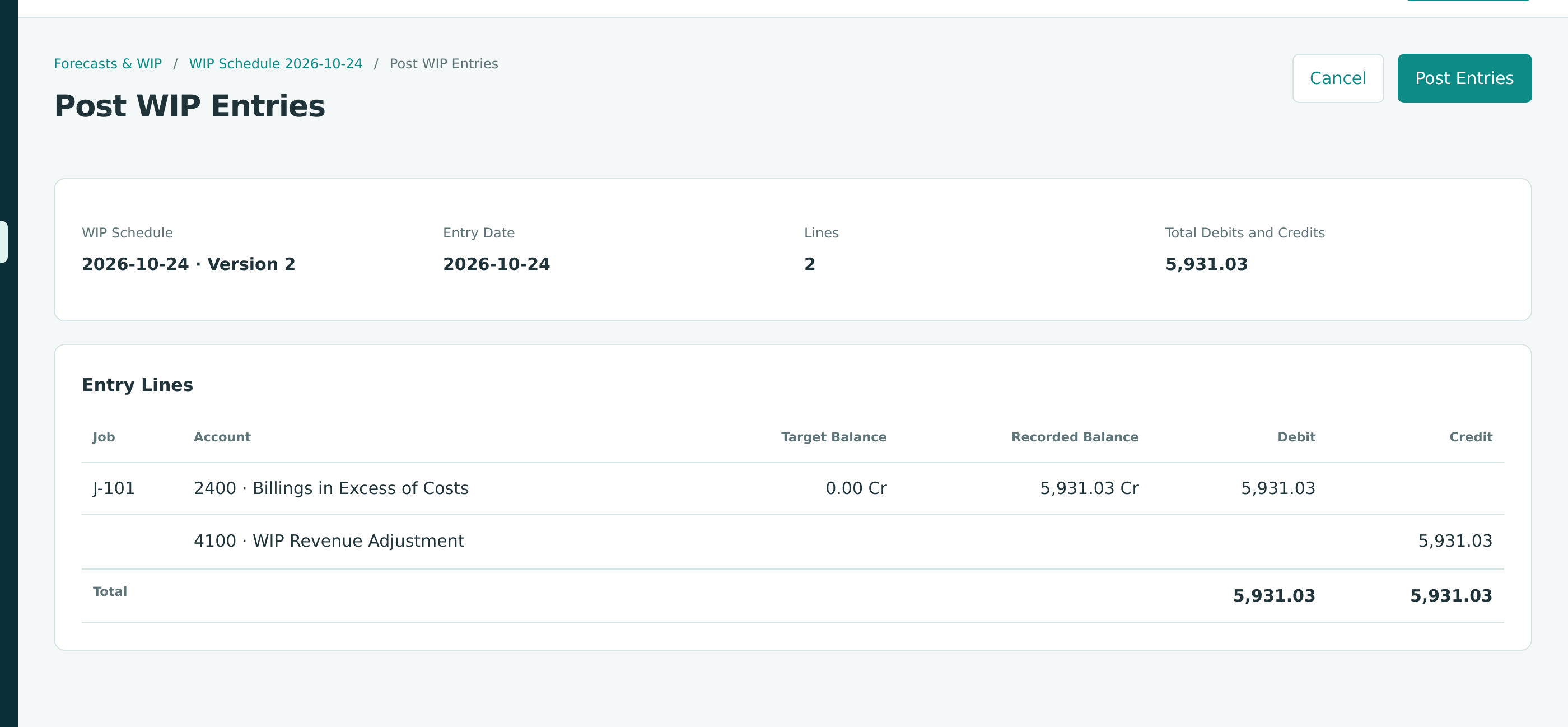
- Open the October 24 WIP schedule and click New Version (see Correcting a Schedule With a New Version). Version 2 reads the figures again and uses Forecast 4: 100% complete, earned revenue 516,000.00, Billings in Excess of Costs 0.00.
- Approve Version 2 and click Post WIP Entries. Structally posts only the difference from what Version 1 posted:
Version 1 becomes Replaced; its entry stays on record.
The WIP Entries Over the Project
| Date | Schedule | 2400 Billings in Excess of Costs | 4100 WIP Revenue Adjustment |
|---|---|---|---|
| 09/30 | September, Version 1 | Credit 10,827.59 | Debit 10,827.59 |
| 10/24 | October, Version 1 | Debit 4,896.56 | Credit 4,896.56 |
| 10/24 | October, Version 2 | Debit 5,931.03 | Credit 5,931.03 |
| Balance | 0.00 | 0.00 |
Over the life of a finished job the WIP adjustments add up to zero: revenue ends at what was billed, $516,000.00.
Closing Out Forecasts
A new forecast starts from the last one. On a finished job, set Still to Buy and Adjustment to 0.00 on every line, and check that the total Forecast Final Cost equals the Actual Cost before you prepare the closeout WIP schedule. See Closing Out a Finished Job.
Step 6: Read the Results
Run the Profit and Loss from 07/01/2026 to 10/24/2026:
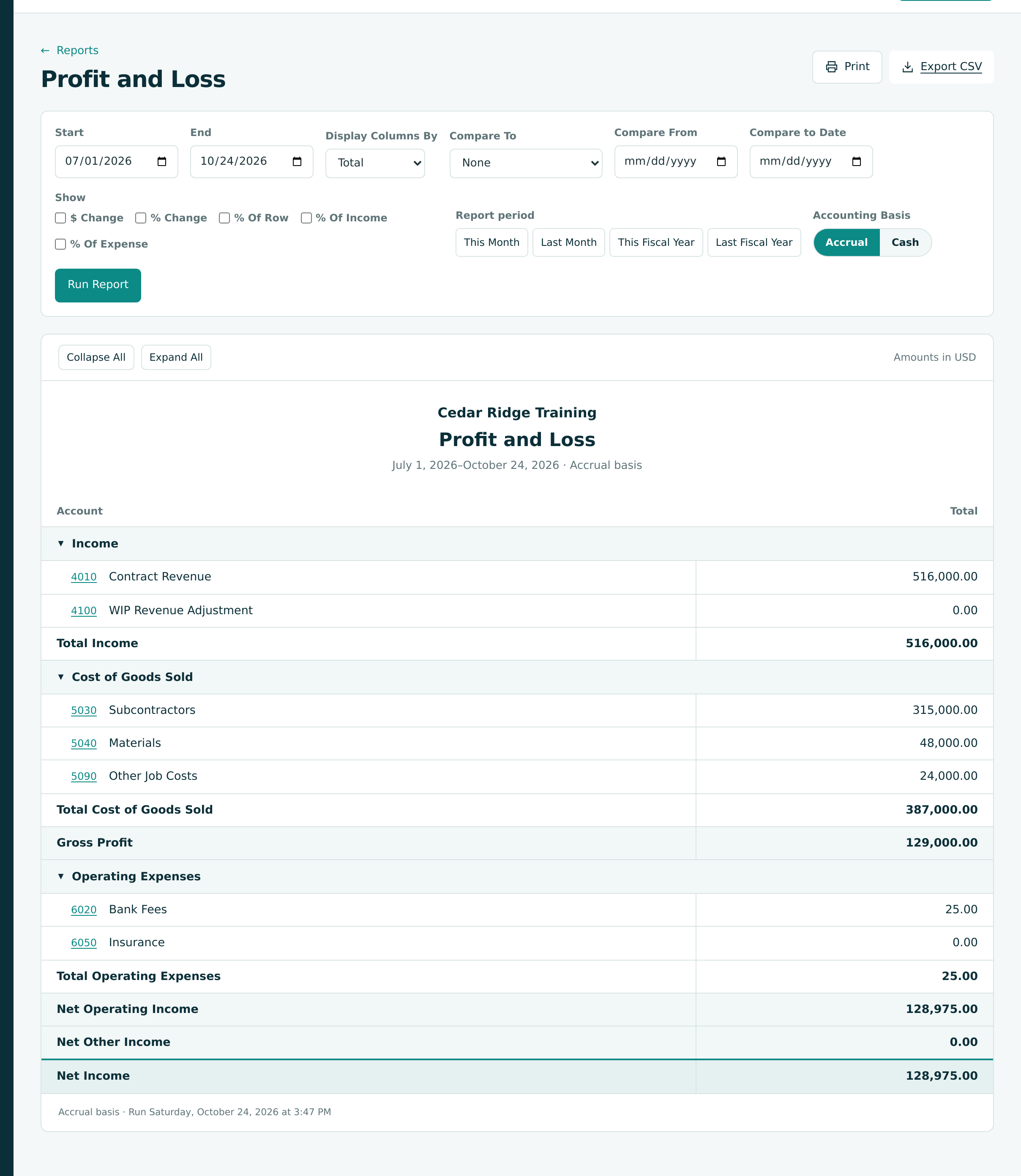
| Line | Amount | Note |
|---|---|---|
| 4010 Contract Revenue | 516,000.00 | The revised contract, all billed |
| 4100 WIP Revenue Adjustment | 0.00 | The adjustments net to zero |
| 5030 Subcontractors | 315,000.00 | Concrete 60,000.00, drywall 105,000.00, electrical 150,000.00 |
| 5040 Materials | 48,000.00 | The lumber purchase order |
| 5090 Other Job Costs | 24,000.00 | Four months of site services |
| Gross Profit | 129,000.00 | 25.0% of revenue, as bid |
| 6020 Bank Fees | 25.00 | September's service charge |
| 6050 Insurance | 0.00 | The premium is prepaid (Exercise G) |
| Net Income | 128,975.00 |
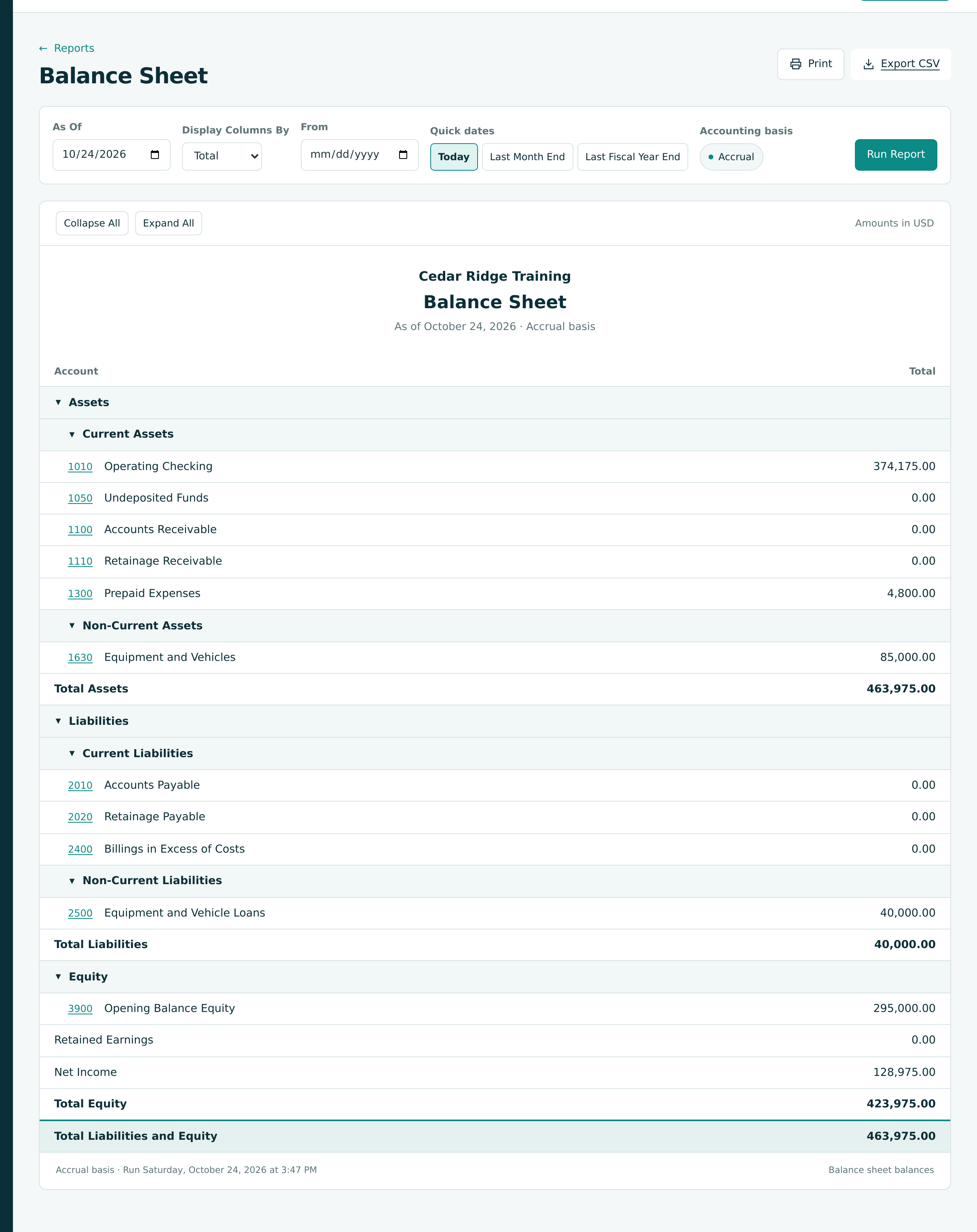
The Balance Sheet as of 10/24/2026 is now simple:
| Proof of Cash | Amount |
|---|---|
| Opening balance, July 1 | 250,000.00 |
| Received from Lakeview (four receipts) | +516,000.00 |
| Paid to vendors (16 checks) | −387,000.00 |
| Insurance premium, check 1009 | −4,800.00 |
| Bank fee | −25.00 |
| Operating Checking, October 24 | 374,175.00 |
The company started with $295,000.00 of equity and ends with $423,975.00: the opening equity plus the year's net income of $128,975.00.
The Home page shows the same company at a glance:
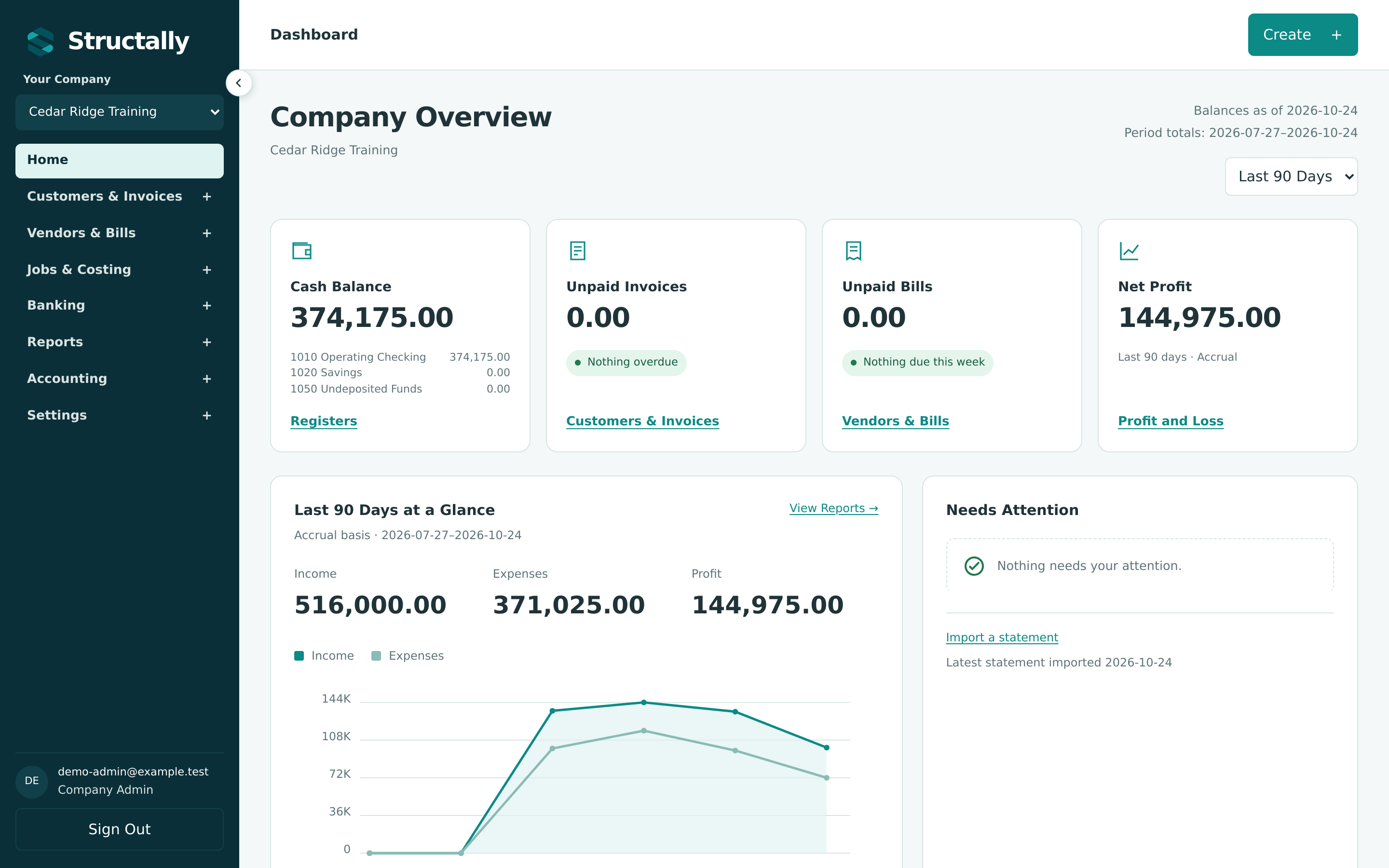
Its Net Profit of $144,975.00 is for the Last 90 Days, July 27 to October 24, so it leaves out the $16,000.00 lumber bill of July 24: $128,975.00 + $16,000.00 = $144,975.00. Choose a different period in the list to compare it with the Profit and Loss.
The Project at a Glance
| Measure | Bid (July) | Final (October) |
|---|---|---|
| Contract | 480,000.00 | 516,000.00 (with CO-2) |
| Cost | 360,000.00 | 387,000.00 |
| Gross profit | 120,000.00 (25.0%) | 129,000.00 (25.0%) |
| Pay applications | 4, plus one retainage release invoice | |
| Vendor bills | 20, including three retainage releases and one voided duplicate |
You have now taken a construction company from an empty set of books through a complete project: setup, budget, commitments, bills, progress billing with retainage, a change order, month-end close with WIP, corrections, retainage release and closeout. The other chapters of this guide cover each workflow in full.
Back to: Training Exercises.