| Account | Debit | Credit |
|---|---|---|
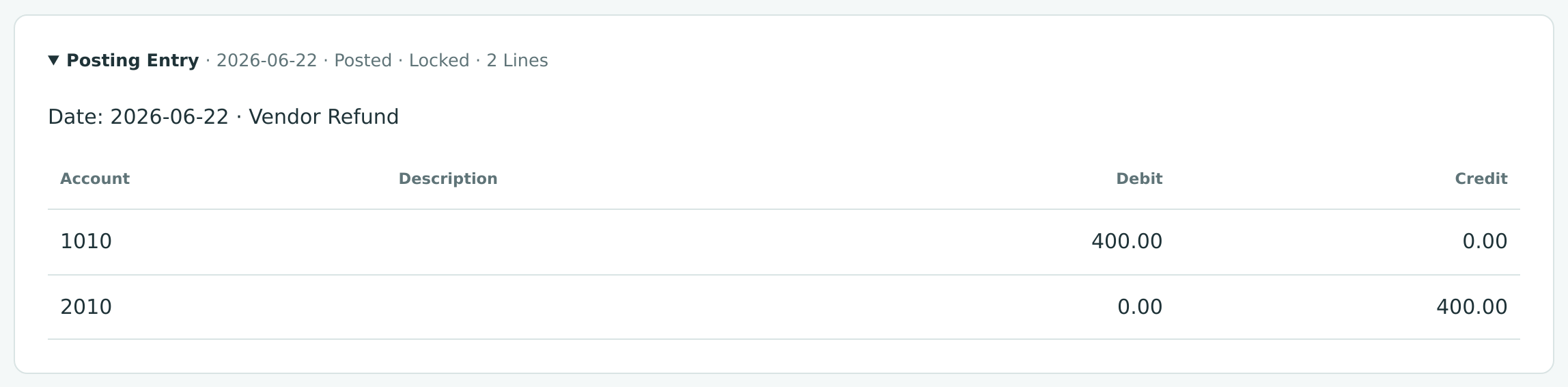
| 1010 Operating Checking | 400.00 | |
| 2010 Accounts Payable | 400.00 |
Recording a Refund
A refund settles a credit with money instead of applying it to a future invoice or bill:
- A customer refund pays money back to a customer who has a credit with you: an open credit memo, or a payment that was more than the customer owed (an overpayment, which stays on the receipt as an unapplied amount).
- A vendor refund records money a vendor pays back to you: an open vendor credit, or a bill payment that was more than the bills it paid (an unapplied amount on the payment).
Each refund lists the credits and overpayments it settles. The settlement amounts must add up to the refund amount, so every refund is fully explained.
Before You Begin
- The credit exists and is posted: an open credit memo or vendor credit, or a receipt or bill payment with an unapplied amount.
- The customer or vendor is active.
- The bank or card account the money moves through has the Cash or Credit Card role.
- You need Edit access to Banking, plus Edit on Vendors & Bills for a vendor refund or on Customers & Invoices for a customer refund. Company Admins and Accountants can record both kinds; Viewers and Project Managers cannot. See Roles and Permissions.
Navigation
Banking → Refunds → New Refund.
The Refunds List
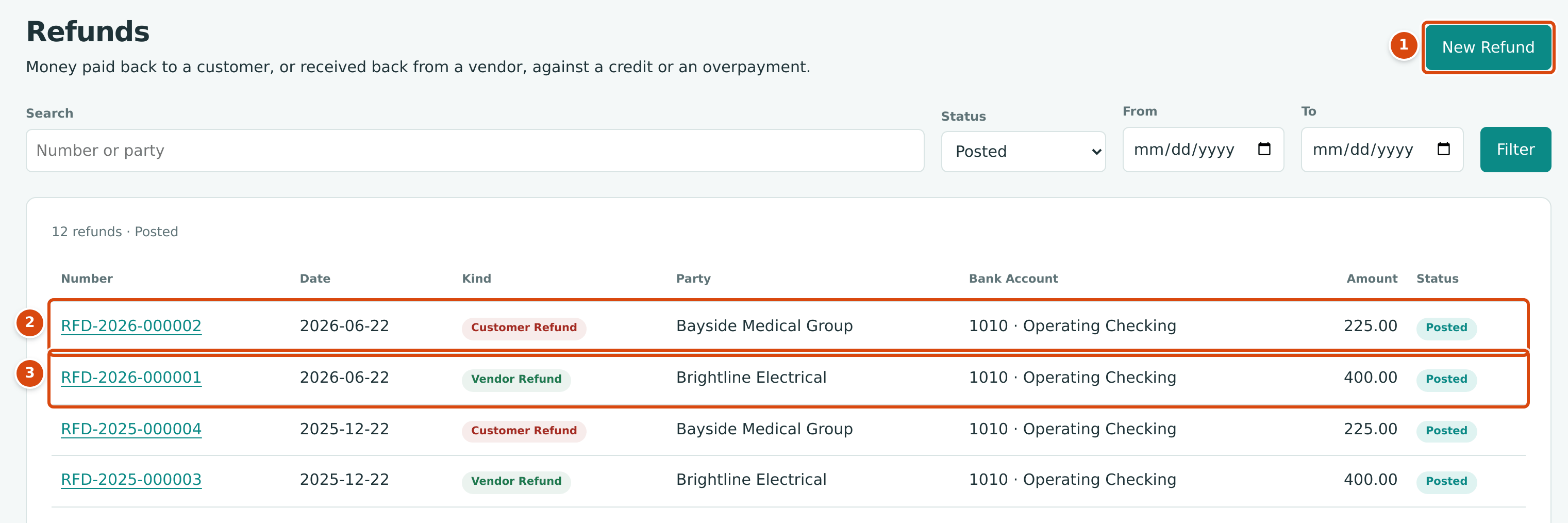
- New Refund starts a refund.
- A Customer Refund: money paid back to Bayside Medical Group.
- A Vendor Refund: money received back from Brightline Electrical.
The list shows Number, Date, Kind, Party, Bank Account, Amount and Status. Above it, Search finds a number or a party name, Status shows Posted, Reversed or All, and From and To limit the dates.
Step by Step
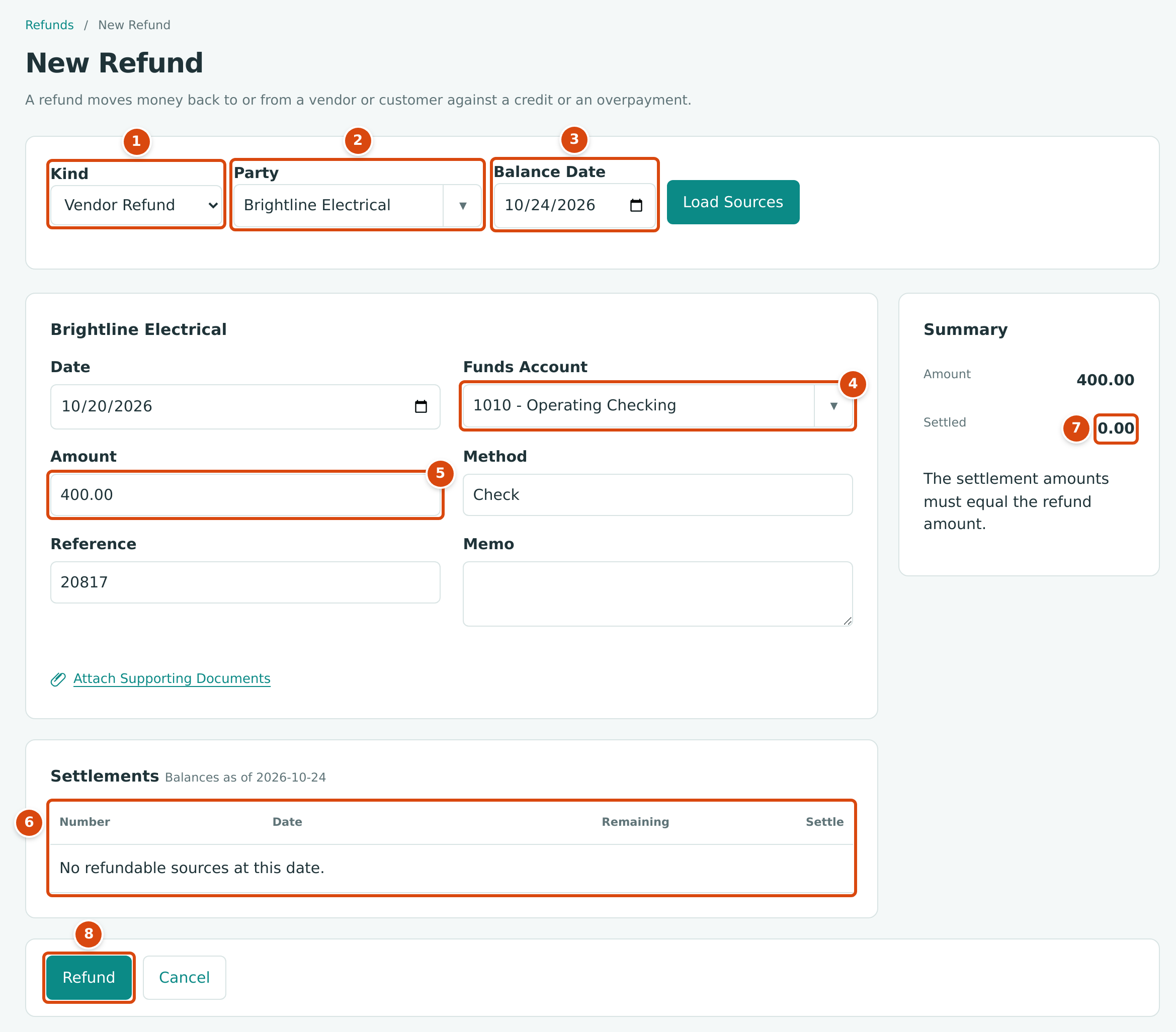
- Kind: Vendor Refund or Customer Refund.
- Party: the vendor or customer. Choosing one loads its sources.
- Balance Date: the date the remaining balances are worked out for. Click Load Sources after changing it.
- Funds Account: the bank or card account the money moves through.
- Amount: the refund amount.
- Settlements: the open credits and overpayments of this party, each with its Remaining balance and a Settle box.
- Settled: the total of the Settle amounts. It must equal the Amount.
- Refund posts the refund.
- Open Banking → Refunds and click New Refund.
- In Kind, choose Vendor Refund or Customer Refund. The Party list changes to vendors or customers.
- In Party, choose the vendor or customer. The page reloads with the party's name as the heading and its sources under Settlements.
- If the refund is for an earlier date, change Balance Date and click Load Sources, so the Remaining balances are as of that date.
- Set Date, the refund date. It cannot be earlier than any source you settle.
- In Funds Account, choose the account the money is paid from (customer refund) or received into (vendor refund).
- Type the Amount, and optionally a Method (such as Check), Reference (such as the check number) and Memo. Use Attach Supporting Documents to add a copy of the check or the vendor's letter.
- Under Settlements, type in Settle how much of each source this refund settles. Leave the others empty.
- Check that Settled equals Amount, then click Refund.
If Settlements shows No refundable sources at this date., the party has no open credit and no unapplied payment at the balance date. That is the case for every party in the sample company today: all of its credits have been applied or refunded.
Field Reference
| Field | Description | Required | Example |
|---|---|---|---|
| Kind | Vendor Refund (money comes in) or Customer Refund (money goes out). | Yes | Vendor Refund |
| Party | The vendor or customer. Active parties only. | Yes | Brightline Electrical |
| Balance Date | The date used for the Remaining column. Starts as today. | No | 10/24/2026 |
| Date | Refund date and accounting date. Not earlier than any settled source; after the Books Closed date. | Yes | 10/20/2026 |
| Funds Account | An active Cash or Credit Card account. | Yes | 1010 - Operating Checking |
| Amount | The refund amount, at least 0.01. | Yes | 400.00 |
| Method | How the money moved, up to 20 characters. | No | Check |
| Reference | A check or transaction number, up to 60 characters. | No | 20817 |
| Memo | A note, up to 240 characters. | No | Credit for returned fixtures |
| Settle (each source) | The part of that credit or overpayment this refund settles; no more than its Remaining. | At least one | 400.00 |
| Attachments | Supporting files: PDF, images, Word or Excel, up to 5 MB each and 3 per refund. | No | Brightline-check.pdf |
Worked Example: A Vendor Pays Back a Credit
On June 14, 2026, Brightline Electrical issued vendor credit VCR-2026-000003 for $400.00. Instead of keeping the credit for a future bill, Brightline sent a check, which Cedar Ridge Contracting deposited in 1010 Operating Checking on June 22, 2026. The refund RFD-2026-000001 records it:
| Item | Amount |
|---|---|
| Vendor credit VCR-2026-000003 | 400.00 |
| Settled by RFD-2026-000001 | 400.00 |
| Credit remaining | 0.00 |
The refund posts this entry:
The vendor credit had lowered Accounts Payable by $400.00 when it was posted; the refund puts that amount back, because the vendor no longer owes it to you. The credit's status becomes Applied, since nothing remains on it.
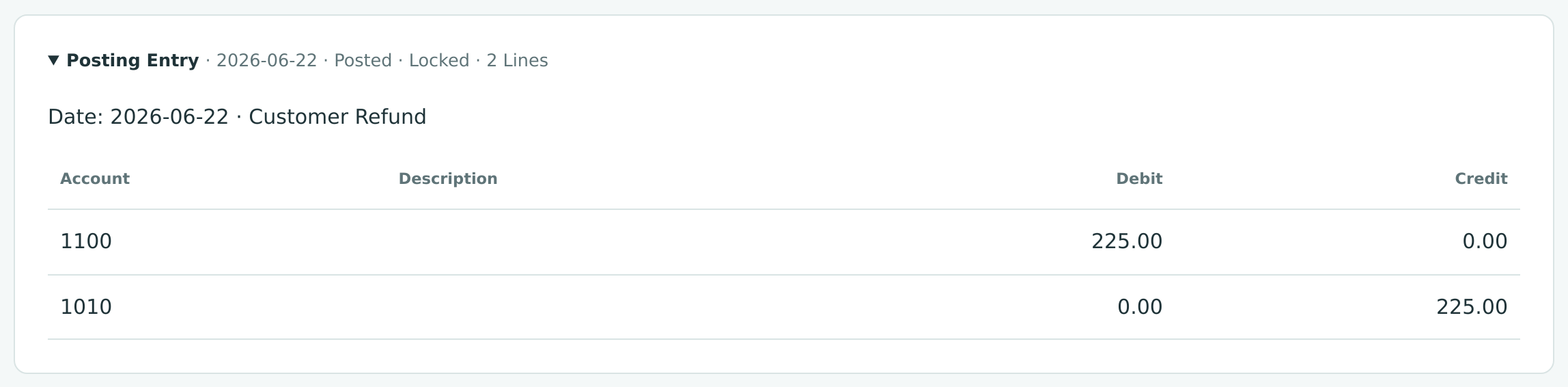
The same company also refunds customers. On June 22, 2026 it paid Bayside Medical Group $225.00 against credit memo CM-2026-000003 (RFD-2026-000002):
| Account | Debit | Credit |
|---|---|---|
| 1100 Accounts Receivable | 225.00 | |
| 1010 Operating Checking | 225.00 |
What Happens After You Record a Refund
- The refund is numbered automatically as RFD-year-sequence and has the status Posted. Its journal entry is posted and locked.
- Each settled source is reduced by its settlement. A credit memo or vendor credit with nothing remaining becomes Applied; a payment's unapplied amount goes down. The source's own page lists the refund under Refunds.
- A posted refund cannot be edited. To correct it, reverse it and record it again.
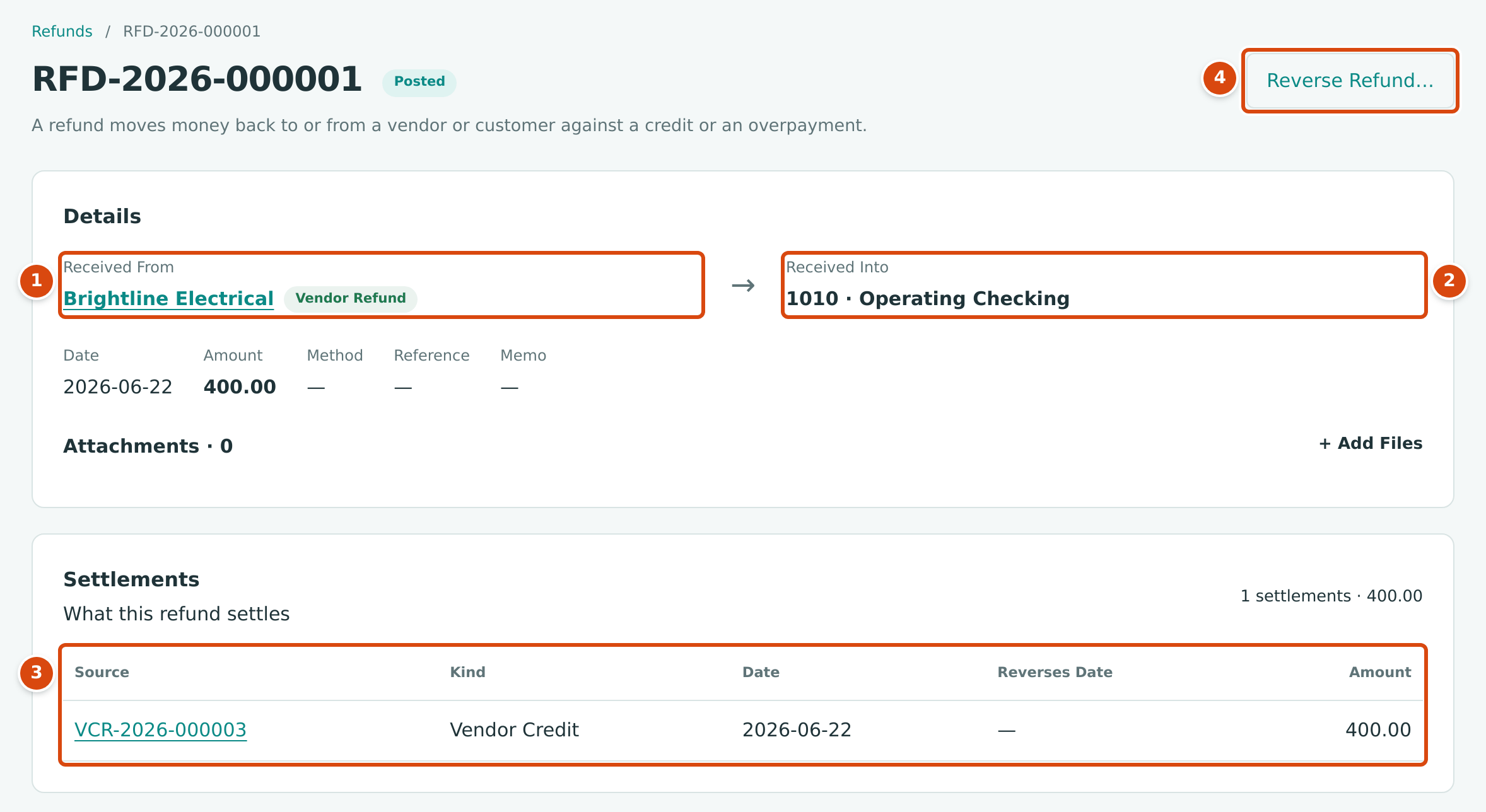
- Received From: the vendor, with the Vendor Refund label.
- Received Into: the bank account the money went into.
- Settlements: what the refund settles. Click the source number to open the vendor credit.
- Reverse Refund… undoes the refund.
For a customer refund the arrow points the other way: Paid From is the bank account and Paid To the customer, labeled Customer Refund.
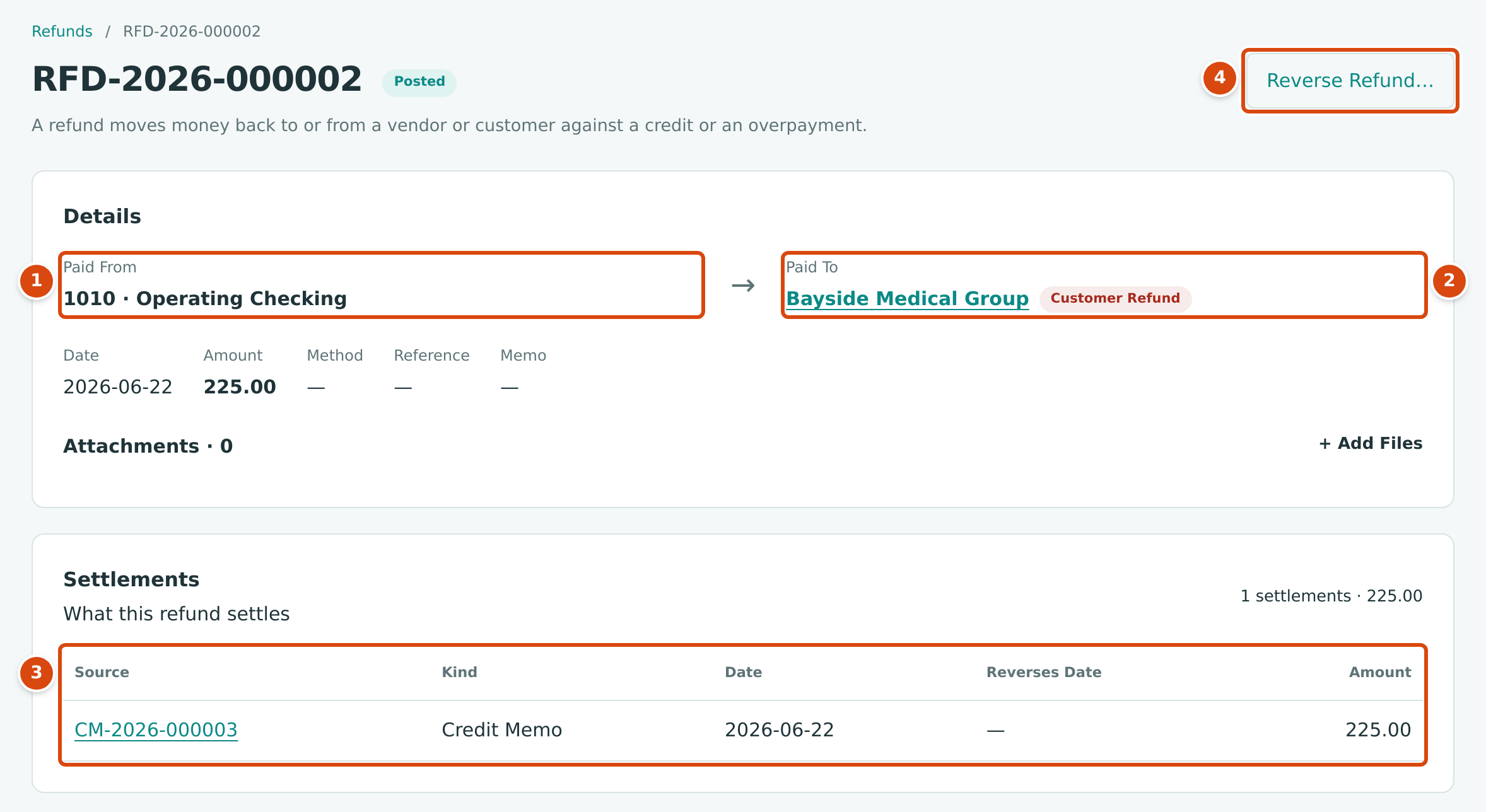
- Paid From: the bank account the money left.
- Paid To: the customer, with the Customer Refund label.
- Settlements: credit memo CM-2026-000003, settled for 225.00.
- Reverse Refund… undoes the refund.
The Posting Entries
A vendor refund debits the funds account and credits Accounts Payable. A customer refund debits Accounts Receivable and credits the funds account. Open Posting Entry on the refund to see it:
Reversing a Refund
- Open the refund and click Reverse Refund….
- Set Date (it starts as today) and optionally a Memo.
- Click Reverse Refund.
Structally posts a reversal entry that mirrors the refund. Each settlement gets a matching negative row, shown in Settlements with its Reverses Date. A credit that had become Applied returns to Open with its amount available again. The refund's status becomes Reversed.
A refund matched to a bank feed line cannot be reversed until the line is unmatched.
Common Mistakes and Troubleshooting
| Message or Symptom | Why It Happens | What to Do |
|---|---|---|
| No refundable sources at this date. | The party has no open credit and no unapplied payment at the Balance Date. | Check the party's credits and payments; post the credit first, or pick a later balance date. |
| Refund settlements must equal the refund amount | Settled differs from Amount. | Change the settle amounts or the amount until they agree. |
| At least one refund settlement is required. | No Settle amount was entered. | Enter how much of a source the refund settles. |
| Settlement exceeds source remaining | A settle amount is more than that source's remaining balance (at the refund date). | Lower the settle amount. |
| Refund date is before source date | A settled credit or payment is dated after the refund. | Use a later refund date. |
| Refunds use a bank or credit card account | The funds account is inactive or not a Cash or Credit Card account. | Choose an active bank or card account. |
| Vendor must be active. or Customer must be active. | The party was deactivated. | Reactivate it on its page first. |
| Entry is matched to a bank line; unmatch it first | You tried to reverse a refund matched in the bank feed. | Unmatch the bank line, then reverse. |
| Refund is already reversed | The refund was reversed before. | Nothing to do. |
| Write Access Required | Your role cannot record this kind of refund. | Ask a Company Admin. A Custom user needs Banking Edit plus Edit on Vendors & Bills (vendor refund) or Customers & Invoices (customer refund). |