| Account | Debit | Credit |
|---|---|---|
| 5030 Subcontractor Costs | 4,368.09 | |
| 5030 Subcontractor Costs | 2,912.06 | |
| 5030 Subcontractor Costs | 353.50 | |
| 5060 Permits and Fees | 3,282.27 | |
| 2010 Accounts Payable | 10,915.92 |
Journal Report
The Journal report lists every journal entry posted in a period, in date order, with all of its lines: each account debited or credited, the line description and the amounts, and a total per entry. Every posted document writes a journal entry (a bill, an invoice, a payment, a WIP schedule), so this is the complete record of what reached your books, entry by entry.
Use it to review a month's postings line by line, to give your accountant the full journal, or to export every line to a spreadsheet.
Before You Begin
- You need View or Edit access to Reports. Opening an entry or a document from the report needs access to its area. See Who Can Use Reports.
Navigation
Reports → Journal. The report is called Journal on screen.
Step by Step
- Open Reports → Journal. It opens for this month to date.
- Enter Start and End, for example 09/01/2026 and 09/03/2026, or click a Report period button (This Month, Last Month, This Fiscal Year, Last Fiscal Year).
- Click Run Report.
- Click Collapse All to see just the entry headings and totals, or Expand All to see every line. Click an entry's ▼ to fold just that entry.
A busy month can hold hundreds of entries; use a short period on screen and Export CSV for long ones.
Reading the Journal
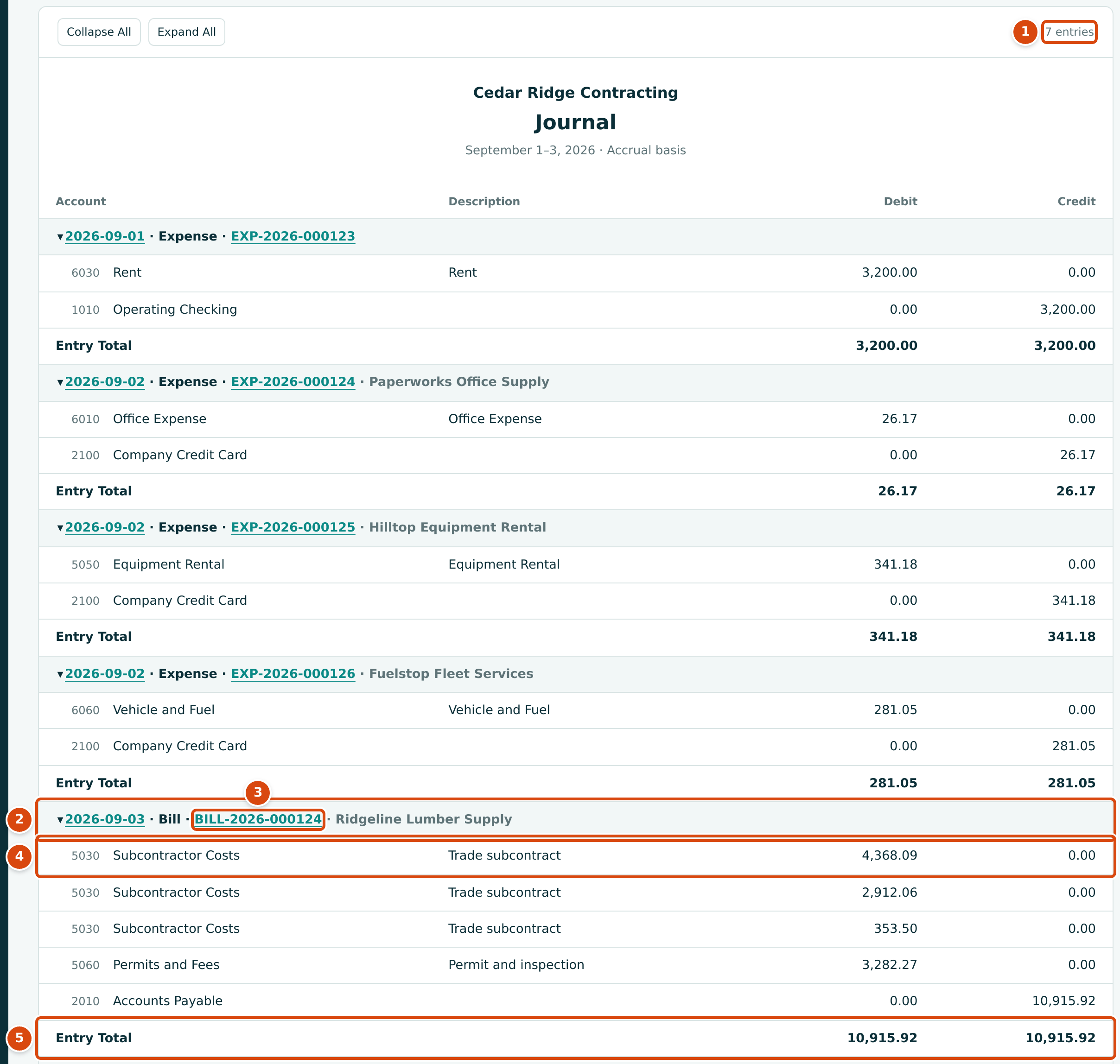
- The number of entries in the period.
- The entry heading: the entry date (a link to the journal entry), the type of posting, the document number and the party.
- The document number opens the bill, invoice or other document that posted the entry.
- One line of the entry: account code and name, the line description, and the Debit or Credit amount.
- Entry Total: the entry's debits and credits, which are always equal.
The type in each heading names what posted the entry, for example Expense, Bill, Invoice, Bill Payment, Customer Receipt, Deposit, Transfer, Bank Entry, Journal Entry, WIP Adjustment, Job Cost Transfer, Opening Balances, or a correction such as Bill Void or Payment Reversal. Entries without a document (manual journal entries, WIP schedule postings) show no number.
At the bottom, Total, 7 Entries adds up every line:

A period without postings shows No entries in this period and a total of 0.00.
How It Differs from Accounting → Journal Entries
Structally has two views of the journal:
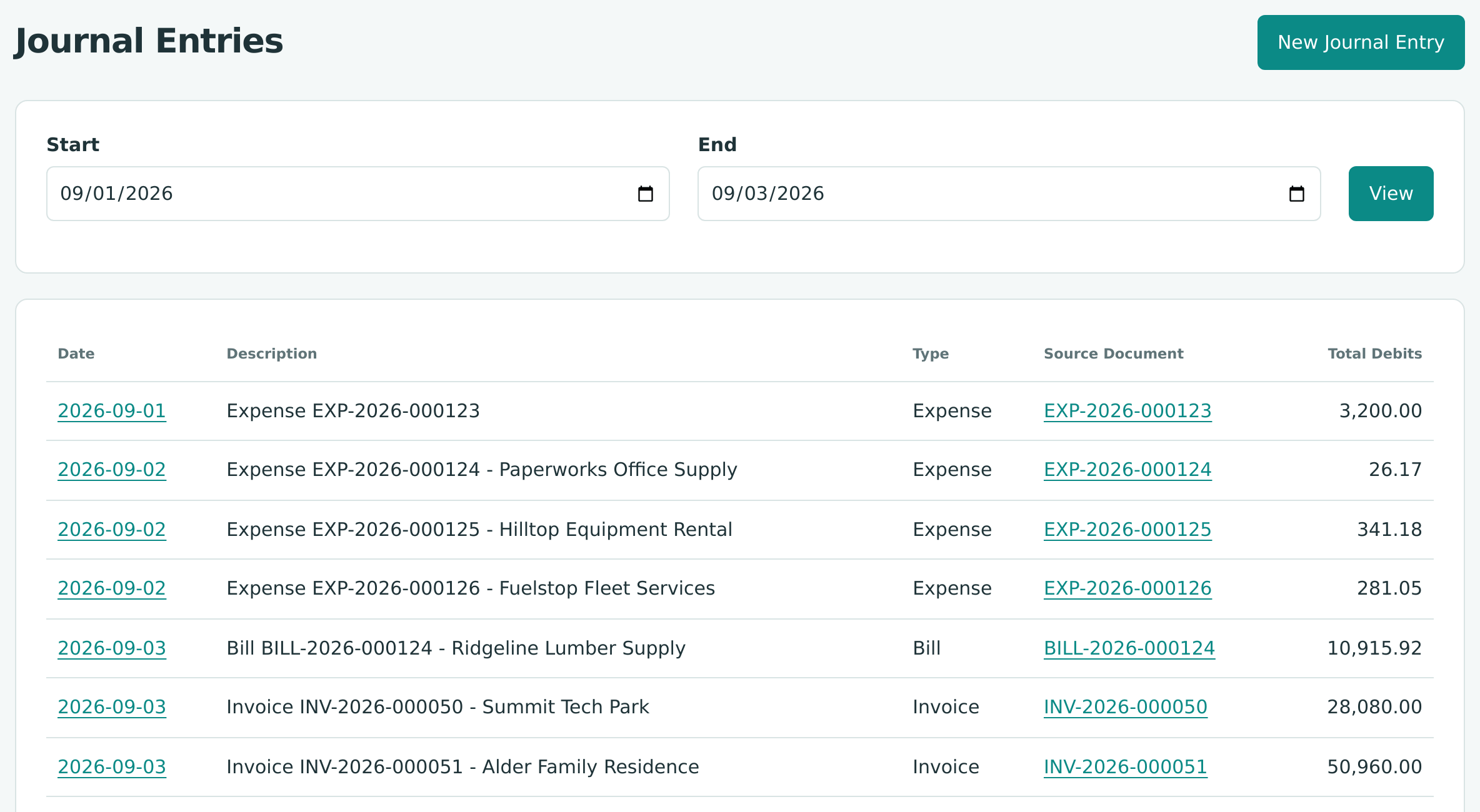
| Reports → Journal | Accounting → Journal Entries | |
|---|---|---|
| What each row is | Every line of every entry, grouped under its entry | One row per entry |
| Columns | Account, Description, Debit, Credit | Date, Description, Type, Source Document, Total Debits |
| Totals | Per entry and for the period | None |
| Options | Start, End, Report period | Start, End, then View |
| Export and print | Export CSV and Print | None |
| Posting | Read-only | New Journal Entry, beside the page title, for users with Edit access to Accounting |
| Access | Reports area | Accounting area |
Use Journal Entries to find an entry and to post or reverse manual entries (see Journal Entries); use the Journal report to read, print or export the lines.
Worked Example: September 1 to 3, 2026
Run the Journal from 09/01/2026 to 09/03/2026. It shows 7 entries: four expenses (EXP-2026-000123 to EXP-2026-000126), one bill (BILL-2026-000124 from Ridgeline Lumber Supply) and two invoices (INV-2026-000050 and INV-2026-000051).
The Ridgeline bill's entry, in the figure, debits three 5030 Subcontractor Costs lines and one 5060 Permits and Fees line and credits 2010 Accounts Payable:
The period total is $93,804.32 on each side: 3,200.00 + 26.17 + 341.18 + 281.05 + 10,915.92 + 28,080.00 + 50,960.00.
Exporting
Export CSV gives one row per line with the columns Date, Type,
Document, Party, Account, Name, Description, Debit and
Credit, and a final Total row. The file is named, for example,
journal-2026-09-01-2026-09-03.csv.
Very Long Journals
The page shows whole entries up to 5,000 lines. When the period holds more, an amber notice appears above the report, for example Showing the first 1,200 of 3,400 entries (4,998 of 14,000 lines). The totals cover the full date range., and a row at the end says how many more entries are not shown. The Total row still covers every entry in the period, and Export CSV always contains every line. Narrow the dates to see every entry on the page.
Common Mistakes and Troubleshooting
| Message or Symptom | Why It Happens | What to Do |
|---|---|---|
| Start must be on or before end. | Start is after End. | Swap the dates. |
| No entries in this period | Nothing was posted between Start and End. Drafts never appear. | Check the dates, or post the drafts. |
| A document is missing. | It is still a draft, or it is dated outside the period. | Post it, or widen the period. |
| A voided bill still appears. | The original entry stays; the void adds a separate Bill Void entry. | Read both entries together. See Reversing and Correcting Transactions. |
| The page is very long. | A long period holds many entries. | Use Collapse All, a shorter period, or Export CSV. |