| Account | Debit | Credit |
|---|---|---|
| 4010 Construction Revenue (J-1034), Carpentry labor (hour) | 340.00 | |
| 1100 Accounts Receivable | 340.00 |
Credit Memos
A credit memo reduces what a customer owes you: a goodwill credit for a schedule delay, a price adjustment, a billing mistake found after the invoice went out, materials returned. Posting the credit memo reverses the revenue on the income account (and job) you choose and lowers the customer's balance. You then apply it to the customer's open invoices, or refund it.
Use a credit memo when an invoice was right when posted but the customer now owes less, or when the invoice is already partly paid. To cancel an invoice entered in error, void it instead.
Before You Begin
- The customer is active.
- The income accounts you will reduce exist in the Chart of Accounts. Items can be used as on invoices (see Items).
- You need Edit access to Customers & Invoices. Company Admins, Accountants and Project Managers have it; Viewers can only look. See Roles and Permissions.
Navigation
Customers & Invoices → Credit Memos → New Credit Memo.
The Credit Memos List
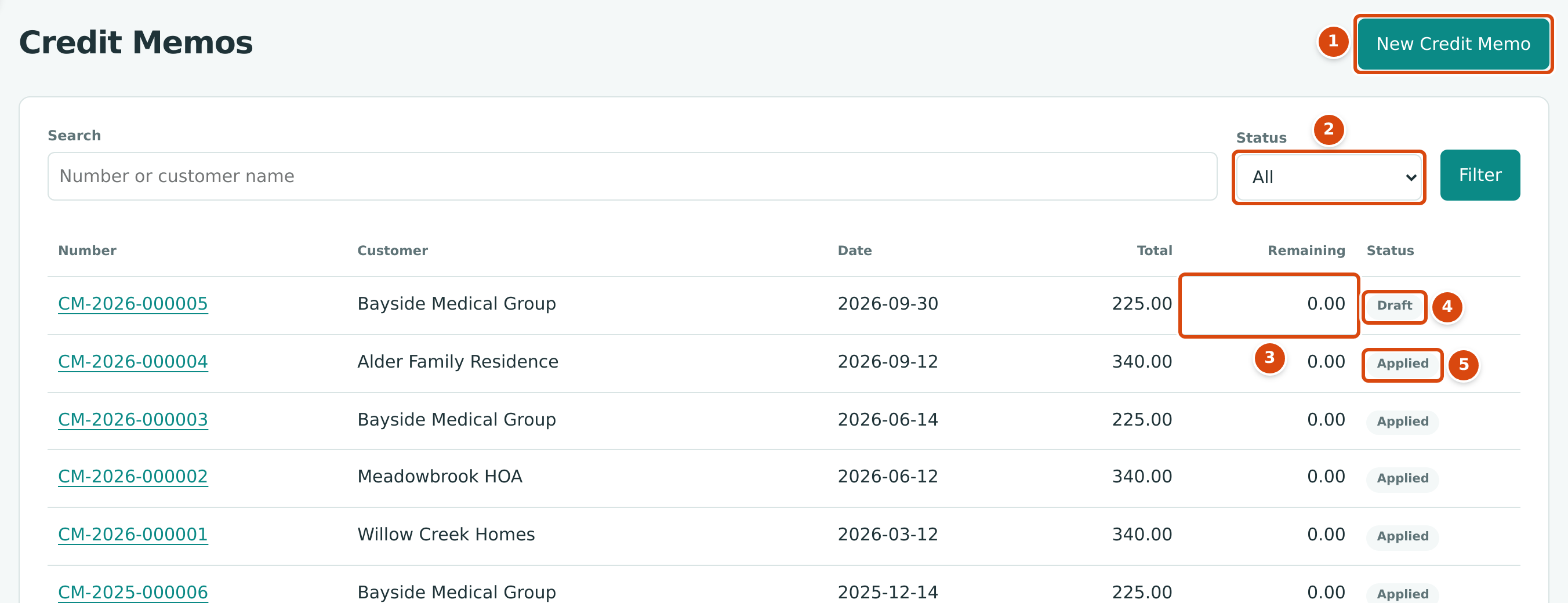
- New Credit Memo opens the form.
- Status: Draft and Open (the default), Draft, Open, Applied, Void or All. Click Filter to apply it.
- Remaining: the part of a posted credit memo not yet applied or refunded.
- Draft: saved, not posted.
- Applied: fully used on invoices.
Search finds credit memos by number or customer name.
| Status | Meaning |
|---|---|
| Draft | Saved, not posted. No effect on your books. |
| Open | Posted, with an amount remaining to apply or refund. |
| Applied | Posted and fully used. Goes back to Open if an application is unapplied. |
| Void | Voided; its posting entry has been reversed. |
Creating a Credit Memo
- Open Customers & Invoices → Credit Memos and click New Credit Memo.
- Choose the Customer.
- Set the Date, the accounting date of the credit.
- Optionally type a Reference and choose a Location.
- Enter the lines as on an invoice: choose an Item, or an income Account with an Amount (or a Qty and Rate), and type a Description the customer will understand.
- To reduce a job's revenue, tick Job Costing and choose the Job on the line.
- Add a Memo explaining the credit, and attachments if you have them.
- Click Save Draft, or Post Credit Memo to post it now.
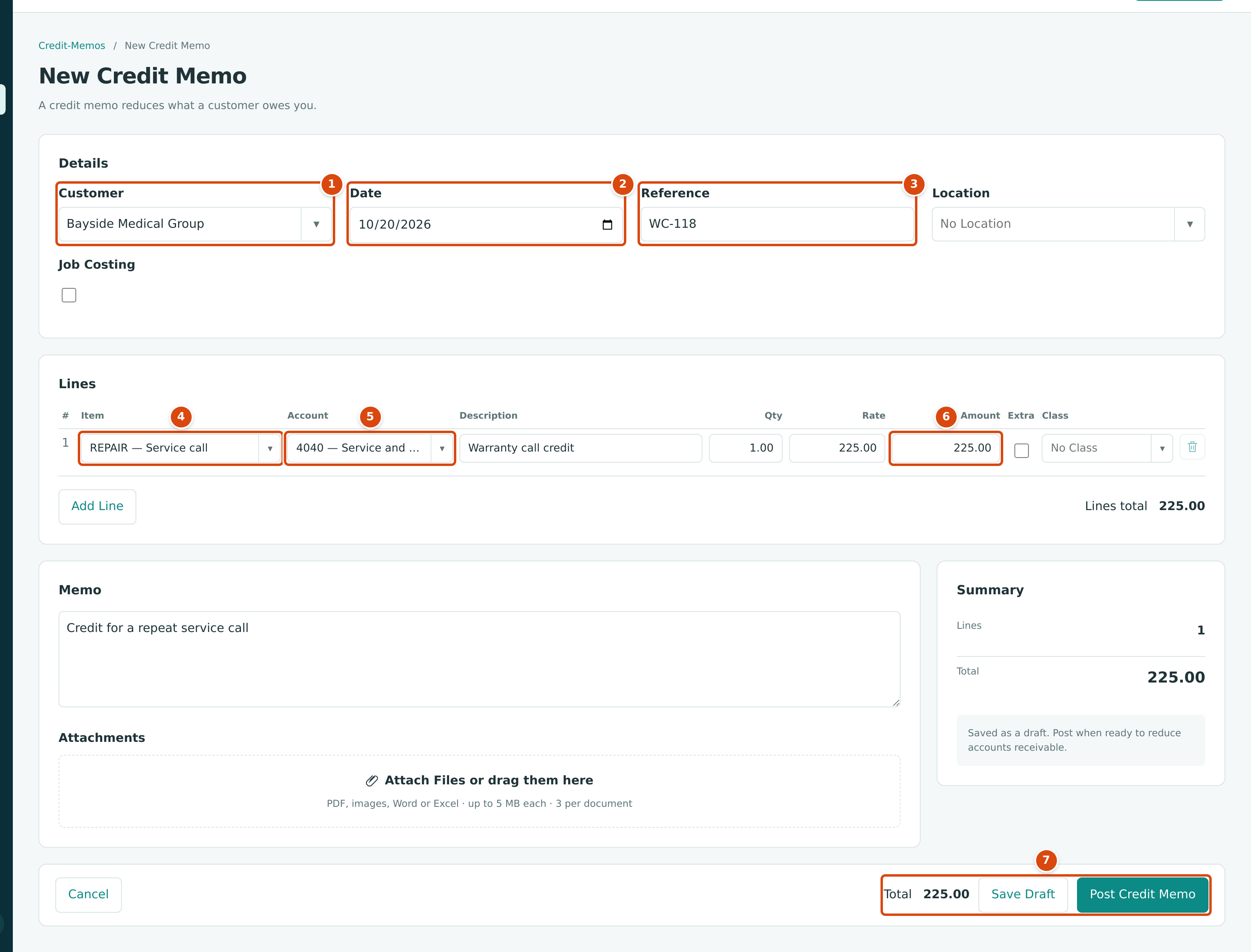
- Customer: who receives the credit.
- Date: the credit's accounting date.
- Reference: your own or the customer's reference.
- Item: here REPAIR — Service call, which fills in the account, a quantity of 1.00 and the rate.
- Account: the income account reduced, 4040 — Service and Repair Revenue.
- Amount: 1.00 × 225.00 = 225.00.
- Total, Save Draft and Post Credit Memo.
A credit memo has no terms, due date or retainage. Like an invoice line, a credit memo line on a job billed through an approved schedule of values must be ticked Extra.
Structally confirms with Credit memo CM-2026-000006 saved as a draft. or Credit memo CM-2026-000006 posted to accounts receivable. and opens the credit memo. Numbers are assigned as CM-year-sequence.
Posting or Editing a Draft
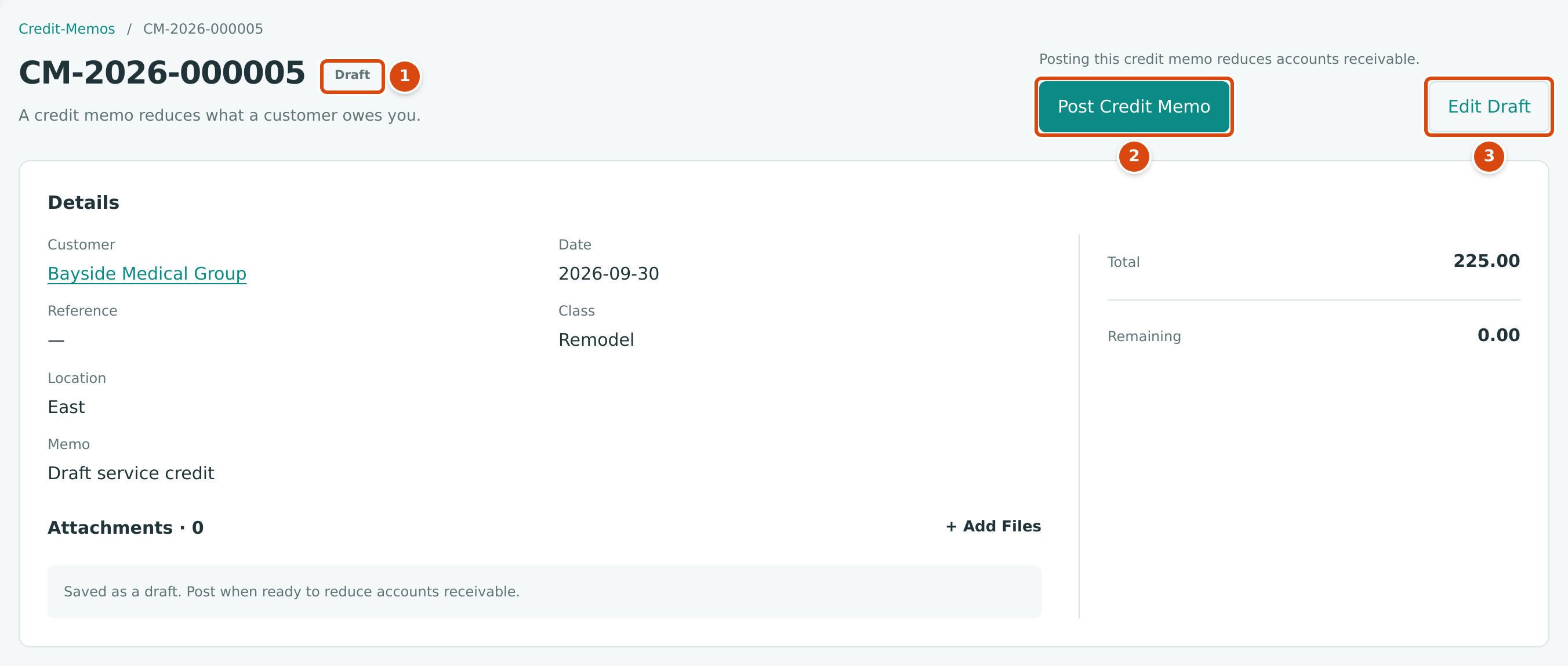
- Draft: not yet posted.
- Post Credit Memo posts it. The page reads Posting this credit memo reduces accounts receivable.
- Edit Draft reopens the form. The customer cannot be changed, and the form has only Save Draft: post from this page afterward.
Draft credit memos cannot be deleted; a draft never affects your books.
Applying a Credit Memo to Invoices
A posted credit memo with an amount Remaining shows an Apply Credit button and an Apply Credit section listing the customer's open invoices.
- Open the credit memo and go to Apply Credit.
- Set the Date of the application. It cannot be before the credit memo's date or the date of an invoice you apply it to.
- In Allocate, type the amount to apply to each invoice. Allocated shows the total.
- Click Apply Credit.
Each invoice's open balance drops, and an invoice with nothing left becomes Paid. The credit memo's Remaining drops; when it reaches 0.00 the credit memo becomes Applied. Applying writes no journal entry: the credit memo already reduced accounts receivable when it was posted.
Apply Credit Not Shown
Every posted credit memo in the sample company is already applied, so there is no screenshot of the Apply Credit section. It has a Date field, the customer's open invoices with an Allocate box each (the same table as on the Receive Payment page), the Allocated total and the Apply Credit button.
On the invoice, the credit appears under Credits Applied:
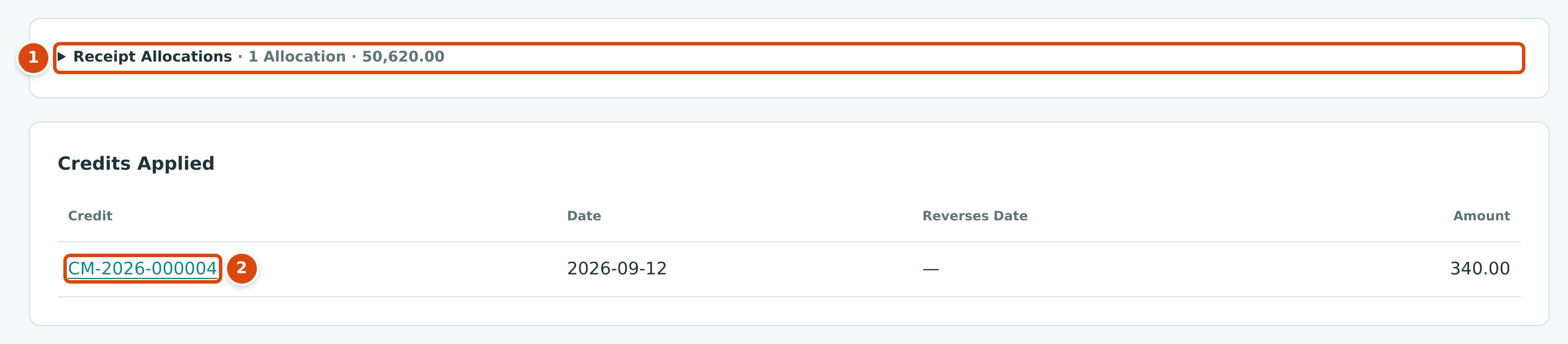
- Receipt Allocations: the receipts that paid the invoice. Click to open the list.
- Credits Applied: the credit memo applied to it, with the date and amount.
To pay a credit memo's remaining amount back to the customer instead, record a customer refund in Banking; see Recording a Refund.
Unapplying a Credit Memo
Unapply when a credit was applied to the wrong invoice, or before voiding it.
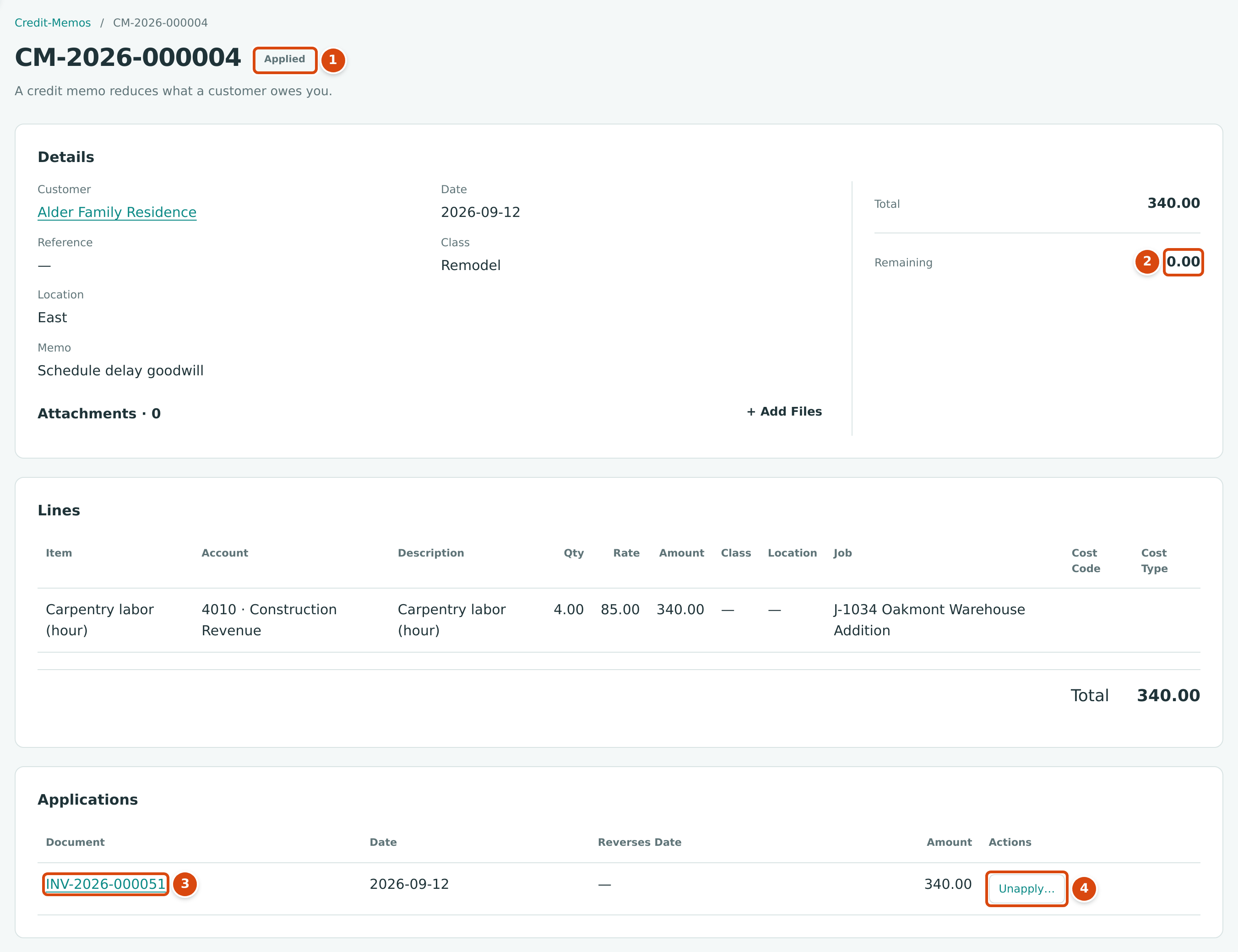
- Applied: the credit memo is fully used.
- Remaining: 0.00 left to apply or refund.
- The invoice the credit was applied to.
- Unapply… takes the application back.
- On the credit memo's page, in Applications, click Unapply… next to the invoice.
- Set the Date of the change. It cannot be before the application date.
- Click Unapply.
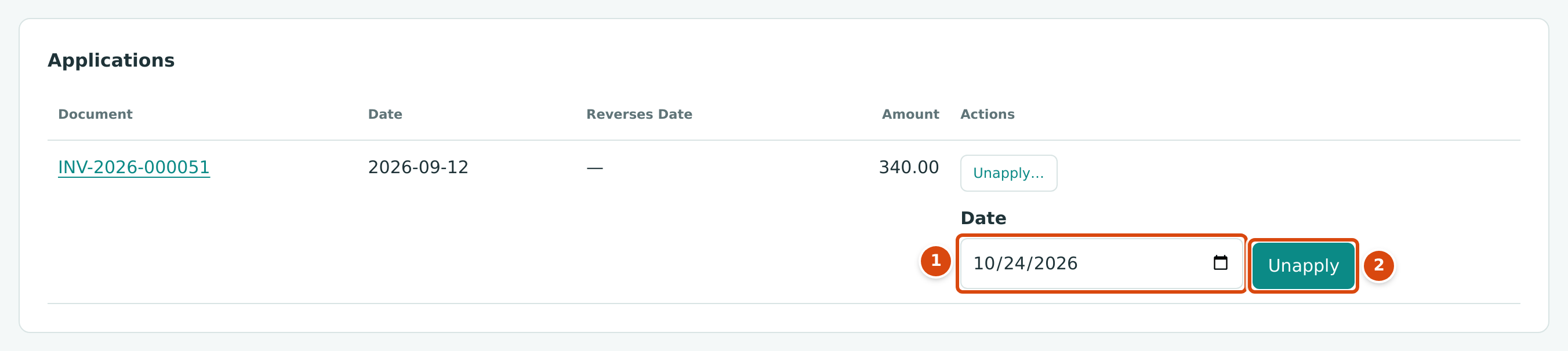
- Date: when the application is taken back.
- Unapply takes it back.
A negative row dated on that day appears in Applications. The invoice goes back to Open with its balance restored, and the credit memo goes back to Open with the amount Remaining again. No journal entry is written.
Voiding a Credit Memo
Voiding cancels a posted credit memo: Structally writes a reversal entry on the date you choose and the credit memo becomes Void. A credit memo can be voided only while it is Open with nothing applied and nothing refunded: unapply every application and reverse any refund first.
- Open the credit memo and click ⋯ → Void Credit Memo….
- Set the Date and, optionally, a Memo.
- Click Void Credit Memo.
The panel works like the one for voiding an invoice.
Void Panel Not Shown
The sample company has no open credit memo, so there is no screenshot of Void Credit Memo….
Field Reference
| Field | Description | Required | Example |
|---|---|---|---|
| Customer | The customer credited. Active customers only. Cannot be changed after the first save. | Yes | Bayside Medical Group |
| Date | Accounting date of the credit. Must be after the Books Closed date to post. | Yes | 10/20/2026 |
| Reference | A reference, up to 60 characters. | No | WC-118 |
| Location | A location for the whole credit memo. | No | East |
| Job Costing | Shows the Job and Split columns. | No | Ticked |
| Item (line) | A product or service; fills the account, description, quantity and rate. | No | REPAIR — Service call |
| Account (line) | The income account reduced. Needed when no item is chosen. | With no item | 4040 — Service and Repair Revenue |
| Job (line) | The job whose revenue is reduced. | With job costing | J-1034 Oakmont Warehouse Addition |
| Description (line) | What the customer reads. | No | Warranty call credit |
| Qty, Rate, Amount (line) | As on an invoice. | Amount, or Qty and Rate | 1.00 × 225.00 |
| Extra (line) | Needed for a job billed through a schedule of values. | On such jobs | Ticked |
| Class (line) | A class for the line. | No | Remodel |
| Memo | Why the credit was given. | No | Credit for a repeat service call |
| Attachments | Up to 3 files of 5 MB each. | No | Customer-letter.pdf |
Worked Example: A Goodwill Credit
On September 12, 2026, Cedar Ridge gave Alder Family Residence a goodwill credit of four hours of carpentry labor for a schedule delay on job J-1034 Oakmont Warehouse Addition: credit memo CM-2026-000004, 4.00 × 85.00 = $340.00, as in the figure above. It was posted and applied the same day to invoice INV-2026-000051.
Posting recorded this entry:
INV-2026-000051 was for $50,960.00. With the $340.00 credit applied, Alder Family Residence owed $50,620.00, which receipt RCPT-2026-000067 paid on September 27, 2026, so the invoice is Paid:
| Item | Amount |
|---|---|
| Invoice INV-2026-000051 | $50,960.00 |
| Less credit memo CM-2026-000004 | −$340.00 |
| Less receipt RCPT-2026-000067 | −$50,620.00 |
| Open balance | $0.00 |
What Happens After You Save or Post
| Draft | Posted (Open) | Applied | |
|---|---|---|---|
| Journal entry | None | One entry on the credit date: debit the income lines, credit Accounts Receivable | No new entry |
| Customer balance | Unchanged | Reduced by the total | Unchanged by applying |
| Invoices | Unchanged | Unchanged until you apply it | Balances reduced; Paid when settled |
| Can be changed | Yes, with Edit Draft | No; void it (if nothing is applied) | Unapply first |
The Posting Entry
Open Posting Entry on a posted credit memo to see its journal entry:
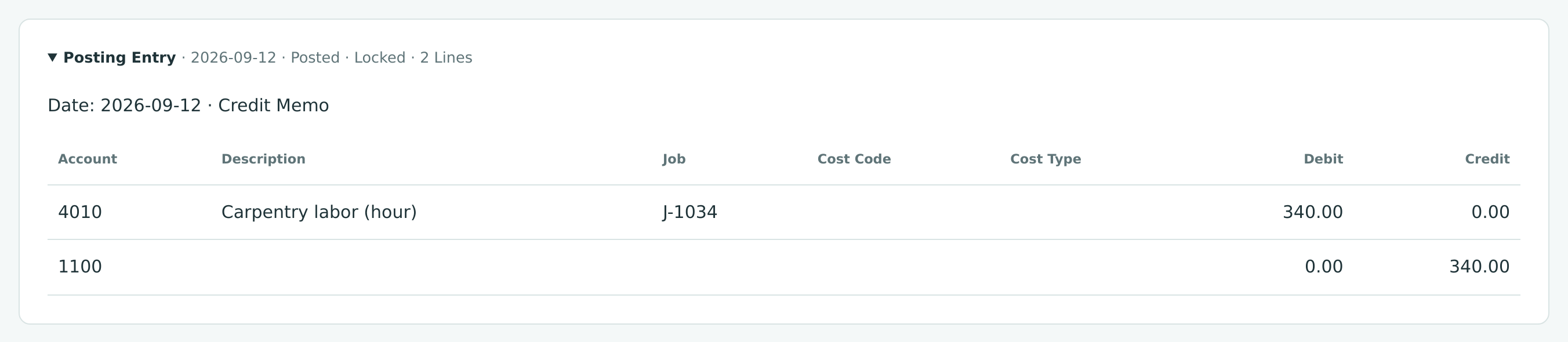
A credit memo is the mirror image of an invoice: it debits the income accounts (and the jobs) on its lines and credits Accounts Receivable. Voiding writes the opposite entry.
Common Mistakes and Troubleshooting
| Message or Symptom | Why It Happens | What to Do |
|---|---|---|
| Customer must be active. | The customer was deactivated. | Reactivate the customer first. |
| Only draft credit-memos can be changed | The edit address of a posted credit memo was opened. | Void it (if nothing is applied) and enter a new one. |
| Line 1: J-2004 bills its contract through its schedule of values. Tick Extra for separate work outside the schedule. | The line's job bills through a schedule of values. | Tick Extra, or adjust contract billing through the job's pay applications and change orders. |
| Application date is before credit date | Apply Credit was dated before the credit memo. | Use the credit memo's date or later. |
| Application date is before invoice date | The application is dated before the invoice. | Use the invoice date or later. |
| Application exceeds invoice balance | More was applied than the invoice owes. | Apply at most the invoice's balance. |
| Applications exceed credit memo remaining | More was applied than the credit memo has left. | Lower the amounts. |
| Credit memo has no remaining amount | The credit memo is fully used. | Unapply an application first if you need to move it. |
| Unapply date is before application date | The unapply date is earlier than the application. | Use the application date or later. |
| Credit memo has applications; unapply them first | You tried to void a credit memo that is applied to invoices. | Unapply each application, then void. |
| Credit memo has refunds; reverse them first | Part of the credit was refunded. | Reverse the refund in Banking, then void. |
| Only open credit memos can be voided | The credit memo is a draft or already void. | Drafts need no voiding. |
| Accounting date must be after the company closing date. | The date is in a closed period. | Use a later date, or ask a Company Admin. |