| Account | Debit | Credit |
|---|---|---|
| 1010 Operating Checking | 120,000.00 | |
| 1020 Savings | 40,000.00 | |
| 1200 Prepaid Insurance | 6,000.00 | |
| 1630 Equipment and Vehicles | 120,000.00 | |
| 1640 Accumulated Depreciation | 24,000.00 | |
| 2700 Equipment Loan | 60,000.00 | |
| 3010 Owner's Capital | 100,000.00 | |
| 3000 Opening Balance Equity | 102,000.00 |
Opening Balances
When a company starts using Structally partway through its life, its bank accounts, equipment, loans and owner's equity already have balances. Opening Balances records those balances in one step: you list the balance sheet accounts and their balances as of the end of the day before your books start, and Structally posts a single journal entry dated that day. Whatever is needed to make the entry balance goes to the Opening Balance Equity account, so you never have to work out the equity figure yourself.
The first time you post, the date you enter as Books Start is saved for the company. After that it cannot be changed, and any further opening balances use the same date.
Before You Begin
- You need Edit access to Settings: Company Admins, and Custom users given Settings Edit. With Settings View you see only the balancing account. See Roles and Permissions.
- The accounts exist and are active in the Chart of Accounts. You can also add an account from the Account picker if you have Edit access to Accounting.
- The chart has exactly one active Opening Balance Equity account (in the sample company, 3000 — Opening Balance Equity), or several with one marked as the default.
- The day before your books start must not be in a closed period (see Books Closed).
- Have the balances as of the last day before the books start, for example from your old system's balance sheet or your accountant's year-end statements.
Navigation
Settings → Opening Balances, or the Opening Balances card on the Settings overview.
The Page
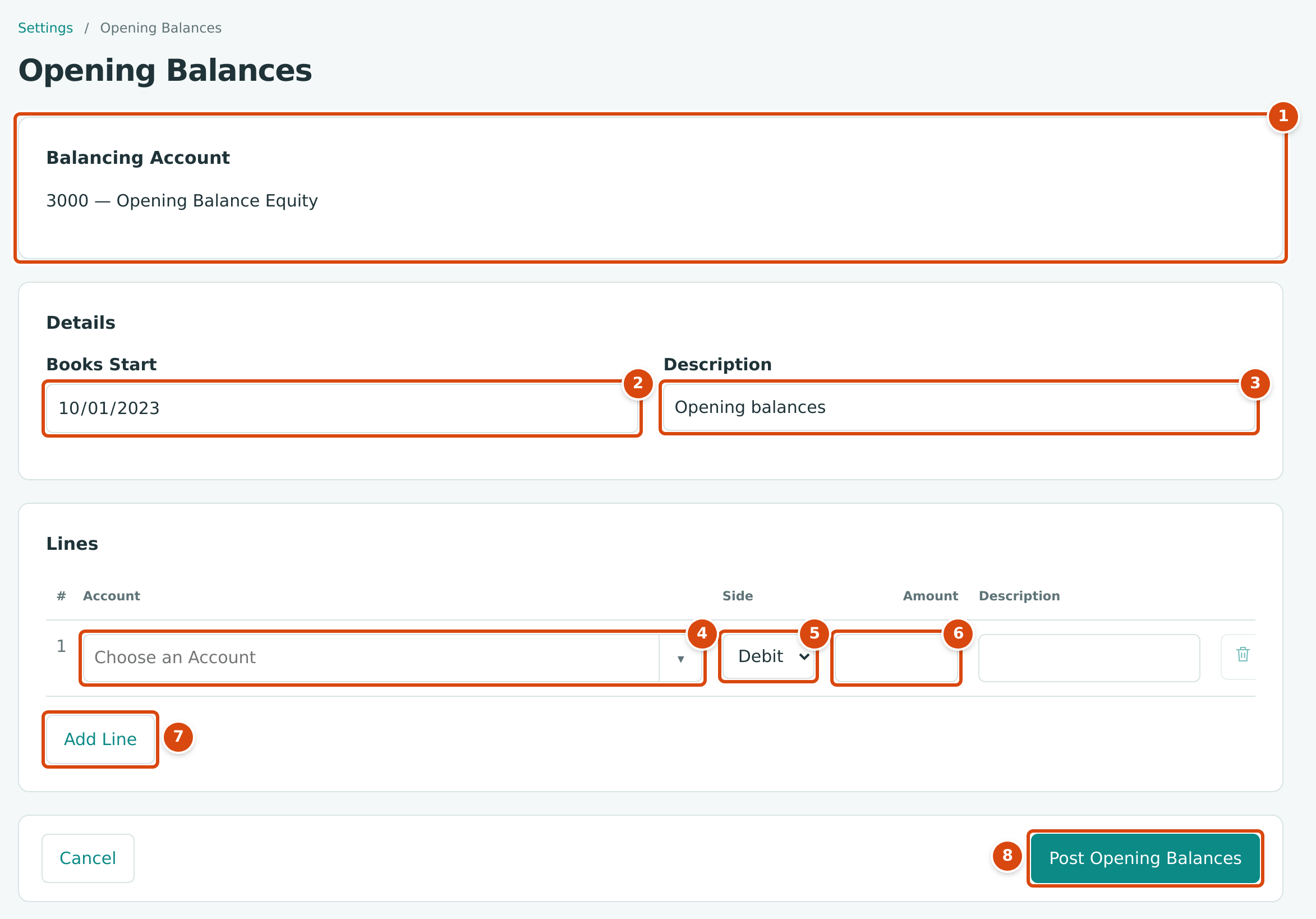
- Balancing Account: the account that takes the difference, 3000 — Opening Balance Equity.
- Books Start: the first day of your books in Structally. Once saved it is shown but cannot be changed; here it is October 1, 2023.
- Description: the journal entry's description, Opening balances unless you change it.
- Account: a balance sheet account. Type to search.
- Side: Debit or Credit.
- Amount: the balance, a positive amount.
- Add Line adds a line; the trash icon at the end of a line removes it.
- Post Opening Balances posts the entry. Cancel leaves without posting.
Step by Step
- Open Settings → Opening Balances.
- Check the Balancing Account. If it shows a message instead of an account, fix the chart of accounts first (see the table at the end of this page).
- Enter Books Start, the first day you will record transactions in Structally (for example October 1, 2023). The entry will be dated the day before. Skip this step if the date is already set.
- Change the Description if you want.
- On each line, choose the Account, choose Debit or Credit, and type the Amount. Use Debit for assets (cash, receivables, prepaid expenses, equipment) and Credit for liabilities, equity and contra-asset accounts such as accumulated depreciation. Add a Description if useful.
- Click Add Line for each further account, up to 50 lines.
- Click Post Opening Balances.
Structally posts the entry and opens it, so you can check it straight away.
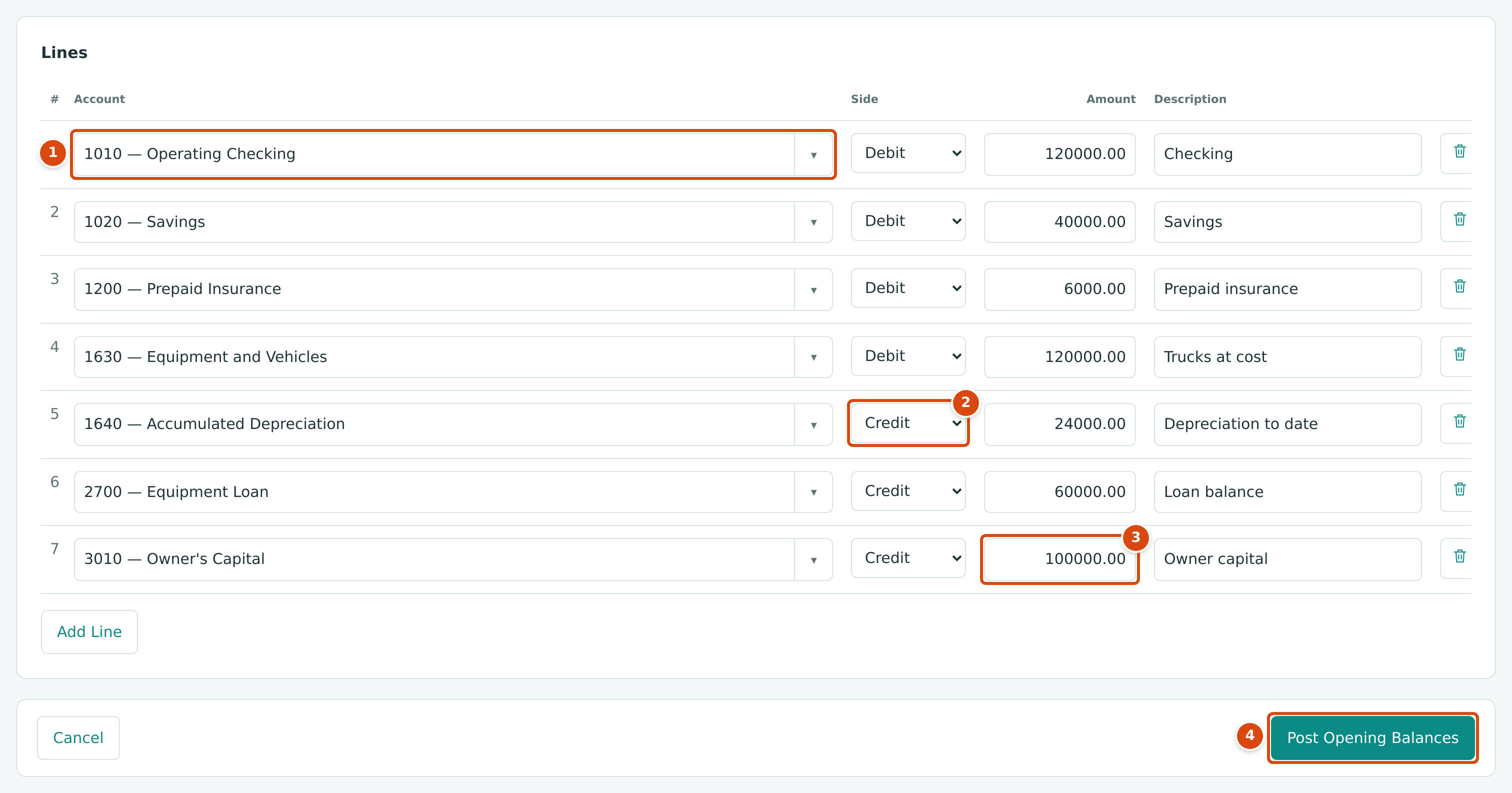
- An asset account, 1010 — Operating Checking, on the debit side.
- A contra-asset, 1640 — Accumulated Depreciation, on the credit side.
- The owner's capital, credited.
- Post Opening Balances. You do not add a line for Opening Balance Equity; Structally adds it.
Which Accounts You Can Use
The Account list offers the active balance sheet accounts (assets, liabilities and equity), except the Opening Balance Equity account itself. Income and expense accounts are not offered: their balances belong to the period before your books start.
Some balance sheet accounts can only be changed by the documents they belong to, and posting refuses them even though they are offered:
| Accounts | Message |
|---|---|
| Retainage Receivable | Account 1110 accepts postings only from invoices and retainage releases. |
| Retainage Payable | Account 2020 accepts postings only from bills and retainage releases. |
| Costs in Excess of Billings, Uninstalled Materials, Billings in Excess of Costs, Provision for Contract Losses | Account 1400 accepts postings only from WIP schedules. (with the account's own code) |
Customer and vendor balances
Opening Balances posts account balances only. It does not create customer invoices or vendor bills, so an amount you enter on Accounts Receivable or Accounts Payable is not owed by any particular customer or to any particular vendor. Aging reports list invoices and bills, and the Tie-Out report compares them with those two accounts, so such an amount shows there as a difference.
Field Reference
| Field | Description | Required | Example |
|---|---|---|---|
| Books Start | First day of your books in Structally. The entry is dated the day before. Saved on the first posting and then fixed. | Yes, the first time | 10/01/2023 |
| Description | Description of the journal entry. Up to 240 characters. | No | Opening balances |
| Account (line) | An active balance sheet account other than Opening Balance Equity. | Yes | 1010 — Operating Checking |
| Side (line) | Debit or Credit. | Yes | Debit |
| Amount (line) | A positive amount with up to two decimals. | Yes | 120000.00 |
| Description (line) | A note on the line. Up to 100 characters. | No | Checking |
Worked Example
Cedar Ridge Contracting's books start on October 1, 2023. Its balance sheet at September 30, 2023 was entered as the lines in the second figure:
| Account | Side | Amount |
|---|---|---|
| 1010 Operating Checking | Debit | 120,000.00 |
| 1020 Savings | Debit | 40,000.00 |
| 1200 Prepaid Insurance | Debit | 6,000.00 |
| 1630 Equipment and Vehicles | Debit | 120,000.00 |
| 1640 Accumulated Depreciation | Credit | 24,000.00 |
| 2700 Equipment Loan | Credit | 60,000.00 |
| 3010 Owner's Capital | Credit | 100,000.00 |
The debits total $286,000.00 (120,000.00 + 40,000.00 + 6,000.00 + 120,000.00) and the credits $184,000.00 (24,000.00 + 60,000.00 + 100,000.00). The debits are larger by $102,000.00, so Structally adds a credit of $102,000.00 to Opening Balance Equity and posts this entry, dated September 30, 2023:
Both sides total $286,000.00. Had the credits been larger, Structally would have debited Opening Balance Equity with the difference instead.
What Happens After You Post
The Opening Entry
Structally posts one balanced, locked journal entry dated the day before Books Start, with your lines plus one line to the balancing account. It appears in Journal Entries with the type Opening Balances. The sample company's entry, posted on September 30, 2023:
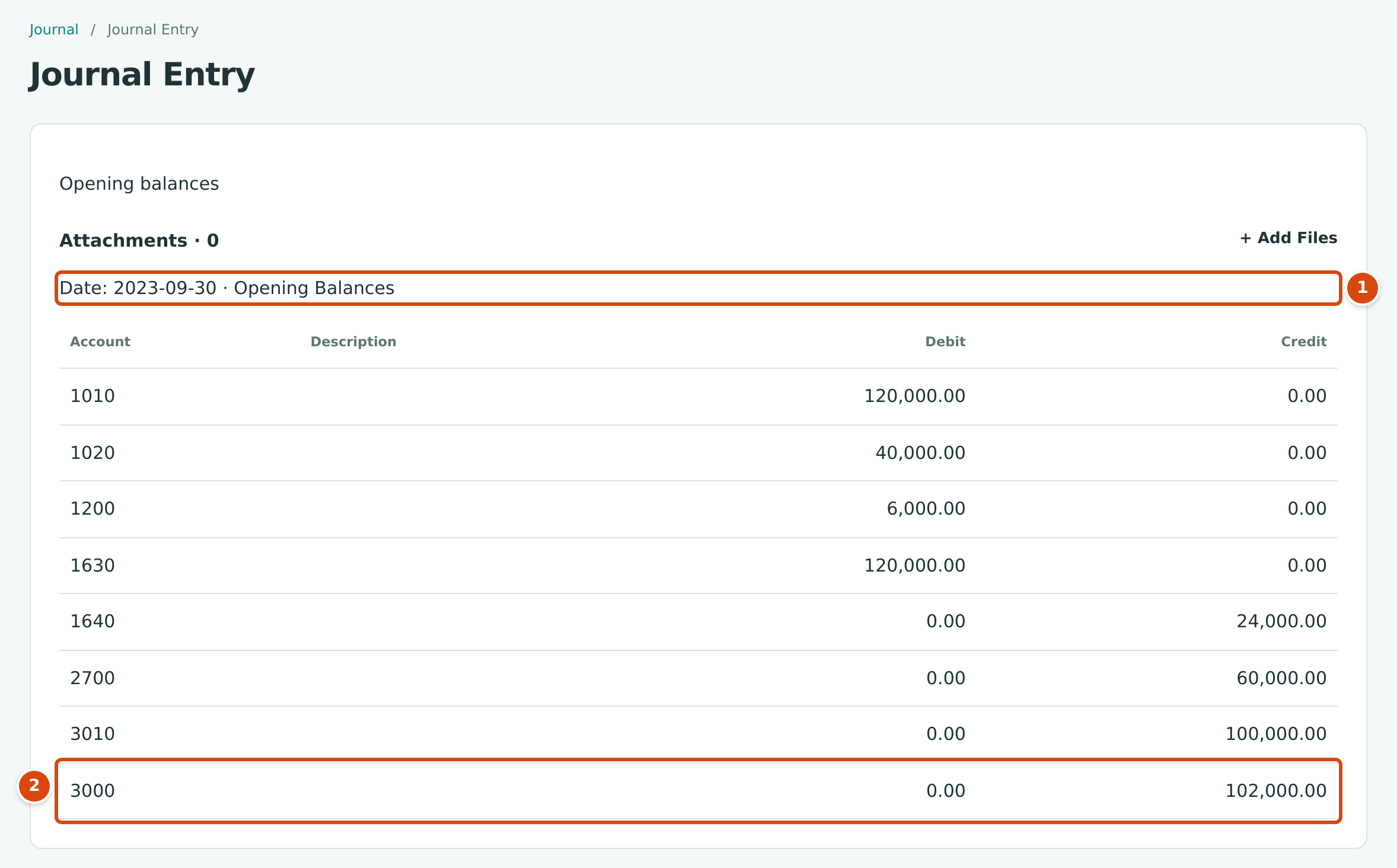
1. The date (the day before the books start) and the type, Opening Balances.
2. The line Structally added: a 102,000.00 credit to 3000.
- Books Start is saved, and the Opening Balances card on the Settings overview shows the date with Entered.
- The balances appear on the Balance Sheet and Trial Balance from that date. The Tie-Out report's cash flow check starts at the books start date.
- Like any posted entry, the opening entry cannot be edited. To correct it, reverse it (see Reversing and Correcting Transactions) or post further opening balances. Further opening balances are dated the same day before the books start, so they are possible only while that day is not closed.
- Over time, move the balance left in Opening Balance Equity to the equity accounts your accountant uses, with a journal entry.
Common Mistakes and Troubleshooting
| Message or Symptom | Why It Happens | What to Do |
|---|---|---|
| No active opening balance equity account; add one to the chart. | The chart has no active account with the Opening Balance Equity role. | Add or reactivate one in the Chart of Accounts. |
| Several opening balance equity accounts; mark one as default | More than one active account has that role and none is the default. | Mark one as the default, or deactivate the extra one. |
| Accounting date must be after the company closing date. | The day before the books start is in a closed period. The sample company, closed through July 31, 2026, gets this message. | Ask a Company Admin to reopen the period, post, and close it again (see Books Closed). |
| Account 1110 accepts postings only from invoices and retainage releases. | A retainage or WIP account was used (see Which Accounts You Can Use). | Leave it out; those balances come from their own documents. |
| An account is missing from the Account list. | It is an income or expense account, inactive, a root account, or the Opening Balance Equity account. | Use an active balance sheet account. |
| The Books Start field cannot be changed. | Opening balances were already posted, which fixed the date. | Further opening balances use the same date. |
| Customer or vendor aging totals do not match Accounts Receivable or Accounts Payable. | Opening balances on those accounts have no invoices or bills behind them. | See the note under Which Accounts You Can Use. |