Messages and What They Mean
When Structally refuses an action, it shows a message and changes nothing: nothing is saved, posted or reversed, and no balance moves. This page lists the messages you can meet in everyday work, grouped by area, with the reason and the fix. To find a message quickly, use your browser's find command (Ctrl+F, or Cmd+F on a Mac) and type a few words of it.
Reading a Message
- Where it appears. A message about the whole action appears in a banner at the top of the page. A message about one field appears in red under that field. A refusal banner stays until you close it with ×; other notices disappear after a few seconds.
- Values in messages. Many messages name the record, account, line, date or amount involved: Account 2020 accepts postings only from bills and retainage releases. names your account's code. On this page such messages show one realistic example, mostly with the sample company's numbers, marked "(example)". The words around the values never change.
- Several problems at once. When a form has more than one problem, the messages are joined with semicolons in one banner, or shown under each field.
- Line numbers count the lines of the form from the top, starting at 1.
If a message is not on this page, look in the Common Mistakes and Troubleshooting table at the end of the page that covers the workflow, or see Troubleshooting for a step-by-step way to find the cause.
Signing In and Access
| Message | Why It Happens | What to Do |
|---|---|---|
| Please enter a correct username and password. Note that both fields may be case-sensitive. | The password is wrong, the email is typed with capital letters, or the address has no active sign-in (an invitation never accepted, or a sign-in that has been turned off). "Username" means your email address. | Type the email in lowercase and check the password's capitals, then use Forgot password?. See Access Problems. |
| If an active account uses that email, a reset link will be sent. | Shown after Send Reset Link whether or not the address has a sign-in. | Check your inbox and spam folder. No email comes for an address that never set a password; ask a Company Admin to use Resend Invitation. |
| This password link is invalid or has expired. | The invitation or reset link is more than three days old, was already used, or you signed in after it was sent. | Click Request a New Password Link, or ask your Company Admin to resend the invitation. See Password Links. |
| This password is too short. It must contain at least 8 characters. | The new password has fewer than eight characters. | Choose a longer password. See Password Rules. |
| Add an uppercase letter and a symbol. (example) | The password lacks a kind of character: an uppercase letter, a lowercase letter, a number and a symbol are all required. The message names what is missing. | Add the missing characters. |
| This password is too common. | The password is on a list of widely used passwords. | Choose something less predictable. |
| This password is entirely numeric. | The password is only digits. | Add letters and a symbol. |
| The password is too similar to the username. | The password is close to your email address or your name. | Choose a password unrelated to your name and email. |
| The two password fields didn’t match. | New Password and Confirm New Password differ. | Type the same password in both. |
| No company access. | You signed in, but you have no active access to any company: it was never given, or it was suspended or removed. | Ask a Company Admin of your company. See No Companies Are Listed. |
| This company is suspended, contact support | Structally has suspended the whole company; its card on Your Companies has no Open link. | Contact your Company Admin or Structally. |
| We Can't Find That Page with The link may be old, or it may point to a company you don't have access to. | The link points to a company you cannot open (your access is suspended or removed, or the company is suspended) or to a record that does not exist. | Click Back to Your Companies and open the company from the list. |
| This company is being updated. Try again in a minute. | Structally is applying an update to the company. | Wait a minute and reload the page. |
| This company is being moved. Try again in a few minutes. | Structally is moving the company. Pages still open, but saving is paused. | Wait a few minutes, then save again. Your entries were not saved. |
| This Area Is Locked for You with Your company access does not include Banking. Nothing is broken, you just need a key. (example) | Your role has no access to that area. | Ask one of the Company Admins named on the page. See An Area Is Missing or Locked. |
| This page is for Company Admins only. | A Custom user with Settings access opened Company Details, Classes & Locations or Users & Access. | Ask a Company Admin. |
| Write Access Required with You can view this company's accounting records. | You have View access to the area, or your role cannot perform this action at all. | Ask a Company Admin for Edit access, or ask a user who has it. See Pages That Open Read-Only. |
| Permission denied for post_bill. (example) | Your role is not allowed this action. The last word is Structally's own name for the action (here, posting a bill). It often appears with Write Access Required, and also for approval steps your role does not include. | See Approval Steps and Roles and Permissions. |
| Company admin access required | A user with Settings access who is not a Company Admin tried to save company details or classes and locations. | Ask a Company Admin. |
| This page is read-only. | You opened New Job or New Forecast with View access to Jobs & Costing. | Ask for Edit access to Jobs & Costing. |
| Jobs & Costing is not turned on for this company. | The Jobs & Costing module is off for this company. | Ask your Company Admin; Structally turns modules on. |
Saving Forms
These messages can appear on any form.
| Message | Why It Happens | What to Do |
|---|---|---|
| This field is required. | A required field is empty. Structally does not mark required fields in advance. | Fill in the field above the message. |
| Enter a valid date. | A date is incomplete or not a real date. | Pick the date from the calendar. |
| Enter a valid email address. | An email field does not hold a complete address. | Correct it, or leave an optional field empty. |
| Start must be on or before end. | On a list or report, Start is after End. | Swap the dates. |
| Select at least one row. | Mark Active or Mark Inactive was clicked with no row ticked. | Tick the rows first. |
| This record was changed by someone else. Reload the page and try again. | Another user saved the same record after you opened it. Jobs, forecasts and WIP schedules say This job was changed by someone else. Reload the page and try again., and change orders name the change order. | Reload the page, check what changed, and make your change again. |
| Reload the page and try again. | The WIP schedule page was out of date when you clicked a button. | Reload the page. |
| Idempotency key was already used for a different request. | The same form was sent twice with different entries, for example after using the browser's back button. Nothing was saved the second time. | Check the entries on the form and click the button again. |
| A document can have at most 3 attachments. | A bill, invoice, expense, payment, receipt, credit or journal entry already has three files. | Remove a file first, or combine documents into one PDF. |
| A job can have at most 25 attachments. (example) | A job, commitment, amendment or change order already has 25 files. The message names the kind of record. | Remove a file first. |
| Attachments must be at most 5 MB. | A file is larger than 5 MB. | Attach a smaller copy. |
| Attachments must be PDF, JPG, PNG, HEIC, Word, Excel or CSV files. | The file is another type, or its content does not match its name. | Save it as one of the listed types. |
| Only draft bills can be changed (example) | The edit page of a posted bill was opened, for example from an old bookmark. Invoices, vendor credits and credit memos give the same message with their own name. | Posted documents cannot change. Void the document and enter it again. See Reversing and Correcting. |
Dates and Closed Periods
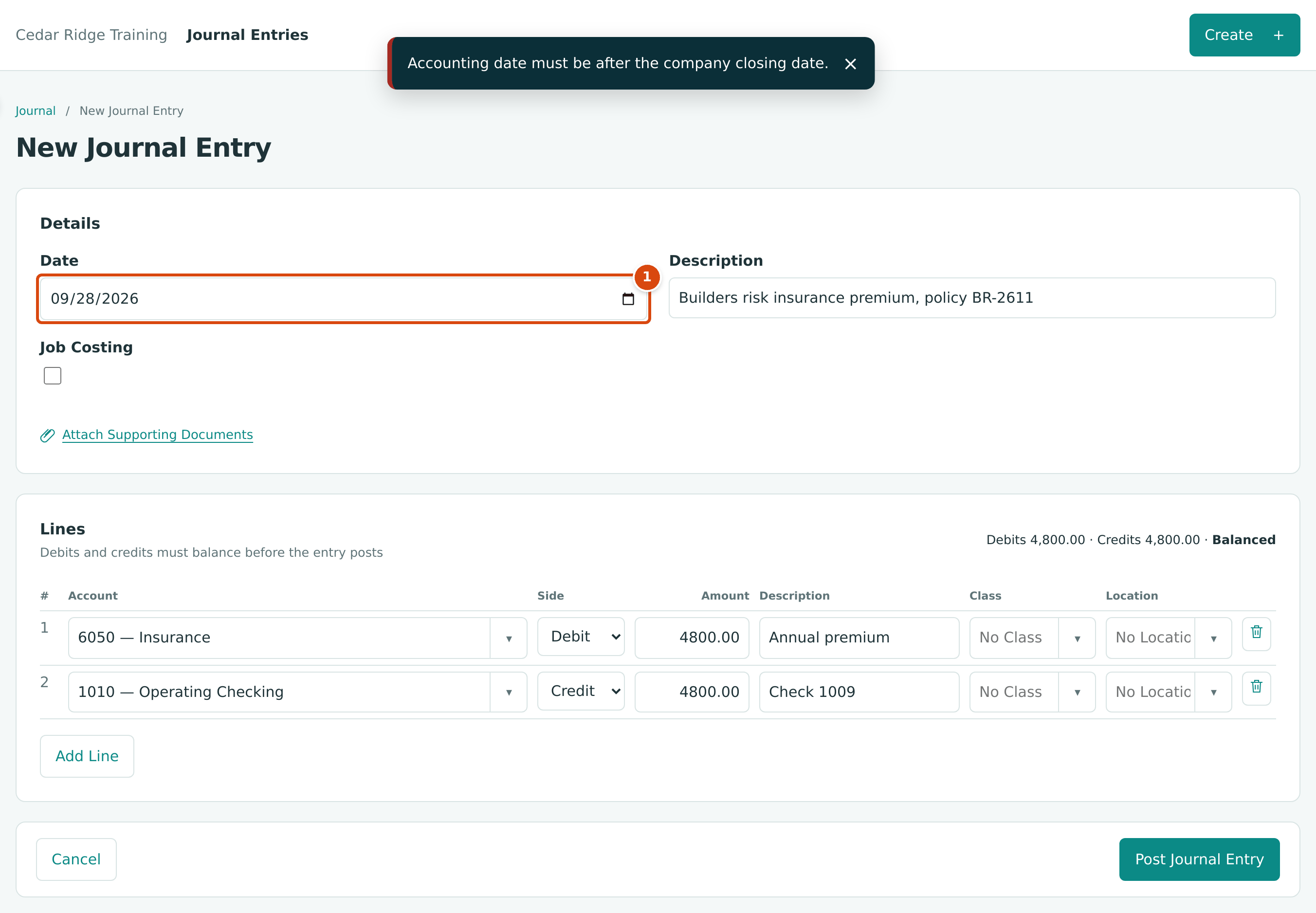
- Date: September 28, 2026 is on or before the Books Closed date, September 30.
| Message | Why It Happens | What to Do |
|---|---|---|
| Accounting date must be after the company closing date. | The document, entry, opening balances or WIP schedule is dated on or before the Books Closed date. | Date it after the closed date if it belongs in the open period. If it truly belongs in the closed month, a Company Admin moves the date back, you post, and the books are closed again. |
| Accounting date must be after the company closing date; 2026-07-31 is on a closed period. (example) | A void or reversal is dated on or before the Books Closed date. The date shown is the one you entered. | Date the void or reversal after the closed date; the original stays in the closed period. See Rules for Every Reversal. |
| Reversal date cannot be earlier than the journal entry date. | A void or reversal is dated before the record it cancels. | Use the original date or later. |
| Lock date cannot be in the future. | The Books Closed date is after today in the company's time zone. | Enter today or an earlier date. |
| Cutoff cannot be after today. | A forecast or WIP schedule cutoff is in the future. | Use today or earlier, normally the last day of last month. |
| Payment date is before bill date | A payment is dated before a bill it pays. | Date the payment on or after the bill date. |
| Receipt date is before invoice date | A customer payment is dated before an invoice it pays. | Correct the receipt date. |
| Deposit date is before receipt date | A ticked receipt is dated after the deposit. | Use a later deposit date, or leave that receipt for the next deposit. |
| Refund date is before source date | A credit or payment the refund settles is dated after the refund. | Use a later refund date. |
| Application date is before credit date or Application date is before bill date | A vendor credit is applied on a date before the credit or the bill. | Use the later of the two dates. |
| Application date is before invoice date | A credit memo is applied on a date before the invoice. | Use the invoice date or later. |
| Allocation date is before payment date or Allocation date is before receipt date | Apply Credit is dated before the payment or receipt. | Use the payment or receipt date or later. |
| Unapply date is before allocation date or Unapply date is before application date | An unapply is dated before the allocation or application it undoes. | Use that date or later. |
| Statement date must be after 2026-08-31 (example) | A reconciliation's statement date is not later than the account's last completed statement. | Enter the new statement's closing date. |
| Line is dated after the statement or Transaction is dated after the statement | A bank line or missing transaction belongs to a later statement. | Leave it for the next statement, or date it on or before the statement date. |
| End date cannot be before the start date. | A job's dates are reversed. | Correct the dates. |
Lines, Accounts and Job Coding
These checks run on bills, expenses, invoices, credit memos, vendor credits and journal entries.
| Message | Why It Happens | What to Do |
|---|---|---|
| Debits and credits must balance exactly. | A journal entry's debits and credits differ. | Correct the amounts until the totals show Balanced. See Journal Entries. |
| Every account must be active, non-root, and belong to the company. | An account on a draft was made inactive after the draft was saved. | Edit the draft and choose an active account, or reactivate the account. |
| Account 2020 accepts postings only from bills and retainage releases. (example) | The line uses the Retainage Payable account. Only bills and retainage releases post there. | Record retainage on bills and release it with a retainage release. |
| Account 1110 accepts postings only from invoices and retainage releases. (example) | The line uses the Retainage Receivable account. | Record retainage on invoices or pay applications. |
| Account 1400 accepts postings only from WIP schedules. (example) | The line uses a WIP account (in the sample company 1400, 1450, 2400, 2450, 4100, 5900 or 5950). | Let a WIP schedule post these accounts. |
| Line account 1450 is a WIP account. (example) | A bill, expense or credit line uses a WIP account. | Choose an expense or cost account. |
| Line account 2100 is excluded. (example) | An expense or bank feed line uses the account the money came from. | Choose the account the money was spent on. |
| Line descriptions must be at most 100 characters. | A line description is longer than 100 characters. A draft saves with it, but posting refuses it. | Shorten the description. |
| Description must be at most 200 characters. | A void or reversal memo is longer than 200 characters. | Shorten the memo. |
| Class REM is inactive. (example) | A class, location or item on the form was marked inactive. The message names Class, Location or Item. | Choose an active value, or mark it active again. |
| Choose an account or an item. | A line has an amount but neither an account nor an item. | Choose one, or remove the line. |
| Enter an amount or a quantity and rate. | A line has an account but no amount. | Type the amount, or a quantity and a rate. |
| Quantity and rate must be given together. | Only one of Qty and Rate is filled. | Fill in both, or clear both and type an amount. |
| Turn on Job Costing or clear the job coding on the lines. | Lines name jobs but Job Costing is not ticked. | Tick Job Costing, or clear the job fields. |
| Account 5040 requires job coding. (example) | Job Costing Settings require a job on this account. | Tick Job Costing and choose the job, cost code and cost type. See Coding Transactions to Jobs. |
| Account 6010 cannot carry job coding. (example) | Job Costing Settings exclude this account from job coding. | Remove the job from the line, or use another account. |
| Job-coded cost lines need a cost code and a cost type. | A cost line has a job but not both codes. | Choose a cost code and a cost type. |
| A cost code or cost type needs a job. | A cost code or type was chosen without a job. | Choose the job, or clear the codes. |
| Cost codes and cost types apply to cost lines only. | A revenue line carries a cost code or cost type. | Clear them; revenue lines take a job only. |
| Cost code 06-100 is not assigned to job J-1036. (example) | The cost code is not assigned to the line's job. | Pick an assigned code, or assign it on the job page. See Cost Codes and Cost Types. |
| Cost type OVH is inactive. (example) | The cost type (or, in Cost code 01-200 is inactive., the cost code) was deactivated. | Reactivate it, or choose another. |
| Choose a listed job. | The job on the line is not one of the jobs offered. | Pick the job from the list. |
| Job J-1008 is not active yet. (example) | The job is still a draft. | Activate the job. See Closing and Reopening Jobs. |
| Job J-2003 is closed; give an adjustment reason. (example) | The line names a closed job (or, with on hold, a job on hold). | Type an Adjustment Reason on the line. See Costs on On-Hold and Closed Jobs. |
| Job J-1001 is archived. (example) | Archived jobs accept no postings. | Choose another job. |
| Line 1 allocations must equal the line amount. (example) | Split rows do not add up to the line amount. | Adjust the allocations until Remaining is 0.00. |
| Add at least one allocation or untick Split. | Split is ticked on a line with no allocation rows. | Add allocations, or untick Split. |
| Line 1 needs a job to hold retainage. (example) | A line with a retainage percentage has no job, or is split. | Choose the job, or set the retainage to 0. |
| Turn on Retainage or clear the retainage on the lines. | Retainage was unticked while lines still hold a percentage. | Tick it again, or clear the percentages. |
| Retainage percent must be from 0 to 100 with at most two decimals. | A retainage percentage is out of range. | Enter a value such as 10 or 7.5. |
Customers & Invoices
| Message | Why It Happens | What to Do |
|---|---|---|
| Customer must be active. | You are saving or posting an invoice or credit memo, or recording a receipt or refund, for a deactivated customer. | Reactivate the customer on its page. See Managing Customers. |
| Customer code already in use | Another customer, active or inactive, has the same code. | Choose another code, or leave Code empty. |
| Customer code must contain only letters, digits, hyphens and underscores. | The code has a space or another character. | Remove spaces and punctuation. |
| Item SKU already in use | Another item has the same SKU, perhaps with different capitals. | Choose a different SKU. See Products and Services. |
| Item must be active. | A new line uses an item that was marked inactive. | Mark the item active, or choose another. |
| At least one invoice line is required. | Every line of the invoice is empty. | Enter at least one line. See Creating an Invoice. |
| Line 1: J-2004 bills its contract through its schedule of values. Tick Extra for separate work outside the schedule. (example) | The line's job bills its contract through an approved schedule of values. | Bill contract work with a pay application; tick Extra only for work outside the contract. |
| Set up retainage in Job Costing Settings before posting invoices with retainage. | There is no Retainage Receivable account. | A Company Admin creates it in Job Costing Settings. |
| Only open invoices can be voided | The invoice is a draft, already void, or paid. | Drafts need no voiding. For a paid invoice, reverse or unapply its receipts first. See Voiding an Invoice. |
| Invoice has receipts applied; reverse them first | A customer payment is applied to the invoice. | Unapply the allocation on the receipt, or reverse the receipt. See Receiving Customer Payments. |
| Invoice has credits applied; unapply them first | A credit memo is applied to the invoice. | Unapply it on the credit memo's page. |
| Invoice has retainage releases; reverse them first | A posted retainage release bills this invoice's retainage. | Reverse the release first. |
| Invoice INV-2026-000049 is billed by J-2004 Pay Application 9; reverse the pay application instead. (example) | The invoice was posted by accepting a pay application. | Reverse the pay application. See Invoices Billed by a Pay Application. |
| Void is not available: reverse Pay Application 9 instead. (example) | Shown in the ⋯ menu of an open invoice that a pay application billed. | Reverse the pay application. |
| Only posted invoices can be sent. | The invoice is a draft or void. | Post the draft, or send the corrected invoice. See Sending and Printing Invoices. |
| Choose attachments of this invoice. | More than three attachments were ticked to send. | Tick at most three of the invoice's files. |
| No open items at this date. | On Receive Payment (or Pay Bills), the customer (or vendor) has nothing unpaid on the Balance Date. | Check the party and the Balance Date, or record the payment as an unapplied amount. |
| Allocations exceed receipt amount | The allocations add up to more than Amount. | Raise the amount or lower the allocations. |
| Allocation exceeds invoice balance | More is allocated to an invoice than it owes on the receipt date. | Allocate at most the invoice's balance; leave the rest unapplied. |
| Invoice must be open; status is paid (example) | The invoice was settled by another receipt or credit in the meantime. | Reload the open items with Load Open Items. |
| Receipt is deposited; reverse the deposit first | The receipt is part of a posted deposit. | Reverse the deposit in Banking, then the receipt. See Reversing a Deposit. |
| Receipt has refunds; reverse them first | Part of the receipt was refunded. | Reverse the refund in Banking first. |
| Allocations exceed unapplied receipt amount | Apply Credit amounts are more than the receipt's unapplied amount. | Lower the amounts. |
| At least one customer credit line is required. | Every line of the credit memo is empty. | Enter at least one line. See Credit Memos. |
| Application exceeds invoice balance | More of a credit memo is applied than the invoice owes. | Apply at most the invoice's balance. |
| Applications exceed credit memo remaining | The applications add up to more than the credit memo has left. | Lower the amounts. |
| Credit memo has no remaining amount | The credit memo is fully used. | Unapply an application first if you need to move it. |
| Credit memo has applications; unapply them first | You tried to void a credit memo that is applied to invoices. | Unapply each application, then void. See Voiding a Credit Memo. |
| Credit memo has refunds; reverse them first | Part of the credit was refunded. | Reverse the refund in Banking, then void. |
| Only open credit memos can be voided | The credit memo is a draft or already void. | Drafts need no voiding. |
Vendors & Bills
| Message | Why It Happens | What to Do |
|---|---|---|
| Vendor must be active. | You are saving, posting or paying a document of a deactivated vendor. | Reactivate the vendor on its page. See Managing Vendors. |
| Vendor code already in use | Another vendor has the same code. | Choose another code, or leave Code empty. |
| Vendor code must contain only letters, digits, hyphens and underscores. | The code has a space or another character. | Use letters, digits, hyphens and underscores only. |
| Vendor name must be 1 to 100 characters. | The name is only spaces, or too long. | Type a name of up to 100 characters. |
| At least one bill line is required. | Every line of the bill is empty. | Enter an account and an amount on at least one line. See Entering a Bill. |
| Set up retainage in Job Costing Settings before posting bills with retainage. | There is no Retainage Payable account. | A Company Admin clicks Create Account beside Retainage Payable Account in Job Costing Settings. |
| Commitment SC-2025-000008 is not issued. (example) | Bills can be matched only to issued commitments. | Issue the commitment, or leave the line unmatched. |
| Commitment SC-2025-000008 belongs to another vendor. (example) | The bill's vendor is not the commitment's vendor. | Choose the right vendor or commitment line. |
| Line 1 exceeds commitment SC-2025-000008 line 1 by 1,250.00. (example) | Commitment Overruns is set to Block and the line is more than what remains on the commitment line. | Amend the commitment, lower the amount, or have a Company Admin or Accountant post it with an Override Reason. See Matching Bills to a Commitment. |
| Only open bills can be voided | The bill is a draft, already void, or fully paid. | Edit a draft instead; for a paid bill, reverse or unapply its payments first. See Voiding an Open Bill. |
| Bill has payments applied; reverse them first | A payment is applied to the bill. | Unapply the payment from this bill, or reverse the payment. |
| Bill has credits applied; unapply them first | A vendor credit is applied to the bill. | Unapply it on the vendor credit's page. |
| Bill has retainage releases; reverse them first | A posted retainage release draws on this bill's retainage. | Reverse the release first. |
| Expenses are paid from a bank or credit card account | Paid From is not an active bank, cash or credit card account. | Choose another Paid From account. See Recording an Expense. |
| Payments are made from a bank or credit card account | The Funds Account is inactive or not a bank, cash or card account. | Choose another Funds Account. See Paying Bills. |
| Allocations exceed payment amount | The Allocate amounts add up to more than Amount. | Raise Amount or lower the allocations. |
| Allocation exceeds bill balance | An allocation is more than the bill owes on the payment date. | Allocate at most the bill's Balance. |
| Bill must be open; status is void (example) | The bill was voided or paid after the list was loaded. | Reload the open items with Load Open Items. |
| Payment has refunds; reverse them first | A refund was recorded against the payment's unapplied amount. | Reverse the refund in Banking first. |
| Payment has no unapplied credit | The whole payment is already applied. | Unapply it from a bill first if you need to move it. |
| Allocations exceed unapplied payment amount | Apply Credit amounts are more than Unapplied. | Lower the amounts. |
| Allocation is already unapplied | The allocation was unapplied before. | Nothing to do. |
| The two amounts must add up to this payment. | In Split This Payment, the investing and operating amounts do not equal the allocation. | Adjust them so they add up. |
| At least one vendor credit line is required. | Every line of the vendor credit is empty. | Enter an account and an amount. See Vendor Credits. |
| Vendor credit lines cannot use the accounts payable account. | A line uses Accounts Payable. | Choose the account the credit reduces. |
| Application exceeds bill balance | More of a credit is applied than the bill owes. | Apply at most the bill's Balance. |
| Applications exceed vendor credit remaining | The applications add up to more than Remaining. | Lower the amounts. |
| Vendor credit has no remaining amount | The credit is fully used. | Unapply it from a bill first to move it. |
| Vendor credit has applications; unapply them first | You tried to void an applied credit. | Unapply each application, then void. |
| Vendor credit has refunds; reverse them first | A refund draws on the credit. | Reverse the refund in Banking first. |
| Only open vendor credits can be voided | The credit is a draft or already void. | Drafts need no voiding. |
Banking
| Message | Why It Happens | What to Do |
|---|---|---|
| No undeposited receipts at this date. | No receipts are waiting in the From Account, or all are dated after the Receipt Date Limit. | Choose the From Account, or set a later date limit and click Load Receipts. See Making Deposits. |
| At least one receipt is required | No receipt was ticked. | Tick the receipts in the deposit. |
| Deposit accounts must differ | To Account is the same as From Account. | Choose the bank account in To Account. |
| Deposits move funds between bank accounts | One of the accounts is inactive or is not a Cash account. | Choose active Cash accounts. |
| Receipt is already deposited | Another deposit already includes the receipt. | Open the receipt to see its deposit. |
| Receipt is reversed | The receipt was reversed after the list was loaded. | Reload and choose other receipts. |
| Transfers move money from a cash account to a cash or credit card account | The From Account is not a Cash account, or the To Account is neither Cash nor Credit Card. | Send from a Cash account. Record card spending as an expense. See Transferring Funds. |
| Transfer accounts must differ | The same account is chosen twice. | Choose two different accounts. |
| No refundable sources at this date. | The vendor or customer has no open credit and no unapplied payment at the Balance Date. | Post the credit first, or pick a later balance date. See Recording a Refund. |
| Refund settlements must equal the refund amount | Settled differs from Amount. | Change the amounts until they agree. |
| At least one refund settlement is required. | No Settle amount was entered. | Enter how much of a source the refund settles. |
| Settlement exceeds source remaining | A settle amount is more than what is left on that credit or payment. | Lower the settle amount. |
| Refunds use a bank or credit card account | The funds account is inactive or not a Cash or Credit Card account. | Choose an active bank or card account. |
| Row 1: file must be at most 1 MB. | The statement file is too large. | Download a shorter period, or split the file. See Importing Bank Statements. |
| Row 1: file must be UTF-8. | The file was saved in another text encoding. | Save it again as "CSV UTF-8". |
| Row 1: missing required columns: amount, description. (example) | The file is not a standard file and has too few columns to map. | Export with date, amount and description columns. |
| Row 1: a header and data rows are required. or Row 2: at least one data row is required. | The file is empty or has only a heading row. | Check the export. |
| Row 7: column count does not match the header. (example) | A row has a different number of cells than the heading row. | Fix the row; check for commas inside unquoted text. |
| Row 5: date must be YYYY-MM-DD and valid. (example) | A standard file has another date format or an impossible date. | Use YYYY-MM-DD, or preview the file and choose the Date Format. |
| Row 4: amount must be a signed decimal with at most two places, without separators or symbols. (example) | An amount has commas, a currency sign or more than two decimals. | Remove them, or preview and map the file. |
| Row 4: amount must not be zero. (example) | Zero-amount rows, such as balance lines, cannot be imported. | Delete those rows. |
| Row 4: both money in and money out are filled. (example) | A mapped row has values in both columns. | Keep only one. |
| Row 9: external_id repeats row 3. (example) or Duplicate external id within the batch | Two rows have the same bank transaction number. | Remove the repeated row. |
| Choose a different column for each field. | Two fields are mapped to the same column. | Map each field to its own column. |
| No posted movement matches this line; categorize it instead. | No unmatched posting of exactly this amount is within 7 days of the bank line. | Use Find Other Records, or categorize the line. See Reviewing the Bank Feed. |
| Entry date is outside the match window | The posting is more than 7 days (31 from Find Other Records) from the bank line. | Use Find Other Records, or correct the posting's date. |
| Entry is already matched on this account | Another bank line is matched to that posting. | Unmatch the other line first if it is wrong. |
| Entry has been reversed | The posting was reversed. | Match the replacement posting. |
| Only new lines can be matched (or categorized) | The line was reviewed already, perhaps by someone else. | Reload the page. |
| A card charge is an expense, not a transfer | Transfer was used on a credit card charge. | Categorize it as an expense. |
| Bank entries cannot settle payables or receivables; use bills, invoices, payments or receipts | The bank entry account is Accounts Payable or Accounts Receivable. | Record the vendor payment or customer receipt in its own area, then match the line to it. |
| Use a transfer for movements between bank and card accounts | The bank entry account is a bank or card account. | Categorize the line as a transfer. |
| Dates must be within 31 days of the bank line. | A Find Other Records date is too far from the line. | Narrow the dates. |
| Entry is matched to a bank line; unmatch it first | You tried to void or reverse a record whose posting is matched to a bank feed line. | Unmatch the line, or undo its categorization, in the bank feed, then void or reverse. |
| Line is cleared in a reconciliation; unclear it first | The bank line is cleared in a statement. | Unclear it in the open reconciliation (reopen a completed one first). |
| An open reconciliation exists for this account | The account already has an open statement. | Continue it, or discard it. See Reconciling an Account. |
| Reconciliations are for bank or credit card accounts | The account is inactive or not a Cash or Credit Card account. | Choose another account. |
| Only lines linked to the ledger can be cleared | A line still needs review. | Match or categorize it first. |
| Line is already cleared | The line is cleared in this or another statement. | Nothing to do. |
| Reconciliation difference is 15.00; it must be 0.00 (example) | The difference is not zero when you complete or finish. | Find the missing line: an uncategorized fee, a line cleared twice, or a wrong ending balance. |
| Reconciliation is completed; reopen it first | You tried to change a completed statement. | Reopen it. |
| A later statement exists; discard or reopen it first | You tried to reopen a statement that is not the latest. | Work backward from the latest statement. |
| A reason is required to reopen | The Reason is empty. | Type a reason. |
| Only open reconciliations can be discarded | The statement is completed. | Reopen it first. |
| No posted movements in this date range. | Nothing posted to the account between Start and End on the register. | Widen the dates. See Account Registers. |
Accounting and Journal Entries
| Message | Why It Happens | What to Do |
|---|---|---|
| Account code must be 1 to 10 letters or digits. | The code is empty, too long, or has a space or symbol. | Use letters and digits only. See Creating and Editing Accounts. |
| Account code already in use | Another account, active or inactive, has this code. | Choose another code, or reactivate the existing account. |
| Account name must be 1 to 100 characters. | The name is empty or too long. | Shorten the name. |
| Account 1635 must be in the same statement group as its parent 2010. (example) | The account and the parent belong to different parts of the statements. | Choose a parent of the same kind, or None. |
| Parent account 1630 is inactive. (example) | The parent is inactive. | Reactivate the parent first. |
| Account 1635 cannot be placed under 1630: accounts can be at most 5 levels deep. (example) | The move would nest accounts more than five levels deep. | Choose a parent higher in the chart. |
| Account 1630 has active sub-accounts; deactivate them first. (example) | You tried to deactivate a parent account. | Deactivate each sub-account first. |
| Account is already inactive or Account is already active | Someone else changed the account after you opened it. | Reload the account page. |
| No accounts payable account configured | No active account has the role Payable (invoices give the same message for Receivable), so the document cannot post. | Reactivate the account. See The Chart of Accounts. |
| Several accounts payable accounts; mark one as default | More than one active account has the role Payable. | Deactivate the extra account so only one remains active. |
| Terms name already in use | Other terms have the same name, ignoring capitals. | Choose another name, or reactivate the existing terms. See Payment Terms. |
| Payment is already reversed (example) | The record was reversed before, perhaps by someone else. Expenses, transfers, deposits, refunds and bank entries give the same message with their own name. | Nothing to do; enter a new record if needed. |
Journal entry messages about dates, balance and accounts are under Dates and Closed Periods and Lines, Accounts and Job Coding.
Reports
| Message | Why It Happens | What to Do |
|---|---|---|
| From must be on or before the as-of date. | On the Balance Sheet, From is after As Of. | Choose an earlier From date. See Balance Sheet. |
| Choose a longer bucket or a shorter period | The columns would number more than 400. | Use Quarters or Years, or a shorter period. |
| Compare from must be on or before compare to date. | The Profit and Loss comparison dates are reversed. | Swap them. See Profit and Loss. |
| Cash basis shows Total, Months, Quarters and Years. | Class, location, item, SKU or job columns were asked for on the cash basis. | Choose Total, Months, Quarters or Years, or switch to Accrual. |
| No eligible jobs defined. | By Job was asked for, but no job is Active, On Hold or Closed. | Use another column choice. |
| No items defined | By Item or By SKU was asked for, but the company has no items. | Add items, or use another column choice. |
| No classes defined or No locations defined | Class or location columns were asked for, but the company has none. | Set them up in Classes & Locations. |
| Choose a non-root account to include sub-accounts. | Include Sub-Accounts is ticked with a section heading chosen. | Choose a real account. See General Ledger. |
| Choose a customer to run the statement | No customer is chosen on Statements. | Choose one and click Run Report. |
| No entries in this period or No activity in this period | Nothing was posted between Start and End. Drafts never appear in reports. | Check the dates, or post the drafts. |
| Balance sheet is out of balance | The Balance Sheet footer says total assets differ from liabilities and equity. Every posted entry balances, so this should not happen. | Run the Tie-Out for the same date and report it to your Company Admin. |
| 2 of 10 checks need attention (example) | Some Tie-Out checks do not agree. | See When a Check Does Not Agree. |
| Showing the first 5,000 of 12,345 lines. (example) | The General Ledger period holds more than 5,000 lines. Totals and balances still cover the whole period. | Narrow the dates, choose one account, or use Export CSV. See Very Long Ledgers. |
Jobs & Costing
| Message | Why It Happens | What to Do |
|---|---|---|
| Job number already in use | Another job has the same number, whatever the capitals. | Use a different number. See Creating and Managing Jobs. |
| Job number must be 1 to 30 characters. or Job name must be 1 to 120 characters. | The number or name is empty or too long. | Shorten it. |
| Job number can only be changed while the job is a draft. | The job is no longer a draft. | Keep the number. |
| Original contract and estimate are frozen once the job is active. | An original amount was changed after the job left Draft. | Use a change order or a budget revision. |
| Archived jobs cannot be changed. | The job is archived. | No action; archived jobs are final. |
| A job needs at least one active cost code and one cost type before activation. | The job has no active cost code, or the company has no active cost type. | Assign a cost code on the job page, or activate a cost type. |
| Enter a reason. | A dialog (reopen or archive a job, reject a change order) was confirmed with an empty reason. | Type a reason. |
| A reason is required to reopen a closed job. or A reason is required to archive a job. | The reason was blank when the change reached Structally. | Try again with a reason. See Closing and Reopening Jobs. |
| Cost code already in use or Cost type already in use | The code exists already, whatever the capitals. | Use another code. See Cost Codes and Cost Types. |
| Cost code must be 1 to 20 letters, digits, hyphens or periods. | The code is empty, too long or has other characters. | Use letters, digits, hyphens and periods only. |
| Cost type code must be 1 to 10 letters or digits. | The cost type code has other characters or is too long. | Use letters and digits only. |
| Cost code is not assigned to this job. | A budget, commitment, amendment or change order line uses a code the job does not have. | Assign the code to the job first. |
| Inactive cost codes cannot be assigned. | A ticked cost code was deactivated. | Untick it, or reactivate it. |
| Cost code 06-100 has posted lines on this job and stays assigned. (example) | The code has posted costs or revenue on the job. | Leave it assigned. |
| General cost codes stay assigned to every job. | You tried to unassign a General cost code. | Leave it assigned. |
| Coding applies to direct cost accounts only. | Required was chosen for a Revenue or Excluded account in Job Costing Settings. | Set Coding to Optional, or make the account Direct Cost. See Job Costing Settings. |
| Account 6030 carries job-coded lines and cannot be excluded. (example) | Posted lines on the account already carry job coding. | Leave it as Direct Cost. |
| No free account code from 2020 to 2099 for Retainage Payable. | Every code in the range is in use. | Review the accounts in that range in the Chart of Accounts. |
| Approve the original budget before adding a revision. | The original budget is still a draft. | Approve the original first. See Job Budgets. |
| Job already has an original budget. | A draft or approved original exists. | Add a revision instead. |
| Revision effective date cannot precede the original budget. | The revision is dated before the original. | Use a later date. |
| An original budget must total more than zero. | The original's lines add up to zero or less. | Enter the budget amounts. |
| Original budget lines cannot be negative. | A negative amount on an original budget. | Use a revision to reduce. |
| An internal transfer must net to zero. | A budget transfer's lines do not add up to 0.00. | Make the decreases equal the increases. |
| Duplicate cost code and cost type. | Two lines use the same cost code and cost type. | Combine them. |
| A unit is required with a quantity. | A quantity was entered without a unit. | Type the unit, such as CY or SF. |
| A reason is required to reject a budget. | Reject was clicked with an empty reason. | Type the reason. |
| Budgets cannot change on a closed or archived job. | The job is closed or archived. | Reopen the job if the change is justified. |
| A commitment must total more than zero. | The commitment's lines add up to zero. | Enter the amounts. See Commitments. |
| A commitment needs at least one line. | No line has a cost code and type. | Complete at least one line. |
| Amount must equal quantity times unit price. | The typed amount does not match quantity × unit price. | Clear the amount or correct the figures. |
| Vendor is inactive. | The commitment's vendor was deactivated. | Reactivate the vendor. |
| Commitments cannot change on a closed or archived job. | The job is closed or archived. | Reopen the job first. |
| Only a draft commitment can be edited. | The commitment is approved or issued. | Withdraw an approved one to draft; amend an issued one. |
| Enter an unused amount and a reason. or A reason is required to close a commitment. | The Close Commitment window was left incomplete. | Fill in both. Check the Unused Amount: it starts at the whole outstanding amount, not what is left unbilled. |
| Unused amount cannot exceed the outstanding balance. | The unused amount is more than the revised amount less what is already closed. | Enter a smaller amount. |
| Only an issued commitment can be amended. | The commitment is draft, approved or closed. | Issue it, or edit the draft. See Commitment Amendments. |
| An amendment needs at least one line or a retainage change. | No line and no New Retainage. | Add a line or a retainage percentage. |
| Amendment date cannot precede the commitment date. | The amendment is dated before the commitment. | Use a later date. |
| Revised commitment cannot be below the closed unused amount. | The amendment would bring the revised amount too low. | Reduce the negative amounts. |
| Only an approved change order can be linked. | The change order chosen is not approved. | Approve it first, or choose No Change Order. |
| Transfer reason is required. | A cost transfer has no Reason. | Type why the cost moves. See Transferring a Cost. |
| Amounts must be positive Decimals with no more than two decimal places. | A cost transfer amount is zero, negative or has more than two decimals. | Enter a positive amount; to move cost back, swap From and To. |
| Transfer accounts must be direct cost accounts. | An account in the transfer is not a job cost account. | Choose an account with Eligibility Direct Cost. |
| This job already has a draft forecast. | A job can have one draft forecast at a time. | Open the draft, or discard it. See Forecasts. |
| Forecasts need an active, on hold or closed job. | The job is a draft or archived. | Activate the job first. |
| Code all job cost to a cost code and cost type before preparing a forecast. | Some cost on the job has no cost code or cost type. | Find it in Job Cost Detail and correct the coding. |
| Choose an active cost code of this job and an active cost type. | Add Line used a code that is not on the job, or an inactive code or type. | Assign or reactivate the code. |
| This cost code and cost type are already on the forecast. | The line exists. | Change the existing line. |
| Line 1 still to buy must be zero or more with at most two decimals. (example) | A negative Still to Buy. | Use Adjustment for a reduction. |
| Set the original contract on the job before approving a forecast. | The job has no original contract amount. | Edit the job and enter its contract. |
| Forecast final cost is below actual cost on 22-100 SUB. (example) | A line's final cost is less than what is already spent. | Raise Still to Buy or Adjustment on that line. |
| Explain the commitment shortfall before approving. | A line is below its open commitments and no explanation was given. | Type an Explanation in the approval dialog. |
| Only a draft forecast can be changed. | The forecast is already approved. | Create a new forecast. |
| Finish or discard the draft WIP schedule first. | The company already has a draft WIP schedule. | Approve or discard the draft. See WIP Schedules. |
| Figures changed since the last refresh. Refresh the schedule and review it again. | Postings, forecasts or change orders changed after the last refresh. | Click Refresh Figures, review, and approve again. |
| J-1036: No approved forecast at the cutoff. (example) | One of the issues that block approval of a WIP schedule. | See Issues That Block Approval. |
| A WIP schedule with a later cutoff is already posted. | WIP schedules post in cutoff order. | Carry the correction into the next schedule. |
| This WIP schedule is already posted. | The schedule was posted before. | To correct it, create a New Version. See Correcting a Schedule With a New Version. |
| Create the WIP accounts first. | The WIP accounts do not exist. | A Company Admin clicks Create Accounts on the WIP Accounts card in Job Costing Settings. |
Progress Billing
| Message | Why It Happens | What to Do |
|---|---|---|
| Change orders cannot change on a closed or archived job. | The job is closed or archived. | Reopen the job first if the change is real. See Change Orders. |
| Contract amount applies to contract changes only. | A Cost or Internal Transfer change order has a contract amount. | Clear it, or enter a Contract change order. |
| Internal transfer lines must net to zero. | An internal transfer's lines do not add up to 0.00. | Make the decreases equal the increases. |
| Line amount cannot be zero. | A change order line has a zero amount. | Enter the amount or remove the line. |
| Line 1 would take 07-100 SUB below zero. (example) | A negative line is larger than the revised budget of that cost code and cost type. | Reduce the negative amount, or move budget to that code first. |
| A reason is required to reject a change order. | Reject was confirmed with an empty Decision Reason. | Type the reason. |
| Only a draft change order can be edited. | The change order was submitted or decided. | A submitted change order can be withdrawn but not edited. See Submit, Withdraw, Approve or Reject. |
| Schedule total 1,632,000.00 does not equal the revised contract 1,600,000.00. (example) | The schedule lines do not add up to the original contract plus approved contract changes. | Adjust the lines until Schedule Total shows Matches. See Schedules of Values. |
| Job J-2004 has no original contract amount. Set it on the job before approving the schedule. (example) | The job's Original Contract Amount is empty. | Edit the job and enter it. |
| Schedules of values need an active or on hold job. | The job is Draft, Closed or Archived. | Activate or reopen the job. |
| Job J-2004 has no customer. (example) | The job has no customer. | Edit the job and choose the customer. |
| Line 5 has been billed and cannot be removed. (example) | A line that has billing was removed from the schedule. | Keep the line. |
| Line 5 cannot be lower than its billed to date, 178,900.00. (example) | A scheduled value is below what was already billed. | Raise it to at least the billed to date. |
| Finish or discard the open schedule revision first. | A draft revision is already open. | Approve or discard it. |
| Finish the application in progress first. | The job already has a draft or sent pay application. | Open it with Open Application. See Pay Applications. |
| Approve the schedule of values before preparing an application. | The job's schedule has no approved revision. | Approve the schedule first. |
| Pay applications need an active or on hold job. | The job is Draft, Closed or Archived. | Activate or reopen the job. |
| Application date must be after 08/25/2026, the date of Application 9. (example) | The date is on or before the last accepted application's date. | Use a later period end. |
| Due date cannot be before the application date. | The due date is earlier than the application date. | Correct the due date. |
| Line 4 would reach 100.01% of its scheduled value. (example) | Completed and stored to date would pass the line's scheduled value. | Lower the amounts, or add the work through a change order. |
| Line 4 installs 5,000.00 from storage; 3,000.00 is stored. (example) | More was installed from storage than is stored on the line. | Lower Installed from Storage. |
| Job J-2004 is on hold; make it active to accept the application. (example) | The job is On Hold. | Set the job back to Active. |
| Only the latest accepted application can be reversed; Application 10 is later. (example) | A later application has been accepted. | Reverse the later one first. |
| Nothing new to bill. Accepting records Application 1 with no invoice and no journal entry. (example) | A notice above a draft whose saved amounts bill nothing new. It is worked out from the last saved figures. | Click Save Draft after typing amounts; the notice then updates. |
| At least one release line is required. | No Release amount was entered on a retainage release. | Enter an amount on at least one line. See Releasing Retainage. |
| Line 1 releases more than the retainage held on its source line. (example) | The amount is more than Held, or another release of the same line was posted meanwhile. | Lower the amount to what is held. |
| Line 1 must name a posted bill line of this vendor that holds retainage. (example) | The source line was voided, or belongs to another vendor. Customer releases say invoice line of this customer. | Load the held retainage again. |
| Line 2 is on a different job than line 1. (example) | A customer release mixes jobs. | Release each job separately. |
| Set up retainage in Job Costing Settings before releasing retainage. | The retainage account is missing or inactive. | Ask a Company Admin to set it up in Job Costing Settings. |
| Only draft retainage releases can be changed. | The release is already posted. | Reverse it and enter it again. |
Settings and Import
| Message | Why It Happens | What to Do |
|---|---|---|
| Choose a listed time zone. | The time zone sent is not in the list. | Choose a zone from the list. See Company Details. |
| Logo must be a PNG or JPG image. | The logo is another format, or not a valid image. | Save it as PNG or JPG. See Document Design. |
| Logo must be at most 2 MB. or Logo must be at most 1600 by 600 pixels. | The logo file or image is too large. | Save a smaller version. |
| Required for your SMTP account. | Use Your SMTP Account is chosen without an SMTP Host or Sender Email. | Fill both, or choose Send Through Structally. See Email Sending. |
| Set the company email before sending a test email. | Company Details has no Email. | Enter it in Company Details. |
| No active opening balance equity account; add one to the chart. | No active account has the Opening Balance Equity role. | Add or reactivate one. See Opening Balances. |
| Several opening balance equity accounts; mark one as default | More than one active account has that role. | Deactivate the extra one. |
| Code must be 1 to 20 letters, digits or hyphens. | A class or location code is empty, too long or has other characters. | Use letters, digits and hyphens only. See Classes & Locations. |
| Code is already in use. or Name is already in use. | Another class (or location) has this code or name. | Choose another. |
| That person already has access. | The email already has active or suspended access to the company. | Find the user in the list; reactivate them if suspended. See Users & Access. |
| Approved seat limit reached for Cedar Ridge Contracting (example) | Every seat is in use. | Suspend or remove someone, or click Request More Seats. |
| You cannot change your own access. | The change was for your own row. | Ask another Company Admin. |
| At least one company admin must remain. | The change would leave the company with no active Company Admin. | Make another user a Company Admin first. |
| Only a custom user has an access matrix. | Access was saved for a user whose role is not Custom. | Change the role to Custom first. |
| Identity has not accepted its invitation yet; resend the invitation instead. | Reset Password was used for a user who never set a password. | Use Resend Invitation. |
| Identity already has a password | Resend Invitation was used for a user who has since set a password. | Use Reset Password if they forgot it. |
| Requested limit must be above the current limit of 10 and at most 1000. (example) | The requested seat limit is not above the current one, or is over 1000. | Enter a larger number, at most 1000. |
| A seat request is already pending. | Structally has not decided an earlier request. | Wait for the decision. |
| File must be a CSV or an Excel workbook (.xlsx) | The import file is another format. | Save it as CSV (UTF-8) or .xlsx. See Import Data. |
| File must be at most 1 MB or Workbook must be at most 5 MB | The file is too large. | Split it into several files. |
| File must be UTF-8 | The CSV was saved in another text encoding. | Save it as "CSV UTF-8". |
| Wrong header; missing columns: …; extra columns: … | The heading row does not match the template. | Copy the heading row from a fresh template. |
| Wrong header; columns must be in the template order | The columns are all there, in another order. | Put them back in the template order. |
| At most 2,000 data rows are allowed | The file has more than 2,000 rows. | Split it. |
| The file contains no data rows | Only the heading row is filled. | Add your rows. |
| Choose a bank account | Bank Feed was chosen without a Bank Account. | Choose the account. |
| Type the batch number to confirm | The confirmation does not match the batch number. | Type it exactly, for example IMP-2026-000001. |
| Bank feed imports are undone in Banking | Undo was tried on a bank feed batch. | Deal with the lines in the bank feed. |
Problems found in single rows of an import file are listed in the preview and in the results file rather than in a banner; see Review the Preview.