Tie-Out
The Tie-Out report runs a set of checks that prove your books agree with themselves at a date: that debits equal credits, that the balance sheet balances, and that each control account (Accounts Payable, Accounts Receivable, the retainage accounts, the accounts that hold customer receipts) agrees with the documents behind it. It also lists the latest completed bank reconciliation of each account.
Run it as part of every month end, after posting the month's work and before sending reports to anyone. When every check agrees, the Balance Sheet, the aging reports and the Cash Flow can be relied on together.
Before You Begin
- You need View or Edit access to Reports. See Who Can Use Reports.
Navigation
Reports → Tie-Out.
Step by Step
- Open Reports → Tie-Out. It opens as of today.
- Enter the As Of date, for example 09/30/2026, or click a Quick dates button (Today, Last Month End, Last Fiscal Year End).
- Click Run Report.
- Read the banner. If a check does not agree, follow When a Check Does Not Agree.
Reading the Tie-Out
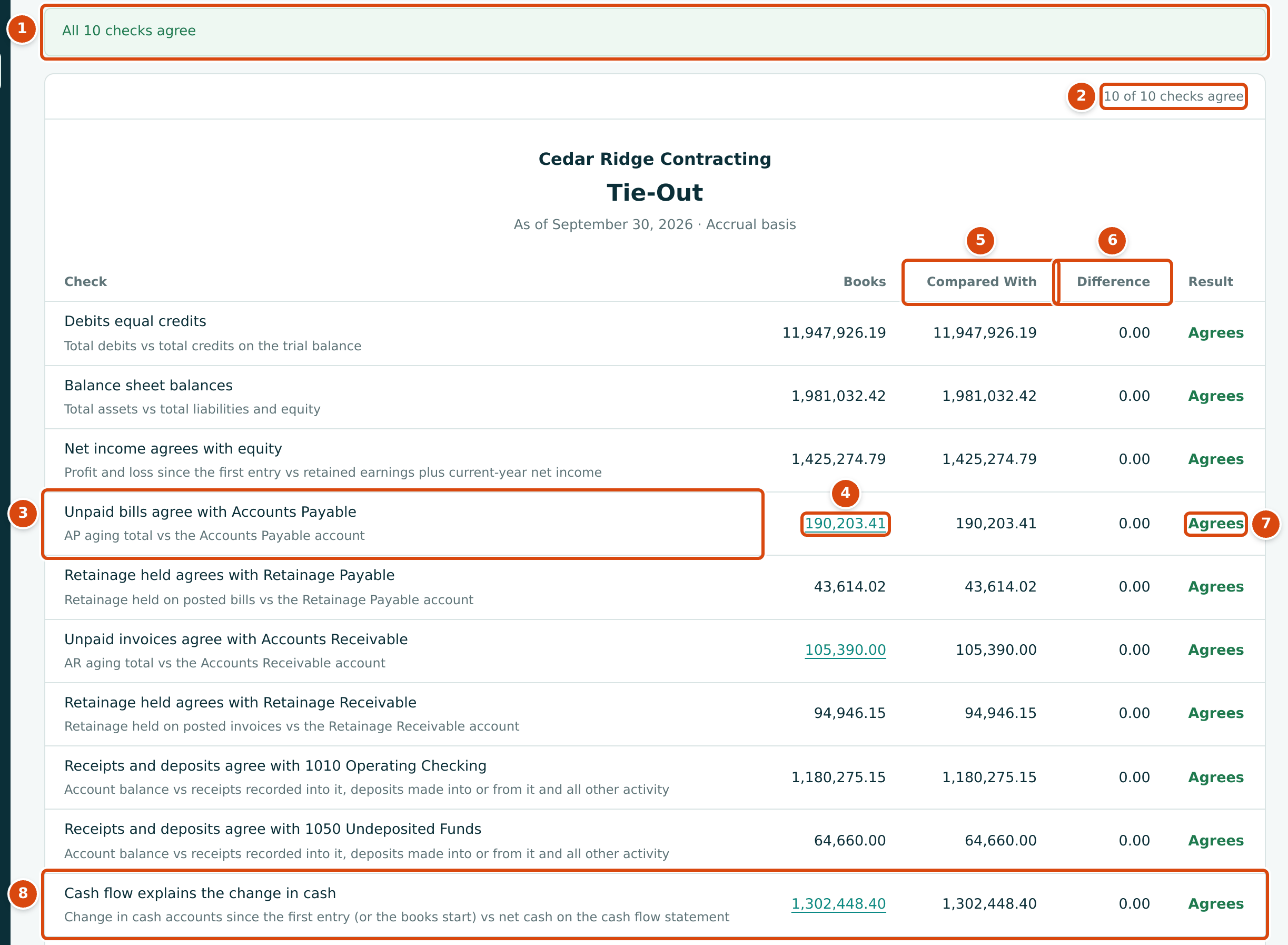
- The banner: All 10 checks agree, or 2 of 10 checks need attention when some do not.
- The count of checks that agree, such as 10 of 10 checks agree.
- Check: what is compared, with a line explaining how.
- Books: the first figure. Where it is underlined, it opens the report it comes from (AP Aging, AR Aging or Cash Flow) for the same date.
- Compared With: the figure it must equal.
- Difference: Books − Compared With.
- Result: Agrees, or Off by the difference.
- Cash flow explains the change in cash, always the last check.
What Each Check Compares
The checks appear in this order. The retainage checks appear only when the company has the retainage account or holds retainage; there is one Receipts and deposits check for each cash account that customer receipts are recorded into or deposits are made from or into.
| Check | Books | Compared With |
|---|---|---|
| Debits equal credits | Total debits on the Trial Balance | Total credits on the Trial Balance |
| Balance sheet balances | Total assets on the Balance Sheet | Total liabilities and equity |
| Net income agrees with equity | Profit and loss from the first entry to the As Of date | Retained Earnings plus Net Income on the Balance Sheet |
| Unpaid bills agree with Accounts Payable | The AP Aging total: open bills (less retainage held), less unapplied payments and vendor credits | The balance of the Accounts Payable account |
| Retainage held agrees with Retainage Payable | Retainage held on posted bills, less retainage released | The balance of the Retainage Payable account |
| Unpaid invoices agree with Accounts Receivable | The AR Aging total: open invoices (less retainage held), less unapplied receipts and credit memos | The balance of the Accounts Receivable account |
| Retainage held agrees with Retainage Receivable | Retainage held on posted invoices, less retainage released | The balance of the Retainage Receivable account |
| Receipts and deposits agree with an account, for example 1050 Undeposited Funds | The account's balance | Receipts recorded into it and not yet deposited, plus deposits made into it, plus all its other activity |
| Cash flow explains the change in cash | The change in your cash accounts from the first entry (or from the books start date set in Opening Balances) to the As Of date | Net Cash on the Cash Flow for the same period |
A retainage check also fails when the company has no active retainage account of that kind, even if the difference is 0.00.
Completed Reconciliations
Below the checks, a second sheet lists every account with at least one completed bank reconciliation. It is for information and is not one of the checks.
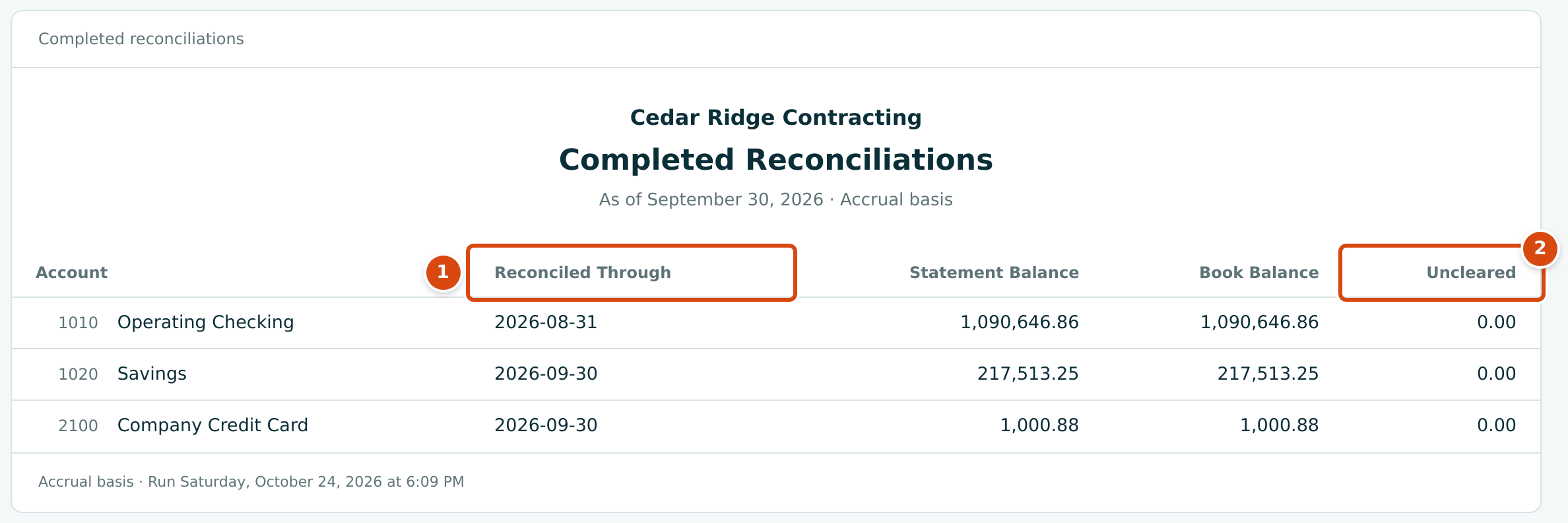
- Reconciled Through: the statement date of the account's latest completed reconciliation.
- Uncleared: Book Balance at that date less the Statement Balance.
The sheet always shows the latest completed reconciliation, whatever the As Of date. None means no reconciliation has been completed yet.
Worked Example: September 30, 2026
Run the Tie-Out as of 09/30/2026. All ten checks agree:
- Net income agrees with equity: 1,425,274.79 on both sides, the profit since the books began, which is Retained Earnings of $1,047,274.24 plus Net Income of $378,000.55 on the Balance Sheet.
- Unpaid bills agree with Accounts Payable: 190,203.41, the AP Aging's Company Total and the balance of 2010 Accounts Payable. Retainage of $43,614.02 is checked separately against 2020 Retainage Payable.
- Unpaid invoices agree with Accounts Receivable: 105,390.00; retainage receivable of $94,946.15 is checked separately.
- Receipts and deposits agree with 1050 Undeposited Funds: 64,660.00, receipts waiting to be deposited.
- Cash flow explains the change in cash: 1,302,448.40, the growth of the cash accounts since the books start, equal to Net Cash on the Cash Flow for the same period.
Under Completed Reconciliations, 1010 Operating Checking is reconciled through August 31, 2026 and 1020 Savings and 2100 Company Credit Card through September 30, 2026, each with 0.00 uncleared.
When a Check Does Not Agree
A failing row is highlighted and its Result reads Off by the difference; the banner says how many checks need attention. Work through it like this:
| Check That Fails | Where to Look |
|---|---|
| Unpaid bills agree with Accounts Payable or Unpaid invoices agree with Accounts Receivable | Click the Books amount to open the aging report, and run the General Ledger for the control account. Look for manual journal entries posted straight to Accounts Payable or Accounts Receivable: they change the account but not any bill or invoice. |
| A retainage check | Run the General Ledger for the retainage account. Check that the account is active in the Chart of Accounts. |
| Receipts and deposits agree with an account | Review the account's receipts and deposits, and its General Ledger. |
| Cash flow explains the change in cash | Click the Books amount to open the Cash Flow for the same period and look at Unexplained. |
| Debits equal credits, Balance sheet balances or Net income agrees with equity | These should always agree, because every posted entry is balanced. Report a failure to your Company Admin. |
Correct a mistake with the document's own correction (void, reverse, unapply) or a journal entry, then run the Tie-Out again. See Reversing and Correcting Transactions and Finding Unexpected Balances.
Exporting
Export CSV gives one row per check with the columns Kind, Check,
Label, Books, Compared With, Difference and Result, followed
by one Reconciliation row per reconciled account. The file is named, for
example, tie-out-2026-09-30.csv.
Common Mistakes and Troubleshooting
| Message or Symptom | Why It Happens | What to Do |
|---|---|---|
| 2 of 10 checks need attention (or similar) | Some checks do not agree. | See When a Check Does Not Agree. |
| Enter a valid date. | The As Of date is incomplete. | Pick the date from the calendar. |
| Every figure is 0.00. | The As Of date is before the first transaction. | Choose a later date. |
| A reconciliation date is later than the As Of date. | Completed Reconciliations always shows the latest one. | Nothing to fix. |