The Home Dashboard
Home is the first page you see in a company. Its heading reads Company Overview, and it brings together the figures most people check every day: how much cash you have, what customers owe you, what you owe vendors, how the period is going, and what needs doing next. Every figure links to the page or report behind it.
The dashboard always works from today's date. Balances (cash, unpaid invoices and bills) are as of today; period totals (income, expenses, money in and out) cover the period you choose.
Before You Begin
- Every user with access to the company can open Home.
- Each card appears only when your role can see the area behind it (see Who Sees Which Cards).
Navigation
Click Home at the top of the navigation, or the house icon when the navigation is hidden. When you have access to one company only, Home opens right after you sign in.
The Dashboard at a Glance
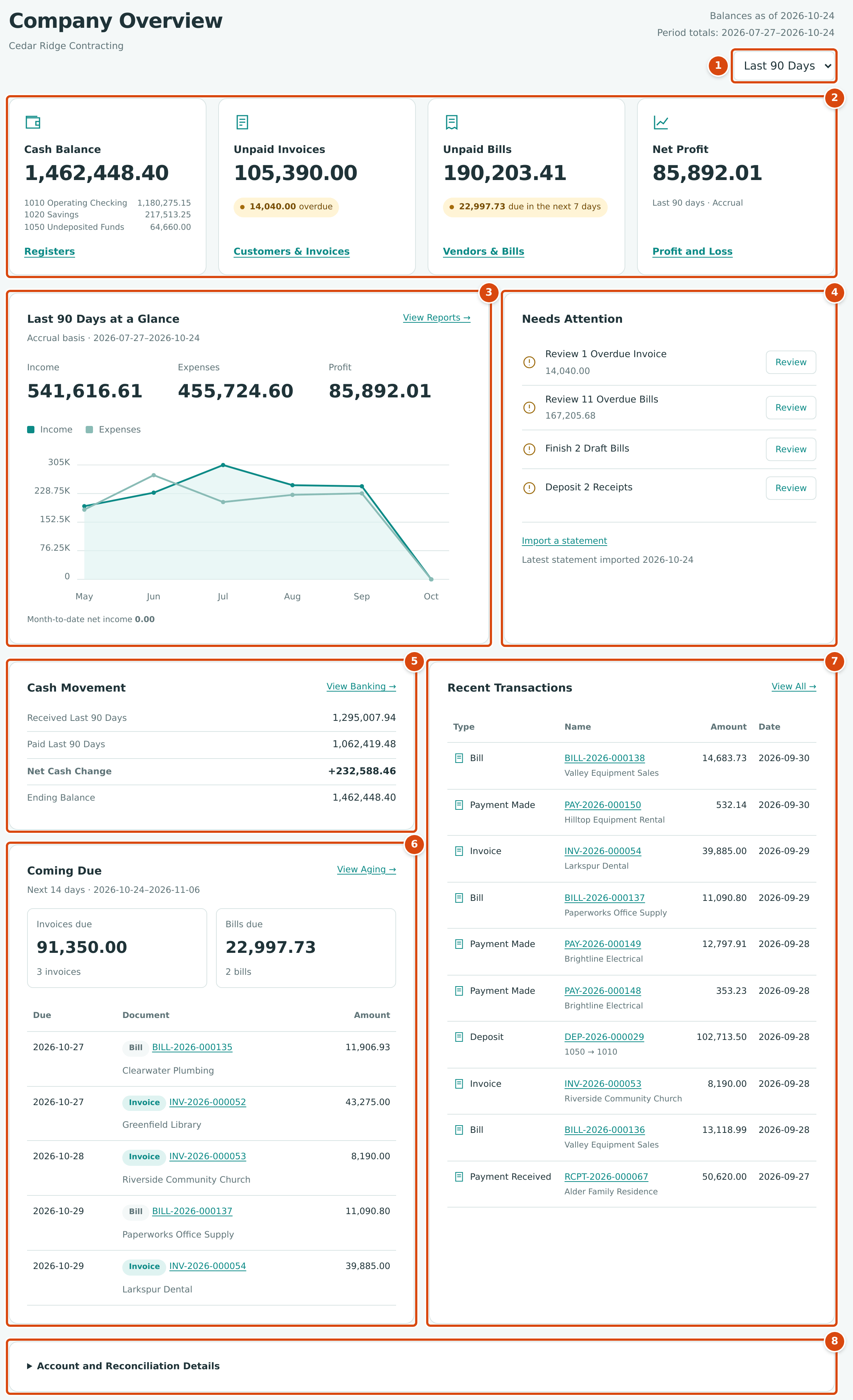
- The period menu: This Month, Last 30 Days or Last 90 Days.
- Four tiles: Cash Balance, Unpaid Invoices, Unpaid Bills and Net Profit.
- Period at a Glance: income, expenses, profit and a six-month chart.
- Needs Attention: work waiting for you.
- Cash Movement: money in and out of your cash accounts in the period.
- Coming Due: invoices and bills due in the next 14 days.
- Recent Transactions: the ten latest posted documents.
- Account and Reconciliation Details: a folded panel with each bank and card account.
The Period Menu
The heading shows Balances as of today's date and Period totals with the first and last date of the chosen period. Choose the period from the menu below them; the page reloads at once.
| Period | From | To |
|---|---|---|
| This Month (the default) | The first day of the current month | Today |
| Last 30 Days | 29 days before today | Today |
| Last 90 Days | 89 days before today | Today |
The period changes Net Profit, the at a Glance card and Cash Movement. It does not change the balances, Needs Attention, Coming Due, Recent Transactions or the chart, which always shows the last six calendar months. Home opens on This Month each time.
The Tiles
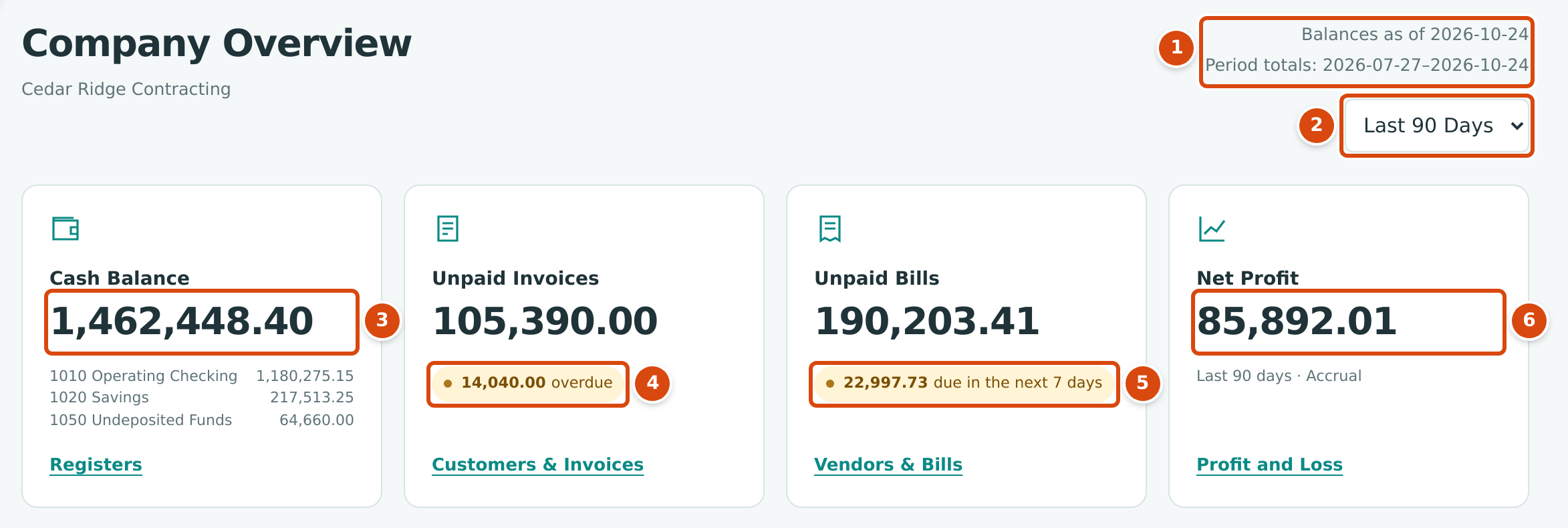
- Balances as of today, and the dates of the period totals.
- The period menu.
- Cash Balance: the total of your cash accounts, with each account listed below.
- Unpaid Invoices: the overdue part, or Nothing overdue.
- Unpaid Bills: the part due within seven days, or Nothing due this week.
- Net Profit for the period, with the period name and Accrual.
| Tile | What the Figure Is | Note Below the Figure | Link |
|---|---|---|---|
| Cash Balance | The book balance today of every active account with the Cash role (bank accounts and holding accounts such as Undeposited Funds). Credit card accounts are not included. | Each cash account with its balance. | Registers (Account Registers) |
| Unpaid Invoices | What customers owe you today: the open balance of posted invoices (excluding retainage still held), less payments received and credits not yet applied to an invoice. | The open balance of invoices past their due date, as … overdue, or Nothing overdue. | Customers & Invoices (The Receivables Overview) |
| Unpaid Bills | What you owe vendors today: the open balance of posted bills (excluding retainage held), less payments and vendor credits not yet applied. | The open balance of bills due from today through the next seven days, as … due in the next 7 days, or Nothing due this week. | Vendors & Bills (The Payables Overview) |
| Net Profit | Income less expenses for the period, on the accrual basis. | The period, for example Last 90 days · Accrual. | Profit and Loss (Profit and Loss) |
At a Glance and Needs Attention
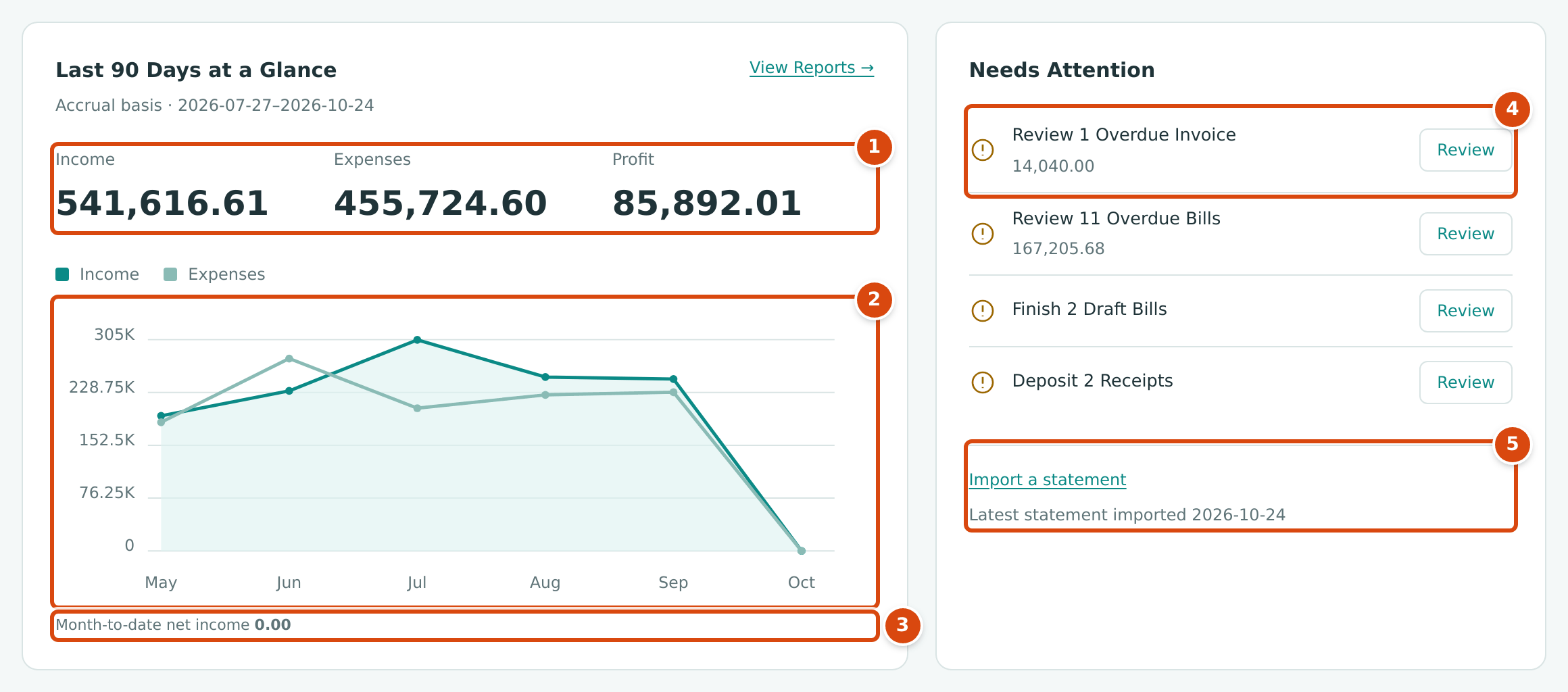
- Income, Expenses and Profit for the period.
- The chart: income and expenses for each of the last six calendar months, including the current one. Hover over a point to see the month and amount.
- Month-to-date net income: profit from the first of this month to today, whatever period is chosen.
- A task with its amount and a Review button.
- The bank feed link and the date of the latest statement import.
At a Glance
The card's title follows the period (This Month at a Glance, Last 30 Days at a Glance or Last 90 Days at a Glance), and its subtitle reads Accrual basis with the period's dates. Income is the total of your income accounts. Expenses is your direct costs plus operating expenses, reduced by other income and increased by other losses, so that Income less Expenses equals Profit, the net income of the period. View Reports → opens the Reports page.
Needs Attention
Needs Attention lists, in this order, the tasks that apply today:
| Task | Appears When | Review Opens |
|---|---|---|
| Review n Overdue Invoice(s), with the overdue amount | Posted invoices are past their due date and not fully paid. | The Invoices list filtered to Overdue |
| Review n Overdue Bill(s), with the overdue amount | Posted bills are past their due date and not fully paid. | The Bills list filtered to Overdue |
| Review n Bank Transactions | Imported bank or card statement lines are new or flagged as possible duplicates. | The Bank Feed |
| Finish n Draft Bills | Bills are saved as drafts. | The Bills list filtered to Draft |
| Complete account Reconciliation | A reconciliation of that account is still open. | That reconciliation |
| Deposit n Receipts | Customer payments are waiting in a holding account such as Undeposited Funds. | Make Deposit |
You see only the tasks of areas your role can open. When there is nothing to do, the card shows Nothing needs your attention.
Users with Banking access also see a link at the bottom of the card: Review the feed when statement lines are waiting, otherwise Import a statement, with Latest statement imported and its date (or No statements imported).
Cash Movement and Coming Due
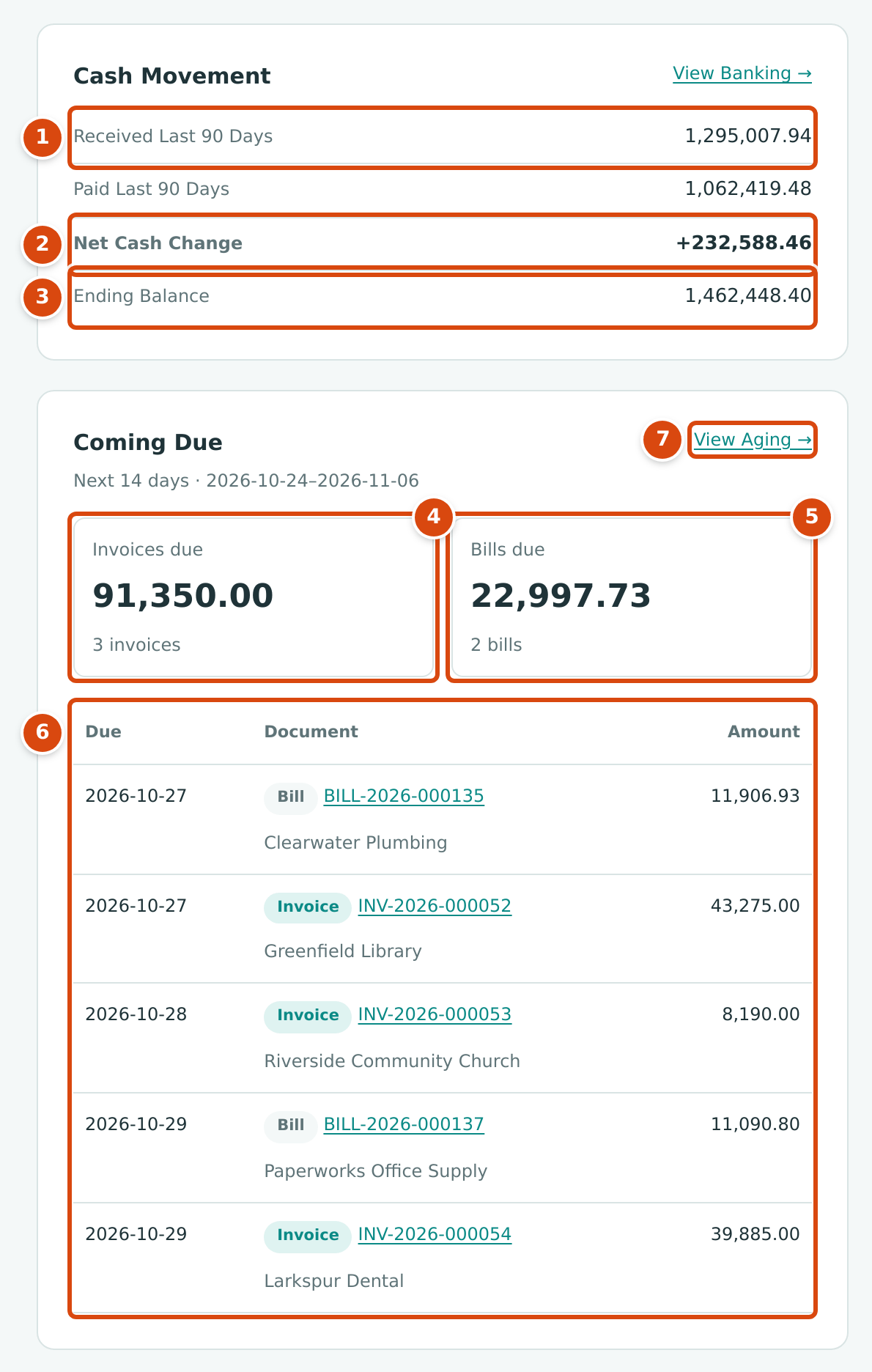
- Received in the period: everything posted into your cash accounts.
- Net Cash Change: received less paid.
- Ending Balance: the same total as the Cash Balance tile.
- Invoices due: the open balance and number of invoices due in the next 14 days.
- Bills due: the same for bills.
- The documents due, earliest first.
- View Aging → opens the AR Aging report (the AP Aging report for users without access to Customers & Invoices).
Cash Movement
Received and Paid add up every amount posted into and out of your cash accounts in the period. Money moved between two of your own cash accounts, such as a deposit from 1050 Undeposited Funds into 1010 Operating Checking, appears in both lines, so it does not change Net Cash Change. View Banking → opens Account Registers.
Coming Due
Coming Due covers today and the following 13 days (Next 14 days with the dates). The totals count every posted invoice and bill due in that window that is not fully paid; the table lists up to eight of them by due date, each with an Invoice or Bill pill, its number (which opens it), the customer or vendor, and the open balance. When nothing is due, the card says Nothing due in the next 14 days. Invoices due and Bills due each open the matching aging report (Aging Reports).
Recent Transactions
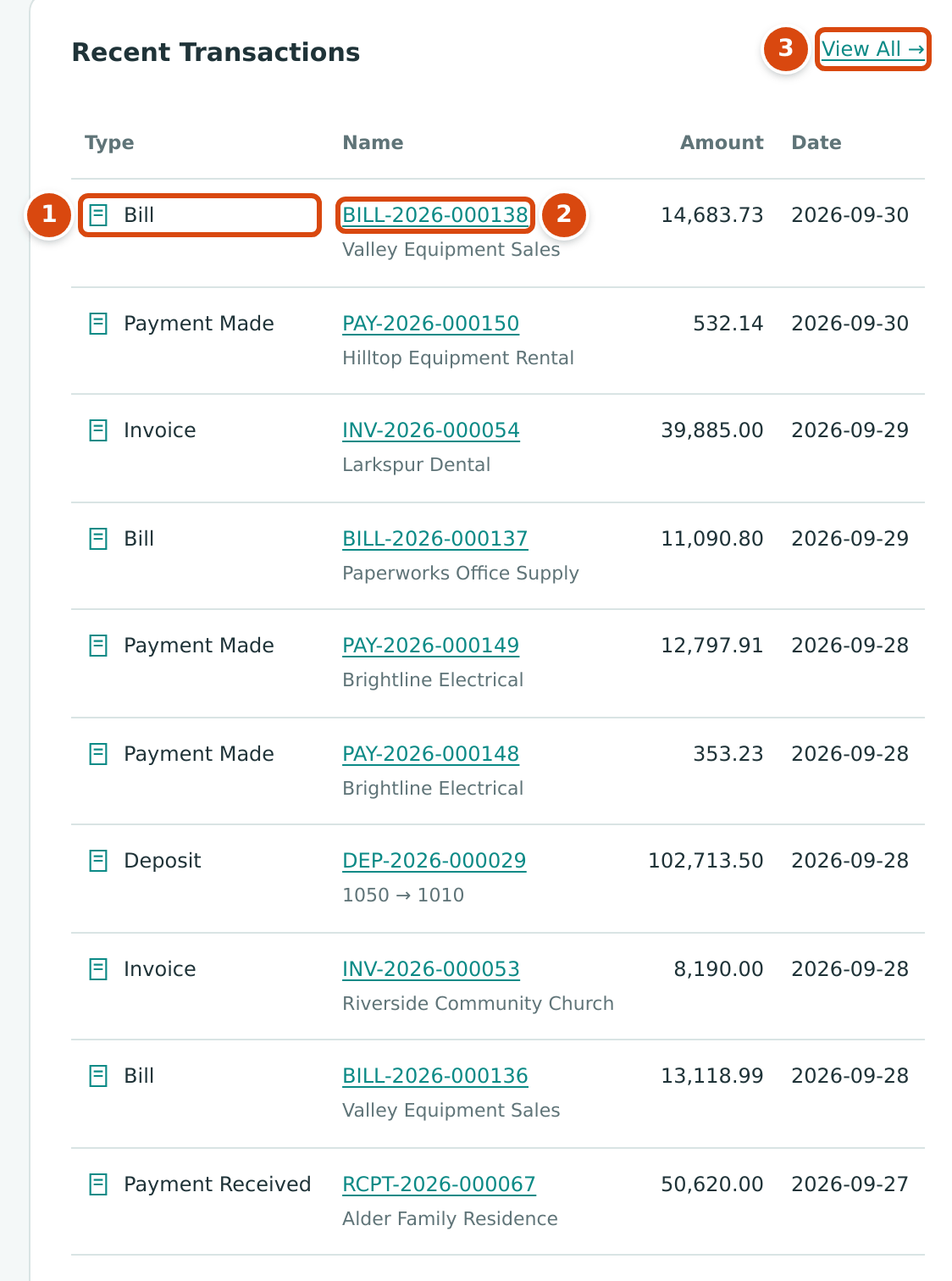
- Type: Bill, Invoice, Expense, Payment Made, Payment Received, Transfer or Deposit.
- Name: the document number, which opens it, with the customer or vendor (for transfers and deposits, the two account codes).
- View All → opens Journal Entries.
The card lists the ten most recent posted documents dated today or earlier, of the seven types above, by date. Drafts, journal entries, refunds, credits and bank entries are not listed here. Amount is the document's total (or the amount paid, received, transferred or deposited).
Account and Reconciliation Details
Click Account and Reconciliation Details at the bottom of the page to unfold it:
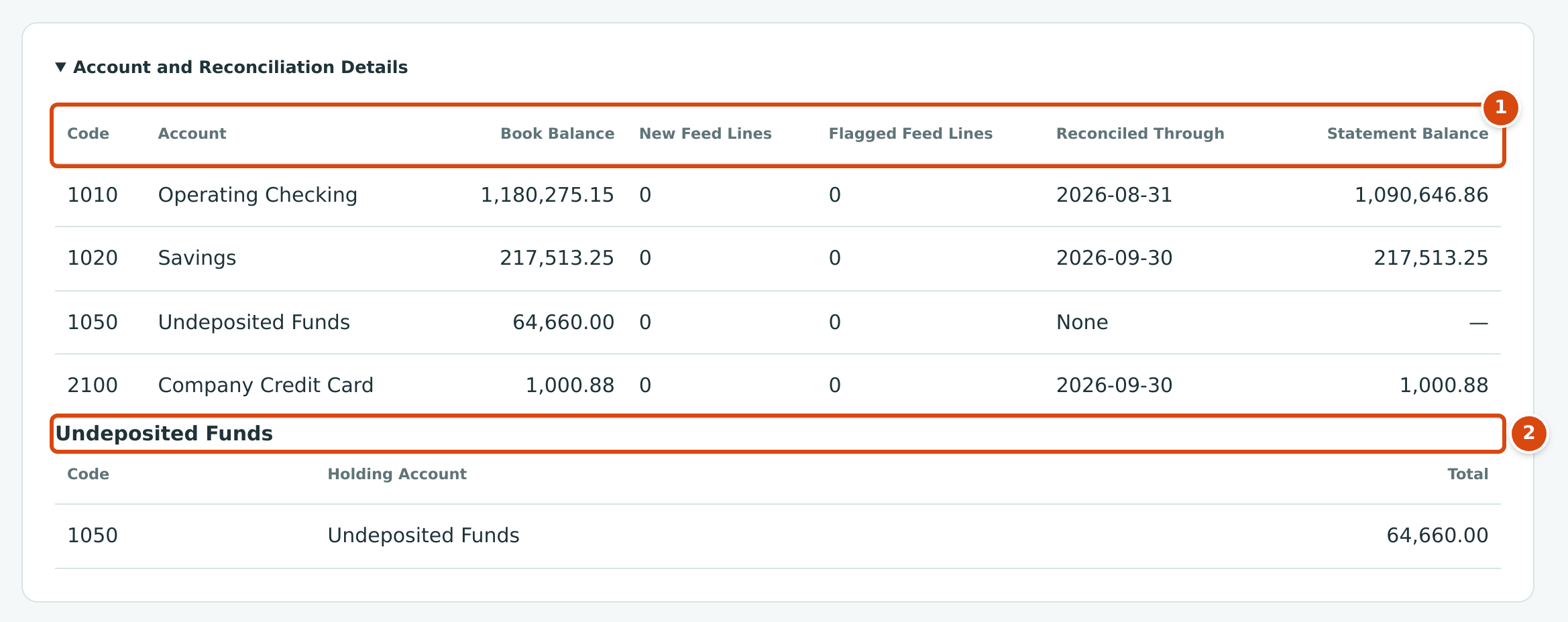
- One row for each active cash and credit card account.
- Undeposited Funds: the receipts waiting in each holding account.
| Column | Meaning |
|---|---|
| Code, Account | The account. |
| Book Balance | The account's balance in your books today. |
| New Feed Lines | Imported statement lines not yet matched, categorized or excluded. |
| Flagged Feed Lines | Imported lines flagged as possible duplicates. |
| Reconciled Through | The statement date of the latest completed reconciliation, or None. |
| Statement Balance | The ending balance of that reconciliation, or —. |
The Undeposited Funds table lists each account that has received customer payments or been the source of a deposit, with the total of receipts not yet deposited (None — 0.00 when there is none). See Making Deposits and Reconciling an Account.
Who Sees Which Cards
Home is open to everyone with access to the company. Each card needs View or Edit access to its area:
| Card | Needs Access To |
|---|---|
| Cash Balance, Cash Movement, Account and Reconciliation Details, the bank feed link in Needs Attention | Banking |
| Unpaid Invoices | Customers & Invoices |
| Unpaid Bills | Vendors & Bills |
| Net Profit, at a Glance | Reports |
| Coming Due | Customers & Invoices or Vendors & Bills (each shows its own half) |
| Recent Transactions | Accounting |
| Needs Attention | Everyone; each task appears only if you can open its area |
For example, a Project Manager (Customers & Invoices, Vendors & Bills and Jobs & Costing only) sees Unpaid Invoices, Unpaid Bills, Needs Attention and Coming Due. See Roles and Permissions.
Worked Example
The figures above are the sample company's Home on October 24, 2026, with Last 90 Days chosen (July 27 to October 24, 2026). They fit together like this:
| Check | Arithmetic | Result |
|---|---|---|
| Cash Balance | 1,180,275.15 (1010) + 217,513.25 (1020) + 64,660.00 (1050) | $1,462,448.40 |
| Net Profit | 541,616.61 income − 455,724.60 expenses | $85,892.01 |
| Net Cash Change | 1,295,007.94 received − 1,062,419.48 paid | +$232,588.46 |
| Unpaid Invoices | 39,885.00 + 8,190.00 + 43,275.00 + 14,040.00 still open on four invoices | $105,390.00 |
| Overdue invoices | INV-2026-000050 was due October 3 and has 14,040.00 open | $14,040.00 |
| Invoices due in 14 days | 43,275.00 (October 27) + 8,190.00 (October 28) + 39,885.00 (October 29) | $91,350.00, 3 invoices |
| Bills due in 14 days, and due within 7 days | 11,906.93 (BILL-2026-000135, October 27) + 11,090.80 (BILL-2026-000137, October 29) | $22,997.73, 2 bills |
Month-to-date net income is 0.00 because nothing is posted in October in the sample data. Needs Attention lists one overdue invoice, eleven overdue bills (167,205.68), two draft bills and two receipts to deposit; the 64,660.00 in 1050 Undeposited Funds is those receipts.
Common Mistakes and Troubleshooting
| Message or Symptom | Why It Happens | What to Do |
|---|---|---|
| Net Profit and at a Glance show 0.00. | Nothing is posted yet in the chosen period, for example early in a month on This Month. | Choose Last 30 Days or Last 90 Days, or open Profit and Loss for any dates. |
| A tile or card is missing. | Your role has no access to its area. | See Who Sees Which Cards. |
| Cash Balance differs from your bank's balance. | The tile shows your book balance, including recorded payments the bank has not cleared yet, and it includes Undeposited Funds. | Compare in a reconciliation. |
| A credit card balance is not in Cash Balance. | Card accounts are not cash; they appear in Account and Reconciliation Details. | Unfold that panel. |
| Unpaid Invoices is lower than the total of open invoices. | A customer payment or credit is recorded but not yet applied to an invoice, or retainage is held. | Apply the payment or credit (see Receiving Customer Payments). |
| The period goes back to This Month. | Home always opens on This Month. | Choose the period again. |