| Account | Debit | Credit |
|---|---|---|
| 5050 Equipment Rental (J-2004 · 31-100 · EQP) | 2,450.00 | |
| 1010 Operating Checking | 2,450.00 |
Coding Transactions to Jobs
Job costs and job revenue are not entered separately. They come from the ordinary transactions you already post, when their lines carry job coding:
- A cost line (on a bill, expense, vendor credit or journal entry) carries a Job, a Cost Code and a Cost Type. When it posts, its amount is job cost for that job, code and type.
- A revenue line (on an invoice or credit memo) carries only a Job. When it posts, its amount is job revenue for that job.
Each journal line keeps its coding, so the job cost reports, budgets, forecasts and the WIP schedule all read the same posted amounts as your general ledger.
Before You Begin
- Jobs & Costing is turned on and at least one job is Active, On Hold or Closed. Otherwise the Job Costing switch does not appear.
- The job's cost codes are assigned to it (see Cost Codes and Cost Types).
- The account you use can carry job coding (see Job Cost Accounts).
- You need Edit access to the area of the document: Vendors & Bills for bills, expenses and vendor credits, Customers & Invoices for invoices and credit memos, Accounting for journal entries.
Navigation
Open the document's form, for example Vendors & Bills → Bills → New Bill, and tick Job Costing at the top of the form.
Where Job Coding Appears
| Document | Switches at the Top | Line Columns Added | See |
|---|---|---|---|
| Bill | Job Costing, Commitments (when issued commitments exist), Retainage (when there is a Retainage Payable account) | Job, Commitment, Cost Code, Cost Type, Retainage, Split, Adjustment Reason | Entering a Bill |
| Expense | Job Costing | Job, Cost Code, Cost Type, Split, Adjustment Reason | Recording an Expense |
| Vendor credit | Job Costing, Commitments | Job, Commitment, Cost Code, Cost Type, Split, Adjustment Reason | Vendor Credits |
| Journal entry | Job Costing | Job, Cost Code, Cost Type, Adjustment Reason (no Split) | Journal Entries |
| Invoice | Job Costing, Retainage (when there is a Retainage Receivable account) | Job, Retainage, Extra, Split | Creating an Invoice |
| Credit memo | Job Costing | Job, Extra, Split | Credit Memos |
Extra appears on invoice and credit memo lines once any job in the company has an approved schedule of values. Adjustment Reason appears on a line only after you choose a job that is on hold or closed. Categorizing a bank transaction as an expense offers the same Job Costing switch (see Reviewing the Bank Feed).
Step by Step: Coding a Cost Line
- Open the bill, expense, vendor credit or journal entry form and tick Job Costing. The lines gain the job columns.
- Choose the line's Account: a direct cost account such as 5050 — Equipment Rental.
- Choose the Job. The list shows active jobs, and on-hold and closed jobs marked (On Hold) or (Closed).
- Choose the Cost Code. Codes not assigned to the chosen job are grayed out.
- Choose the Cost Type.
- If the job is on hold or closed, type an Adjustment Reason.
- Enter the description and amount and finish the document as usual.
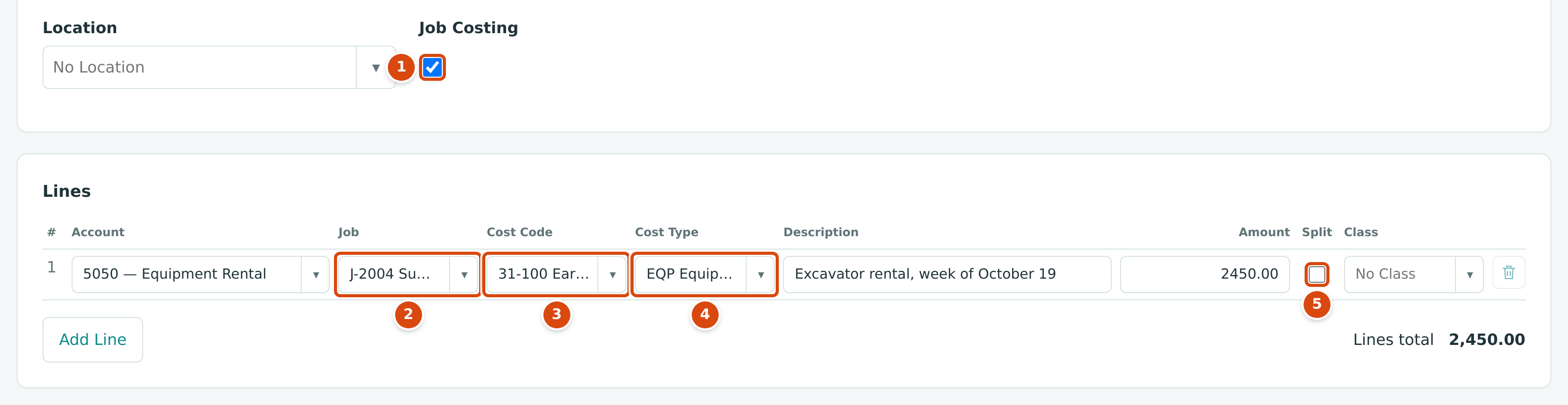
- Job Costing ticked: the job columns appear.
- Job: the job the cost belongs to.
- Cost Code: one of the job's assigned codes.
- Cost Type: the kind of cost.
- Split: divide the line among several jobs, codes or types (see Splitting a Line).
A line without a job is an ordinary, uncoded line: overhead such as rent or office supplies normally stays that way. A job-coded line on a Direct Cost account needs all three: job, cost code and cost type.
If you untick Job Costing while lines are coded, Structally asks Turn off Job Costing and clear the job coding on every line? Clicking OK clears the coding; Cancel keeps it.
Coding Revenue Lines
On an invoice or credit memo, tick Job Costing and choose the Job on each revenue line. Revenue lines have no cost code or cost type, and only Active jobs are offered.
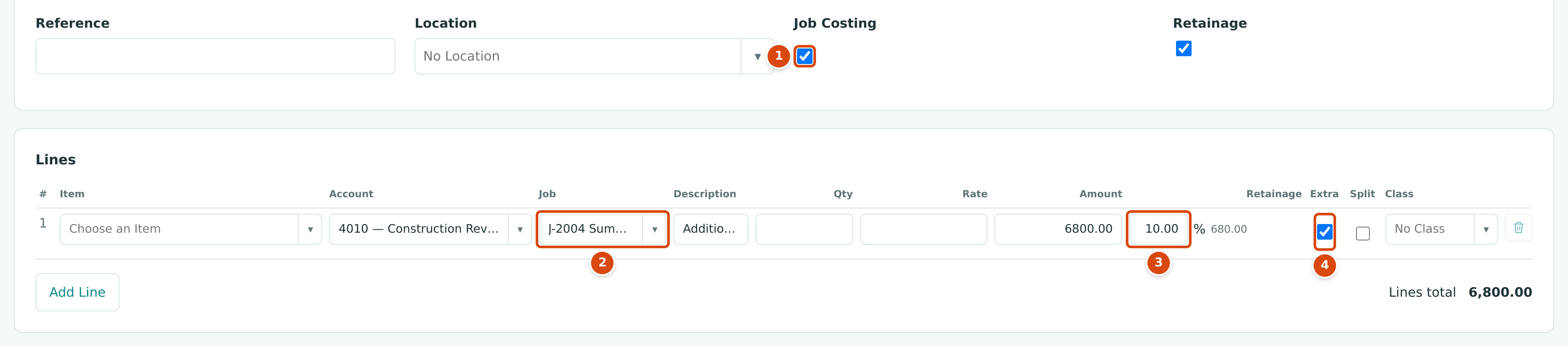
- Job Costing ticked.
- Job: the job the revenue belongs to.
- Retainage: choosing a job whose Billing Retainage is above zero ticks Retainage and fills the job's percentage (10.00 for J-2004).
- Extra: ticked because this is work outside J-2004's schedule of values.
Jobs Billed Through a Schedule of Values
A job with an approved schedule of values is billed through its pay applications. An ordinary invoice line for such a job is refused unless you tick Extra to say it is separate work outside the schedule:
Line 1: J-2004 bills its contract through its schedule of values. Tick Extra for separate work outside the schedule.
Extras appear on the job page under Billing as Other invoices on this job.
Coding Journal Entry Lines
Tick Job Costing on a new journal entry. Each line gains Job, Cost Code and Cost Type. Use it for reclassifications and accruals, for example to move a cost that was posted to an overhead account onto a job. To move cost from one job to another, use Transfer Cost in Job Costs and Cost Transfers instead.
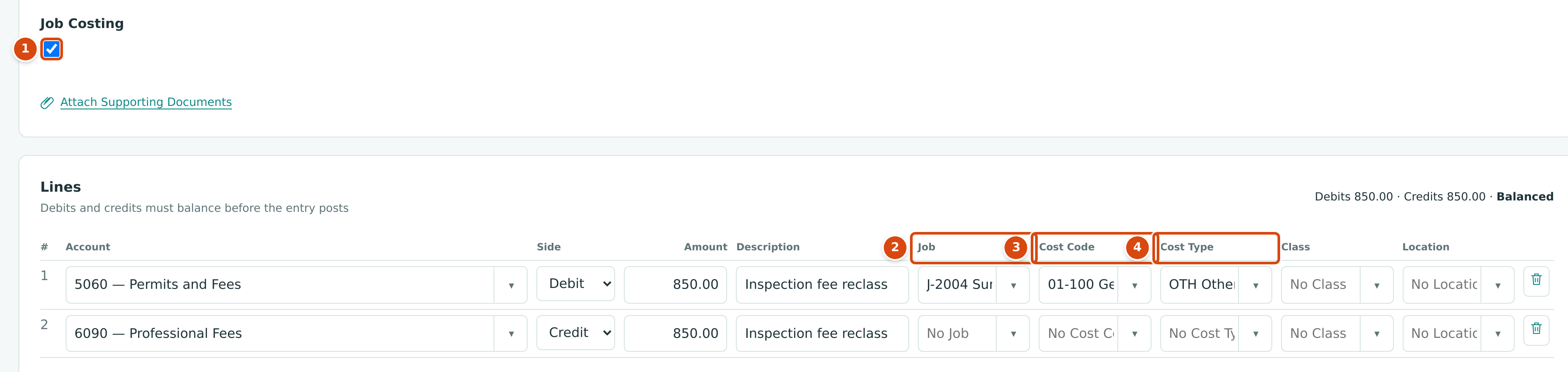
- Job Costing ticked.
- Job on the debit line.
- Cost Code of the job.
- Cost Type.
The Rules Structally Checks
Structally checks every line when you save or post. A line is refused with these messages:
| Message | Why | What to Do |
|---|---|---|
| Account 5040 requires job coding. | The account is set to Required in Job Cost Accounts. | Tick Job Costing and choose the job, cost code and cost type. |
| Account 1010 cannot carry job coding. | The account is Excluded (bank, balance sheet and excluded accounts). | Remove the job coding, or use a job cost account. |
| Job-coded cost lines need a cost code and a cost type. | A cost line has a job but no code or type. | Choose both. |
| A cost code or cost type needs a job. | A code or type was chosen without a job. | Choose the job, or clear the code and type. |
| Cost codes and cost types apply to cost lines only. | A revenue line (or a revenue account on a journal entry) has a code or type. | Keep only the job on revenue lines. |
| Cost code 06-100 is not assigned to job J-1036. | The code is not assigned to the job. | Choose an assigned code, or assign it on the job page. |
| Cost code 01-200 is inactive. / Cost type OVH is inactive. | The code or type was deactivated. | Choose an active one, or reactivate it. |
| Job J-1008 is not active yet. | The job is a draft. | Activate the job. |
| Job J-2003 is closed; give an adjustment reason. | The job is on hold or closed. | Type an Adjustment Reason. |
| Job J-1001 is archived. (with your job's number) | The job is archived. | Use another job. |
| Line 1: J-2004 bills its contract through its schedule of values. Tick Extra for separate work outside the schedule. | Invoice line for a job with a schedule of values. | Tick Extra, or bill through a pay application. |
| Line 1 allocations must equal the line amount. | Split rows do not add up to the line. | Correct the allocations. |
| Line 1 needs a job to hold retainage. | A line holds retainage without a job. | Choose the job, or clear the retainage. |
| Turn on Job Costing or clear the job coding on the lines. | Job Costing is unticked while lines are coded. | Tick it, or clear the coding. |
| Choose a listed job. (or cost code, cost type) | The choice is no longer in the list, for example the job was archived. | Choose again. |
| Jobs & Costing is not turned on for this company. | The module was turned off. | Ask Structally support. |
Worked Example: An Equipment Rental Coded to J-2004
Hilltop Equipment Rental charges 2,450.00 for an excavator used on the Summit Tech Park site, paid on the spot from the operating account. (This example is illustrative.) You record an expense:
- Paid From: 1010 Operating Checking; Vendor: Hilltop Equipment Rental.
- Line: 5050 — Equipment Rental, J-2004, 31-100 Earthwork, EQP Equipment, Excavator rental, week of October 19, 2,450.00, as in the first figure.
The Posting Entry
The debit carries the job coding. J-2004's job cost rises by 2,450.00 in the 31-100 · EQP slot, its budget page shows it under Actual to Date, and the Overview counts it in Job Cost This Month.
On the revenue side, the invoice line in the second figure (6,800.00 of extra work on J-2004, 10% retainage) would post: debit 1100 Accounts Receivable 6,120.00, debit 1110 Retainage Receivable 680.00, and credit 4010 Construction Revenue 6,800.00 coded to J-2004.
Related Topics
- Entering a Bill, including commitments and retainage
- Job Costing Settings
- Closing and Reopening Jobs
- Job Costs and Cost Transfers
- Schedules of Values and Pay Applications