The Payables Overview
The Vendors & Bills overview answers three questions at a glance: how much do you owe your vendors today, which bills need paying first, and where did the money you spent directly (by card or bank) go. It is a read-only page: every figure links to, or is built from, the bills, expenses and payments you entered elsewhere. From it you can jump straight to Pay Bills or New Bill.
Before You Begin
- You need View access to Vendors & Bills to open the page. The Pay Bills, New Bill and Pay Bill buttons appear only for users with Edit access (Company Admins, Accountants, Project Managers, and Custom users with Edit). See Roles and Permissions.
Navigation
Vendors & Bills → Overview. Clicking the Vendors & Bills heading in the navigation opens the same page.
Balances and the Period
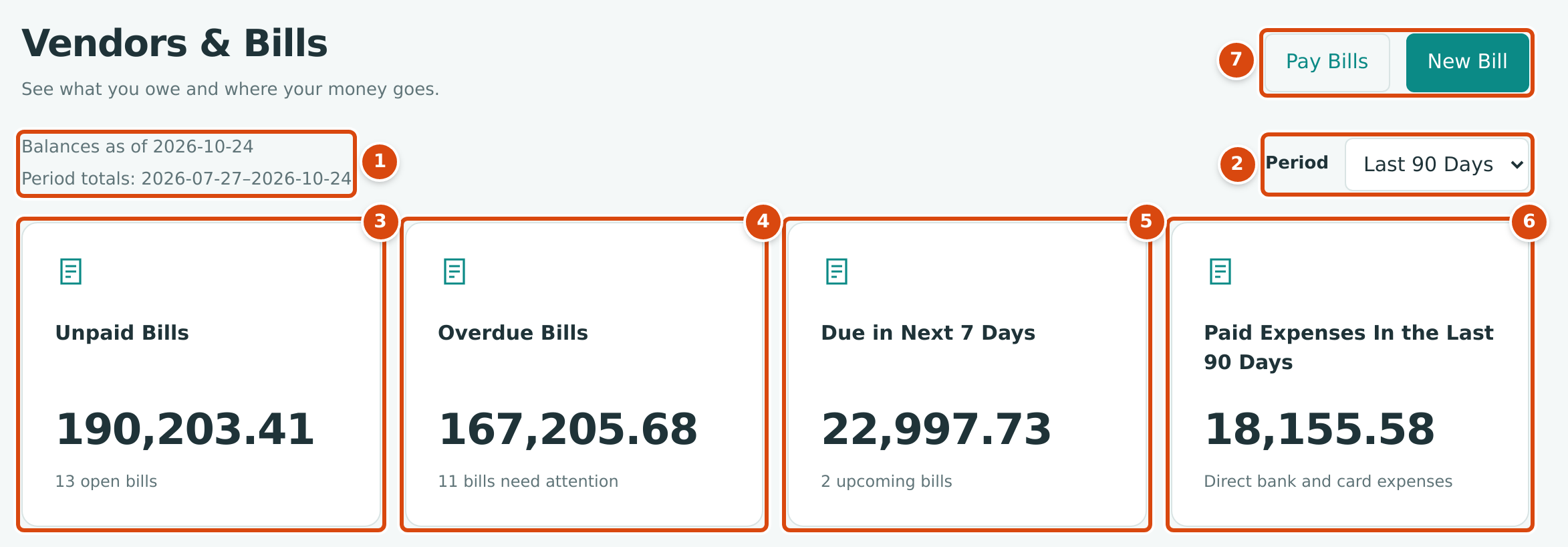
- Balances as of is always today. Period totals shows the dates the period covers.
- Period: This Month, Last 30 Days or Last 90 Days. It changes only the expense figures (the fourth tile and Spending by Category); the bill balances are always as of today.
- Unpaid Bills: the open balance of every posted bill not yet paid, with the number of open bills.
- Overdue Bills: the part of that total whose due date has passed.
- Due in Next 7 Days: open bills due from today through the next seven days.
- Paid Expenses: posted expenses (purchases paid directly from a bank or card account) dated in the period. Bills are not included.
- Pay Bills and New Bill start a payment or a bill.
The bill figures use each bill's open balance: the amount due (the total less any retainage held) less payments and credits applied to it. Draft and void bills are never counted. Retainage held on a bill is not counted either; it becomes payable only through a retainage release.
Spending by Category and the Payment Schedule
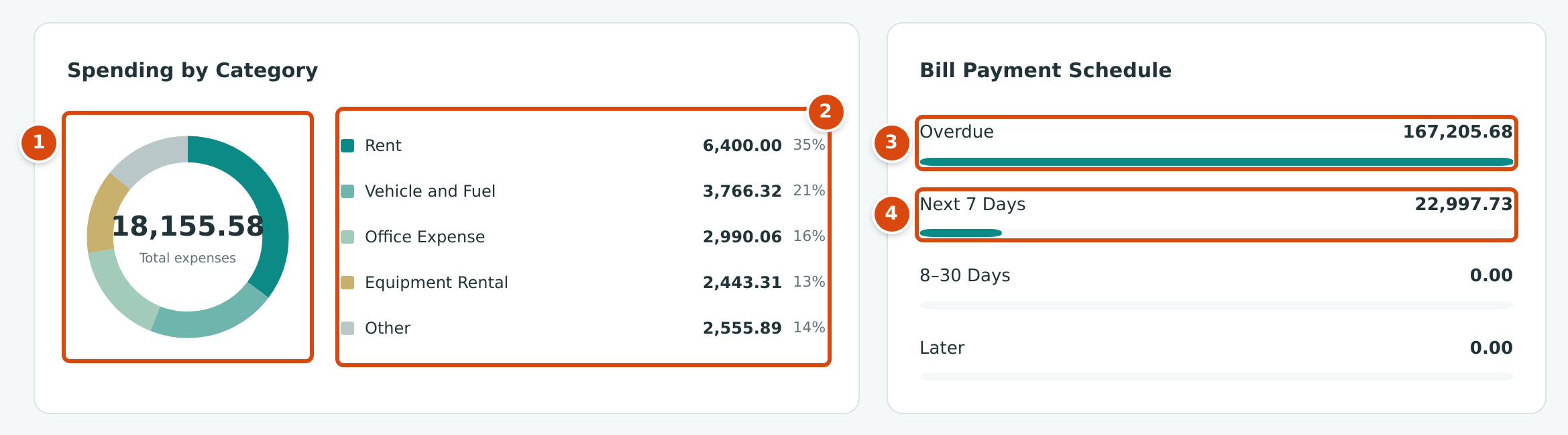
- The total of posted expenses in the period, drawn by account.
- The four largest expense accounts by amount, with their share; every other account is grouped as Other.
- Overdue: open bills past their due date. Click a row to open the Bills list (this row filters it to overdue bills).
- Next 7 Days, then 8–30 Days and Later (more than 30 days away, or no due date). These rows open the list of open bills.
Bills Needing Attention
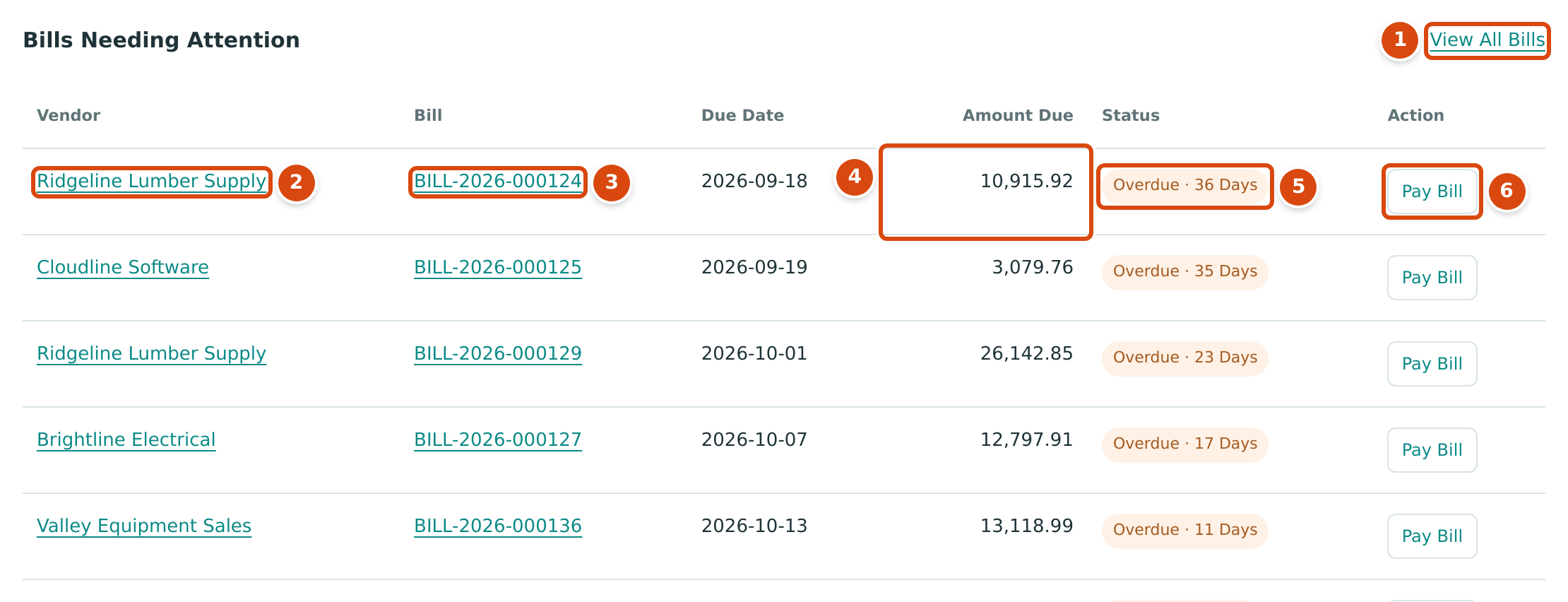
- View All Bills opens the Bills list filtered to Overdue.
- The vendor's name opens the vendor page.
- The bill number opens the bill.
- Amount Due: the bill's open balance today.
- How many days the bill is overdue.
- Pay Bill opens Pay Bills for that vendor with this bill's open balance already entered (see Paying Bills).
The table shows at most ten overdue bills, the earliest due date first. When more are overdue, the Overdue Bills tile shows the full count and total, and View All Bills lists them all. No overdue documents. means nothing is past due.
Worked Example: Reading the Sample Company's Overview
On October 24, 2026, with the period set to Last 90 Days, Cedar Ridge Contracting's overview shows (figures above):
| Figure | Amount | How It Adds Up |
|---|---|---|
| Unpaid Bills | 190,203.41 | 13 open bills |
| Overdue Bills | 167,205.68 | 11 of those bills are past due |
| Due in Next 7 Days | 22,997.73 | BILL-2026-000135 (11,906.93, due 2026-10-27) + BILL-2026-000137 (11,090.80, due 2026-10-29) |
| Paid Expenses In the Last 90 Days | 18,155.58 | Expenses dated 2026-07-27 to 2026-10-24 |
The 13 open bills are either overdue or due within seven days, so $167,205.68 + $22,997.73 = $190,203.41, the Unpaid Bills total, and the 8–30 Days and Later rows show 0.00. The same $190,203.41 is the sum of the Open Balance column on the Vendors list.
Common Mistakes and Troubleshooting
| Message or Symptom | Why It Happens | What to Do |
|---|---|---|
| Paid Expenses This Month shows 0.00 early in a month. | This Month starts on the first of the current month. | Choose Last 30 Days or Last 90 Days. |
| A bill you just entered is not counted. | It is still a Draft. Drafts never affect balances. | Post it (see Posting, Editing, and Voiding Bills). |
| The overdue table lists fewer bills than the tile counts. | The table shows only the ten earliest due. | Click View All Bills. |
| A paid subcontractor bill still has money withheld but is not in Unpaid Bills. | Retainage held is not payable until it is released. | See Releasing Retainage and the vendor's Retainage Held tile. |
| The Pay Bills, New Bill and Pay Bill buttons are missing. | You have View access to Vendors & Bills. | Ask a Company Admin for Edit access. |
Related Topics
- Paying Bills
- Posting, Editing, and Voiding Bills
- Recording an Expense
- Managing Vendors
- AP Aging, for balances by age and vendor on any date