Bank and Cash Accounts
Banking does not keep a separate list of bank accounts. It uses the accounts in your Chart of Accounts whose Role is Cash or Credit Card. Checking accounts, savings accounts, petty cash and the Undeposited Funds holding account all have the Cash role. Company credit cards have the Credit Card role. Every active account with one of these two roles appears automatically in the Bank Feed, Reconciliation and Registers.
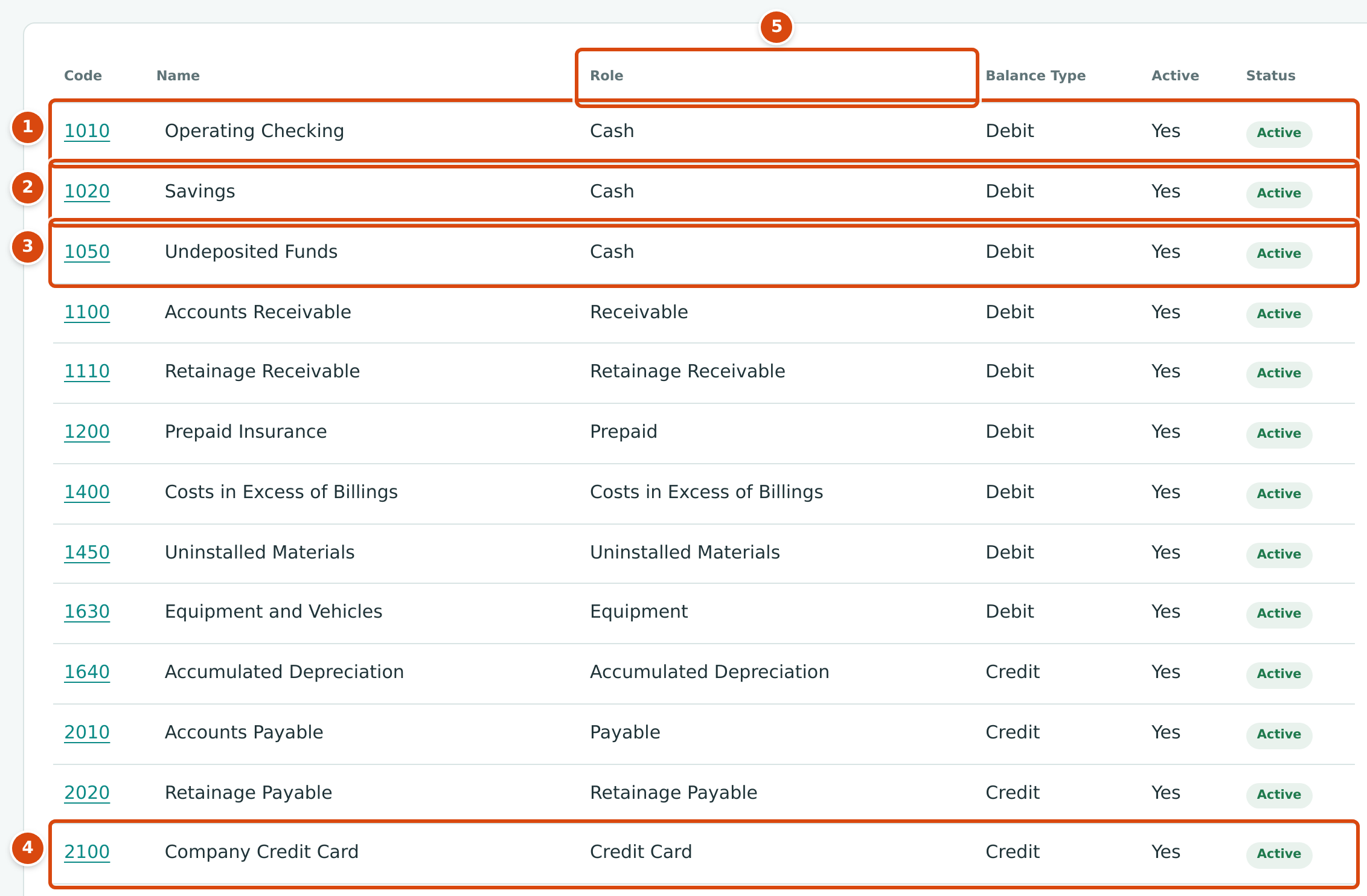
- 1010 Operating Checking: the main bank account. Role Cash, balance type Debit.
- 1020 Savings: a second bank account. Role Cash.
- 1050 Undeposited Funds: the holding account for customer checks not yet deposited. Role Cash.
- 2100 Company Credit Card: Role Credit Card, balance type Credit, because the balance is money the company owes.
- Role: the column that decides whether Banking uses an account.
Before You Begin
- Adding an account needs Edit access to Accounting (Company Admins and Accountants have it). See Roles and Permissions.
- Using the accounts in Banking needs access to Banking: Company Admins and Accountants can make changes, Viewers can look, Project Managers have no access.
Which Accounts Each Banking Screen Offers
Only active accounts are offered. An account you deactivate disappears from these lists, but its history stays in your books.
| Screen | Accounts Offered |
|---|---|
| Bank Feed, Reconciliation, Registers | Cash and Credit Card accounts |
| New Transfer: From Account | Cash accounts |
| New Transfer: To Account | Cash and Credit Card accounts |
| Make Deposit: From Account | Cash accounts that hold undeposited customer receipts at the chosen date |
| Make Deposit: To Account | Cash accounts |
| New Refund: Funds Account | Cash and Credit Card accounts |
| Receive Payment: Funds Account | Cash accounts |
| Pay Bills: Funds Account, New Expense: Paid From | Cash and Credit Card accounts |
Undeposited Funds
When you receive a customer's check you usually do not deposit it the same day, and the bank often deposits several checks as one amount. To keep your books in step with the bank, record each payment into a holding account and move the checks to the bank later with Make Deposit.
- Undeposited Funds is an ordinary account with the Cash role. Nothing else marks it as special: it becomes a holding account because you choose it as the Funds Account when you receive a payment.
- Any Cash account that holds customer receipts can be the From Account of a deposit. Cedar Ridge Contracting records every receipt in 1050 Undeposited Funds and deposits it to 1010 Operating Checking.
- A receipt stays undeposited until it is included in a posted deposit. If you reverse the deposit, its receipts become undeposited again.
Use Make Deposit, not a transfer
Move customer receipts out of Undeposited Funds with Make Deposit. A transfer out of Undeposited Funds moves the money but does not mark any receipt as deposited, so the receipts keep appearing under Undeposited Receipts on the Make Deposit page.
Adding a Bank or Credit Card Account
Add the account in the Chart of Accounts; it then appears in Banking.
- Open Accounting → Chart of Accounts and click Add Account beside the page title.
- In the Add Account drawer, type the Code (1 to 10 letters or digits) and the Name.
- Choose the Role: Cash for a bank, savings or petty cash account, Credit Card for a company credit card.
- Choose the Balance Type: Debit for a Cash account, Credit for a Credit Card account. Structally refuses an account whose balance type does not suit its role.
- Optionally choose a Parent Account, then click Add Account.
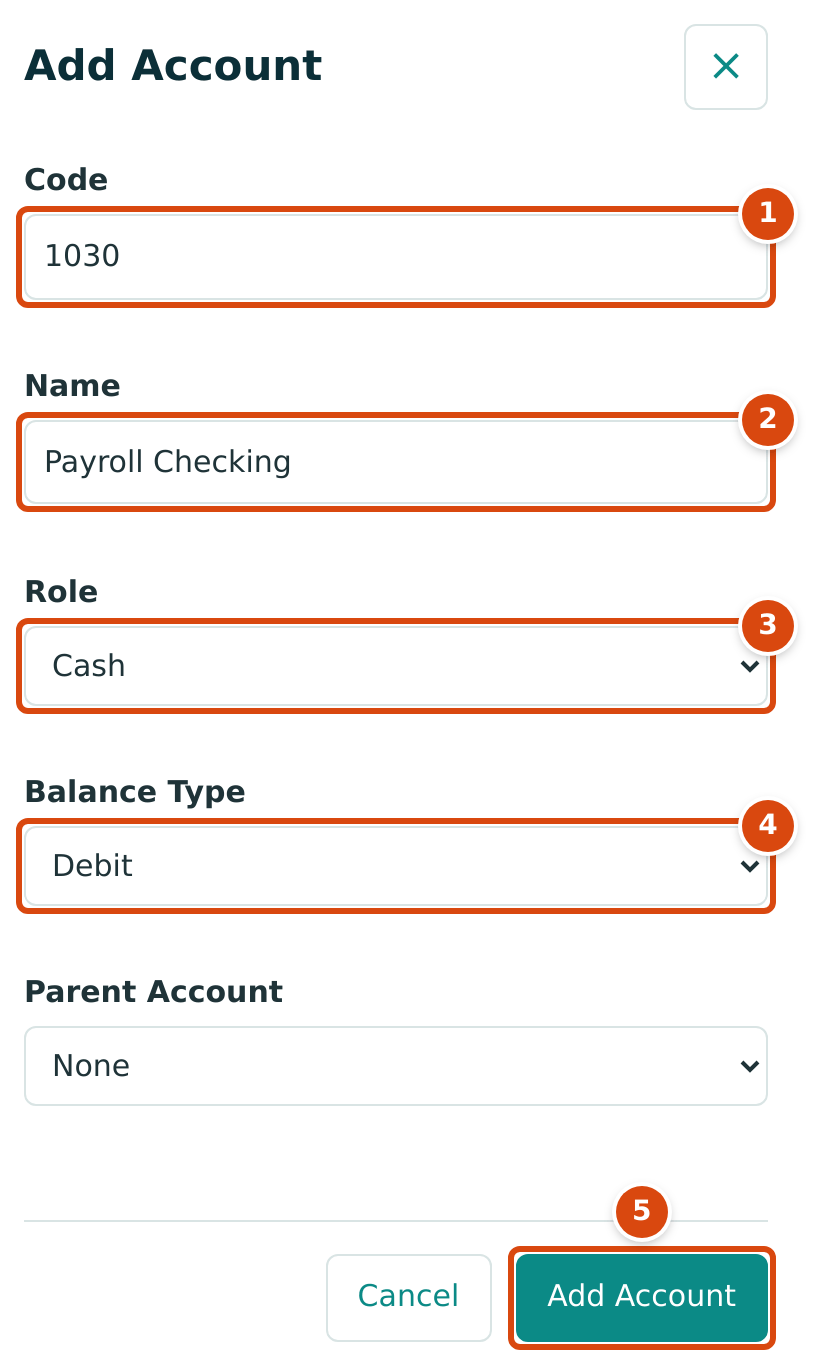
- Code: the account number, for example 1030.
- Name: how the account appears in lists, for example Payroll Checking.
- Role: Cash makes it a bank account in Banking.
- Balance Type: Debit for a Cash account.
- Add Account saves it.
For the account's opening balance, see Opening Balances. For everything else about accounts, see Creating and Editing Accounts and Account Roles.
Where Balances Show
| Where | What It Shows |
|---|---|
| Home dashboard, Cash Balance card | The total of all Cash accounts today and each Cash account's balance. Credit Card accounts are not included. |
| Home dashboard, Account and Reconciliation Details | Every bank and card account: Book Balance, New Feed Lines, Flagged Feed Lines, Reconciled Through and Statement Balance, plus an Undeposited Funds table of holding accounts. |
| Bank Feed, an account's Bank Transactions page | Books Balance Today and Last Reconciled. |
| Reconciliation | Reconciled Through date and statement balance for each account. |
| Registers | Opening balance, a running balance after every movement, and the closing balance for the dates you choose. |
| Balance Sheet and General Ledger | Account balances and detail as of any date. |
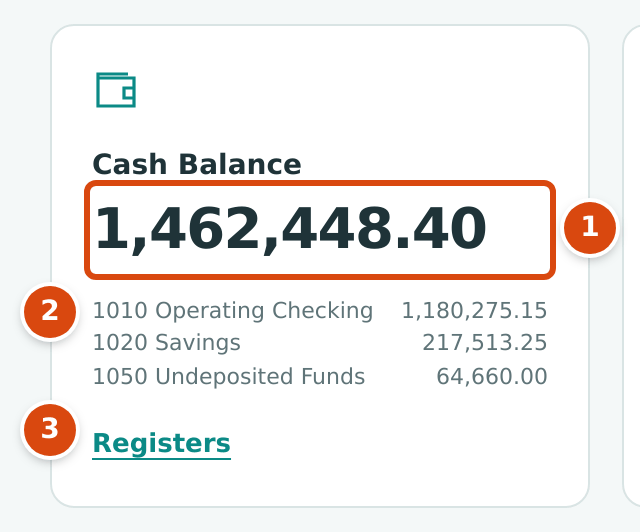
- The total of all Cash accounts today: 1,462,448.40.
- Each Cash account's balance. 1050 Undeposited Funds holds 64,660.00 of customer receipts waiting to be deposited.
- Registers opens the account registers.
The Account and Reconciliation Details panel near the bottom of the Home dashboard opens when you click it:
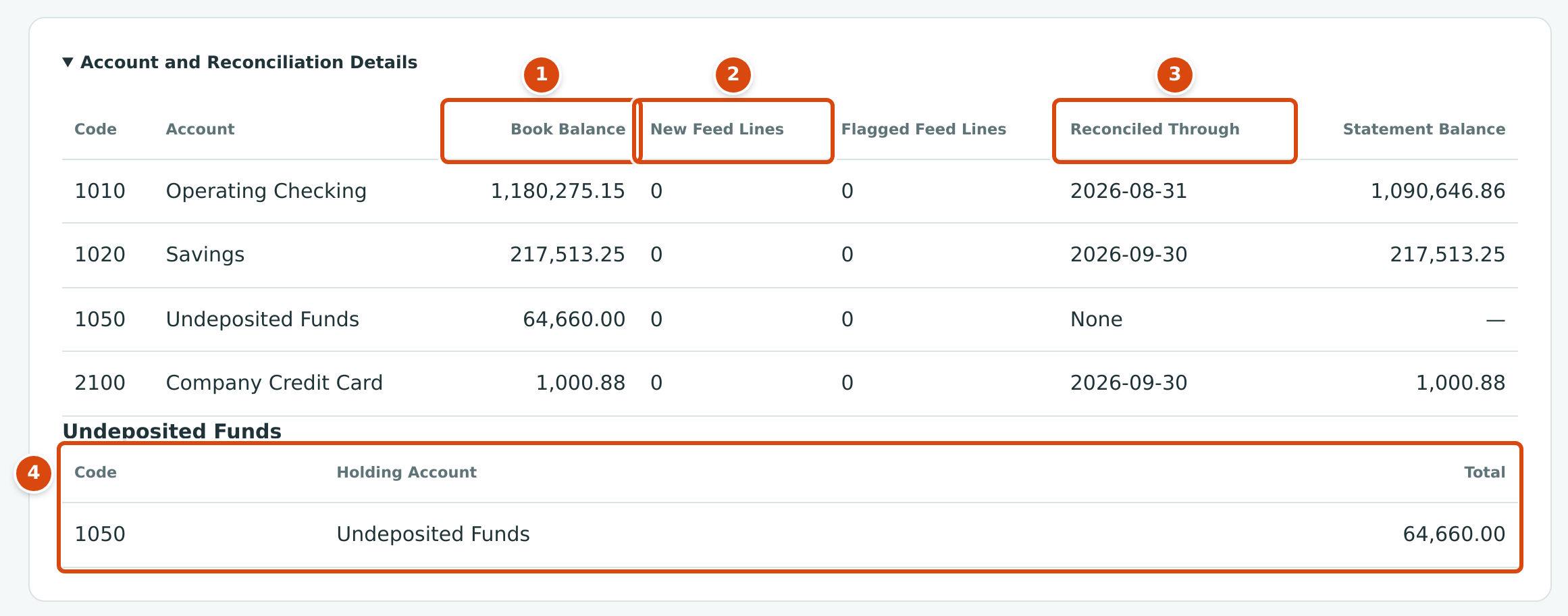
- Book Balance: the account's balance in your books today.
- New Feed Lines and Flagged Feed Lines: bank feed lines still waiting for review.
- Reconciled Through and Statement Balance: the statement date and ending balance of the last completed reconciliation. 1010 Operating Checking is reconciled through 2026-08-31; September is not reconciled yet.
- Undeposited Funds: each holding account and the total of its undeposited receipts.
Worked Example: Reading the Sample Company's Cash
On October 24, 2026 the Home dashboard shows a cash balance of $1,462,448.40:
| Account | Balance |
|---|---|
| 1010 Operating Checking | 1,180,275.15 |
| 1020 Savings | 217,513.25 |
| 1050 Undeposited Funds | 64,660.00 |
| Cash Balance | 1,462,448.40 |
The $64,660.00 in Undeposited Funds is two customer receipts that have not been deposited: RCPT-2026-000066 from Summit Tech Park for $14,040.00 and RCPT-2026-000067 from Alder Family Residence for $50,620.00 (14,040.00 + 50,620.00 = 64,660.00). The Home dashboard lists Deposit 2 Receipts under Needs Attention. Depositing them, as shown in Making Deposits, moves the amount from 1050 to 1010; the cash balance stays the same because both accounts are Cash accounts.
The credit card, 2100 Company Credit Card, owes $1,000.88. It is not part of the cash balance; it appears in Account and Reconciliation Details.
Common Mistakes and Troubleshooting
| Message or Symptom | Why It Happens | What to Do |
|---|---|---|
| A new account does not appear in the Bank Feed or Registers. | Its Role is not Cash or Credit Card, or it is inactive. | Check the role and status on the account's page in the Chart of Accounts. |
| A credit card cannot be chosen as the From Account of a transfer. | Transfers move money out of Cash accounts only. | Record card spending as an expense, and card payments as a transfer from the bank to the card. |
| Account code already in use | Another account already has this code. | Choose a different code. |
| Account code must be 1 to 10 letters or digits. | The code has spaces, symbols or more than 10 characters. | Use letters and digits only. |