Trial Balance
The Trial Balance lists every account with its balance at the end of a chosen day, in a Debit or a Credit column, and totals both columns. Because every journal entry Structally posts is balanced, the two totals are always equal; the report's real use is as a one-page list of every balance, to review before you close a month or to hand to your accountant.
Before You Begin
- You need View or Edit access to Reports. See Who Can Use Reports.
Navigation
Reports → Trial Balance.
Step by Step
- Open Reports → Trial Balance. It opens as of today.
- Enter the As Of date, for example 09/30/2026, or click a Quick dates button (Today, Last Month End, Last Fiscal Year End).
- Click Run Report.
- Click an account code to open its General Ledger from the start of the fiscal year to the As Of date.
| Field | Description | Required | Example |
|---|---|---|---|
| As Of | Include every transaction dated on or before this day. Opens as today. | Yes | 09/30/2026 |
Reading the Trial Balance
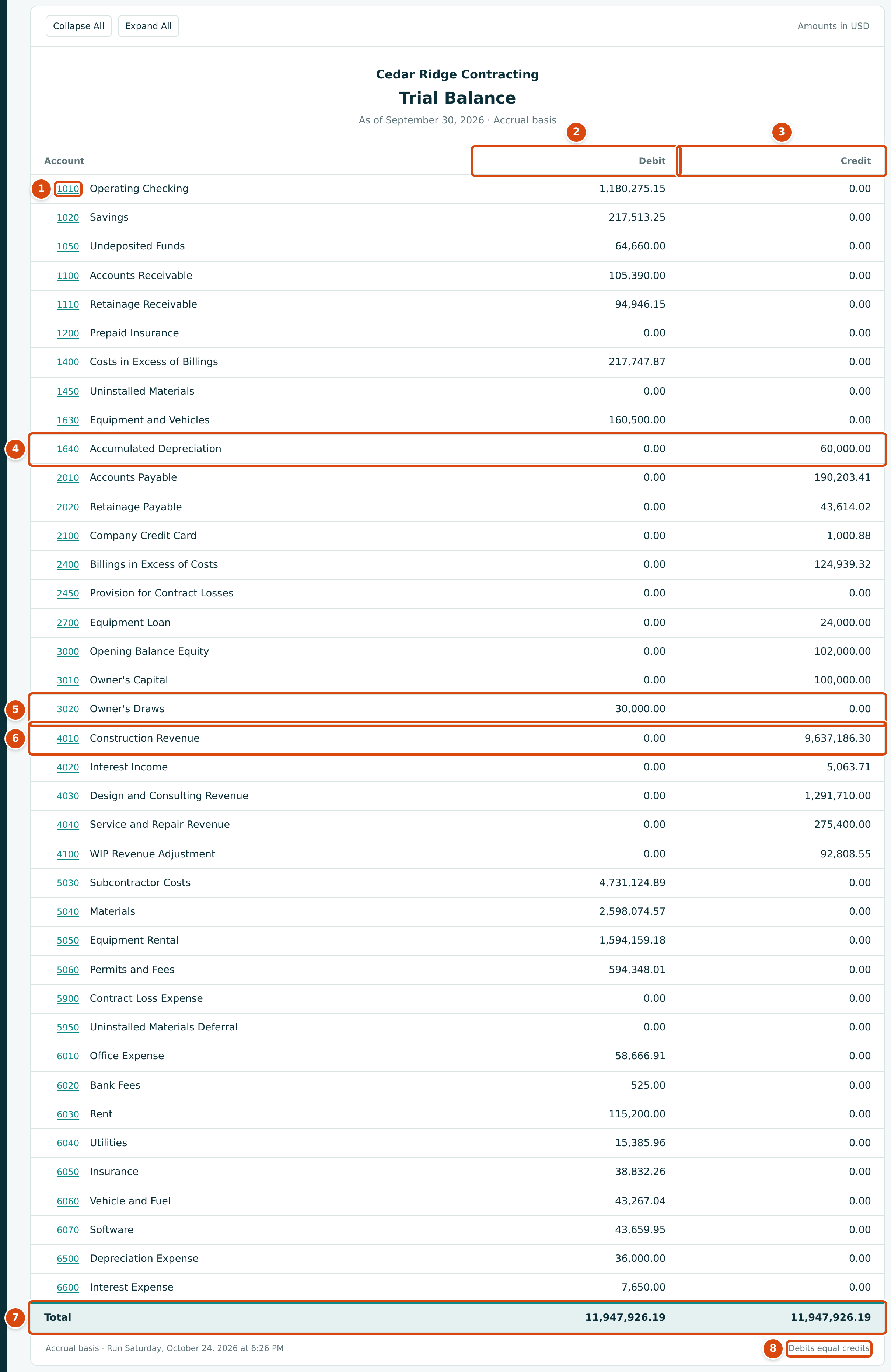
- The account code opens the account's General Ledger.
- Debit: the balance of accounts whose debits exceed their credits (assets, costs and expenses, owner's draws).
- Credit: the balance of accounts whose credits exceed their debits (liabilities, equity, income, and contra assets).
- 1640 Accumulated Depreciation is an asset account with a credit balance.
- 3020 Owner's Draws is an equity account with a debit balance.
- 4010 Construction Revenue shows all revenue since the books began, not only this year's (see below).
- Total: the debit and credit column totals.
- Debits equal credits appears when the two totals agree.
- Every account with posted activity on or before the As Of date is listed, in code order, even when its balance is 0.00. Accounts never used are left out (in the sample, 6080 Advertising and 6090 Professional Fees). Section headings such as 0100 Assets never appear.
- Each account's balance is its debits less its credits up to the As Of date, shown in whichever column it falls; the other column shows 0.00.
- Income and expense accounts are never closed. Structally does not post year-end closing entries, so their Trial Balance amounts run from the first transaction to the As Of date. The Balance Sheet splits the same amounts into Retained Earnings (earlier years) and Net Income (this fiscal year).
Clicking an account code opens its General Ledger from the start of the fiscal year to the As Of date. For an income or expense account, the ledger's opening balance is therefore everything posted in earlier years:
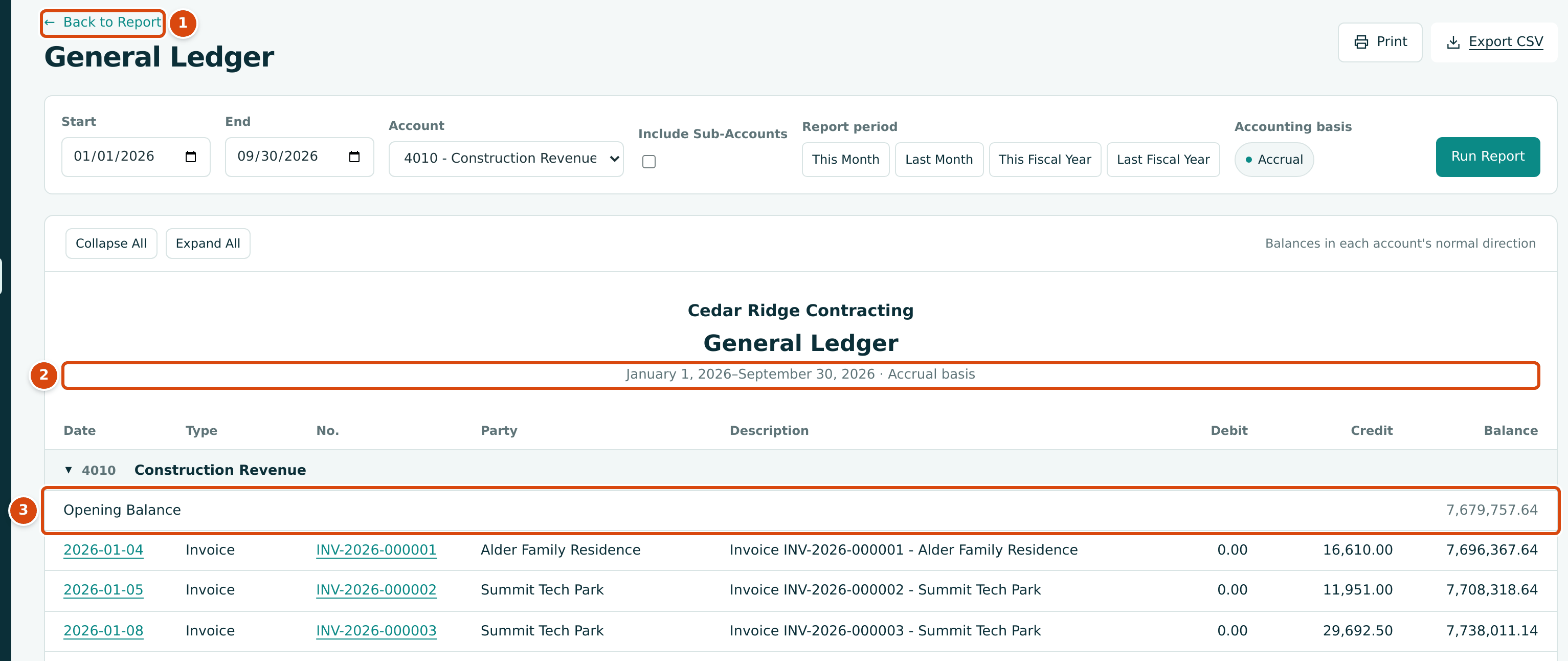
- Back to Report returns to the Trial Balance.
- The ledger covers the fiscal year to date: January 1 to September 30, 2026.
- Opening Balance: 7,679,757.64 of revenue from earlier years. Add this year's 1,957,428.66 and you reach the 9,637,186.30 on the Trial Balance.
Parent Accounts
If your chart has sub-accounts, each parent account has a ▼. While open, the parent row shows only the amount posted directly to the parent, its sub-accounts follow, and a Total row (for example Total Equipment) shows the combined balance. Folded, the parent row shows the combined balance instead. The grand Total counts each account once. The sample company has no sub-accounts.
Using the Trial Balance to Check Balances
- Against the Balance Sheet: every asset, liability and equity account shows the same balance on both reports for the same date.
- Against the Profit and Loss: total income less total costs and expenses on the Trial Balance equals Retained Earnings plus Net Income on the Balance Sheet.
- Against subledgers: Accounts Payable, Accounts Receivable and the retainage accounts should equal the AP and AR aging totals and the retainage held on open documents. The Tie-Out report compares these for you.
- Before closing: look for balances that should be zero (a clearing account, Undeposited Funds after deposits) or that have the unusual side (a bank account in the Credit column is overdrawn).
Worked Example: Profit Since the Books Began
From the Trial Balance as of September 30, 2026:
| Arithmetic | Amount | |
|---|---|---|
| Income (credits) | 9,637,186.30 + 5,063.71 + 1,291,710.00 + 275,400.00 + 92,808.55 | $11,302,168.56 |
| Costs and expenses (debits) | 4,731,124.89 + 2,598,074.57 + 1,594,159.18 + 594,348.01 + 58,666.91 + 525.00 + 115,200.00 + 15,385.96 + 38,832.26 + 43,267.04 + 43,659.95 + 36,000.00 + 7,650.00 | $9,876,893.77 |
| Profit since the books began | 11,302,168.56 − 9,876,893.77 | $1,425,274.79 |
On the Balance Sheet for the same date, Retained Earnings of $1,047,274.24 plus Net Income of $378,000.55 is also $1,425,274.79. The debit and credit totals are both $11,947,926.19.
Exporting
Export CSV gives one row per account (and per parent Total row) with the
columns Code, Account, Debit, Credit, Row Type and Level,
and a final Total row. The file is named, for example,
trial-balance-2026-09-30.csv.
Common Mistakes and Troubleshooting
| Message or Symptom | Why It Happens | What to Do |
|---|---|---|
| Enter a valid date. | The As Of date is incomplete. | Pick the date from the calendar. |
| This field is required. | As Of is empty. | Enter a date. |
| Only a Total row of 0.00 appears. | The As Of date is before the company's first transaction. | Choose a later date. |
| Revenue looks far too large for one year. | Income and expense accounts are never closed; they show all years. | Use the Profit and Loss for one year's figures. |
| Debits equal credits is missing from the footer. | The totals differ. Every posted entry is balanced, so this should not happen. | Run the Tie-Out for the same date to see the difference, and report it to your Company Admin. |